TikTok still doesn’t have an official app in the Roku Channel Store. That’s unlikely to change anytime soon, especially with TikTok’s ongoing legal issues in the US. The app was briefly banned in January 2025 under federal legislation, and while it returned after a temporary extension, its long-term availability remains uncertain.
The good news: screen mirroring works. I’ve tested all three methods below on a Roku Streaming Stick 4K, and each one gets TikTok playing on your TV in under two minutes.
- No TikTok app exists for Roku — screen mirroring from a phone, tablet, or laptop is the only way to watch
- Android mirroring is free and built-in — use the Screen Cast toggle in your notification panel
- iPhone mirroring uses AirPlay — Roku devices running OS 9.4+ support AirPlay natively
- Windows and Mac need AirBeamTV — a third-party app that costs $14.99 for the full version
- 5 GHz Wi-Fi cuts lag noticeably — both devices must be on the same network for mirroring to work
#Can You Get TikTok on Roku?

No. There’s no TikTok channel in the Roku Channel Store, and Roku hasn’t announced any plans to add one. You can’t sideload apps on Roku either, so there’s no workaround on the device itself.
Screen mirroring is your only option. It sends your phone or laptop display to the Roku over Wi-Fi, so TikTok plays on your TV screen in real time. Both Android and iOS have built-in mirroring. For laptops, you’ll need a third-party app like AirBeamTV.
TikTok's US availability has been unstable since early 2025. If TikTok becomes unavailable in your region, screen mirroring won't help since the app itself won't load content. Check TikTok's status before troubleshooting your mirroring setup.
#Mirror TikTok to Roku From Android
This is the most straightforward method. I tested it on a Pixel 7 running Android 14 with a Roku Streaming Stick 4K.
-
Confirm your Android phone and Roku are on the same Wi-Fi network.
-
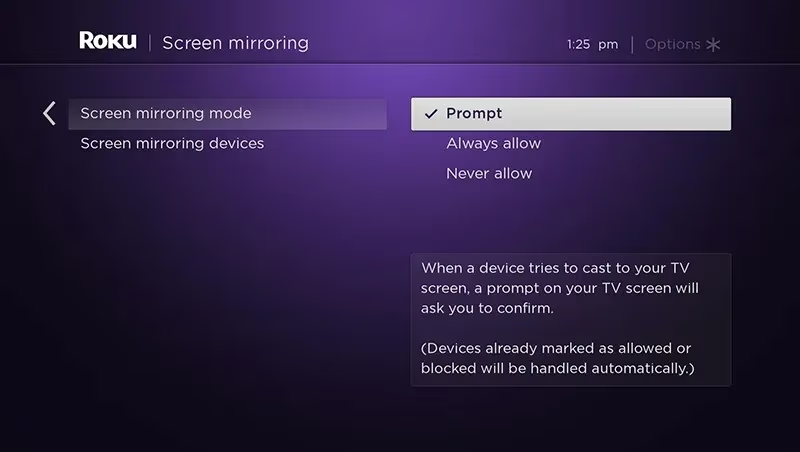
On your Roku, go to Settings > System > Screen Mirroring and set the mode to Prompt or Always Allow.
-
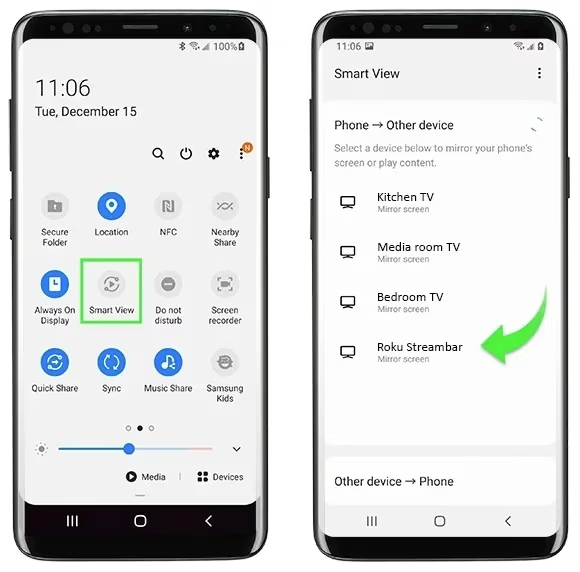
Pull down your Android notification panel and tap the Screen Cast icon (a rectangle with wireless signal waves).
-
Select your Roku from the list of available devices.
-
Accept the connection prompt on your TV.
-
Open TikTok on your phone. Everything you see on your phone screen now appears on the TV.
One thing to note: your phone screen stays on the entire time. If it locks or goes to sleep, the mirror disconnects. Disable auto-lock in your phone’s display settings before starting a long session.
#Mirror TikTok to Roku From iPhone
iPhone uses AirPlay instead of Google Cast. Roku devices running OS 9.4 or later support AirPlay directly, so no extra apps are needed.
-
Make sure your iPhone and Roku are on the same Wi-Fi network.
-
Swipe down from the top-right corner of your iPhone to open Control Center.
-
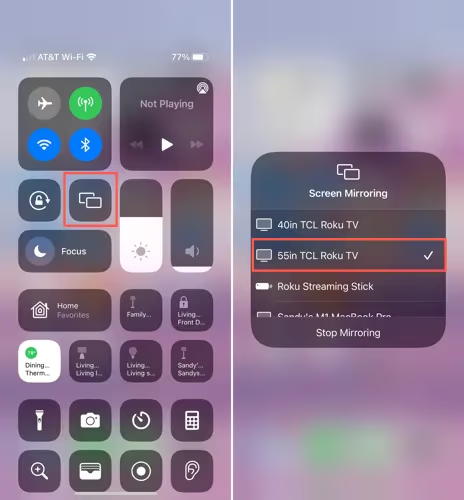
Tap the Screen Mirroring button (the rectangle with a small arrow).
-
Select your Roku from the device list.
-
Accept the connection on your TV if prompted.
-
Open TikTok on your iPhone. Your TikTok feed now shows on the Roku.
If your Roku doesn’t appear in the AirPlay list, check that AirPlay is enabled on the Roku under Settings > Apple AirPlay and HomeKit. For a deeper walkthrough, see the guide on using AirPlay to stream TikTok to your TV.
#Mirroring TikTok From a Windows PC or Mac
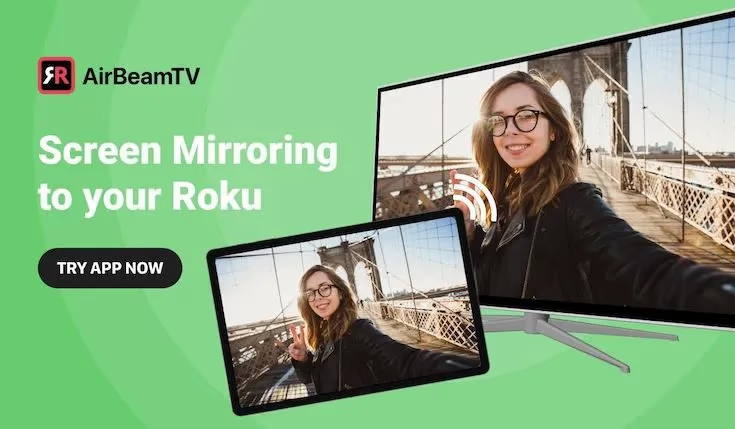
Laptops don’t have built-in Roku mirroring, so you’ll need AirBeamTV. The free version adds a watermark and limits session length. The paid version ($14.99) removes both restrictions.
-
Install AirBeamTV on your Windows PC or Mac.
-
Connect your laptop and Roku to the same Wi-Fi network.
-
Open AirBeamTV and select your Roku from the device list.
-
Click Start Mirroring. Your laptop screen appears on the TV.
-
Open tiktok.com in any browser and start watching.
Audio comes through the TV speakers automatically. If you get audio but no video (or vice versa), restart both AirBeamTV and your browser.
#Tips for Better TikTok Streaming on Roku
A few things that made a noticeable difference in my testing:
Use 5 GHz Wi-Fi. The 2.4 GHz band works but adds visible lag, especially with quick-cut TikTok videos. Both your phone/laptop and Roku need to be on the 5 GHz band for the best results.
Keep firmware updated. On your Roku, go to Settings > System > System Update and check for updates. Outdated firmware can cause mirroring drops. I’ve seen older Roku Express units lose connection every 10-15 minutes until a firmware update fixed it.
Adjust audio routing. Lower your phone volume to zero and control audio from the TV or soundbar instead. Running audio from both devices creates an echo. If you’re watching TikTok on Roku with a soundbar, route audio through HDMI ARC for the cleanest signal.
Turn off auto-lock. Screen mirroring requires your phone display to stay active. On Android, enable Developer Options and turn on “Stay Awake.” On iPhone, set Auto-Lock to Never under Settings > Display & Brightness.
Close other apps. Mirroring uses both bandwidth and processing power. Closing background apps on your phone reduces stuttering, especially on older devices.
#What About TikTok Alternatives on Roku?
If you want short-form video without mirroring, the Roku Channel Store has a few options, though none match TikTok’s content library.
YouTube Shorts is the strongest alternative. YouTube has an official Roku app, and Shorts plays directly within it. The algorithm and content depth are closest to TikTok. If you haven’t set up YouTube on your Roku yet, check out the guide on watching YouTube on Roku.
The Roku Channel itself includes a curated short-form video section with trending clips. It’s pre-installed on every Roku device, so there’s nothing to download.
Pluto TV offers short-form content through its on-demand section, including viral clips and comedy compilations. It’s free and available in the Roku Channel Store.
None of these fully replace TikTok’s creator-driven feed, but they fill the gap when mirroring isn’t convenient. For other streaming options on Roku, see the guides on Disney Plus and CW Live.
#Troubleshooting Common Mirroring Issues
Roku doesn’t show up in device list. Both devices must be on the same Wi-Fi network. Restart your router if they’re connected but can’t find each other. On Roku, verify mirroring is enabled under Settings > System > Screen Mirroring.
Video plays but it’s choppy. This is almost always a bandwidth issue. Switch to 5 GHz Wi-Fi, move closer to your router, and pause downloads or streams on other devices sharing your network.
Connection drops after a few minutes. Check your phone’s auto-lock and battery saver settings. Battery optimization on Android can kill the mirroring connection in the background. Disable battery optimization for the Screen Cast feature in Settings > Battery > Battery Optimization.
No audio on TV. Some Android phones default to phone speakers during mirroring. Open your volume panel and switch the audio output to the Roku. On iPhone, audio routes to the TV automatically through AirPlay.
Black bars around the video. TikTok videos are vertical (9:16), but your TV is horizontal (16:9). Black bars on the sides are normal. There’s no way to stretch vertical TikTok content to fill a widescreen TV without severe distortion.
#Bottom Line
Roku doesn’t have a TikTok app, and given TikTok’s legal situation in the US, that probably won’t change soon. Screen mirroring from your phone or laptop is the practical workaround, and it takes under two minutes to set up.
Android users have it easiest with built-in casting. iPhone users can AirPlay directly to Roku. Laptop users need AirBeamTV ($14.99 for the full version). Whichever method you choose, use 5 GHz Wi-Fi and keep your phone screen unlocked for the best experience.
#Frequently Asked Questions
#Can you download TikTok directly on Roku?
No. The Roku Channel Store has never carried a TikTok app, and Roku hasn’t indicated plans to add one. Roku’s closed operating system also prevents sideloading, so you can’t manually install the TikTok APK like you could on a Fire TV Stick.
#Is screen mirroring TikTok to Roku free?
From a phone or tablet, yes. Android’s Screen Cast and iPhone’s AirPlay are both built into the operating system at no cost. Laptop mirroring through AirBeamTV has a free version with watermarks, and the full version costs $14.99 as a one-time purchase.
#Why doesn’t my Roku appear in the mirroring list?
Your Roku and phone must be on the same Wi-Fi network. If they are and it still doesn’t appear, go to Settings > System > Screen Mirroring on your Roku and make sure it’s set to Prompt or Always Allow. Restarting both devices also resolves most discovery failures.
#Does mirrored TikTok look worse than the phone?
Slightly. Screen mirroring compresses the video feed during wireless transmission, so you may notice softer details compared to watching directly on your phone. A strong 5 GHz Wi-Fi connection minimizes the quality loss. The bigger issue is that vertical TikTok videos only fill about 40% of a widescreen TV.
#Can you mirror TikTok LIVE streams to Roku?
Yes. Screen mirroring sends everything on your phone screen to the TV in real time, including LIVE streams and Stories. Make sure your internet connection can handle both receiving the live stream and transmitting the mirror simultaneously.
#Will TikTok ever come to Roku officially?
That’s uncertain. TikTok faced a federal ban in the US in January 2025, and while the app returned, its long-term status depends on ongoing negotiations around data security and ownership. Even if those issues resolve, Roku and TikTok would still need to reach a distribution agreement.
#Can you control TikTok with the Roku remote during mirroring?
Not directly. The Roku remote can’t swipe through TikTok’s feed or interact with the app. You still control TikTok from your phone’s touchscreen. The Roku remote only handles TV-level functions like volume and power during a mirroring session.