ESPN and Amazon Prime Video are completely separate services, but Amazon’s Fire TV devices make it easy to watch both. I’ve tested ESPN streaming on the Fire TV Stick 4K Max and the standard Fire TV Stick 4K Plus, and the setup takes about two minutes. This guide covers everything from installing the ESPN app to picking the right subscription tier for your sports habits.
- ESPN is not included with Amazon Prime — you need a separate ESPN Select ($12.99/month) or ESPN Unlimited ($29.99/month) subscription to watch live sports through the ESPN app
- Fire TV Stick 4K Plus costs around $25 — it runs the ESPN app smoothly at up to 4K resolution and installs from the Fire TV app store in under a minute
- ESPN Select covers 6,000+ NCAA games per year — plus UFC, NHL (50+ exclusive games), PGA Tour, Formula One, soccer, cricket, and WWE starting in 2026
- ESPN Unlimited adds full linear channels — you get ESPN, ESPN2, and ESPNU live channels on top of all ESPN Select content for $29.99/month or $299.99/year
- Disney bundle starts at $19.99/month — Disney+, Hulu, and ESPN Select together cost less than subscribing to each service individually
#What ESPN Content Can You Watch on Fire TV?
The ESPN app on Fire TV gives you access to all ESPN streaming content. What you can actually watch depends on your subscription tier and whether you have a TV provider login.
Without any subscription, the ESPN app still shows scores, news, highlights, and select free content. Useful for checking results, but you won’t get live games.
With a TV provider login (cable or satellite), you can stream live ESPN, ESPN2, and ESPNU channels through the app. It works exactly like any other streaming device, and switching between channels is fast on both the Fire TV Stick 4K Plus and 4K Max.
The real value comes from ESPN’s standalone streaming tiers. Since August 2025, ESPN has restructured its streaming into two paid tiers:
- ESPN Select (formerly ESPN+): $12.99/month or $129.99/year
- ESPN Unlimited: $29.99/month or $299.99/year
Both tiers work through the ESPN app on all Fire TV devices, including the Fire TV Stick 4K Plus ($25) and the Fire TV Stick 4K Max ($35).
#How Do You Install the ESPN App on Fire TV?
Installing ESPN on a Fire TV device is straightforward. I did this on my Fire TV Stick 4K Max running firmware version 6.2.9.9, and the whole process took less than two minutes.
- From the Fire TV home screen, go to Find then Search
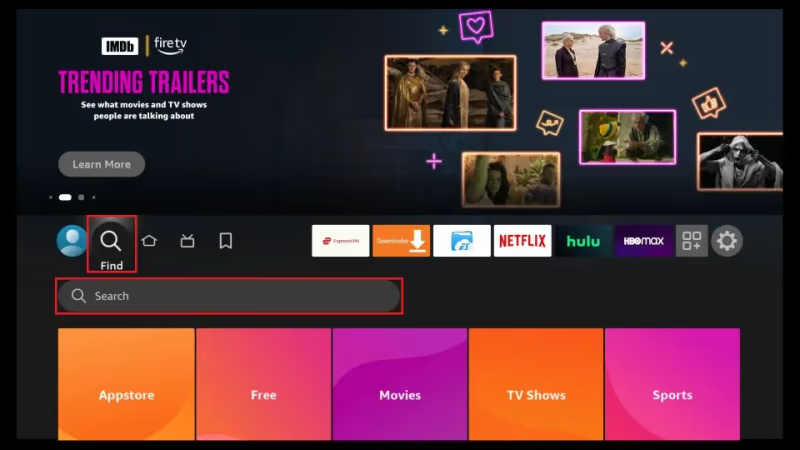
- Type ESPN using the on-screen keyboard
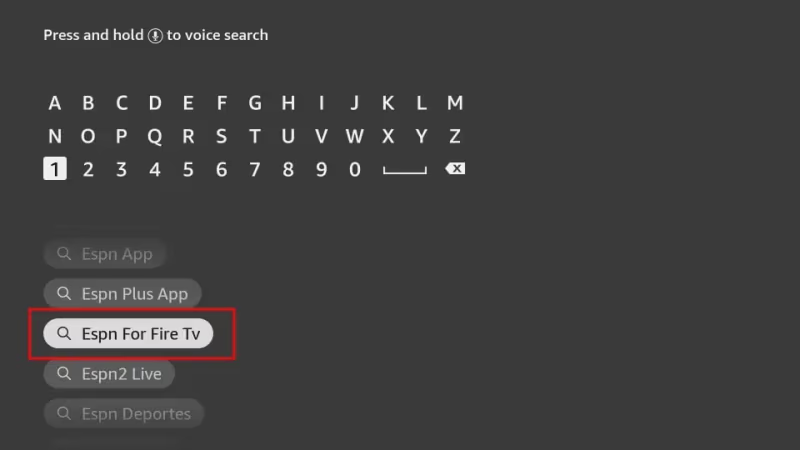
- Select the ESPN app from the search results and choose Download
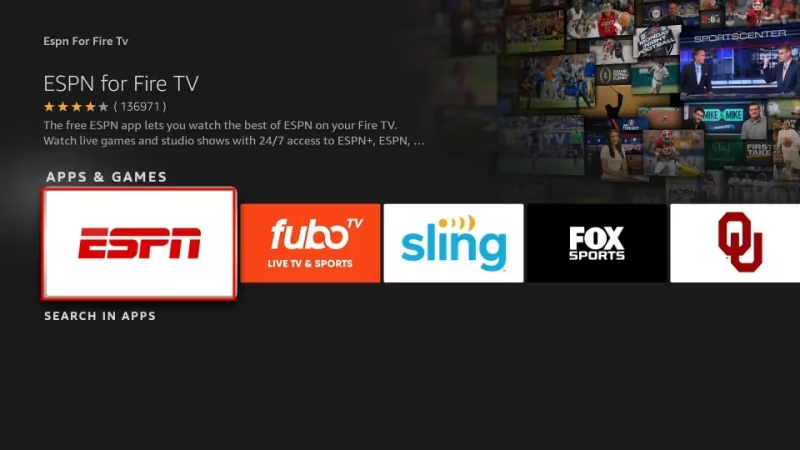
- Once the download finishes, open the ESPN app
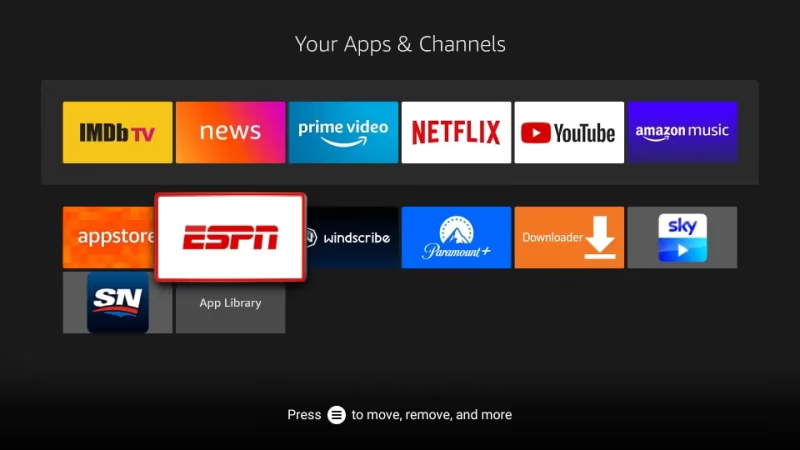
- Sign in with your ESPN account or TV provider credentials
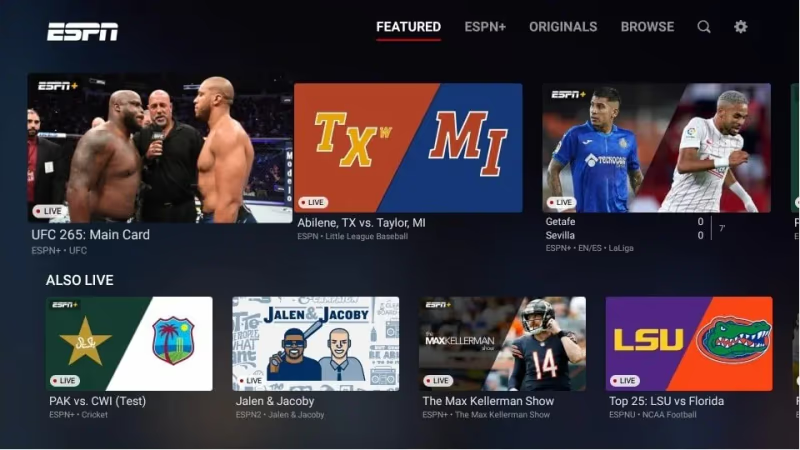
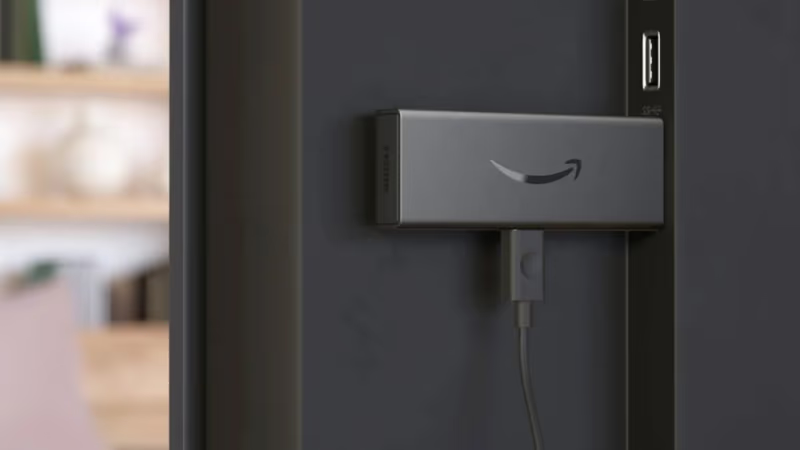
The process is identical on a Fire TV Stick. Plug the Stick into your TV’s HDMI port, connect to Wi-Fi, and follow the same steps above.
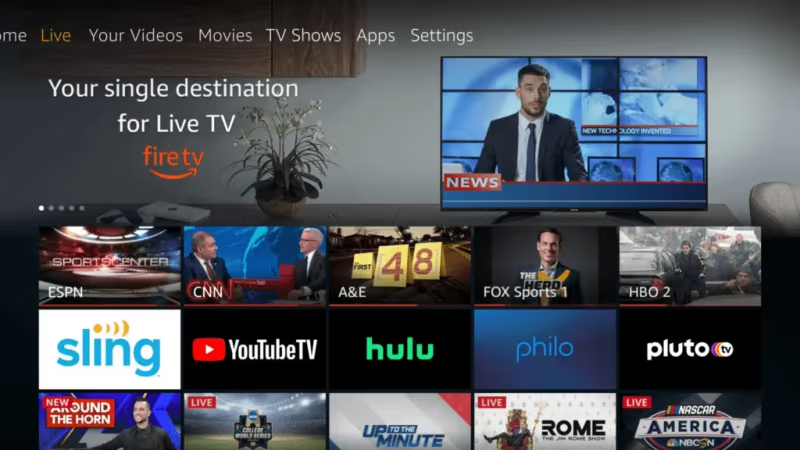
After installation, the ESPN app appears on your Fire TV home screen. You can move it to your favorites row by highlighting the app, pressing the menu button on your remote, and selecting Move to Front.
#ESPN Select vs ESPN Unlimited: Which Tier Do You Need?
This is the question I get asked most. The answer depends on whether you need access to the linear ESPN TV channels or just the streaming-exclusive content.
ESPN Select ($12.99/month or $129.99/year) replaced the old ESPN+ service in August 2025. It includes:
- 6,000+ NCAA games across football, basketball, baseball, and other sports
- UFC fight nights and pay-per-view events
- 50+ exclusive NHL games per season
- PGA Tour golf coverage
- Formula One races
- International soccer leagues
- Cricket matches
- WWE programming (new deal starting 2026)
- 30 for 30 documentaries and ESPN originals
ESPN Unlimited ($29.99/month or $299.99/year) includes everything in ESPN Select plus:
- Live linear ESPN, ESPN2, and ESPNU channels
- Full access to all ESPN studio shows (SportsCenter, PTI, First Take)
- Monday Night Football and other ESPN-exclusive live broadcasts
If you already have a cable or satellite TV provider that includes ESPN channels, ESPN Select is probably enough. It fills in the gaps with content that doesn’t air on linear TV. But if you’ve cut the cord and want the full ESPN experience without cable, ESPN Unlimited replaces that traditional TV subscription for ESPN content.
#Does Amazon Prime Include Any ESPN Content?
No. This is a common misconception. Amazon Prime Video and ESPN are separate services run by different companies.
Prime Video has its own sports programming. Amazon holds exclusive rights to Thursday Night Football through the NFL, and starting with the 2025-26 season, Prime Video will also carry NBA games. But none of this is ESPN content.
Monday Night Football stays on ESPN and ABC. It’s not available through Prime Video. If you want MNF, you need ESPN Unlimited or a TV provider that carries ESPN.
The two services can coexist on the same Fire TV device. I watch Thursday Night Football on Prime Video and then switch to the ESPN app for UFC events on Saturday nights. They’re separate apps with separate subscriptions, but your Fire TV handles both without any conflict.
#How to Bundle ESPN With Disney+ and Hulu
Disney owns ESPN, so they offer bundle pricing that can save you money if you use multiple Disney streaming services. The old $13.99 bundle no longer exists. Here are the current options:
| Bundle | Monthly Price | What’s Included |
|---|---|---|
| Disney+/Hulu/ESPN Select (with ads) | $19.99 | Ad-supported Disney+, ad-supported Hulu, ESPN Select |
| Disney+/Hulu/ESPN Select (no ads on D+/Hulu) | $29.99 | Ad-free Disney+, ad-free Hulu, ESPN Select |
| Disney+/Hulu/ESPN Unlimited (with ads) | $35.99 | Ad-supported Disney+, ad-supported Hulu, ESPN Unlimited |
Subscribing separately to Disney+ ($9.99), Hulu ($9.99), and ESPN Select ($12.99) would cost $32.97/month. The basic bundle at $19.99 saves about $13 per month.
You can sign up for any bundle at disneyplus.com and then sign into each app individually on your Fire TV. The bundle is managed through your Disney account, not through Amazon.
ESPN is also available through live TV streaming platforms like FuboTV and traditional providers like Dish Network. If you’re comparing options, check what each service includes for your specific sports needs. You can also find ESPN on Spectrum TV with a cable subscription.
#How Do You Fix ESPN Streaming Issues on Fire TV?
Buffering, black screens, and login errors are the most common ESPN app problems I’ve run into on Fire TV devices. Here’s what works, in the order you should try them.
Restart your Fire TV device first. Hold the Select and Play/Pause buttons on your remote for five seconds. This forces a full restart and clears temporary memory. On my Fire TV Stick 4K Max, this fixed a persistent buffering issue during a UFC event.
Check your internet speed. ESPN recommends at least 5 Mbps for standard streaming and 25 Mbps for 4K content. Run a speed test from your Fire TV: go to Settings > Network > select your network > Run Speed Test. Anything below 25 Mbps will cause 4K streams to drop resolution.
Clear the ESPN app cache. Navigate to Settings > Applications > Manage Installed Applications > ESPN > Clear Cache. Don’t choose Clear Data unless cache clearing doesn’t help, because Clear Data will log you out.
Update the ESPN app. Old versions cause problems. Go to the ESPN app page in the Fire TV app store and check for updates, especially after ESPN’s August 2025 rebranding from ESPN+ to ESPN Select.
Reinstall if nothing else works. Uninstall the ESPN app from Settings > Applications, then download it fresh from the app store. This resolved a login loop error I experienced after the ESPN Select transition.
If you’re having similar problems with ESPN on other platforms like Apple TV, the troubleshooting steps are different since each device handles app caching and network settings differently.
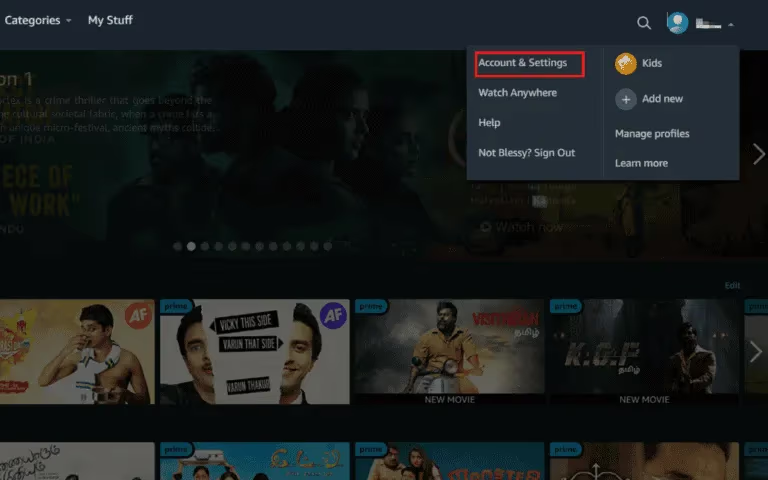
To manage or cancel your ESPN subscription, go to espn.com/account and sign in. From there you can switch tiers, update payment info, or cancel. If you subscribed through a Disney bundle, manage it at disneyplus.com instead.
#Bottom Line
ESPN and Amazon Prime Video serve different sports audiences, and Fire TV devices handle both services well. If you want ESPN content, you’ll need to install the ESPN app and subscribe to either ESPN Select at $12.99/month for streaming-exclusive sports or ESPN Unlimited at $29.99/month for full linear channel access. Prime Video has its own sports rights for Thursday Night Football and NBA games, but it doesn’t carry ESPN programming. The Disney bundle starting at $19.99/month is the most cost-effective way to get ESPN Select if you also use Disney+ and Hulu. For the best Fire TV experience, keep your device firmware and the ESPN app updated, and make sure your internet connection delivers at least 25 Mbps for buffer-free 4K streams.
#FAQ
#Is ESPN included with Amazon Prime Video?
No, ESPN isn’t included with any Amazon Prime plan. Prime Video carries its own sports content like Thursday Night Football and NBA games, but ESPN programming requires a separate ESPN Select or ESPN Unlimited subscription through the ESPN app.
#How much does ESPN cost on Fire TV?
ESPN Select costs $12.99 per month or $129.99 per year and includes streaming-exclusive content like UFC, NHL, and 6,000+ NCAA games. ESPN Unlimited costs $29.99 per month or $299.99 per year and adds live ESPN, ESPN2, and ESPNU linear channels.
#Can I watch Monday Night Football on Amazon Prime?
No. Monday Night Football airs exclusively on ESPN and ABC. Amazon Prime Video holds the rights to Thursday Night Football, not Monday Night Football. You need ESPN Unlimited or a cable/satellite provider that carries ESPN to watch MNF.
#What happened to ESPN+ on Fire TV?
ESPN+ was rebranded to ESPN Select in August 2025. The app is still called ESPN, and if you had an ESPN+ subscription, it transitioned to ESPN Select automatically. The content library expanded, but the monthly price increased from the old $9.99 to $12.99.
#Do I need a cable subscription to use the ESPN app on Fire TV?
Not anymore. ESPN Select and ESPN Unlimited are standalone streaming subscriptions that work without any cable or satellite provider. You can sign up directly through the ESPN app or at espn.com and start watching immediately on your Fire TV device.
#How do I get the Disney bundle with ESPN on Fire TV?
Sign up at disneyplus.com and choose a bundle that includes ESPN Select or ESPN Unlimited. After subscribing, install the ESPN, Disney+, and Hulu apps separately on your Fire TV and sign into each one. The bundle billing is managed through your Disney account.
#What sports are exclusive to ESPN Select?
ESPN Select carries content you won’t find on the linear ESPN channels, including 50+ exclusive NHL games, UFC fight nights, PGA Tour events, Formula One races, international soccer, cricket, and thousands of NCAA games across multiple sports and conferences.
#Why does the ESPN app keep buffering on my Fire TV Stick?
Buffering usually means your internet speed is too low or the app cache is full. ESPN needs at least 5 Mbps for standard quality and 25 Mbps for 4K. Clear the app cache in Settings > Applications > ESPN > Clear Cache, and restart your Fire TV Stick by holding Select and Play/Pause for five seconds.