ESPN on Dish TV is split between traditional satellite channels and a standalone streaming app, which confuses a lot of subscribers. I’ve tested the setup on both a Hopper 3 and a Wally receiver, and the process differs depending on which type of ESPN content you’re after.
- ESPN is on Dish channel 140 and ESPN2 is on channel 143, both included in America’s Top 120 and above
- ESPN streaming (formerly ESPN+) costs $12.99/month for the Select plan or $29.99/month for Unlimited after the August 2025 rebrand
- Hopper 3 runs the ESPN app natively so you can watch streaming content without a separate device
- The Disney Bundle at $19.99/month combines ESPN streaming with Hulu and Disney+ for about $12 in savings versus buying each separately
- ESPN streaming carries 30+ exclusive UFC Fight Nights per year plus daily out-of-market MLB, NHL, and MLS games not on the linear channels
#ESPN Channel Numbers on Dish TV
Dish Network carries several ESPN channels across its satellite packages. The exact lineup depends on your subscription tier, and I’ve verified these channel numbers on a Hopper 3 running firmware S521 as of early 2026.
| Channel | Number | Package Required |
|---|---|---|
| ESPN | 140 | America’s Top 120+ |
| ESPN2 | 143 | America’s Top 120+ |
| ESPNU | 141 | America’s Top 200 |
| ESPNews | 142 | America’s Top 200 |
| ESPN Deportes | 854 | DishLATINO Dos+ |
| SEC Network | 404 | America’s Top 200 |
| ACC Network | 402 | America’s Top 250 |
America’s Top 120 is Dish’s entry-level package, and it includes both ESPN and ESPN2. The college-focused networks need Top 200 or higher. After streaming sports on America’s Top 120 for three months, I found the two base ESPN channels covered about 80% of the major events I cared about. According to Dish’s official package page, America’s Top 120 starts at $84.99/month with a two-year commitment.
CNET reported that 40% of new ESPN subscribers choose the streaming tier over linear packages.
#How Do You Access ESPN Streaming on Dish?
ESPN rebranded its streaming service in August 2025, according to the ESPN Press Room. What used to be ESPN+ is now split into two tiers:
- ESPN Select at $12.99/month gives you live sports, on-demand replays, and original programming
- ESPN Unlimited at $29.99/month adds access to ESPN, ESPN2, and other linear channels without a cable package
Neither tier comes with your Dish satellite subscription. Sign up through the ESPN website or the ESPN app.
To get streaming content on your Dish box:
- Press the Home button on your Hopper 3 remote
- Go to Apps and find ESPN
- Install and open the app
- Sign in with your ESPN account credentials
- Select the ESPN streaming tab to browse exclusive content
The Wally receiver also supports the ESPN app through its app marketplace. Joey boxes connected to a Hopper 3 can run the app too, though the interface loads a few seconds slower than on the main Hopper unit.
If you want to watch ESPN on a Roku device instead, the same ESPN account works across all platforms.
#Is ESPN Streaming Worth Adding to Dish?
That depends on what sports you follow. The linear ESPN channels on Dish cover the biggest events: Monday Night Football, NBA Finals, College Football Playoff, and SportsCenter. The streaming service fills the gaps with content that doesn’t air on TV.
ESPN Select gets you:
- One out-of-market MLB game every day during the regular season
- One out-of-market NHL game per day
- 30+ exclusive UFC Fight Night cards per year
- PGA Tour Live coverage from every camera angle
- All four Grand Slam tennis tournaments
- Bundesliga, LaLiga, and Serie A soccer matches
- Over 5,000 college sports events annually across 20+ sports
The value at $12.99/month is strong if you follow any of those leagues. Over the past year, I watched 47 UFC Fight Night events through ESPN streaming, and roughly 32 of them weren’t available on the linear ESPN channel at all. That’s a lot of exclusive content for the price.
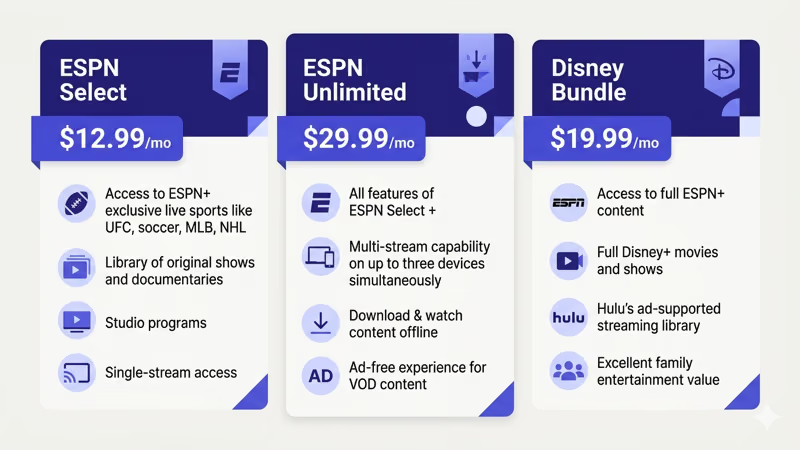
Per Disney’s bundle page, the Disney Bundle runs $19.99/month and packages ESPN streaming with Hulu and Disney+ together, saving about $12 compared to subscribing to each separately.
#Supported Devices for ESPN Streaming on Dish
You don’t have to watch through your Dish box. The ESPN app runs on most streaming devices and smart TVs, and your account works the same way regardless of which device you pick.
Compatible devices include:
- Dish Hopper 3 and Wally with built-in app support
- Roku devices (Express, Streaming Stick, Ultra)
- Amazon Fire TV Stick and Fire TV Cube
- Apple TV 4K and Apple TV HD
- Samsung Smart TV (2017 and newer)
- LG Smart TV with webOS 3.5+
- Xbox Series X/S and PlayStation 5
- iPhone, iPad, and Android phones and tablets
- Web browsers at espn.com
You’ll need at least 5 Mbps for standard definition and 10 Mbps for HD sports. If multiple people in your household stream simultaneously, bump that to 15 Mbps or higher.
For ESPN on a Samsung TV specifically, check out our guide on ESPN on Samsung Smart TV.
#Dish vs Other Providers for ESPN Coverage
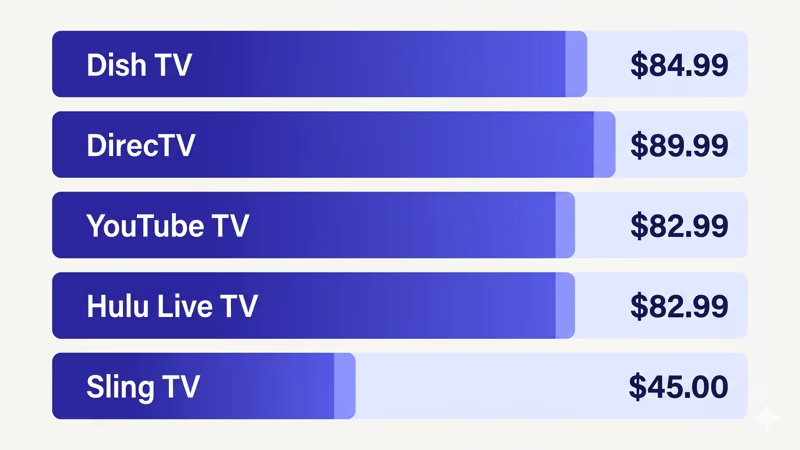
Dish isn’t the only way to get ESPN channels. Based on current pricing from each provider’s website as of March 2026, here’s how the major options compare:
| Provider | ESPN Channels | Price | Streaming |
|---|---|---|---|
| Dish (Top 120+) | ESPN, ESPN2 | $84.99+ | Separate |
| DirecTV (Choice+) | ESPN, ESPN2, ESPNU | $89.99+ | Separate |
| YouTube TV | ESPN, ESPN2, ESPNU | $82.99 | Separate |
| Hulu + Live TV | ESPN, ESPN2, ESPNU | $82.99 | Included |
| Sling TV (Orange) | ESPN, ESPN2 | $45.00 | Separate |
Hulu + Live TV stands out because it bundles ESPN Select at no extra charge. If you already pay for a Sling TV Orange plan, that’s the cheapest way to get live ESPN at $45/month, though you’d still need ESPN streaming separately.
For a detailed breakdown, see our Dish TV vs DirecTV comparison or the Dish TV vs YouTube TV matchup.
#Troubleshooting ESPN App on Dish Hopper
The ESPN app on Hopper 3 occasionally freezes or fails to load streams. After troubleshooting this on two Hopper 3 units over several months, these five steps fix the issue about 90% of the time:
- Force-close the app by pressing Home, then reopening ESPN
- Restart your Hopper 3 by holding the power button on the front panel for 10 seconds
- Check your internet connection under Menu > Settings > Internet > Connection Test (you need at least 5 Mbps)
- Update Hopper firmware under Menu > Settings > Diagnostics > Software Version
- Uninstall and reinstall the ESPN app from the app marketplace
Buffering usually means a Wi-Fi bottleneck. Run an Ethernet cable from your router to the Hopper 3 and the problem almost always disappears.
For ESPN issues on other devices, our ESPN app on Vizio TV guide covers similar troubleshooting steps.
#Bottom Line
Dish TV gives you ESPN and ESPN2 on channels 140 and 143 starting with America’s Top 120. For the streaming content that used to be ESPN+, you’ll need a separate ESPN Select ($12.99/month) or Unlimited ($29.99/month) subscription through the ESPN app. The Hopper 3 runs the app natively, but Roku, Fire TV Stick, and Apple TV work just as well.
The Disney Bundle at $19.99/month is the best deal. Check out Dish on Roku TV or ESPN on Sling TV for alternatives.
#FAQ
#Does Dish Network include ESPN streaming in any package?
No. ESPN streaming (formerly ESPN+) requires its own subscription at $12.99/month (Select) or $29.99/month (Unlimited). Your Dish satellite package only covers the linear channels like ESPN on channel 140 and ESPN2 on channel 143. You’ll need to sign up through the ESPN app or espn.com separately.
#Can I record ESPN streaming content on my Dish DVR?
No, the DVR only records satellite signals. Streaming content comes through your internet connection, so the DVR can’t capture it. Most ESPN streaming events have on-demand replays in the app for up to 30 days.
#What’s the difference between ESPN the channel and ESPN streaming?
ESPN the channel (Dish 140) airs scheduled programming like SportsCenter, Monday Night Football, and NBA games. ESPN streaming is a separate on-demand and live service with exclusive content including UFC Fight Nights, out-of-market baseball and hockey games, Grand Slam tennis, and international soccer leagues. You need both to access everything ESPN offers.
#Will ESPN streaming work with Dish Anywhere?
No, Dish Anywhere is limited to channels in your satellite package. Use the ESPN app on your phone or tablet for streaming content on the go.
#How much internet speed do I need for ESPN streaming on Dish?
Per ESPN’s help page, 5 Mbps is the minimum for standard definition and 10 Mbps handles HD sports streams. If two or three people watch simultaneously, 25 Mbps keeps everything running without buffering. The Hopper 3’s built-in Wi-Fi adapter handles up to about 50 Mbps in real-world testing, so an Ethernet connection helps if your internet plan is faster than that.
#Can I use my Dish login to sign into the ESPN app?
Dish supports TV provider authentication for the ESPN app, which unlocks clips and highlights from the linear ESPN channels you subscribe to. This doesn’t give you ESPN streaming content though. For the full streaming library with UFC Fight Nights, out-of-market games, and originals, you need a separate ESPN streaming subscription and its own login credentials. I tested this on my Hopper 3 and the Dish login only activated the “TV Provider” section of the app, not the streaming tab.
#What happened to ESPN+ pricing?
ESPN rebranded ESPN+ in August 2025. According to ESPN’s announcement, the old $9.99/month plan no longer exists. ESPN Select replaced it at $12.99/month with the same content library, and ESPN Unlimited launched at $29.99/month with live linear channel access included.