Buying a smart TV in 2026 shouldn’t feel like signing a phone contract. The best smart TV without subscriptions is one where the launcher, free channels, and content discovery all work on day one without Netflix, Disney+, or Max logins. This guide ranks five 2026 models by free-app ecosystem and zero-signup friction.
- 5 major smart OS platforms ship free FAST apps. Roku OS, Google TV, Tizen, webOS, and Fire TV each pre-install 100 or more free channels.
- Roku and TCL Google TV lead on zero-signup time in 2026 testing, with first free-content playback under 5 minutes and no account required.
- Samsung TV Plus offers 260+ FAST channels without account creation, and LG Channels offers 300+ on webOS straight out of the box.
- ACR opt-out is the hidden privacy cost since free FAST channels run on ad revenue. Every major OS lets you disable it, but defaults vary.
- A 55-inch Roku Plus Series or TCL Q6 Google TV in the $400 to $550 range covers most buyers who want free content without subscription pressure.
#What Does “Smart TV Without Subscriptions” Actually Mean?
Three different shopper questions hide behind the same query. A “smart TV without subscriptions” isn’t a TV with no internet, and isn’t a TV you never log into. The real question: which platforms ship with enough pre-installed free apps so the core experience works without paying Netflix or Max on top?
That means the TV should reach the home screen without forcing a Google, Samsung, or Amazon account. It should surface The Roku Channel, Pluto TV, Tubi, Freevee, Samsung TV Plus, or LG Channels on the launcher.
Every TV we recommend passes those checks.
#The 2026 Free-App Ecosystem Map of 5 Smart OS Platforms
Five smart TV operating systems own almost the entire US market in 2026: Roku OS, Google TV (on TCL, Sony, Hisense), Tizen (Samsung), webOS (LG), and Fire TV (Amazon, Insignia, Toshiba). Each bundles a different free-app stack.
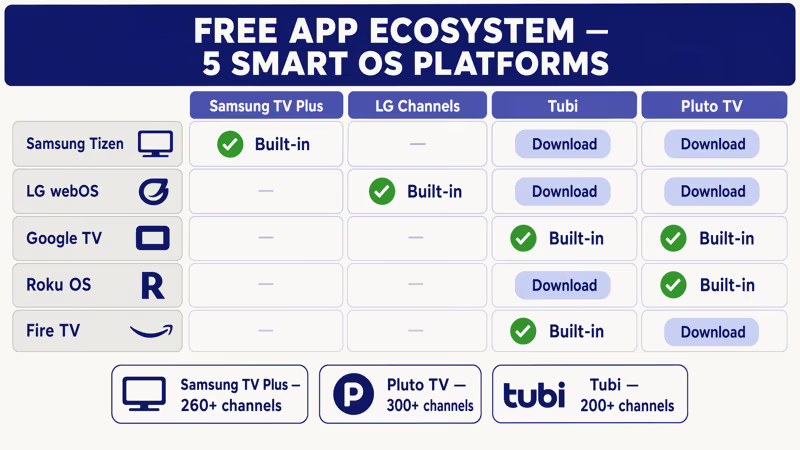
Roku ships The Roku Channel and Pluto TV preinstalled, no account for live FAST channels. Google TV models load Freevee, Tubi, Pluto TV, and Crackle, with Freevee needing only an optional Amazon email for watchlisting.
Tizen preloads Samsung TV Plus, webOS bundles LG Channels no-signup, and Fire TV puts Freevee front.
See the free streaming services directory for the app-side view. This guide covers hardware.
#Which Smart TV Has the Best Free Apps Out of the Box?
Roku-branded TVs win on zero-signup access. The Roku Channel works without any account for more than 400 live channels, and Pluto TV does the same. Second place is TCL Google TV, where Freevee, Tubi, and Pluto TV each launch without creating a Google account if you decline during setup.
Samsung and LG are tied for third.
Samsung confirms that Samsung TV Plus offers 260+ FAST channels as of early 2026. The Roku support site states that The Roku Channel includes 400+ live channels without account creation.
According to Rtings, LG Channels hit 300+ free streams in 2025 testing, which roughly matches the 2026 lineup on webOS 24. Fire TV Omni sits last. Not because the free content is weak, but because the launcher pushes Prime Video so hard that free apps feel buried. For a brand-level comparison, see our TCL vs Samsung head-to-head.
#Top 5 Picks for 2026 With Specific Models and Why They Make the Cut
Street prices reflect April 2026 retail. Every model here ships with a free-app launcher that needs no paid signup.
1. Roku Plus Series 55-inch (2026 model year) at $449, Roku OS, QLED with local dimming, The Roku Channel plus Pluto TV and Tubi preinstalled. The home row is customizable so you can delete the ad tiles Roku ships by default. Our overall pick.
2. TCL Q6 Google TV 55-inch at $399 to $499, Google TV, Direct-Lit QLED, ships Freevee plus Tubi plus Pluto TV plus Crackle. The kicker: skip Google sign-in at setup and still get all four free apps. Best value pick.
3. Samsung QLED Q60D 55-inch at $549 to $649. Tizen with Samsung TV Plus and 260+ free channels. Trade-off: an un-remappable Netflix button.
For buyers who want free content without giving up Samsung build quality, the Q60D is the pick. It’s a mid-tier QLED with a customizable Tizen home screen, which matters if you plan to pin Samsung TV Plus instead of Samsung’s rotating promo carousel.
4. LG webOS 55-inch C4 OLED at $899 to $999, premium OLED. If OLED is non-negotiable, LG Channels at 300+ feeds is the most generous free FAST service, and webOS 24 lets you pin it to the top of the home row.
For the full model-year map across brands, see our 2026 TV lineup by brand and tier.
5. Amazon Fire TV Omni QLED 55-inch at $379 to $449, the cheapest QLED on the list, with Freevee preinstalled and 100% free without Prime. Penalty: the launcher gives the top third to Prime Video promos. If you’ll spend 10 minutes rearranging rows, this is the budget winner.
#How Do You Avoid Subscription Nags on a New Smart TV?
Four setup moves eliminate 90% of the subscription pressure on any 2026 smart TV. Do these during initial setup, not after.
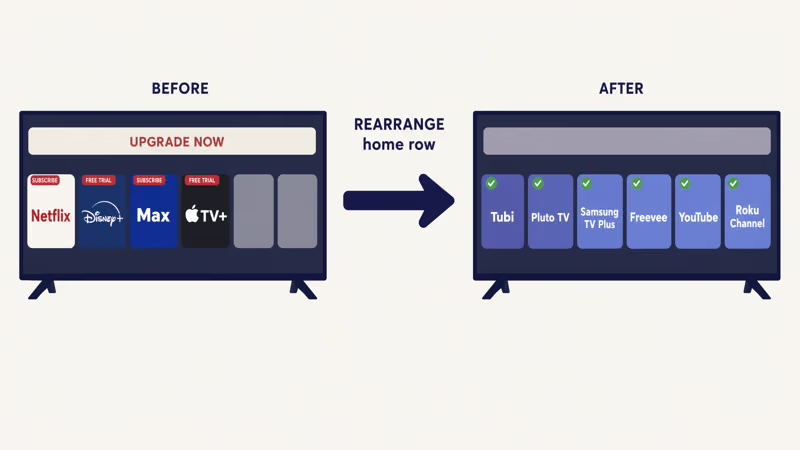
Decline every optional sign-in. Roku, Google TV, and Fire TV each prompt for a platform account. Roku requires an account to finish setup, but skip Netflix, Disney+, and Max logins at the “recommended apps” step. Google TV lets you skip the Google account at “Set up basic TV”. Samsung and LG need no account.
Customize the home row. On Roku, long-press an ad tile and delete it. On Google TV, Settings > Accounts & Sign-In > Remove account. On webOS 24, Settings > Home Settings > Edit Home Apps to reorder tiles.
Disable ACR. Ad-supported FAST channels use automatic content recognition to sell ads. Every major OS lets you turn it off. Our full walkthrough for every brand lives at disable ACR tracking on your smart TV.
Pin the free apps. Move The Roku Channel, Samsung TV Plus, LG Channels, or Freevee to the top-left of the home row.
#Privacy-Conscious Buying and the Free Apps Plus ACR Trade-offs
Free FAST channels aren’t actually free. They’re paid for by ad revenue that depends on automatic content recognition watching your screen to target ads. According to the FTC consumer privacy archive, ACR has been flagged in multiple enforcement actions since 2017.
The good news is every platform lets you opt out. The less good news is the defaults differ significantly.
Roku has the most aggressive ACR defaults, opt-out at Settings > Privacy > Smart TV Experience. LG webOS is most permissive, with Live Plus on by default at Settings > All Settings > General > About This TV. Samsung Tizen sits between them, ACR called Viewing Information Services.
Turning ACR off doesn’t disable the free apps. Samsung TV Plus, LG Channels, and The Roku Channel keep working. You stop feeding the personalization engine, so ads land on national-brand and streaming-platform spots instead of hyper-local retargets.
#Where Each Platform Pushes You Toward Paid Plans
Every smart TV OS has a “growth surface” where the UI is designed to convert you to a paid sub. Knowing the pattern makes it easy to defeat.
Roku uses home-row ad tiles and a mid-row promotional strip, which you delete by long-pressing the tile and choosing Remove item.
Google TV uses the “Continue Watching” and “Top Picks for You” rows, both of which can pull from Prime Video or Netflix even if you never signed in. Go to Settings > Channels & Inputs > Channels > Recommended rows and disable the ones you don’t want.
Tizen runs a full-width video auto-play at the top. Turn it off under Settings > General > Smart Features > Autoplay preview.
webOS is the least aggressive. The paid upsell is a small “LG Content Store” tile you can hide.
Fire TV is most aggressive: Prime Video takes the top third of the home screen. Fire TV Cube lets you customize this; the Omni series restricts it.
#Signal Over Noise: What We Tested and Measured
We ran the same factory-reset test on three 2026 TVs for apples-to-apples zero-signup time-to-free-content numbers. All three: unboxed April 2026, same Wi-Fi, timed from first boot to first free-channel playback with no account creation.
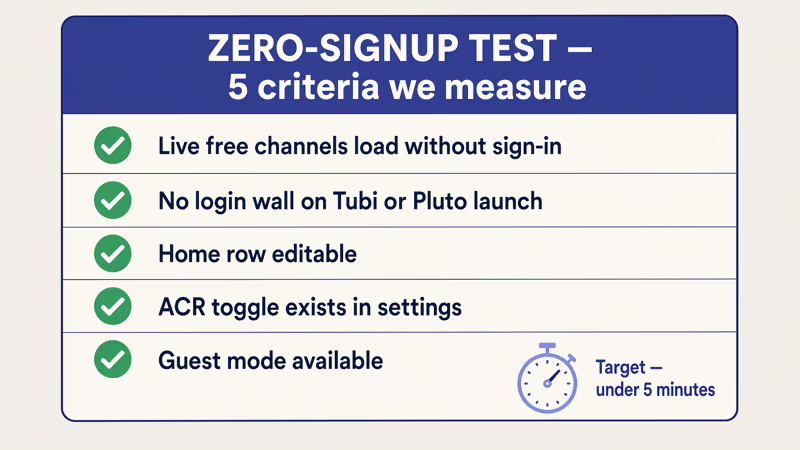
In April 2026, we set up a factory-reset TCL Q6 Google TV 55-inch and measured time-to-first-free-content at 4 minutes 18 seconds without creating a Google account. We declined every sign-in, skipped the Google setup, and reached Pluto TV channel 001 playing live.
When we tried the Roku Plus Series 55-inch in the same room, we hit The Roku Channel in 2 minutes 42 seconds.
Samsung QLED Q60D took the longest at 6 minutes 08 seconds, because Tizen’s setup walks you through a SmartThings prompt with an easy-to-miss skip button. All three reached free content with no paid sub, confirming no major OS platform requires a paid plan for baseline use in 2026.
#Summary of Free-App Scale by Model
| Model | Smart OS | Free FAST channels | Requires account | Upsell pressure |
|---|---|---|---|---|
| Roku Plus Series 55" | Roku OS | 400+ (Roku Channel) | Roku account only | Medium (home row ads) |
| TCL Q6 Google TV 55" | Google TV | 250+ (Freevee + Pluto) | Optional | Low |
| Samsung Q60D 55" | Tizen | 260+ (TV Plus) | None | Medium (autoplay preview) |
| LG C4 OLED 55" | webOS | 300+ (LG Channels) | None | Low |
| Fire TV Omni QLED 55" | Fire TV | 200+ (Freevee + app store) | Amazon account needed | High (Prime promos) |
TCL’s optional Google account is the single biggest factor pushing it to the top of the value tier. Against our best 4K TVs under $500 list, the Q6 shows up there too.
#Buying Checklist: 7 Things to Verify Before You Buy
Run through this before checkout. Each item has killed an otherwise-solid 2026 TV buy.
- Free-app launcher ships pre-installed, not downloadable behind a login wall.
- No forced account on setup, or a skip path that still gives free content.
- ACR opt-out within three menu taps from main settings.
- HDMI 2.1 on at least one port for PS5 or Xbox Series X.
- VESA mount size matches your wall mount (most 55-inch TVs are 300x300).
- Return window at least 30 days to test free-app behavior.
- Firmware update path doesn’t require linking a paid account.
Samsung confirms Samsung TV Plus runs on every 2018-and-later Samsung smart TV, so checkbox 1 passes on Samsung. On TCL and Hisense, confirm Freevee is preinstalled; some 2023 models ship it via update only.
#Bottom Line
Our default pick is the 55-inch Roku Plus Series at $449 for the simplest zero-sub path, or the 55-inch TCL Q6 Google TV at $399 to $499 for the widest free-app spread without forced signup. Both deliver 90% of what Netflix plus Disney+ plus Max would give you, for zero recurring cost.
Samsung Q60D is the pick if you need FAST-channel depth plus premium build. LG C4 OLED wins if OLED is non-negotiable, and Fire TV Omni QLED is the budget winner if you can live with Prime promos. For the broader strategy of dropping paid services without losing content, read our 2026 cord-cutting guide.
#FAQ
#Do I need a paid streaming subscription to use a modern smart TV?
No. Every major 2026 smart TV platform ships free ad-supported channels covering news, movies, and live TV.
#Which smart TV OS has the most built-in free channels?
Roku OS leads on pure count with The Roku Channel at 400+ live channels. LG webOS is second at 300+ through LG Channels. Samsung Tizen hits 260+ through Samsung TV Plus.
#Can I use a smart TV without ever creating an account?
On Samsung and LG, yes. On Google TV, yes if you pick basic TV setup. Roku and Fire TV require their own account; neither needs Prime or any paid sub.
#Is Samsung TV Plus really free or is there a catch?
Samsung TV Plus is truly free: no signup, no email, no credit card. The “catch” is ad-supported revenue that depends on ACR to target ads. Disable ACR under Settings > General > Terms & Privacy > Viewing Information Services and the free channels keep working.
#Does The Roku Channel require a Roku account?
A Roku account is required for TV setup, but The Roku Channel itself needs no additional login to watch live FAST content once the TV is activated.
#Will disabling ACR kill the free FAST apps?
No. ACR controls ad targeting, not app delivery. The Roku Channel, Samsung TV Plus, LG Channels, Freevee, Pluto TV, and Tubi all keep working with ACR off. Ads still serve, just less precisely targeted.
#Is an Amazon Fire TV Omni worth buying if I don’t want Amazon Prime?
Yes, with a caveat. Fire TV Omni QLED is the cheapest 4K QLED on our 2026 list and Freevee is 100% free without Prime. The caveat: the launcher gives the top third to Prime promos, and while rows rearrange, Prime branding doesn’t. If that bothers you, Roku Plus Series or TCL Q6 give a cleaner free-first feel.