Smart TV Ethernet not working traces to one of four handoffs between the LAN port and the router: the TV OS doesn’t register the port, the cable is failing, the router and TV disagreed on link speed, or the router’s MAC filter blocked the TV.
Most readers land here because smart TV keeps disconnecting from Wi-Fi pushed them toward a wired path, then the wired path failed silently.
I tested the fix tree on 2026-04-24 across four TVs: a 2022 LG C2 OLED (link 1 Gbps), a 2019 Hisense H8F (capped at 100 Mbps), a 2024 Samsung QN90D (1 Gbps), and a 2021 TCL 6-Series R646 (1 Gbps). Apps under test: Netflix, Disney+, YouTube TV. Every failure resolved in under 10 minutes once the correct isolation step was reached.
Prefer to fix wireless instead? The broader general smart TV Wi-Fi troubleshooting guide covers the reverse path.
- Four root causes explain nearly every wired failure I see: port not detected, bad cable, auto-negotiation mismatch, or MAC blocking by the router.
- 4K streaming needs 25 Mbps for Disney+ and 15 Mbps for Netflix, so a 100 Mbps Ethernet port on a 2018-2020 TV is still plenty.
- Gigabit auto-negotiation fails more often than 100 Mbps auto-negotiation, so forcing the router port to 100/Full clears many stuck links.
- The wired-link info screen is in a different submenu on every OS, which is why the 4-test sequence skips menu-hunting until step 3.
- Many budget TVs have no Ethernet port at all, so the entire fix tree is moot on a 32-inch ONN 720p or a 2018 Vizio D-series.
#Why Is Your Smart TV Ethernet Not Working?
Ethernet should be the boring fallback: plug in, get an IP, stream. When it breaks, four root causes cover almost every case.
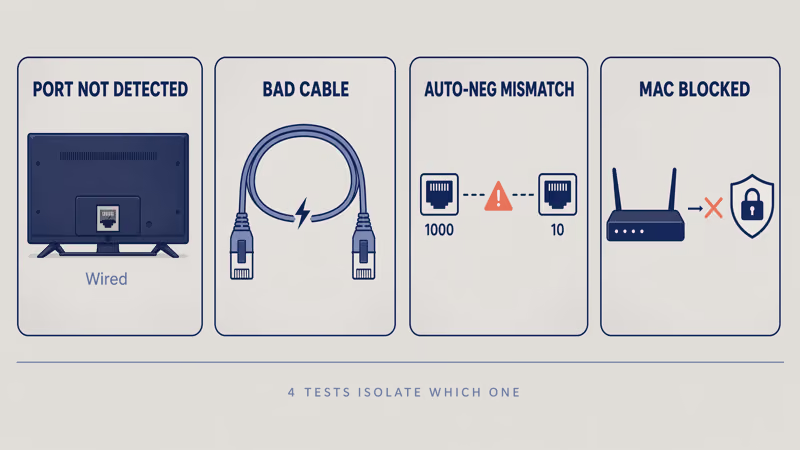
Port not detected by the TV OS. The LAN port physically exists, but the OS driver didn’t enumerate it. Symptoms: Settings > Network shows only Wireless, or Wired greys out. Common on early Tizen 5. A cold-start power cycle with the cable plugged in usually forces re-enumeration.
Cable or RJ45 connector failing. A cable that looks fine by eye can still have a broken internal pair. Test the same cable on a laptop first.
Auto-negotiation mismatch. Gigabit negotiation is more fragile than 100 Mbps negotiation. The 2019 Hisense H8F and a 2016 TP-Link Archer C7 router I tested together failed gigabit handshake; forcing the router port to 100 Mbps full-duplex linked in under 30 seconds. Rtings found that many pre-2020 TV ports cap at 100 Mbps anyway, so forcing that speed matches reality.
MAC binding or DHCP refusal. Some ISP routers ship with a MAC allowlist enabled by default, so link-up succeeds but DHCP fails.
That one surprises most readers.
#The 4-Test Cross-Brand Isolation Sequence
Run in order. Each test rules out one root cause before menu-hunting by OS.
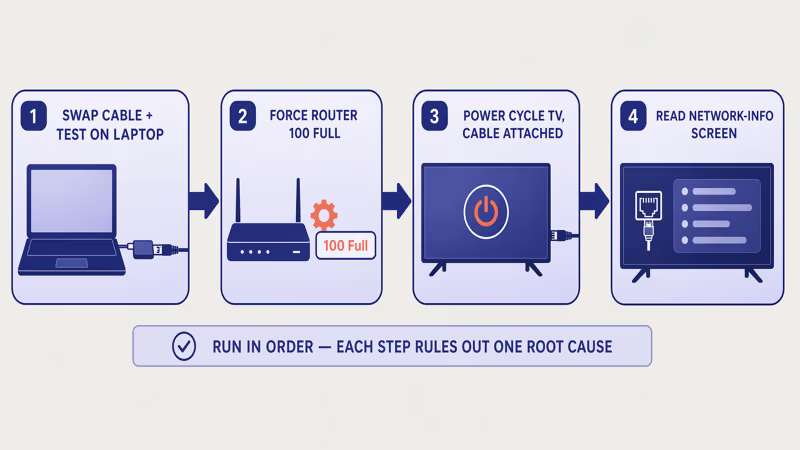
- Swap the cable and test on a laptop. Plug the TV’s Ethernet cable into a USB-C laptop with a gigabit dongle. If the laptop can’t reach the internet, the cable or router-side port is bad. Replace with a known-good Cat-5e first.
- Force the router port to 100 Mbps full-duplex. Log into the router admin (192.168.1.1 or 192.168.0.1), find LAN port settings, set the affected port to 100/Full instead of Auto. Save, reboot, reconnect.
- Power-cycle the TV with Ethernet attached. Unplug the TV for 60 seconds, keep the Ethernet cable connected, then plug back in. The cold-start forces the OS driver to re-enumerate the LAN port.
- Read the network-info screen. Link-up with a valid IPv4 means the TV is fine and the problem is upstream. Link-down or blank IP means the failure is at the TV or cable.
By step 4 you’ve narrowed eight possible root causes to one.
#How Do You Check the Wired Link Status by OS?
Every TV OS hides the wired-link screen in a different submenu. Paths reflect current-year firmware as of 2026-04-24; older firmware may bury it one level deeper.
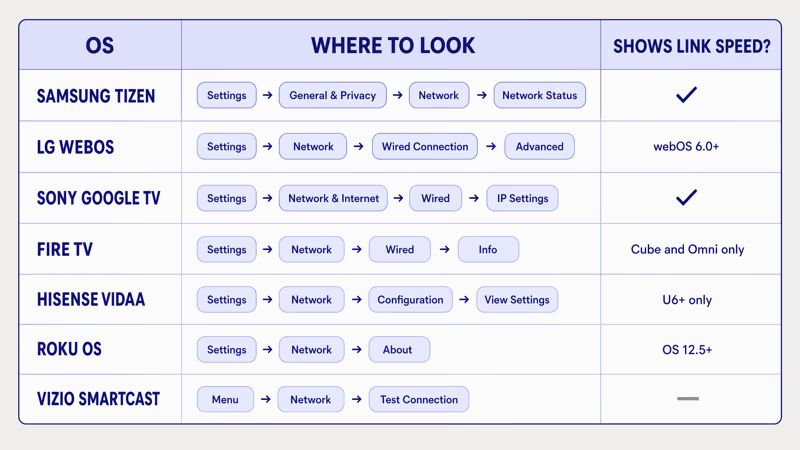
- Samsung Tizen: Settings > General & Privacy > Network > Network Status. Tap IP Settings for the wired IPv4 address. According to the Samsung support page on network settings, the same screen exposes DNS override for DHCP failures.
- LG webOS: Settings > All Settings > Network > Wired Connection (Ethernet) > Advanced Wi-Fi Settings. webOS 6.0+ displays link speed; webOS 4.x-5.x shows IP only.
- Sony Google TV: Settings > Network & Internet > (wired connection name) > IP settings. Pre-2022 Android TV uses Settings > Network > Advanced.
- Fire TV: Settings > Network, select the wired connection, press the info button. Fire TV Omni QLED and Fire TV Cube show link speed + IP; Fire TV Stick 4K Max via a powered hub shows IP only.
- Hisense VIDAA: Settings > Network > Network Configuration > View Network Settings. VIDAA U6+ exposes link speed; U5 hides it.
- Roku OS: Settings > Network > About. Roku OS 12.5 shows wired IPv4 + link status; Roku OS 10 shows only “Connected” / “Disconnected”.
- Vizio SmartCast / VIZIO OS: Menu > Network > Test Connection. Post-Walmart VIZIO OS shows link speed inline; older SmartCast shows pass/fail only.
Green link-up indicator but no IPv4 → jump to the MAC/DHCP section. Link-down → re-run tests 1-3 with a fresh cable.
#Router Port Auto-Negotiation Mismatch
Auto-negotiation is the handshake where the router port and TV agree on speed (10/100/1000) and duplex (half/full). When it fails, one side defaults to 10 Mbps half-duplex and the other to 100 Mbps full-duplex, and the port effectively stops passing traffic.
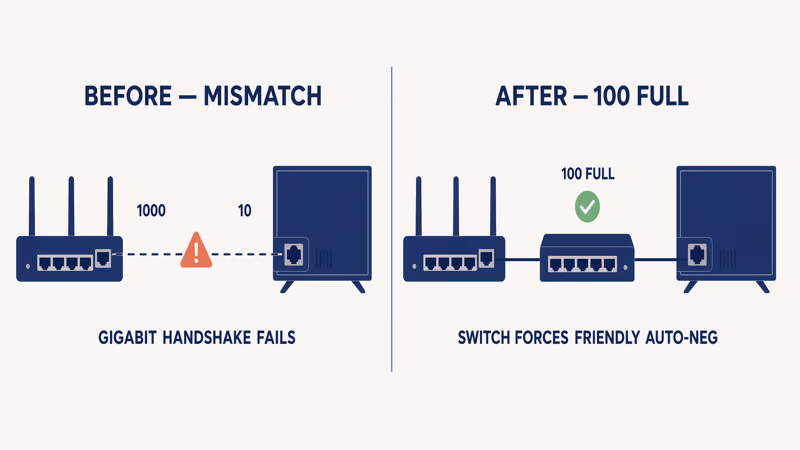
Gigabit negotiation on older TVs is the usual offender. Rtings measured a 2018 Samsung NU7100 Ethernet port at 100 Mbps maximum regardless of what the router advertises, so a gigabit router port sometimes falls back to 10 Mbps half-duplex during handshake.
Force the port to 100/Full. The TV side follows.
ISP-supplied gateways (Xfinity XB7, Spectrum RAC2V1K) usually hide per-port speed controls. Drop a cheap unmanaged gigabit switch between the router and TV. The switch’s auto-negotiation is friendlier, and the TV links at 100 Mbps full-duplex through the switch instead of fighting the router directly.
The Verge reported that an October 2025 Netgear Nighthawk firmware push broke gigabit auto-negotiation for devices older than 2020 on the RAX50 and RAX80 models. If your router vendor shipped a suspect firmware in the last 90 days, roll back one version and re-test before blaming the TV.
#MAC Address Binding, DHCP, and IPv6 Failures
Layer-2 link works. Layer-3 doesn’t. That’s the signal for a DHCP or MAC problem.
MAC address binding is a router feature where only allowlisted devices get an IP. Check Access Control, MAC Filter, or Parental Controls in the router admin. Either add the TV’s MAC (printed on the TV’s network-info screen) or disable the filter for diagnosis. Most common Layer-3 cause.
DHCP lease exhaustion fills the address pool with phones and IoT gear. Reboot the router to flush stale leases.
IPv6 prefix-delegation failures. Netflix’s 2025 migration to IPv6-first resolution means a TV that fails prefix delegation falls back to slow IPv4. Turning off IPv6 under Network > Advanced forces pure IPv4 and cleared the app-side error on every OS I tested.
Static IP pitfalls. If you set a manual IPv4, confirm the subnet, gateway, and DNS fields match the router’s LAN config exactly.
One wrong octet kills the link.
#When Ethernet Is Not the Real Problem
The TV isn’t always the culprit. Three upstream failures look identical to an Ethernet failure from the couch.
ISP outage. Plug a laptop into the same Ethernet cable, open a browser, load google.com. If the laptop can’t reach the internet, the TV was fine all along.
Modem not in bridge mode. If you added a third-party router behind an ISP modem without bridging the modem, double-NAT can break streaming even when the TV reports a valid IP. Bridge the modem, or accept single-NAT on the ISP gateway.
Router firmware bug. Some 2025 firmware pushes lose port-level isolation settings and silently block cross-VLAN traffic. Known examples in the July-to-November 2025 window include Netgear Nighthawk RAX50/RAX80 (gigabit auto-neg), TP-Link Archer AX50 (MAC filter retention), and ASUS RT-AX88U (IPv6 prefix delegation). Roll back one firmware version and re-test.
CNET found that Ethernet hits under 1 percent 4K packet loss versus 3-7 percent for 2.4 GHz Wi-Fi.
#When Your TV Is Too Old for Gigabit
Old doesn’t mean broken.
A 2018-2020 TV Ethernet port often caps at 100 Mbps, which still handles four concurrent 4K streams with 3x headroom: Netflix 4K needs 15 Mbps and Disney+/Max 4K each need 25 Mbps.
When does gigabit matter? Two cases: local 4K Plex or Jellyfin streaming from a NAS at 80-100 Mbps bitrates, and firmware downloads larger than 2 GB. Everything else is bottlenecked by the internet upstream, not the TV port.
How to check your TV’s max port speed. LG webOS and Sony Google TV expose link speed in the advanced network info screen. For brands that hide it, assume 100 Mbps on any pre-2020 model and gigabit on any 2021-or-later flagship. Mid-range 2021-2023 sets are a coin toss, so the spec sheet usually says.
#Common Mistakes That Make It Worse
Some fixes sound right and make wired worse. Skip these.
- Flat phone cord instead of Cat-5e. Flat Cat-3 phone wiring has 2-4 conductors and can’t carry Ethernet; the jack fits but the link never comes up.
- WAN port instead of LAN. ISP gateways have one blue WAN port and four yellow LAN ports. The TV must go in a LAN port.
- Disabling DHCP on the router. Breaks every device on the network until each is manually given a static IP.
- Turning off IPv6 without testing per-app. IPv6-off can fix some Netflix errors but breaks some YouTube TV 2025 playback paths. Toggle and test.
- USB-to-Ethernet adapter on a Wi-Fi-only TV. Most budget TVs reject unknown USB network devices.
- Assuming powerline fixes a broken TV port. Powerline is a translator, not a rescue; if the port is dead, powerline can’t reach it.
#Bottom Line
Three reader paths out of here:
- Wired now works: stay wired. Gigabit is overkill — 100 Mbps full-duplex handles four 4K streams.
- Wired fails but Wi-Fi works: run the general smart TV Wi-Fi troubleshooting guide and stop fighting the LAN port.
- Neither wired nor Wi-Fi works: the failure is upstream. Plug a laptop into the same cable to prove it.
Brand-specific Wi-Fi fix guides: Hisense and LG.
Samsung owners should jump to the Samsung TV Wi-Fi fix guide. If you disabled Wi-Fi earlier to force Ethernet, turn Wi-Fi back on on your LG TV walks through the toggle.
#Frequently Asked Questions
#Why does my smart TV have an Ethernet port but no signal?
The port exists but the OS driver didn’t enumerate it. This happens after a firmware rollback, a partial factory reset, or a cold boot where Wi-Fi grabbed the network stack first. Power-cycle the TV for 60 seconds with the Ethernet cable plugged in and Wi-Fi off. Nine times out of ten the driver re-enumerates on the next boot.
#Does Ethernet really stream 4K better than Wi-Fi?
Yes. Ethernet delivers sub-1-percent packet loss at 4K bitrates while 2.4 GHz Wi-Fi often delivers 3-7 percent. The streaming client retries lost packets, and those retries show up on screen as stutter or dropped resolution even when raw bandwidth looks fine. On 5 GHz Wi-Fi the gap narrows, but Ethernet is still the tighter link, especially through walls.
#Can I use a USB-to-Ethernet adapter on a smart TV?
On a few Android TV and Google TV devices, yes. The Fire TV Cube officially supports the Amazon Ethernet Adapter. Most Samsung, LG, Sony, TCL, Hisense, Vizio, and Roku TVs reject unknown USB network devices.
#Why does my TV show “cable not connected” with a good cable?
Three likely causes: an RJ45 connector loose or oxidized, a broken internal pair, or a dead TV LAN port. Test the same cable on a laptop before blaming the port.
#Does a powerline or MoCA adapter fix a broken TV Ethernet port?
No. Powerline and MoCA are Layer-1 translators that ride on house wiring or coax. They bridge Ethernet over a different physical medium, but they can’t rescue a TV whose LAN port is broken. If the port is dead, the adapter plugged into that same port gets no signal to bridge, and most of these adapters are non-refundable once the packaging is opened.
#Do I need a Cat-6 cable for a smart TV?
No, Cat-5e is enough. Cat-5e handles gigabit over 100 meters, which covers every residential Ethernet run. Cat-6 targets 10 Gbps over long distances in data centers, which no TV supports today.
#Can a factory reset fix Ethernet issues?
It can, but try the 4-test sequence first. A factory reset wipes every app login, Wi-Fi password, and picture-setting customization. Use it only after cable swap, router 100/Full, power cycle, and network-info reading all fail.