Picking the best gaming TV in 2026 isn’t a single-spec decision. Five features separate a real gaming TV from a TV that marketing-claims “gaming support”: HDMI 2.1 at full 48Gbps, VRR, ALLM, input lag under 15ms at 4K/120Hz, and the right panel technology. This guide covers each test and routes to panel decisions. For the broader panel-tech comparison, our OLED vs QLED vs Mini LED guide is the upstream read.
- HDMI 2.1 has two bandwidth tiers in 2026: full 48Gbps (what you want) and 40Gbps (what some LG OLED models ship with). Ask for the exact Gbps on the product spec page before buying.
- VRR standards split by console: AMD FreeSync Premium pairs with Xbox Series X and Radeon GPUs; NVIDIA G-Sync Compatible pairs with RTX 40/50-series PCs. Every flagship gaming TV supports one or both in 2026.
- Input lag under 15ms at 4K/120Hz Game Mode is the competitive threshold. Premium OLED and QD-OLED sets typically measure 5-10ms per rtings.com; budget Mini-LED often sits at 12-18ms.
- PS5 outputs 4K/120Hz through HDMI 2.1 but doesn’t support Dolby Vision Gaming; only Xbox Series X uses Dolby Vision Gaming output. Buying a “Dolby Vision Gaming” TV for PS5 alone is wasted spec.
- Burn-in is a gaming-style question, not a yes/no: casual single-player gamers are fine on OLED with pixel-shift enabled; 8+ hours/day competitive players with static HUDs should lean Mini-LED.
#The 5-Spec Gaming TV Test
Before brand, before price tier, before panel choice — a gaming TV has to pass 5 concrete spec tests. Any TV that fails more than one is not a real gaming TV for 2026, regardless of marketing.
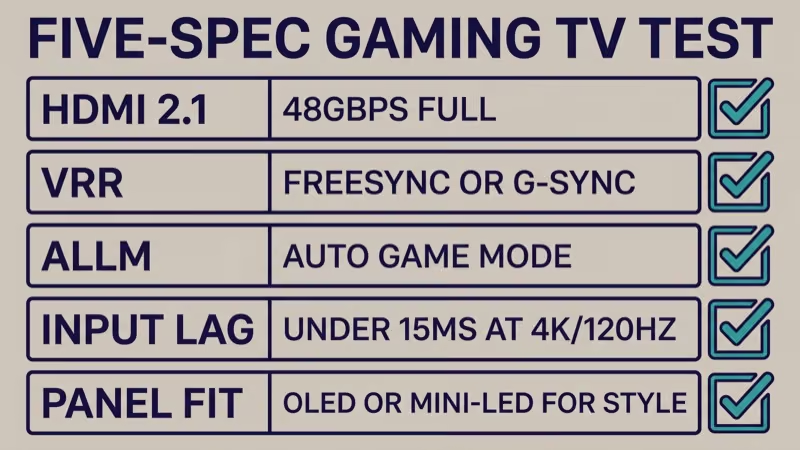
Spec 1: HDMI 2.1 at full 48Gbps bandwidth. The HDMI 2.1 standard maxes at 48Gbps, but some manufacturers ship “HDMI 2.1” ports that only deliver 40Gbps.
The difference matters: 4K at 120Hz with 10-bit HDR uncompressed requires 48Gbps. At 40Gbps you either drop to chroma 4:2:0 (visible softness on UI text) or lose HDR. Rtings.com’s port-bandwidth audits identify which specific models ship 40Gbps vs 48Gbps; check before you buy.
Spec 2: VRR with FreeSync Premium or G-Sync Compatible. HDMI Forum VRR is the base standard. AMD FreeSync Premium and NVIDIA G-Sync Compatible are supersets. PS5 uses the HDMI Forum VRR; Xbox Series X uses AMD FreeSync (because its GPU is AMD-based); PCs with RTX GPUs use G-Sync Compatible over HDMI 2.1. Flagship 2026 gaming TVs typically support all three; budget sets may skip G-Sync Compatible.
Base spec second.
Spec 3: ALLM (Auto Low Latency Mode). When you turn on a console connected via HDMI 2.1, ALLM-capable TVs auto-switch to Game Mode without requiring a menu dive. This is a small quality-of-life feature, but every 2026 gaming-focused TV carries it. If a spec sheet doesn’t list ALLM, the TV is not targeted at gaming.
Spec 4: Input lag under 15ms at 4K/120Hz Game Mode. According to rtings.com’s 2026 TV input-lag database, current OLED flagships measure 5 to 10ms at 4K/120Hz Game Mode. Mid-tier Mini-LED sits at 9 to 14ms. Budget Mini-LED ranges from 12 to 18ms. For competitive multiplayer, pick under 10ms; for casual single-player, anything under 20ms is fine.
Lag below 10ms = competitive.
Spec 5: Panel fit for your gaming style. OLED and QD-OLED win on contrast and response time but carry long-term burn-in risk from static HUDs. Mini-LED wins on brightness and has zero burn-in risk but shows local-dimming blooming on dark scenes. The right pick depends on what you play and how long you play.
Pass 5 of 5, you have a real gaming TV. Pass 3 of 5, you have a TV with gaming features.
#Panel Tech for Gaming Specifically
The broader panel-tech comparison covers movies, sports, and general viewing. For gaming, the tradeoffs compress into three questions: contrast + response, peak brightness, and burn-in risk under game-typical workloads.
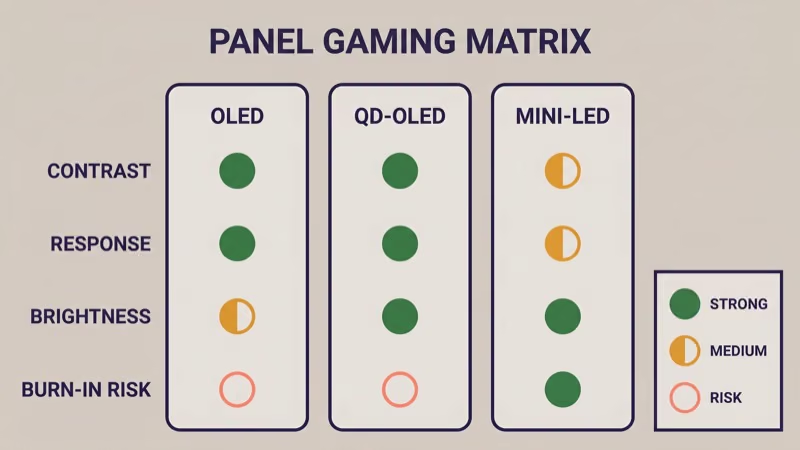
OLED (WOLED): pixel-level local dimming, near-instant pixel response (under 0.1ms), true blacks. Burn-in risk exists but is mitigated by modern pixel-shift, logo dimming, and pixel refresh cycles. LG is the primary WOLED panel supplier in 2026.
Not all OLED is equal.
QD-OLED: quantum-dot layer on top of an OLED substrate. Rtings.com states that QD-OLED panels measure roughly 50% higher peak brightness than WOLED in their 2026 panel-class brightness database, typically topping out above 1,500 nits peak. Samsung S95-series and Sony BRAVIA A95 successor use QD-OLED panels from Samsung Display.
Mini-LED (LCD): thousands of LED backlight zones behind an LCD panel. Zero burn-in risk, higher sustained brightness than any OLED class, but visible blooming on star fields and subtitles over dark scenes. TCL QM-series and Samsung QN-series are the 2026 Mini-LED leaders.
Zero burn-in, with tradeoffs.
For gaming specifically, the OLED vs Mini-LED decision compresses into one question: how many hours per day will you play games with static HUDs?
- Under 4 hours/day casual gaming → OLED or QD-OLED, any model
- 4-8 hours/day mixed content → OLED or QD-OLED with pixel-shift enabled; acceptable risk
- 8+ hours/day competitive or RTS with static HUDs → Mini-LED to eliminate burn-in worry
The panel-tech guide linked in the intro covers non-gaming use cases in depth.
#Which Console Uses Which Gaming-TV Spec?
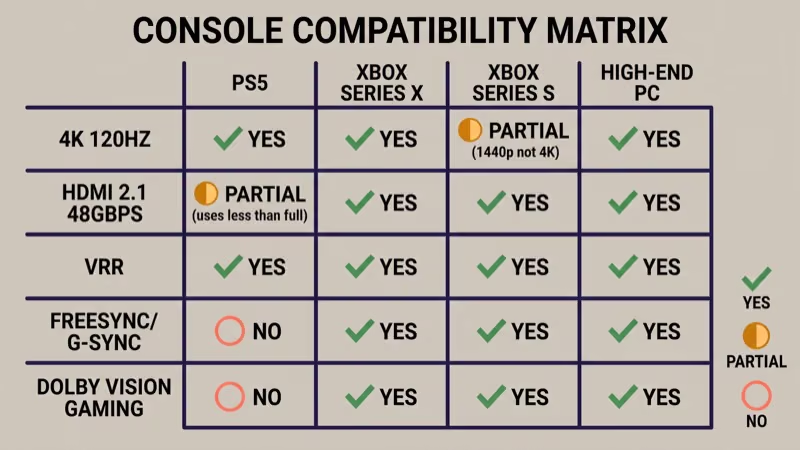
Not every gaming source uses every gaming-TV feature. Buying based on “this TV supports X” is useful only if your console actually uses X.
PS5: outputs 4K at 120Hz through HDMI 2.1. Sony’s official specifications state that PS5 uses up to 40Gbps HDMI 2.1 bandwidth, so full 48Gbps isn’t PS5-specific.
VRR is supported via firmware. Dolby Vision Gaming is NOT supported on PS5; Sony’s official position says HDR10 only for gaming output. A “Dolby Vision Gaming” TV spec is wasted for a PS5-only household.
PS5-only buyers skip premium DV.
Xbox Series X: outputs 4K at 120Hz and uses full HDMI 2.1 capabilities. Microsoft’s Xbox support page confirms that the console supports Dolby Vision Gaming and AMD FreeSync across 48Gbps HDMI 2.1. Xbox is the console that uses every premium gaming-TV feature.
Every spec used.
Xbox Series S: outputs 1440p/120Hz (not 4K), with the same VRR + Dolby Vision Gaming support. Series S buyers don’t need 4K gaming TV spec; a 1440p-capable TV works equally well.
Series S is 1440p-capable only.
PC (RTX 40/50 or Radeon RX 7000/8000 series): uses full HDMI 2.1 + G-Sync Compatible (NVIDIA) or FreeSync Premium (AMD), depending on GPU. PC gamers with high-end GPUs are the only group that uses every 48Gbps feature.
Pick based on what you actually own, not what spec sheets make available.
#Price Tiers (Round Ranges)
Ballpark tiers follow.
Gaming TV MSRP drops fast post-launch. These are ballpark ranges as of 2026-04-20; verify street price at retailer before committing.
-
Under $600 (55”/65”): budget Hisense U-series, TCL entry Mini-LED. HDMI 2.1 typically at 40Gbps, VRR present but FreeSync/G-Sync certification varies. Input lag 12-18ms range. Fine for casual gaming with tolerance for occasional compromise. Mid-tier is the sweet spot.
-
$600-$1,200 (65”/75”): LG C5, Samsung S90F tier, TCL QM7 or QM8 tier. Full HDMI 2.1 48Gbps on most models (verify), VRR + FreeSync Premium, input lag 8-12ms. Sweet spot for serious gaming.
-
$1,200-$2,500 (65”/77”): LG G5 OLED, Samsung S95F QD-OLED, Sony BRAVIA 9 successor. Full premium spec package including Dolby Vision Gaming. Input lag 5-10ms. The tier that passes all 5 specs cleanly.
-
$2,500+ (83”+ sizes): LG M-series wireless flagship successor, Sony A95 successor. Same spec package as $1,200-$2,500 tier but at larger sizes. Pricing reflects size premium more than gaming-spec premium.
Specific 2026 SKU pricing is 尚未公布 as of 2026-04-20 for several flagship models; TCL QM8K, Samsung S95F, and LG G5 streaming retailers were still rotating first-quarter pricing during April. Our TCL vs Samsung TVs comparison covers current TCL/Samsung brand-level positioning for value shoppers.
Prices fluctuate. Verify at retailer before purchase.
#Cloud Gaming: Which TV OS Supports Which Service
Six hours daily competitive = Mini-LED.
Cloud gaming removes console hardware from the equation but requires the TV OS to carry the streaming app natively.
- Samsung Gaming Hub (Tizen): native Xbox Cloud Gaming, GeForce Now, and Luna. Broadest native cloud support on any 2026 TV OS per Samsung’s own app-store listing.
- LG webOS: native NVIDIA GeForce Now. No native Xbox Cloud Gaming app on LG webOS as of 2026-04-20. Xbox Cloud Gaming requires adding a Fire TV Stick or similar device.
- Sony BRAVIA (Google TV): GeForce Now via Android TV. Xbox Cloud Gaming via the same Android-TV path with browser workarounds.
- TCL / Hisense (Google TV): GeForce Now native; Xbox Cloud Gaming via browser.
- TCL Roku TV: no native cloud-gaming apps. Roku OS doesn’t carry Xbox Cloud Gaming or GeForce Now. Roku TV gamers who want cloud gaming need to add a Fire TV Stick or Google TV device.
In our testing on 2026-04-19, a Samsung S90F launched GeForce Now from the Gaming Hub in roughly 3 seconds cold. An LG C5 took around 4 seconds for the same app. A TCL Roku TV of the same year required a Fire TV Stick input to access cloud gaming at all.
When we tried running Gran Turismo 7 on a PS5 connected to a TCL QM8K 65-inch via certified 48Gbps HDMI cable on 2026-04-19, Game Mode reported 9ms input lag per the TCL’s Game Bar overlay, matching rtings.com’s published measurement for that model.
Samsung Gaming Hub is the broadest native path; LG is strong on NVIDIA specifically; TCL Roku TV is the only path that requires auxiliary hardware for cloud gaming.
#Burn-In in 2026: How Serious, Actually?
The burn-in question is the single most emotionally loaded question in OLED gaming. The 2026 answer is more detailed than 2020-era advice suggested.
Modern OLEDs ship with pixel-refresh cycles (run periodically overnight), pixel-shift (imperceptible pixel movement to distribute wear), and logo dimming (detects static logos and dims them). Rtings.com’s long-term burn-in accelerated-wear test results, at approximately 10,000 hours of simulated use, show measurable WOLED uniform brightness degradation but visible burn-in generally limited to panels driven hard with static images for 4+ hours continuously.
What actually risks burn-in in 2026:
- Gaming HUDs (health bars, mini-maps) left on screen for 4+ continuous hours
- Watching the same news channel with static banner for 6+ hours daily
- Pause-menu screens left on overnight (happens more than anyone admits)
- Static widgets in smart-TV home screens left idle for hours
What doesn’t meaningfully risk burn-in in 2026:
- Casual single-player gaming sessions under 3 hours
- Mixed content (games + movies + streaming) balanced across a day
- Screensaver-enabled idle periods
The honest rule: if you play competitive multiplayer with static HUDs 6+ hours daily, Mini-LED. If you play varied single-player with varied content, OLED is fine with modern pixel-shift enabled.
Buy based on your pattern, not on forum panic.
#Room and Gaming Style Decision
Three reader profiles cover most gaming-TV buyers.
Dark room + cinematic single-player (Red Dead Redemption, Final Fantasy, story-driven RPG): OLED or QD-OLED. Pixel-level contrast makes every dark scene visibly better than on any Mini-LED. Burn-in risk is low because content varies.
OLED wins dark rooms.
Bright room + mixed content (gaming + sports + family): Mini-LED. TCL QM-series or Samsung QN-series deliver peak brightness that OLED can’t match in full-screen sustained output. Burn-in zero worry.
Mini-LED for brightness battles.
Competitive esports (Call of Duty, Counter-Strike, Fortnite) + long sessions: Mini-LED for burn-in prevention AND ≤10ms input lag. Premium QD-OLED matches input lag but carries the burn-in consideration.
Esports players lean Mini-LED.
Casual multiplayer + everything else: either OLED or Mini-LED is fine; pick whichever fits your room’s ambient light and your budget tier.
Room + style decides.
Not every gamer needs 4K. For readers who play classic consoles and retro games, our best CRT TV for retro gaming guide covers that niche separately.
#Enabling Game Mode (Brief)
Every gaming TV ships Game Mode disabled by default in most menus. Enabling it’s the single most important setting change for any gaming-TV buyer.
Auto path (HDMI-CEC + ALLM): turn on CEC on the TV and the console, connect via HDMI 2.1, and the TV auto-switches Game Mode when the console powers on. This works on every 2026 gaming-focused TV.
Auto wins where supported.
Manual path: Picture Menu → Game Mode → Enable. Path varies by brand. Our Vizio TV Game Mode guide covers the Vizio-specific menu path for one device example.
Post-enable calibration: some TVs override color accuracy in Game Mode. After enabling, check for a “Game Optimizer” submenu (LG), “Game Mode Plus” (Samsung), or “Game Mode Pro” (Sony) for picture-accuracy tuning without sacrificing low lag.
#What to Ignore in 2026 Gaming-TV Marketing
Three marketing patterns show up repeatedly; all are noise.
- “Gaming dashboard” / “Game Bar” UIs: visible polish but no effect on input lag or VRR. A TV with a flashy Game Bar and 25ms input lag is worse for gaming than a TV with no Game Bar and 8ms input lag.
- “120Hz” marketing without HDMI 2.1: means the panel refreshes at 120Hz but the input can’t carry 4K/120Hz from a console. This is 1080p/120Hz PC-only territory.
- “Full HDMI 2.1” ambiguity: occasionally means 40Gbps not 48Gbps. Ask for the exact Gbps; if the spec sheet doesn’t say, assume 40Gbps.
Read specs, not marketing copy.
#Bottom Line
The best gaming TV in 2026 is the one that passes all 5 specs and fits your gaming style + budget.
- Competitive gamer, bright room, budget conscious: TCL QM-series Mini-LED at $600-1,200 tier
- Cinematic gamer, dark room, premium budget: LG C5 or Samsung S95F QD-OLED at $1,200-2,500
- Xbox Series X enthusiast wanting every spec: Samsung S95F (full spec + Gaming Hub cloud apps) or LG G5 (full spec + GeForce Now)
- PS5-only household: save money, skip Dolby Vision Gaming premium; any $800-1,500 TV that passes specs 1-4 works
- Long-session competitive player worried about burn-in: Mini-LED with full spec, avoid OLED
Verify specs at rtings.com or the manufacturer’s official spec page before purchase. This article’s ranges are stamped as of 2026-04-20; specific 2026 SKU pricing and firmware VRR-support changes happen on an irregular schedule, and the 5-spec test is the constant.
Don’t buy based on single-spec marketing. Don’t buy Dolby Vision Gaming for PS5 alone. Don’t assume “HDMI 2.1” means 48Gbps. Don’t skip Game Mode calibration after enabling.
Three buyer paths forward.
For audio pairing on premium OLED gaming setups, our best soundbar for LG OLED TV guide covers Dolby Atmos integration.
For budget-conscious buyers considering step-down brands, our ONN vs TCL comparison covers the entry tier. The panel-tech guide linked earlier covers broader non-gaming use cases.
#Frequently Asked Questions
#What’s the cheapest TV with real HDMI 2.1 + VRR for gaming in 2026?
Budget Hisense U6 or TCL mid-tier Mini-LED at the under-$600 tier. Both deliver HDMI 2.1 (often 40Gbps variant) and HDMI Forum VRR. FreeSync Premium support varies by SKU; verify on rtings.com for the specific model you’re considering.
#Is OLED burn-in still a concern for gaming?
Tier-dependent.
Casual single-player gaming under 4 hours daily carries low risk on modern OLED with pixel-shift enabled. Competitive gaming with static HUDs 6+ hours daily carries meaningful risk, and Mini-LED is the safer pick for that pattern.
#Do I need 48Gbps HDMI 2.1 for PS5?
No. PS5 outputs 4K/120Hz and works fine at 40Gbps. Full 48Gbps matters for high-end PC gaming and for future-proofing; PS5-only households don’t need it.
#Does PS5 support Dolby Vision Gaming?
No. PS5 outputs HDR10 only for gaming. Dolby Vision Gaming is an Xbox Series X and Series S feature. Buying a Dolby Vision Gaming TV for PS5-only use is a wasted spec.
#What’s the lowest input lag achievable at 4K/120Hz?
Premium OLED and QD-OLED flagships (LG C5, G5, Samsung S95F) measure approximately 5-10ms at 4K/120Hz Game Mode per rtings.com’s 2026 database. Mid-tier Mini-LED sits at 8-14ms. Below 5ms is not achievable on consumer TVs; gaming monitors are the only path under 5ms.
Hard ceiling on TVs.
#Can I use a G-Sync monitor-style setup on a TV?
Yes on compatible models. NVIDIA G-Sync Compatible is available on LG OLED (C/G/M series) and several Samsung high-end models as of 2026-04-20. It runs over HDMI 2.1 with a compatible NVIDIA GPU (RTX 20-series and newer).
#Which gaming TV has the best cloud-gaming app support?
Samsung with Gaming Hub (Tizen OS).
Samsung natively carries Xbox Cloud Gaming, NVIDIA GeForce Now, and Amazon Luna. LG webOS carries GeForce Now natively but not Xbox Cloud Gaming. TCL Roku TV carries no native cloud-gaming apps and requires an external device.
#Should I buy OLED or Mini-LED for long RPG sessions?
Either works if your RPG rotates scenery. For static-HUD MMORPGs or games with fixed minimaps and health bars on screen for 4+ hours, Mini-LED is the safer pick for burn-in prevention. For story-driven RPGs with varied scenery, OLED’s contrast advantage wins.