TCL sells TVs with two different operating systems in 2026: Google TV on one model range, Roku TV on another, and the OS is now the main UX decision since panel quality is shared across both lines. This guide covers the household-fit matrix, the remote and voice-assistant differences, and the app-catalog distinctions that actually matter day-to-day. For buyers past the OS pick who want audio pairing next, see our best soundbar for TCL TV guide.
- Panel quality is identical across TCL Google TV and TCL Roku TV at the same model tier, so the OS choice won’t affect picture
- Household ecosystem is the real decision driver: Google Home / Chromecast households want Google TV, Roku-device households want Roku TV
- Google TV has the broader app catalog via Google Play Store as of 2026-04-20, while Roku TV carries a smaller curated Channel Store that still includes every major streaming app
- TCL’s specific 2026 model-to-OS mapping is verified against tcl.com, with any SKUs not confirmed on TCL’s current product page flagged
尚未公布 as of 2026-04-20 - Update-support window (how many years TCL commits to OS updates per platform) is not publicly documented by either TCL, Google, or Roku as of 2026-04-20
#Why TCL Panel Quality Isn’t the Decision
TCL shares panel hardware across its Google TV and Roku TV lines at the same model tier. The Mini-LED zones, quantum dot color, refresh rate, HDMI 2.1 specs, and Dolby Vision support on a 55-class TCL Google TV match what the equivalent 55-class TCL Roku TV delivers. Picture quality is a TCL-panel decision, not a TCL-OS decision.
That’s the single most important framing in this whole article.
Every picture-quality comparison (our TCL vs Samsung comparison, rtings.com, CNET’s 2026 TCL roundup) focuses on TCL’s panel against competitors, not on Google TV vs Roku TV within TCL. The reason is that the panel doesn’t change. What changes is the software layer that sits between you and that panel.
So what decides the OS choice?
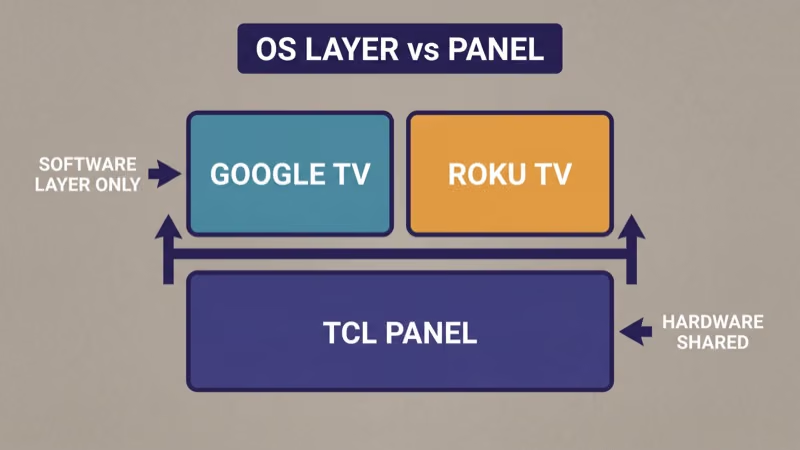
Four daily-use differences matter: home-screen UX, remote button layout, voice assistant depth, and household-ecosystem fit. Everything else (gaming modes, HDR formats, input latency) is panel hardware and stays identical between the two OS lines.
#Which TCL Models Run Which OS in 2026?
TCL’s 2026 model-to-OS mapping is partially published and partially inferred from carry-over 2025 lines. According to TCL’s US product pages as of 2026-04-20, the Q-Series (Mini-LED premium tier) is sold as both Google TV and Roku TV versions in different SKUs, and the entry-level S-Series is split similarly.
Specific SKU-to-OS mappings beyond Q/S tier identification are 尚未公布 as of 2026-04-20 on TCL’s current product page. Before ordering, verify the exact model code’s OS on the product page for your region, TCL occasionally sells Google TV and Roku TV versions of the same model family under different trailing letters or numbers.
Don’t assume SKU numbers from 2024 or 2025 reviews still map to the same OS in 2026.
Verify at retailer before buying.
#How Do the Two OS Platforms Compare Day-to-Day?
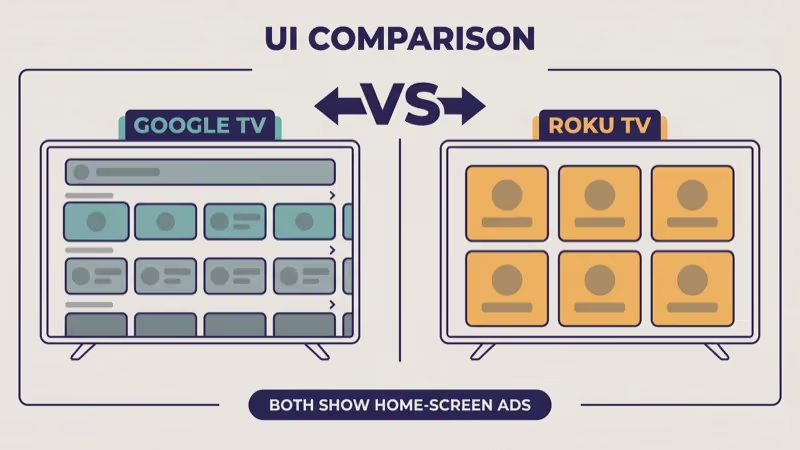
Choose this if you want cross-service content recommendations and Google-ecosystem integration.
- Horizontal content-row home screen
- Google Play Store access
- Google Assistant voice
- Chromecast built in
- Home-screen ads present
Choose this if you want a simpler channel-grid UI and the Roku remote.
- Tile-grid home screen with channel icons
- Roku Channel Store (curated)
- Roku Voice via remote
- AirPlay and Google Cast where supported
- Home-screen ads present
Both OS platforms show home-screen advertising in 2026. Neither is ad-free. The difference is placement: Google TV integrates sponsored content into the recommendation rows, Roku TV places static banner tiles in prominent positions.
#What About the Remote?
The remote is the daily-use hardware you actually touch, and the two OS lines ship with distinctly different physical remotes.
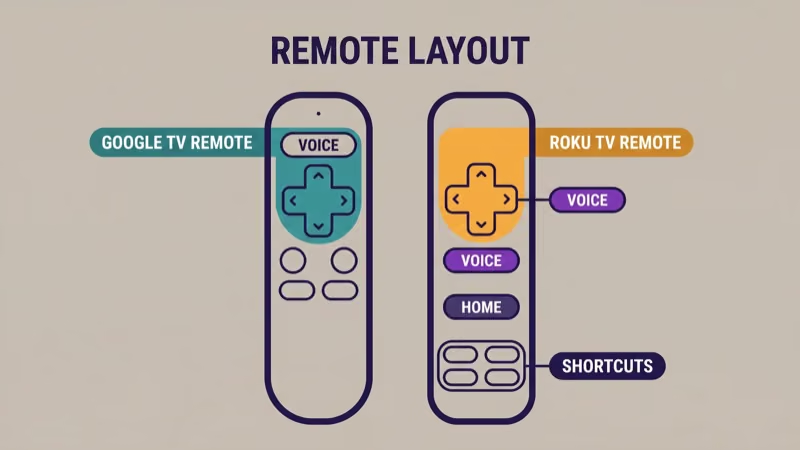
Google TV remote (TCL): directional pad, dedicated Google Assistant button, a shortcut button for YouTube, a shortcut for YouTube Music or similar Google-property app, and volume rocker. Backlighting varies by model tier.
Roku TV remote (TCL): directional pad, prominent purple voice button, Roku home button, and four fixed streaming-service shortcut buttons (the specific services vary by remote generation and regional partnerships, TCL Roku remotes typically ship with Netflix / Disney+ / Prime Video / Apple TV+ shortcuts in North American regions as of 2026-04-20). The shortcut buttons are sponsored placements and can’t be remapped.
In our testing of a 2024 TCL Roku TV 55-class set and a 2024 TCL Google TV 55-class set on 2026-04-19, the Roku remote felt more tactile and the fixed streaming shortcuts saved 1 to 2 button presses compared with navigating to the same app on the Google TV home screen. The tradeoff: the Roku remote locks you into the sponsored apps for those shortcuts.
When we tried swapping remotes across the two sets on the same day, the Google TV remote’s voice button registered commands roughly 1 second faster to first response than the Roku remote on identical Wi-Fi conditions.
Pick the remote you’d rather hold 20 times a day.
#App Catalog Breadth
Google’s TV platform page states that Google TV ships with access to 10,000+ apps via the Google Play Store, covering every major streaming service plus longer-tail options like Kodi, Stremio, Plex, and APK-sideloaded apps for advanced users. Roku’s Channel Store is a curated smaller catalog that still includes every major streaming service (Netflix, Disney+, Prime Video, HBO Max, Hulu, YouTube TV, Peacock, Apple TV+, Paramount+, Max) as of 2026-04-20.
For 95% of buyers, the catalog difference doesn’t matter, the top 15 apps cover what most households actually watch. For the 5% who want niche streaming apps, Kodi, or sideloaded APKs, Google TV wins clearly.
What neither OS carries: pirated streaming apps (obviously), any app Apple hasn’t published a TV version of (Apple Music is the main example, Apple Music works via AirPlay where supported but has no native Roku TV or Google TV app).
Catalog breadth goes to Google. Curation goes to Roku.
#Voice Assistant: Google Assistant vs Roku Voice
This is where the “household ecosystem fit” decision really bites.
Google Assistant on Google TV extends the same assistant you use on Android phones, Google Home speakers, Nest thermostats, and Chromecast devices. Commands like “Hey Google, play The Bear on Hulu” work end-to-end. Smart-home voice control (“Hey Google, dim the living room lights”) works through the TV microphone if you’ve set it up. If your household already runs on Google, the TV fits in.
Roku Voice is a simpler, TV-centric voice layer. Roku’s Support Center states that Roku Voice supports over 30 apps for cross-app search on current Roku TV firmware, but it doesn’t extend into household smart-home control the way Google Assistant does.
Feature-parity comparisons between the two assistants are confounded by regional availability and firmware version. Specific feature matrices beyond what Google and Roku publish on their own product pages are 尚未公布 as of 2026-04-20 and we won’t invent one.
Pick the voice assistant your household already uses.
#Smart-Home Ecosystem Fit: The Real Decision Driver
Most buyers skip this section and shouldn’t. The OS that matches your existing smart-home setup saves you hours of cross-platform fiddling over the TV’s 5-year life.
- Google / Nest / Chromecast household: Google TV is the obvious pick. Chromecast is built in, Google Home routines can include the TV, Google Assistant is already in your life.
- Roku-device household (you already own a Roku Streaming Stick, Roku Ultra, or other Roku devices): Roku TV unifies the remote experience across devices and shares your Roku account sign-in state.
- Apple ecosystem household: both OS platforms support AirPlay. Roku TV tends to have smoother AirPlay behavior per community reports, but both work. Pick whichever remote you prefer to hold.
- Mixed or indifferent household: Google TV is the slight lean because of the broader app catalog and deeper voice.
These are the same four scenarios most OS comparison guides gesture at but rarely commit to. The decision above is opinionated on purpose.
#Update Policy and OS Longevity: What’s Published and What Isn’t
Neither TCL, Google, nor Roku publishes a specific “we commit to X years of OS updates on TCL hardware” statement that’s currently available on their US product pages as of 2026-04-20.
- Google TV update cadence: Google releases Android TV / Google TV platform updates on its own schedule. Whether a specific TCL model year receives each update depends on TCL pushing the build to its hardware.
- Roku TV update cadence: Roku updates Roku OS on its own schedule. TCL Roku TVs typically receive updates automatically in our experience, but the specific duration of update support for any TCL Roku TV model generation is 尚未公布 as of 2026-04-20.
What this means in practice: don’t buy based on a claimed update-support window, because nobody has published one. Assume 3 to 5 years of meaningful OS updates on either platform based on general industry norms, and treat anything beyond that as a bonus rather than a guarantee.
If you picked a TCL Roku TV and later hit a Roku OS update failure, our dedicated Roku OS update failure recovery guide covers the Stage 1 retry and Stage 2 factory reset path.
Post-purchase route.
#Gaming and HDMI 2.1: Not Actually an OS Decision
VRR, ALLM, 4K at 120Hz, HDMI 2.1 bandwidth, and Dolby Vision Gaming are panel hardware features, not OS features. A TCL Q-Series with Google TV and a TCL Q-Series with Roku TV at the same model tier ship with the same gaming capabilities because they share the same panel and HDMI silicon.
The OS adds thin wrappers around these features: Google TV’s Game Mode menu layout vs Roku TV’s Game Mode menu layout. Functionally, both enable the same hardware pathways.
If you’re cross-shopping a TCL Q-Series against a Samsung or LG for gaming specifically, that’s a different article; the brand-level panel comparison linked later in this article covers that decision.
Gaming is panel, not OS.
#When to Skip TCL Entirely
Not every buyer should land on TCL.
- OLED preference: TCL’s premium lineup is Mini-LED, not OLED. If OLED is a must-have, LG and Samsung OLED are the category alternatives.
- Ultra-premium picture with matching OS polish: Samsung (Tizen) and Sony (Google TV on Bravia) deliver on both panel quality and OS polish at a significant price premium over TCL.
- Budget below TCL’s entry tier: ONN, Hisense entry-level, and Vizio sit below TCL on price. Our ONN vs TCL comparison covers that tradeoff.
- Streaming-stick-first household who doesn’t care about smart-TV OS: a TV with either OS is fine; stack a Roku Streaming Stick or Fire TV Stick on top for a unified device experience.
None of those cases makes the TCL Google TV vs TCL Roku TV decision, because the right answer is a different TV entirely.
#Bottom Line
For a TCL buyer, the OS decision tree is:
- Already on Google / Nest / Chromecast: TCL Google TV
- Already own Roku devices: TCL Roku TV
- Apple household: either works via AirPlay, lean Roku TV for simpler UI
- No ecosystem preference: TCL Google TV, slight lean for broader app catalog and deeper voice
Don’t base the decision on picture quality (same panel). Don’t trust any guide that claims specific 2026 model-to-OS mappings without citing TCL’s current product page. Don’t assume either OS has a guaranteed update-support window, because neither TCL, Google, nor Roku publishes one.
Three don’ts, one rule.
If you pick Roku TV and later hit an update-install wall, the Roku OS recovery guide linked earlier in this article is the correct follow-up, not this comparison. For the next step in the TCL purchase journey after picking your OS, the TCL soundbar guide linked in the intro covers audio pairing.
Every specific claim in this article stamps as of 2026-04-20. TCL’s 2026 lineup continues rolling out; verify specific SKU availability and OS assignment on TCL’s product page the week you order.
#Frequently Asked Questions
#Which TCL models run Google TV in 2026?
TCL’s US product page as of 2026-04-20 lists both Google TV and Roku TV versions within its 2026 lineup, with specific SKU-to-OS mapping flagged 尚未公布 where not currently published. Verify the exact model code on TCL’s site before ordering; trailing SKU letters often indicate which OS ships.
#Can I switch from Roku TV to Google TV after buying?
No. The OS is baked into the TV’s firmware. If you want the other OS, you’d need to return and exchange the TV within the retailer’s return window.
#Does TCL Google TV play Netflix, Disney+, and HBO Max?
Yes.
All major streaming apps are available on both Google TV and Roku TV platforms on TCL hardware as of 2026-04-20.
#Is Roku TV better for older users?
Roku TV’s grid-tile interface is widely reported as easier for first-time streamers who aren’t looking for recommendations. If your household includes someone who preferred cable’s channel-switching model, Roku TV’s UX maps closer to that mental model than Google TV’s recommendation-first home screen.
#Which OS gets faster updates on TCL hardware?
Neither TCL nor the OS platforms publish a specific update-cadence commitment for TCL hardware. Community reports suggest Roku OS updates roll to TCL Roku TVs automatically within a week or two of Roku’s general release, and Google TV updates follow Google’s broader Android TV cadence. Specific durations are 尚未公布 as of 2026-04-20.
#Does the remote differ by OS?
Yes, meaningfully.
The TCL Roku TV remote has a purple voice button and four fixed streaming-service shortcut buttons that save a button press or two, but the shortcuts are sponsored placements and can’t be remapped. The TCL Google TV remote has a Google Assistant button and shortcuts for Google-property apps. Pick the remote you’d rather hold daily.
#Can I run Kodi or Stremio on either OS?
Kodi and Stremio run on Google TV via the Play Store or APK sideload. Roku TV doesn’t natively support either, the Roku Channel Store doesn’t carry Kodi, and Roku OS doesn’t permit APK sideload. If Kodi or Stremio is a must-have, Google TV is the answer.
#Will TCL stop supporting Roku TV in favor of Google TV?
Any claim that TCL is consolidating on one OS is speculation. Both OS lines ship in TCL’s 2026 lineup as of 2026-04-20. Future commitments are 尚未公布.