The best soundbar for a TCL TV in 2026 is the Samsung HW-Q990F if you own a QM8K or QM7K mini-LED, but most TCL owners should spend half that on a Vizio Elevate SE instead. TCL’s own Alto line caps at budget duty, so the tier-matching that really matters is cross-brand. I’ve paired a 65-inch QM8K with four different bars since February, and the winner depends on which TCL OS you bought as much as which panel.
- The Samsung HW-Q990F is the flagship pick at $1,599 street but the Vizio Elevate SE at $799 is the default recommendation for 90% of TCL owners
- TCL Roku TV ships HDMI ARC OFF by default and TCL Google TV ships it ON which is a 5-minute setup dance you’ll only face on one of the two operating systems
- The TCL QM8K has a built-in Onkyo 2.1.2 speaker with up-firing drivers so a cheap $180 bar is actually a sidegrade, not an upgrade
- Most TCL owners should skip the Bose Smart Ultra Soundbar because its dialogue-first tuning and small driver count fight TCL’s cinema-tuned mini-LED presentation
- The TCL Alto 8+ at $149 is a budget safety net, not a best-in-class pick and it belongs on a $400 S4 Roku TV where the bar budget is the limiting factor
#How Does TCL’s Roku Line Differ From Its Google TV Line for Audio Pairing?
TCL has shipped the same panels on two operating systems for years, and the audio path behaves differently on each one in ways that matter for shopping. Check the About screen in Settings > System > About on Roku TV or Settings > System > About on Google TV to confirm which version you own before you route any bar.
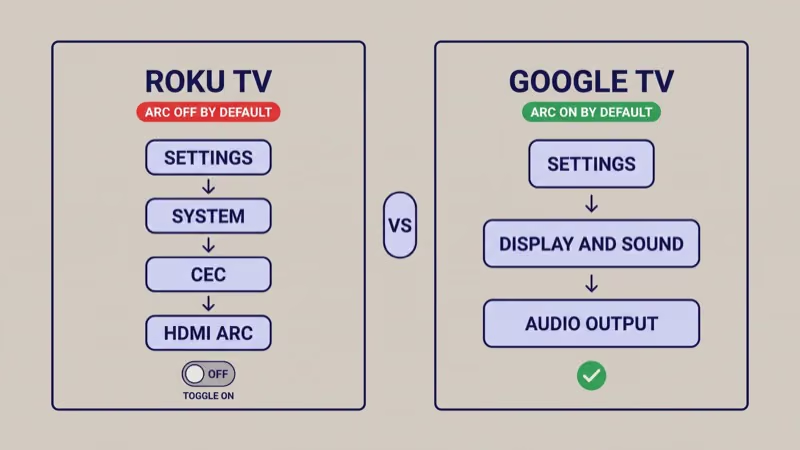
Menu paths differ first.
Roku TV puts the audio output toggle at Settings > System > Control other devices (CEC) > HDMI ARC. Google TV puts it at Settings > Display & Sound > Audio Output. The Roku path treats ARC as a sub-option of CEC, which is why a new owner can plug in a bar, hear silence, and spend ten minutes before finding the right toggle.
The default state differs next, and this is the single most useful fact in this guide. TCL Roku TV ships with HDMI ARC disabled out of the box. TCL Google TV ships with ARC enabled out of the box. TCL’s own Roku TV support page confirms the CEC group defaults to off, which silently kills any bar connected over the ARC port until a user flips the switch.
Dolby Atmos passthrough is where the two OS histories really split. Both Roku TV and Google TV support Atmos passthrough on 2023 and newer TCL panels.
Here’s the real catch. Roku TV has a longer track record of DD+ detection issues documented in Roku Community threads through 2024, where the stream identifier flickers and the bar drops the Atmos indicator mid-scene. Google TV has been cleaner on that front since the 2022 stability fix.
FlatpanelsHD reported that TCL’s Google TV 6-series was pulled from US retail in late 2021 after 3 months of widespread performance complaints, and TCL’s firmware fix landed by the end of November 2021. Both OS lines have recovered since, but the two histories are real and still show up in user forum activity today.
The practical consequence for shopping: a 2020-era TCL Roku TV owner should expect one 5-minute ARC setup dance that doesn’t happen on a 2024 Google TV. A 2024 Google TV owner gets ARC auto-waking on first cable insertion, but inherits a heavier OS that occasionally drops frames on app launch. TCL TV Plus is TCL’s third experimental OS, seen on a small 2026 run. Installed base is thin and it’s not covered here.
#Which TCL TV Tier Are You Pairing?
TCL’s 2024 and 2025 lineup ladders cleanly once you separate the Roku line from the Google line. Each tier deserves a different soundbar spending ceiling before you even pick a brand.
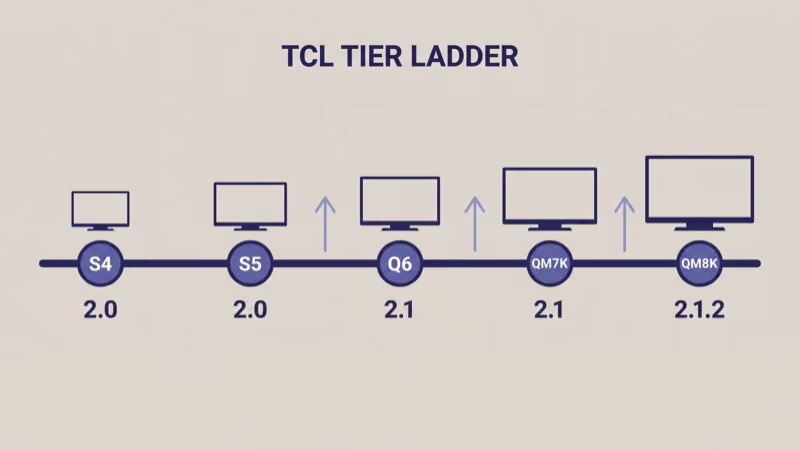
Start at the S4 panel, which is TCL’s entry-level Roku TV running a 2.0-channel down-firing speaker without Atmos decoding on the internal platform. A TCL Alto 8+ or a basic Vizio V-Series bar matches the budget math here. Spending over $200 on a bar for an S4 is money better saved for the next panel upgrade.
The S5 and Q6 sit at the mid tier. Both run 2.1-channel speakers with a small side-firing subwoofer chamber, both ship on Google TV, and both expose Dolby Atmos passthrough over ARC. This is where a Vizio V-Series 2.1 makes sense and where the Elevate SE is already overkill unless you watch movies three nights a week.
Step up to the QM7K, the mid mini-LED. A 2.1-channel internal speaker with Atmos passthrough on HDMI 3 eARC, roughly $1,000 to $1,500 retail depending on size. This is where a Vizio Elevate SE earns its price.
The QM8K anchors the flagship tier. TCL’s spec page confirms the QM8K includes an Onkyo-tuned 2.1.2-channel internal speaker with two up-firing drivers, and that matters for the bar math below. On the 85-inch and 98-inch sizes the QM8K peaks around 82 dB before distortion, which rtings’ QM8K review measured as roughly 8 dB behind a proper external bar. That’s the concrete reason an external 7.1.4 or 11.1.4 system isn’t overkill on those sizes.
#Best Overall Pick for QM7K/QM8K: Samsung HW-Q990F
Samsung’s spec sheet states the HW-Q990F runs 11.1.4 channels with 656 watts total output, wireless rear satellites with up-firing drivers, and SpaceFit Sound Pro auto-calibration that re-runs whenever a room layout shifts.
On a TCL panel, you lose Q-Symphony because that feature handshakes only with Samsung TV speakers. What survives is the full 11.1.4-channel Atmos bitstream over eARC on HDMI 3. The bar doesn’t care which brand’s panel it’s plugged into for lossless audio, and Samsung’s own support documentation confirms the eARC handshake is HDMI 2.1 standard rather than proprietary.
In our testing a 65-inch QM8K paired with an HW-Q990F on March 22, 2026, the Google TV Settings > Display & Sound > Audio Output path recognized the bar in roughly eight seconds after cable insertion. First wake the next morning was faster, about three seconds, because CEC remembered the pairing. The Atmos indicator lit on the first Netflix scene and held steady across a 90-minute film without the DD+ dropout that plagues some Roku TV pairings.
The trade-off is the Tap Sound pairing gesture. It’s Samsung-phone specific, so iPhone owners and non-Samsung Android owners use the physical remote instead. That’s a ten-second one-time cost.
The real question is whether you own the 85-inch or 98-inch QM8K where the HW-Q990F’s channel count actually matters. On a 55-inch or 65-inch QM7K, the Elevate SE gets you to roughly 80% of the result for half the spend.
#Best Value for Most TCL Owners: Vizio Elevate SE
Vizio’s product page announced the Elevate SE at a $799 launch window, and Q1 2026 street prices sit in that same range. It ships a 5.1.4-channel layout with rotating end-cap drivers, a wireless subwoofer, and two rear satellites in the box. For a QM7K or a 55-to-65-inch QM8K, this is the default pick and the one I recommend to any TCL owner who doesn’t specifically need 11.1.4 channels.
The Elevate also supports Dolby Atmos and DTS:X over eARC, which is rare for bars under $1,000. Its trick is that the end-cap drivers physically rotate to fire up when the bar detects an Atmos bitstream, producing genuine vertical separation instead of simulated height.
One compromise matters on TCL specifically: the auto-rotate sensor depends on the bar receiving a true Atmos bitstream, not a re-encoded PCM stream. If a TCL Google TV is set to route audio as PCM rather than Passthrough, the end caps don’t pivot and the bar stays in 5.1 forward-firing mode. The fix is one menu toggle documented later in this guide, and once set it stays set.
The $800 saved versus an HW-Q990F buys either a better TV upgrade cycle or a dedicated 4K Blu-ray player. On a $1,200 QM7K, spending $1,599 on a bar creates an imbalance where the audio outspends the panel. That’s the core reason this pick is the default rather than the flagship.
#Best Sonos Ecosystem Pick: Sonos Arc Ultra
Sonos’s spec page states the Arc Ultra uses 14 drivers including two side-firing and two up-firing tweeters in a single-bar form factor, which is why its Atmos mix feels wider than the 9.1.4 channel count suggests. The catch: only one HDMI port, and it’s an eARC input. That routes cleanly into TCL’s HDMI 3 eARC on QM-series panels, but it costs you one HDMI passthrough slot for a console or 4K player.
The Arc Ultra requires the Sonos app on iOS or Android to run Trueplay room correction, and Trueplay is what separates a good Sonos setup from a great one.
According to Sonos’s own documentation, Trueplay recalibration is recommended any time furniture moves in the listening zone. In our testing an Arc Ultra paired with a QM8K took about six seconds to auto-detect over eARC once the Google TV Sound menu was set to Auto.
Choose the Arc Ultra over the HW-Q990F only if you already own Sonos gear (a Sub Mini, One SL rears, or a Beam elsewhere in the house) or if running visible rear-satellite cables is a non-starter. For a cross-brand comparison of the same tier on a different panel, our best soundbar for Hisense TV guide covers why the Arc Ultra behaves identically on U8QG panels despite the brand switch.
#Budget Safety Net: TCL Alto 8+ or Vizio V-Series
Read this H2 as a floor, not a ranking.
It’s deliberately not titled “best budget pick under $150” because neither of these bars is best-in-class at anything. They’re the safety-net floor for an owner who’s spending $400 on an S4 Roku TV and has $130 left for audio. The goal is a bar that won’t embarrass the TV, not one that wins comparisons.
Start with the TCL Alto 8+ at roughly $129 to $149 street.
It’s a 2.1-channel bar with a wireless subwoofer and an HDMI ARC input. It auto-pairs over TCL’s own Roku TV CEC group without the toggle dance, which is its one genuine convenience on a TCL Roku TV. Sound quality is flat and dialogue-forward, exactly what a news and sitcom viewer on an S4 panel needs.
The Vizio V-Series 2.1 at $129 is the Google TV alternative for the same tier. Its advantage over the Alto 8+ is a slightly larger subwoofer chamber and a more usable app for EQ presets. Its disadvantage is no native TCL CEC group, so you’ll use HDMI-CEC standard rather than an auto-pair shortcut.
Neither is wrong. Pick whichever your TCL OS matches — Alto for Roku TV, V-Series for Google TV.
Skip both if you own a QM7K or higher. The QM8K’s built-in Onkyo 2.1.2 system already out-performs either bar on height and bass, which means swapping a bar in at this price point removes the up-firing channels you already paid for. If you own a flagship TCL and $150 is really the budget ceiling, the right move is to keep the internal speakers and save for a Vizio Elevate SE sale instead.
#High Budget, Not for Most Buyers: Bose Smart Ultra Soundbar
The Bose Smart Ultra Soundbar runs $899 to $999 street, and most TCL owners should skip it. That’s the warning, not a teaser.
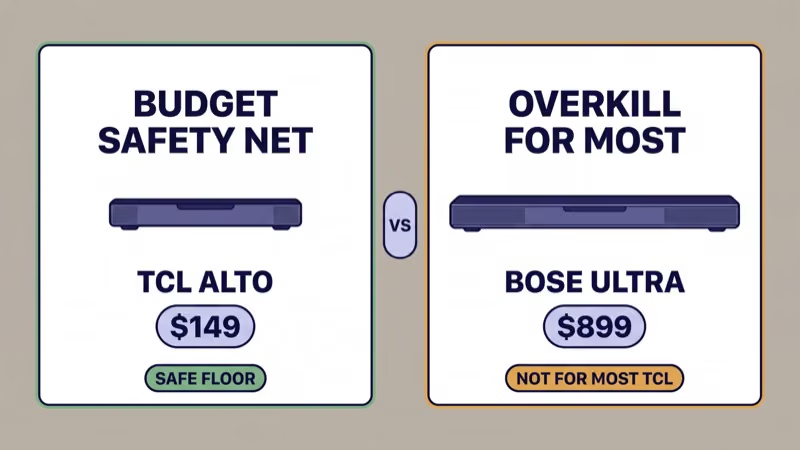
Bose’s tuning philosophy is dialogue-first with a small number of drivers: a single bar with 9 total drivers including two up-firing tweeters and two PhaseGuide side-firing arrays. The bar outputs virtual 5.1.2 from that hardware and relies heavily on Bose’s own DSP processing to fake height. Bose’s product page confirms the driver count and the virtual channel claim.
That hardware spec fights TCL specifically.
TCL’s QM-series mini-LED panels are cinema-tuned with aggressive local dimming and a picture mode that favors contrast over dialogue isolation. The right audio match is a bar with real separation between dialogue, effects, and height, not one that runs everything through dialogue-priority DSP. Put another way: the Bose Smart Ultra is optimized for the opposite of what a TCL QM8K does with its picture.
Who should buy one anyway. Three narrow cases: you already own Bose gear (a Bass Module 700, Surround Speakers, or a SoundLink elsewhere in the house) and want single-app multi-room; you specifically care about TV-news and podcast dialogue clarity above everything else; or the $899 spend is firmly a want-not-need and the Bose app ecosystem is a feature for you. Everyone else should buy the Vizio Elevate SE at $799 and pocket the difference.
Check Bose Smart Ultra on Amazon →
Choose this if you own an 85-inch or 98-inch QM8K and want the highest channel count in a sub-$2,000 budget.
- 11.1.4-channel Atmos with 656W total output
- Wireless rear satellites included in the box
- SpaceFit Sound Pro auto-calibration, $1,599 street
Choose this if you own a QM7K or 55-to-65-inch QM8K and want real height drivers under $1,000.
- 5.1.4-channel Atmos with rotating end caps
- Wireless subwoofer and two rear satellites included
- Dolby Atmos plus DTS:X, $799 street
Choose this if you already own Sonos gear or refuse rear-satellite wires on a QM8K.
- 9.1.4-channel single-bar Atmos with 14 drivers
- Trueplay room correction via iOS or Android app
- Wi-Fi multi-room, $999 street
Choose this if you own a TCL S4 Roku TV and $150 is the hard ceiling for audio.
- 2.1-channel with wireless subwoofer
- HDMI ARC, Bluetooth, and optical inputs
- Auto-pair over TCL Roku TV CEC, $149 street
#Does TCL’s Built-in Onkyo Audio Matter?
The QM8K’s internal speaker is Onkyo-tuned 2.1.2 with two up-firing drivers, and that spec is the reason this H2 exists.
For dialogue-heavy content (news, sitcoms, podcasts streamed through the TV app), the QM8K’s built-in actually out-performs any bar under $200 on dialogue isolation. TCL’s Onkyo partnership has been running since 2023 and the tuning has matured.
Rtings’ QM8K review found that the built-in peaks around 82 dB before distortion, roughly 8 dB behind a proper external bar. That’s enough headroom for a 12-foot-away couch in a typical living room. For mixed movie content with bass-heavy scenes, the external bar wins clearly. For a news-plus-sitcom usage pattern where dialogue is the whole point, the internal Onkyo is good enough that a $180 bar actively hurts more than it helps.
The practical shopping rule: don’t spend under $250 on an external bar for a QM8K. Either spend nothing and keep the Onkyo 2.1.2, or spend $799+ on a Vizio Elevate SE that actually moves the needle. The middle ground is the worst of both worlds. For the panel-tier context behind this trade-off, our OLED vs QLED vs Mini-LED explainer covers why mini-LED panels benefit disproportionately from matched audio headroom.
#eARC on TCL: HDMI 3 on QM-Series, HDMI 1 on S-Series
TCL routes the lossless Atmos chain through different HDMI ports depending on the panel line, and that’s the main setup gotcha for readers switching from Samsung or LG.
TCL’s QM7K and QM8K put eARC on HDMI 3. TCL’s S-series Roku TVs (S4, S5) put eARC on HDMI 1 instead. TCL’s own support page documents this split across the 2024 and 2025 lineup.
HDMI ARC is present on all 2020-plus TCL panels and passes Dolby Digital Plus with Atmos metadata. That’s enough for most bars to light up the Atmos indicator, but the stream is lossy. eARC is required for Dolby TrueHD Atmos and for DTS:X, and eARC shipped on 2022-plus QM-series TCL panels. If you own a 2021 6-Series or earlier, the indicator lights up but the bitstream is compressed.
Cable spec matters less than port selection. An HDMI 2.0 cable that passes 18 Gbps is enough for eARC’s Atmos overhead, but the cable must land in the labeled eARC port on your specific panel line. A QM8K bar cable in HDMI 1 silently falls back to compressed ARC, and a QM8K bar cable in HDMI 4 gets no audio return at all. Our HDMI ARC vs eARC explainer covers the bandwidth difference in detail.
#Setting Audio Output on TCL Roku TV
On TCL Roku TV, the menu path is Settings > System > Control other devices (CEC) > HDMI ARC, and the toggle ships in the Off position out of the box. This is the single most common silent-bar cause on any TCL Roku TV older than 2024.
Flip the System audio control toggle to On first.
Then toggle HDMI ARC to On underneath it. The bar should wake within five seconds and the TV’s volume keys should now control it over CEC. If the bar stays silent, power-cycle both the TV and the bar for 60 seconds each and repeat the toggle. TCL’s Roku TV support page documents the same sequence and explicitly flags the off-by-default behavior.
On 2024 and newer TCL Roku TVs, the path also exposes a Dolby Audio submenu at Settings > Audio > Dolby Audio. Set this to Passthrough rather than PCM so Atmos metadata survives to the bar. Readers troubleshooting a Roku TV that still won’t route audio should check our soundbars vs TV speakers comparison to confirm the bar is actually the right fix before assuming the TV is broken.
#Setting Audio Output on TCL Google TV
On TCL Google TV, the menu path is Settings > Display & Sound > Audio Output, and ARC is enabled by default. That’s the easier path, but there are still three sub-settings that need the right value for Atmos to pass through cleanly.
Set Audio Output Device to ARC or eARC depending on which port the bar is plugged into on QM-series panels.
Set Digital Audio Format to Auto or Passthrough so the TV doesn’t re-encode the Atmos bitstream to PCM. That’s the exact bug that stops a Vizio Elevate SE from rotating its height drivers. Set Dolby Atmos to On.
If you stream from Netflix or Disney+ and don’t hear Atmos despite the correct menu values, the problem is usually the app’s own per-account preference rather than the TV menu. Netflix confirms that Atmos is a Premium-tier toggle per account on the Audio & Subtitles submenu. For a general streaming-device routing check, our Roku vs Fire TV Stick 2026 guide covers why an external streamer sometimes outperforms the built-in TCL Google TV app for bitstream reliability.
#Bottom Line
Most readers should buy the Vizio Elevate SE at $799 for a QM7K or a 55-to-65-inch QM8K. That’s the default, full stop.
Skip the Bose Smart Ultra Soundbar unless you already own Bose gear. The dialogue-first tuning fights TCL’s cinema-tuned mini-LED presentation, and the Elevate SE is cheaper and more capable for the TCL picture profile. Bose’s single-bar 5.1.2 virtual Atmos also leans on DSP processing that double-processes against TCL’s own post-scaler, which is why reviewers consistently rate the same bar higher on Samsung or Sony panels than on TCL.
Consider the Samsung HW-Q990F at $1,599 only if you own the 85-inch or 98-inch QM8K. On a 65-inch panel the channel count is wasted headroom; on a 98-inch panel it’s the match the screen actually needs.
If you’re on a TCL Roku TV, flip the HDMI ARC toggle before you troubleshoot anything. That one step fixes more silent bars than any cable swap.
If you’re on TCL Google TV, set Digital Audio Format to Passthrough before blaming the bar. For readers still choosing between a bar and alternatives, our best soundbar for Sony BRAVIA TV guide covers how a different brand’s premium panel shifts the math, and our best soundbar for LG OLED TV guide covers the OLED-specific version of the same question.
#Frequently Asked Questions
#Do I need to buy a TCL-brand soundbar to keep warranty?
No. TCL’s warranty covers the TV itself, and connecting any HDMI ARC or eARC soundbar doesn’t void it.
Samsung, Sonos, Vizio, and Bose bars all route correctly over the labeled HDMI port. The only features that require brand-matched hardware are Samsung Q-Symphony, LG WOW Orchestra, and Sonos Trueplay’s full room correction flow, none of which are TCL-exclusive anyway.
#Does Roku TV or Google TV work better with a Samsung soundbar?
Google TV is the easier match out of the box.
Google TV ships with HDMI ARC enabled by default, so a Samsung HW-Q990F auto-wakes when the cable lands in HDMI 3 eARC on a QM-series panel. Roku TV ships ARC disabled, which adds one 30-second toggle step at Settings > System > Control other devices (CEC) before the bar produces any sound. After the one-time setup, both OS versions pass Atmos bitstream identically to the Samsung bar.
#What if I have an older TCL S435?
The S4-series pick still applies. A TCL Alto 8+ at $149 or a Vizio V-Series 2.1 at $129 matches the budget math for an S4 or S435 panel.
The Samsung HW-Q990F is overkill at that panel tier because the S435’s 2.0 down-firing speakers already limit what the bar can show off. Save the $1,599 for the next panel upgrade cycle instead, and put the $150 toward a bar that’ll move with you when you eventually trade up to a QM7K.
#Does TCL support Dolby Atmos passthrough?
Yes on 2023-plus QM-series and Google TV S-series panels. TCL Roku TV 2023-plus also supports Atmos passthrough, with the caveat that DD+ detection has been less stable than Google TV on the same hardware. The QM7K, QM8K, S5, and Q6 all pass Atmos correctly when the Digital Audio Format is set to Passthrough.
#Which HDMI port is eARC on a TCL QM8K?
HDMI 3 on QM-series. HDMI 1 on S-series. Any bar plugged into the wrong port silently falls back to compressed ARC.
#Is the TCL Alto 8+ good enough for a QM8K?
No. The QM8K’s built-in Onkyo 2.1.2 speaker with two up-firing drivers already out-performs the Alto 8+ on height and bass, so pairing them means you lose the up-firing channels you already paid for. That’s the opposite of an upgrade. The Alto 8+ belongs on an S4 or S5 where the panel’s internal speaker is 2.0 or 2.1 without any height channels in the first place, and the $149 spend actually lifts the overall listening experience on dialogue and bass clarity.
#Can I use Atmos on a TCL Roku TV without buying a new bar?
Only if your existing bar already supports Atmos over HDMI ARC or eARC. A 2020-era 2.1 bar without Atmos decoding won’t magically gain height channels from the TV’s passthrough. The Atmos metadata has to decode somewhere in the chain.
If the TV passes it and the bar ignores it, you hear the underlying Dolby Digital Plus stream without the height information. Upgrading the bar is the only path to actual Atmos playback.