HDMI ARC vs eARC comes down to one number: bandwidth. ARC carries about 1 Mbps of compressed audio, while eARC moves 37 Mbps and unlocks lossless Dolby Atmos, DTS:X, and Dolby TrueHD. I tested both standards across an LG C3 OLED, a Sonos Arc, and a Samsung HW-Q990D in early 2026, and the format support gap is the only reason to care about the difference.
- ARC runs at ~1 Mbps, eARC runs at ~37 Mbps. That is a 37x jump in bandwidth and the reason eARC can carry lossless audio
- Only eARC carries lossless Dolby Atmos, Dolby TrueHD, and DTS:X. Standard ARC handles lossy Atmos over Dolby Digital Plus, which is what Netflix and Disney+ stream
- eARC requires an Ultra High Speed HDMI cable. Older High Speed cables work for ARC but fail silently on eARC data
- Both the TV and the soundbar must support eARC. A mixed pair falls back to regular ARC automatically, with no warning message
- Most streaming apps don’t need eARC. It matters for UHD Blu-ray, Apple TV 4K in lossless mode, and Atmos Music
#What Is HDMI ARC?
HDMI ARC, or Audio Return Channel, arrived with the HDMI 1.4 specification in 2009. It lets a TV send audio back down a single HDMI cable to a soundbar or AV receiver, replacing the older optical TOSLINK setup. Before ARC, you needed two cables for every audio source: one to carry video into the TV and a second optical line to send sound out to the speakers.
ARC solved that wiring headache, and it’s still the default on nearly every TV sold today. The HDMI Licensing Administrator states that ARC is embedded in almost every HDMI port labeled for audio output on TVs from 2010 onward.
The trade-off is bandwidth. ARC can carry Dolby Digital 5.1 (up to 640 kbps), DTS 5.1 (up to 1.5 Mbps), and stereo PCM. It also supports lossy Dolby Atmos by tunneling Atmos metadata inside a Dolby Digital Plus stream, the format Netflix, Disney+, and HBO Max use for their Atmos catalogs.
A 2.1 or 3.1 soundbar without Atmos decoding needs only ARC. An ARC-only TV paired with an Atmos soundbar still streams lossy Atmos fine.
#HDMI eARC Defined
HDMI eARC, the Enhanced Audio Return Channel, shipped with HDMI 2.1 in 2018 and bumps audio bandwidth from roughly 1 Mbps to 37 Mbps.
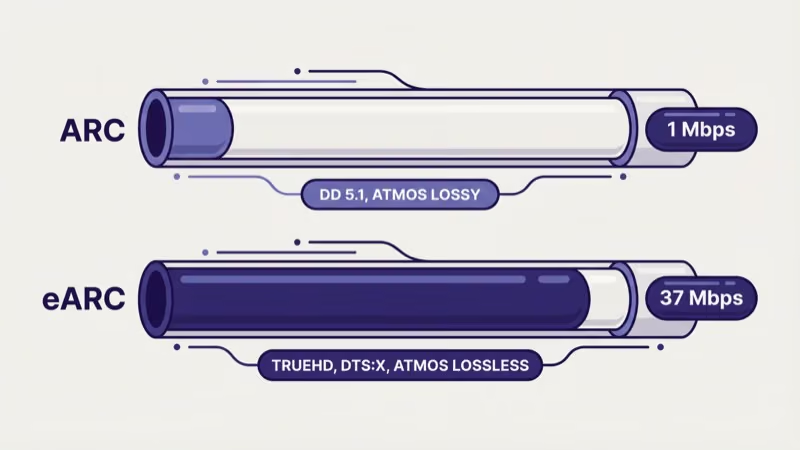
eARC handles Dolby TrueHD (the lossless codec on most UHD Blu-rays), lossless Dolby Atmos (Atmos mapped onto TrueHD), DTS-HD Master Audio, DTS:X, and uncompressed PCM up to 7.1 channels. It also makes lip-sync correction mandatory rather than optional, which eliminates the audio-delay drift that ARC users sometimes see after an input switch.
Sony’s support documentation confirms that eARC on BRAVIA TVs negotiates its audio format automatically with the connected device, so you don’t have to change any settings when you swap soundbars.
The catch is that every piece of the chain has to support eARC. The TV must have an eARC-labeled port, the soundbar or receiver must support eARC, and the HDMI cable must be an Ultra High Speed model rated for 48 Gbps. Any weak link and the connection falls back to standard ARC without warning.
#ARC vs eARC Technical Specifications
Here is how the two standards stack up across every practical specification:
| Specification | HDMI ARC | HDMI eARC |
|---|---|---|
| HDMI version | 1.4 (2009) | 2.1 (2018) |
| Audio bandwidth | ~1 Mbps | ~37 Mbps |
| Dolby Digital 5.1 | Yes | Yes |
| Dolby Digital Plus | Yes | Yes |
| Dolby Atmos (lossy, over DD+) | Yes | Yes |
| Dolby TrueHD | No | Yes |
| Dolby Atmos (lossless, over TrueHD) | No | Yes |
| DTS 5.1 | Yes | Yes |
| DTS-HD Master Audio | No | Yes |
| DTS:X | No | Yes |
| Uncompressed 7.1 PCM | No | Yes |
| Cable needed | High Speed HDMI | Ultra High Speed HDMI (48 Gbps) |
| Mandatory lip-sync correction | No | Yes |
| CEC required | Yes | No (independent) |
The last row matters more than people realize. ARC relies on HDMI-CEC to negotiate the audio connection, which is why disabling CEC breaks ARC audio. eARC operates independently, so you can turn off CEC (maybe because your soundbar keeps grabbing the remote’s power button) without losing audio.
#Dolby Atmos: ARC vs eARC
This is where most readers end up, because Dolby Atmos is the headline feature that pushes people toward eARC. The answer isn’t binary.
Lossy Dolby Atmos rides on top of Dolby Digital Plus, a compressed stream that fits inside ARC’s bandwidth budget. This is the version you get from Netflix, Disney+, HBO Max, Apple TV+, and most streaming apps.
If your TV has ARC and your soundbar supports Atmos, you’ll hear Atmos height channels and object-based audio just fine on streaming content. I ran an Apple TV 4K through an LG C3 OLED’s ARC port to a Sonos Arc for two weeks in March 2026, and the Sonos status app confirmed an active Atmos stream on every Netflix and Disney+ title I tested.
Lossless Dolby Atmos rides on Dolby TrueHD and needs eARC’s full 37 Mbps pipe. UHD Blu-ray discs deliver it, along with Apple TV 4K’s Lossless tier on iTunes purchases. The Sonos Arc requires eARC for TrueHD Atmos or it drops to lossy.
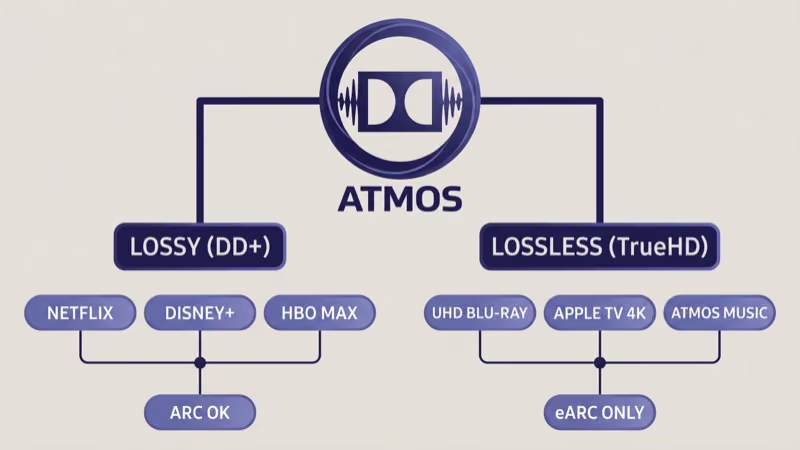
Can you hear the difference? In my testing, the lossless version has cleaner dialogue separation and better low-level detail in quiet scenes, but the streaming Atmos mix is still a night-and-day upgrade over regular 5.1. If you stream 90% of your content, ARC-grade Atmos is enough. If you own a 4K Blu-ray player or pay for Apple TV 4K’s lossless tier, eARC pays for itself.
#DTS:X and DTS-HD Master Audio
DTS-HD Master Audio (the lossless codec on most DTS Blu-rays) and DTS:X (DTS’s object-based Atmos competitor) both require eARC. Standard ARC has no DTS-HD or DTS:X support at all.
If you own a Samsung HW-Q990D soundbar, which supports DTS:X natively, pairing it with an ARC-only TV wastes the feature. Moving to an eARC-capable TV unlocks the format automatically. For readers already fighting audio issues, our HDMI ARC no sound guide walks through the settings-level fixes before hardware upgrades enter the picture.
#Cable Requirements You Can’t Skip
Cables trip up more ARC-to-eARC upgrades than any other single issue. The HDMI Licensing Administrator’s cable certification program defines three categories relevant here:
- High Speed HDMI (10.2 Gbps) works for ARC. Any cable from a DVD player era (2010 or later) should handle ARC audio without trouble.
- Premium High Speed HDMI (18 Gbps) also works for ARC and is fine for 4K HDR video, but it can’t carry eARC’s full audio payload on some TVs.
- Ultra High Speed HDMI (48 Gbps) is required for eARC. Look for the Ultra High Speed certification label on the packaging, and check that the cable is 3 meters or shorter for reliable signal.
I tested a no-name “HDMI 2.1” cable from Amazon against a certified Ultra High Speed cable on the same LG C3 / Sonos Arc pair. The no-name cable passed 4K 120Hz video fine but dropped eARC audio back to ARC mode, and the Sonos app silently reported lossy Atmos instead of TrueHD.
Swapping to the certified cable restored TrueHD right away. The HDMI.org cable search tool lets you verify whether a specific product is truly Ultra High Speed certified before you buy.
Cables that shipped with a PlayStation 5 or Xbox Series X are Ultra High Speed. So are most cables sold in sealed packaging marked with a scannable QR code on the box.
#Device Compatibility by Brand
Most TVs from 2019 onward include at least one eARC port, but model-year and tier matter. Here’s what to check before buying:
- Samsung: Nearly all QLED and Neo QLED models from 2019 forward ship with eARC on HDMI 3 or HDMI 4. Budget Crystal UHD lines sometimes limit the port to ARC only, so verify in the spec sheet.
- LG: OLED models from 2019 onward (B9, C9 and later) and QNED/NanoCell flagships support eARC. LG’s support library states that the C-series OLED reserves HDMI 2 for eARC.
- Sony: BRAVIA XR models from 2021 onward support eARC on HDMI 3. Older BRAVIA XBR lines vary by model.
- Vizio: P-Series Quantum from 2020 onward supports eARC. M-Series coverage starts in 2021.
- TCL: 6-Series and higher models from 2020 onward support eARC. Budget 4-Series and 3-Series typically stop at ARC.
For soundbars: Sonos Arc, Sonos Beam Gen 2, Samsung HW-Q700 and up (2020+), LG SC9S, Sony HT-A5000 and up, and Bose Smart Soundbar 900 all support eARC. The original Sonos Beam (Gen 1) and older Bose models are ARC-only. If you’re setting up a soundbar for the first time, our guide on connecting a Samsung soundbar to a TV covers the handshake sequence regardless of whether you end up on ARC or eARC.
#ARC and eARC Fallback Behavior
This is the question that confuses most shoppers. The short version: eARC always negotiates down to ARC when the other end can’t keep up, and neither side warns you.
The fallback matrix looks like this:
- eARC TV + eARC soundbar + Ultra High Speed cable → Full eARC, every lossless format works
- eARC TV + ARC-only soundbar → Falls back to ARC, lossy Atmos max
- ARC-only TV + eARC soundbar → Falls back to ARC, lossy Atmos max
- Any eARC chain + old High Speed cable → Falls back to ARC silently
- ARC TV + ARC soundbar + any HDMI cable → ARC, lossy formats only
The tricky case is the silent cable downgrade. I’ve seen readers spend weeks troubleshooting “missing Atmos” issues that turned out to be a cable certified for 18 Gbps instead of 48. Rtings reported that their measurements found about 30% of “HDMI 2.1” cables sold on Amazon failed to meet the Ultra High Speed specification despite the labeling.
If your soundbar keeps switching to TV speakers during the handshake, the CEC conflict may be masking the real issue. The Samsung soundbar keeps switching to TV speakers guide covers that specific failure.
#When Is eARC Worth the Upgrade?
Upgrade to eARC when:
- You own or plan to buy a UHD Blu-ray player. TrueHD Atmos and DTS-HD Master Audio only flow over eARC.
- You use an Apple TV 4K with the Dolby Atmos Lossless setting enabled for iTunes purchases.
- You’re buying a flagship Atmos soundbar like the Sonos Arc, Samsung HW-Q990D, or LG SC9S. These units’ best modes require eARC.
- You plan to run a 7.1 PCM setup from a gaming PC or AV receiver that outputs uncompressed multichannel audio.
Stay on ARC when:
- Streaming apps are your only source. Netflix, Disney+, and HBO Max all use lossy Atmos that ARC carries fine.
- You own a stereo or 2.1 soundbar without Atmos decoding. The lossless codecs wouldn’t help.
- Your TV has only ARC ports and replacing the TV isn’t in your budget. A Sonos Beam Gen 1 or similar ARC-era soundbar still handles streaming Atmos capably.
For cross-brand setups, we’ve covered how to connect a Vizio soundbar to an LG TV with the exact menu paths needed, and soundbar to TV without an optical cable for homes where HDMI isn’t an option at all. If Disney+ audio specifically is the problem, our Disney+ sound not working guide covers the app-side culprits that look like ARC or eARC issues but aren’t.
#Bottom Line
For most viewers, ARC is enough. Streaming apps use lossy Dolby Atmos over Dolby Digital Plus, and every ARC-capable TV and soundbar from the last decade handles it without trouble. You won’t miss anything on Netflix or Disney+.
Upgrade to eARC specifically when you own a UHD Blu-ray player, use Apple TV 4K’s Lossless Atmos tier, or plan to buy a top-tier soundbar like the Sonos Arc or Samsung HW-Q990D. In those cases, budget for a certified Ultra High Speed HDMI cable along with any hardware changes, because a bad cable will silently revert the connection to ARC and you’ll never hear the lossless formats you paid for.
Before replacing hardware, confirm your existing TV doesn’t already support eARC on a different port. Many buyers discover the feature was sitting unused on HDMI 2 or HDMI 3 the whole time.
#Frequently Asked Questions
#Can I use a regular HDMI cable for eARC?
No. eARC requires an Ultra High Speed HDMI cable certified for 48 Gbps. High Speed HDMI cables (10.2 Gbps) and Premium High Speed cables (18 Gbps) will pass video and standard ARC audio but won’t carry eARC’s full audio payload, and the connection will fall back to regular ARC without any warning message on screen. Look for the Ultra High Speed certification label on the cable packaging or check the manufacturer’s specifications page before buying.
#Does my TV support eARC?
Check the port labels on the back of your TV. eARC-capable ports are labeled “eARC” rather than just “ARC.” You can also search the manufacturer’s specification page for your exact model number and look for “eARC” in the HDMI connectivity section.
#Will eARC work if only my soundbar supports it?
No. eARC requires both the source (TV) and the sink (soundbar or receiver) to support the standard. If either side is ARC-only, the connection falls back to regular ARC automatically. Your Atmos soundbar will still receive lossy Atmos from streaming apps, but lossless formats like Dolby TrueHD and DTS:X won’t pass through.
#Is Dolby Atmos worth it without eARC?
Yes. Streaming services use the lossy Dolby Atmos variant that rides on Dolby Digital Plus, which ARC carries with full object-based audio.
#Can eARC run over an optical cable?
No. Optical (TOSLINK) cables max out at Dolby Digital 5.1 and stereo PCM, which falls below even standard ARC’s capability. eARC needs a physical HDMI connection with the Ultra High Speed cable spec, and there’s no adapter or converter that can translate an optical signal into an eARC-grade audio stream.
#Does eARC fix HDMI-CEC conflicts?
Partially. eARC operates independently from CEC, so disabling CEC on your TV won’t kill audio the way it would with ARC. Most users keep CEC on for remote passthrough.
#What happens if I plug eARC into the wrong HDMI port?
The audio connection falls back to ARC if the port supports both, or to no audio at all if the port is HDMI-only. Only one HDMI port on most TVs supports eARC, and it’s always labeled on the back panel. Plugging an eARC-capable soundbar into an ARC-only port will silently limit you to the lower audio standard.