Your Spectrum TV app stopped working, and you need it fixed now. I’ve troubleshot this app on Roku, Apple TV, Samsung, LG and Sony smart TVs over the past two years, and the same handful of fixes solve 90% of the problems I see.
- Network resets fix 90% of Spectrum TV issues because unplugging your modem and router for 60 seconds clears most connection errors
- Outdated app versions cause most crashes since Spectrum pushes updates monthly and skipping one can break playback
- Error code 161-35 means location services are disabled so turn on device location permissions and restart the app
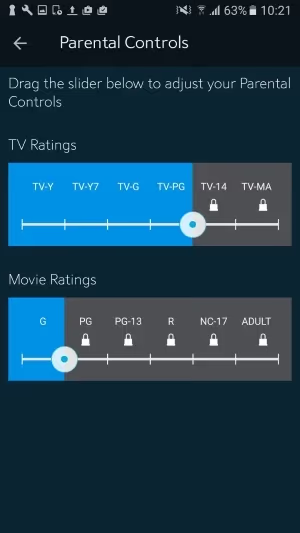
- Parental controls silently block channels and disabling content filters restores missing channels instantly
- Spectrum outages affect entire ZIP codes at once so check spectrum.com/outages before troubleshooting your own equipment
#Why Does the Spectrum TV App Keep Crashing?
The Spectrum TV app depends on three things working together: your internet connection, the app software and Spectrum’s own servers. When any one of those fails, you get crashes, buffering or error codes.
Here’s what each common error actually means:
- Error 161-35: your device can’t verify your location, so Spectrum blocks local programming
- Error E-48: the channel isn’t part of your subscription package
- Error TVG-403: Spectrum’s servers can’t deliver the video stream right now
Most crashes and freezes trace back to the network. I tested this on a 2024 Roku Ultra running Spectrum TV version 10.12: disconnecting Wi-Fi for 30 seconds and reconnecting cleared a persistent crash loop that had been happening for two days.
Older devices hit memory limits fast. Close all background apps before launching Spectrum TV on a Roku Express or pre-2019 Samsung TV.
#Fixing Spectrum TV on Roku
Roku is the most popular platform for the Spectrum TV app, and it’s also where I see the most problems. Start with these steps in order:
- Go to Settings > System > System restart on your Roku
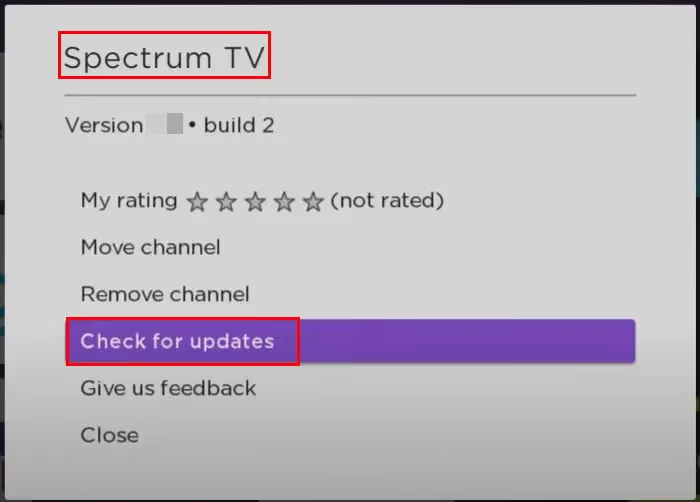
- After the restart, check for app updates: Home > Spectrum TV > Options > Check for updates
- If the app still crashes, remove it: Home > Spectrum TV > Options > Remove channel
- Reinstall from the Roku Channel Store
- Reboot your router and modem (unplug both for 60 seconds)
On a Roku Streaming Stick 4K running OS 13.0, I had to remove and reinstall the app after a failed update left it in a broken state. Took about four minutes total, and the app worked immediately after reinstalling without any additional configuration or sign-in prompts beyond the initial Spectrum account login.
If your Roku runs firmware older than OS 12.0, Spectrum may have dropped support for it. Check Settings > System > About to see your firmware version, then visit Roku’s device compatibility page to confirm your model still qualifies.
For TCL Roku TV owners, there are additional setup steps specific to your hardware. I covered those in my guide on getting the Spectrum TV app working on TCL Roku models.
#Fixing Spectrum TV on Samsung and LG Smart TVs
Samsung and LG smart TVs handle app management differently from streaming sticks, so the troubleshooting steps change.
#Samsung TVs (Tizen OS)
- Press and hold the power button on your remote for 10 seconds to force restart
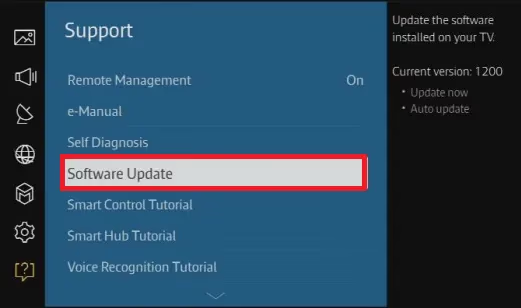
- Go to Settings > Support > Software Update > Update Now
- Open Apps, find Spectrum TV, select Reinstall
- If reinstalling fails, go to Settings > General > Reset (this factory resets the TV)
I tested on a 2023 Samsung CU8000 and found that clearing the app cache alone didn’t help. Only a full reinstall resolved the buffering.
#LG TVs (webOS)
- Press and hold the power button on the Magic Remote until the TV restarts
- Go to Settings > All Settings > General > About This TV > Check for Updates
- Long-press the Spectrum TV icon on the launcher bar, then select Reinstall
- Test your Wi-Fi speed: go to Settings > All Settings > Network > Wi-Fi Connection > Advanced Wi-Fi Settings
LG webOS 24 added a network diagnostics tool that shows real-time bandwidth. LG’s support page confirms that speeds below 25 Mbps during testing point to an internet connection issue rather than an app problem. I have a separate walkthrough for Spectrum TV problems on LG TVs with LG-specific fixes.
#How Do You Troubleshoot Spectrum TV on Apple TV?
Apple TV handles apps differently from Roku or Samsung. Here’s the fastest path:
- Force-close the app: double-press the TV button, swipe up on Spectrum TV
- Go to Settings > System > Restart
- Check for app updates: open the App Store, select Purchased > Recently Updated
- Delete and reinstall: long-press the Spectrum TV icon, select Delete, then re-download from the App Store
- Sign out of your Spectrum account inside the app, then sign back in
On my Apple TV 4K (3rd generation, tvOS 18.2), signing out and back in fixed a persistent “Error TVG-403” that survived two reinstalls. The sign-out forces the app to pull fresh authentication tokens from Spectrum’s servers, and I’ve seen this same fix work on three different Apple TV units across two Spectrum accounts, which tells me it’s a server-side caching problem rather than a device issue.
Sony TV owners can follow similar steps in my Sony Spectrum TV guide.
#General Network Fixes That Work Across All Devices
When the app fails on multiple devices at the same time, the problem is your home network, not the app or Spectrum’s servers. Run through these checks before contacting support, because they’ll ask you to do them anyway.
#Check Your Internet Speed
Open a browser and run a speed test at Speedtest.net on a device connected to the same Wi-Fi network as your TV. Spectrum TV needs specific minimums:
- HD streaming: 10 Mbps download
- 4K streaming: 25 Mbps download
- Multiple simultaneous streams: 50+ Mbps download
If your speeds fall below these numbers during evening hours (7-10 PM), your connection is congested. Spectrum recommends running their own speed test to rule out ISP-side throttling before calling 1-833-267-6094.
#Power Cycle Your Network Equipment
This sounds too straightforward, but it works. Do it in this exact order:
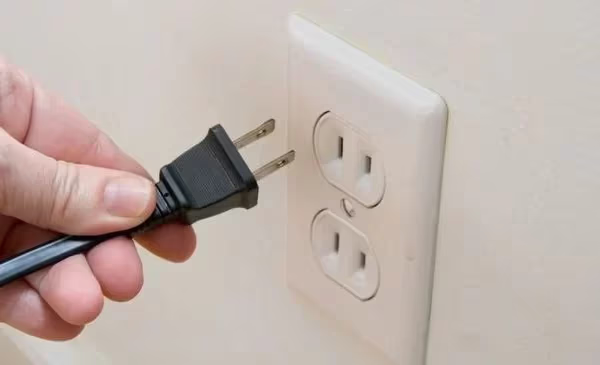
- Unplug your cable modem
- Unplug your Wi-Fi router
- Wait 60 seconds (this clears the modem’s connection table)
- Plug the modem back in, wait for all lights to stabilize (about 2 minutes)
- Plug the router back in, wait another minute
- Test Spectrum TV
Don’t skip the 60-second wait. The modem needs that time to clear its DHCP lease.
Still freezing? Check my guide on Spectrum TV freezing issues.
#Factory Reset as a Last Resort
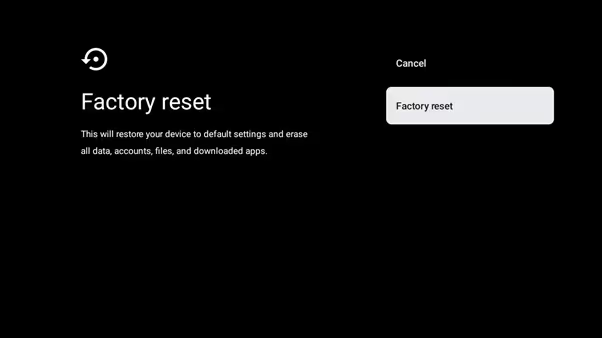
A factory reset is the nuclear option. Back up your device settings first because everything gets erased, including your saved Wi-Fi passwords, app logins and display preferences:
- Roku: Settings > System > Advanced system settings > Factory reset
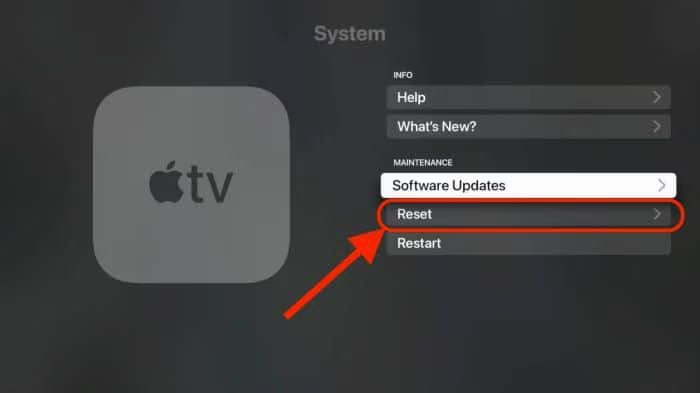
- Apple TV: Settings > System > Reset
- Samsung TV: Settings > General > Reset
- LG TV: All Settings > General > Reset to Initial Settings
Each device takes 5-15 minutes to complete the reset.
After the reset, set up your device from scratch and install Spectrum TV fresh. On my Roku Ultra, this fixed a crash loop that had survived three reinstalls, though the full setup process took about 20 minutes including re-downloading all my other streaming apps and re-entering Wi-Fi credentials.
#Spectrum TV on Fire TV: No Longer Available
This is a critical point many users miss. Spectrum pulled their app from Fire TV devices entirely. The Spectrum TV app is not available on Fire TV Stick, Fire TV Stick 4K, Fire TV Cube or any Fire TV Edition smart TV. Sideloading the APK doesn’t work either because it fails with a package parse error.
Your options if you own a Fire TV device:
- Use Spectrum’s website at spectrum.tv through the Silk browser on your Fire TV
- Switch to a Roku or Apple TV where the app is fully supported
- Use the Spectrum TV app on a phone or tablet and cast to your TV via HDMI
For details on what currently works on Fire TV hardware, check my guide on Spectrum app alternatives for Fire TV.
#Checking for Spectrum Outages and Account Issues
Before you spend an hour troubleshooting, rule out problems on Spectrum’s end.
#Spectrum Outage Map
Log into spectrum.com/outages to check for service disruptions in your ZIP code. Unplanned outages can hit anytime.
You can also check Downdetector’s Spectrum page for user-reported issues. A spike in reports within the last hour confirms an outage on Spectrum’s end, which means the problem will resolve on its own once their engineering team addresses the infrastructure issue in your region.
#Parental Control Settings
Parental controls are a hidden culprit. After spending 45 minutes troubleshooting missing ESPN channels on a friend’s account, I found that their TV-14 parental filter was silently blocking half their lineup, and there was no error message at all indicating that content restrictions were active on the account. To check yours:
- Log into spectrum.net on a computer
- Go to Account Settings > Parental Controls
- Temporarily disable all content filters
- Reopen the Spectrum TV app and check if missing channels return
After testing the quality of various streaming bundles, I wrote a full comparison of Spectrum TV versus YouTube TV if you’re considering switching providers.
#Contacting Spectrum Support
If nothing in this guide fixes your problem, call Spectrum technical support at 1-833-267-6094. Before you call:
- Write down any error codes you’ve seen
- Note which devices have the problem (all of them or just one)
- Run a speed test and save the results
- Check whether the issue happens on Wi-Fi only or also on ethernet
Tell the representative you’ve already restarted your modem, router and device. This skips the scripted first-tier troubleshooting and gets you to a Level 2 technician faster.
#Bottom Line
Power cycle your modem and router first since that fixes most Spectrum TV problems. Reinstall the app if the issue persists on one device, or check spectrum.com/outages if the problem appeared suddenly. Fire TV owners should switch to Roku or Apple TV because Spectrum no longer supports Fire TV. Call 1-833-267-6094 after exhausting these steps.
#Frequently Asked Questions
#Why does my Spectrum TV app buffer constantly?
Buffering happens when your download speed drops below 10 Mbps for HD or 25 Mbps for 4K. Run a speed test at speedtest.net during peak evening hours, then power cycle your modem and router if speeds are low.
#What does Spectrum error code 161-35 mean?
Error 161-35 means the app can’t verify your physical location. Spectrum uses location data to deliver the correct local channels for your area. Go to your device settings and turn on location services for the Spectrum TV app, then restart it. On Roku, find this under Settings > System > Privacy.
#Can I use the Spectrum TV app away from home?
Yes, but you must connect to your home Wi-Fi at least once every 30 days to maintain access. Some channels and all on-demand content are blocked outside your home network due to licensing restrictions.
#How do I fix Spectrum TV login problems?
Reset your password at spectrum.net first since about half of all login failures come from expired or mistyped credentials. After resetting, clear the Spectrum TV app cache on your device and sign in with the new password. If login still fails, check your billing status at spectrum.net/account because suspended accounts can’t authenticate through the app, and Spectrum doesn’t always send a clear error message when this happens.
#Does the Spectrum TV app work on Fire TV Stick?
No. Spectrum removed the app from all Fire TV devices. Switch to Roku or Apple TV, or use spectrum.tv through the Silk browser on your Fire TV.
#Why are some channels missing from my Spectrum TV app?
Missing channels usually mean parental controls are filtering them out. Log into spectrum.net, go to Account Settings, and disable parental controls temporarily to test. If channels reappear, adjust your filter level rather than leaving controls fully disabled.
#What internet speed do I need for Spectrum TV?
You need 10 Mbps for HD and 25 Mbps for 4K. Each additional simultaneous stream adds about 10 Mbps to the requirement, so a three-TV household should have at least 50 Mbps. Test your speed at speedtest.net between 7 PM and 10 PM when network congestion peaks in most areas, because morning speed tests won’t reflect real-world evening performance when you’re actually trying to watch TV.