Netflix and Chromecast used to be a one-tap combo. That changed in late 2025 when Netflix pulled Google Cast support from most devices. If you still own a Chromecast, here’s what works now and what doesn’t.
Google also discontinued the entire Chromecast line in August 2024, replacing it with the Google TV Streamer. Millions of Chromecasts are still plugged into TVs, though, so this guide covers both old and new hardware.
- Netflix removed Google Cast support in December 2025 — casting now only works on legacy Chromecast dongles without a remote
- Netflix’s ad-supported tier blocks casting entirely — you need a Standard or Premium plan to cast at all
- Google discontinued Chromecast in August 2024 — the $99 Google TV Streamer is the official replacement
- Chromecast with Google TV runs Netflix as a native app — no casting required, just open the app with the remote
- Netflix’s built-in download feature on mobile lets you save shows for offline viewing without any third-party tools
#Does Netflix Still Work With Chromecast?
It depends on which Chromecast you own and which Netflix plan you’re on.
Netflix removed Google Cast support from most devices in December 2025. Here’s the breakdown:
Legacy Chromecast dongles (no remote): Casting still works, but only on ad-free Netflix plans (Standard or Premium). The ad-supported plan blocks casting on every device.
Chromecast with Google TV: This model runs Netflix as a built-in app. You don’t need to cast at all. Open Netflix with the remote, sign in, and stream directly. Casting from your phone to this device no longer works for Netflix.
Google TV Streamer: Same situation as Chromecast with Google TV. Netflix runs natively. No casting needed.
If you’re comparing streaming devices, check out Chromecast vs Roku for a side-by-side look.
#How Do I Cast Netflix to a Legacy Chromecast?
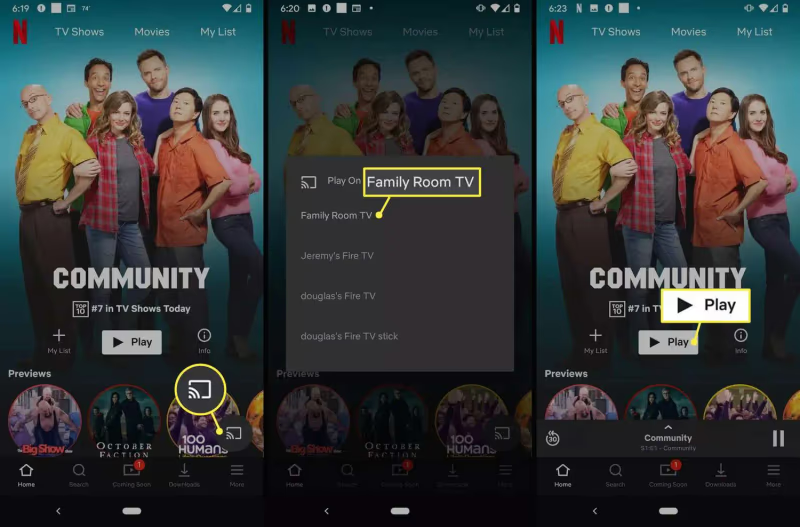
If you own one of the original Chromecast dongles (the puck-shaped models without a remote), casting Netflix still works. Your Netflix plan must be Standard or Premium. The ad-supported tier won’t show a Cast button.
From your phone or tablet:
-
Connect your phone and Chromecast to the same Wi-Fi network.
-
Open the Netflix app and sign in.
-
Tap the Cast icon in the top-right corner.
-
Select your Chromecast from the device list.
-
Pick a title to play. It starts on your TV.
-
Use playback controls in the Netflix app to pause, rewind, or adjust volume.
Your phone acts as a remote control during casting. The Chromecast streams video directly from Netflix’s servers, not from your phone.
To stop casting, tap the Cast icon again and select Disconnect.
From a laptop:
-
Open Google Chrome and go to netflix.com.
-
Sign into your account.
-
Click the three-dot menu in Chrome’s top-right corner.
-
Select “Cast” from the dropdown.
-
Choose your Chromecast from the list.
-
Pick something to watch. Playback starts on your TV.
-
Control playback through the Chrome browser tab.
Chrome has casting built in. There’s no extension to install.
When you’re done for the night, here’s how to properly turn off your Chromecast to save power.
#How to Set Up Chromecast with Google TV
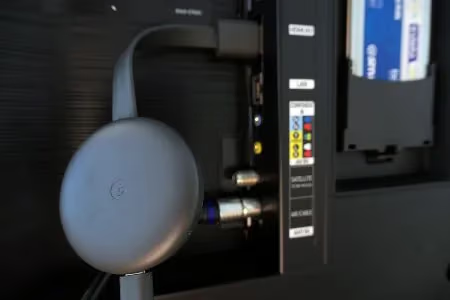
Chromecast with Google TV and the newer Google TV Streamer both run Netflix as a native app. No casting involved. You browse and control everything with the included remote.
#What You Need
-
Chromecast with Google TV or Google TV Streamer
-
TV with an HDMI port
-
Wi-Fi network
-
Google account
#Setup Steps
-
Plug the device into an HDMI port on your TV and connect it to power.
-
Turn on your TV and switch to the correct HDMI input.
-
Wait for the remote to pair automatically via Bluetooth.
-
Follow the on-screen setup to connect to Wi-Fi and sign into your Google account.
-
Select Netflix from the list of streaming services during setup (or download it from the Google Play Store later).
-
Open Netflix, sign in, and start watching.
Google TV pulls recommendations from Netflix, YouTube, Disney+, Max, and other services into one home screen. You can also use Google Assistant on the remote for voice search.
Runs Netflix as a native app, so you don't need to deal with casting restrictions. Since Netflix pulled Cast support from most devices, a Google TV-based streamer is the most reliable way to get Netflix on a non-smart TV.
#Why Is Netflix Not Casting to My Chromecast?
If you can’t get Netflix to cast, the cause is usually one of these issues.
Netflix removed Cast support for your device. This is the most common reason in 2026. If you own a Chromecast with Google TV or Google TV Streamer, Netflix no longer supports casting to it. Open the Netflix app directly on the device with the remote instead.
You’re on Netflix’s ad-supported plan. The Standard with Ads tier blocks casting on every Chromecast model, including legacy dongles. Upgrading to Standard or Premium restores casting on legacy hardware.
Your devices are on different Wi-Fi networks. Both your phone and Chromecast must be on the exact same network. Guest networks and 2.4 GHz vs 5 GHz bands count as separate networks on some routers.
The Cast icon is missing from the Netflix app. Restart your phone first. If that doesn’t fix it, uninstall and reinstall Netflix from the App Store or Play Store. Also confirm your Chromecast firmware is up to date through the Google Home app.
Chromecast can’t be found on the network. Open the Google Home app and check if your Chromecast appears. If it doesn’t, restart your router by unplugging it for 30 seconds. Factory resetting the Chromecast (hold the button on the back for 25 seconds) fixes persistent connection bugs.
Choppy or low-quality video. Weak Wi-Fi signal between your router and Chromecast causes buffering. Move the Chromecast closer to the router, or use an ethernet adapter for a wired connection. Netflix recommends at least 15 Mbps for 4K streaming.
For broader Netflix troubleshooting across all TV types, see Netflix not working on TV.
#Can I Download Netflix for Offline Viewing?
Netflix has a built-in download feature on its mobile apps. You don’t need any third-party software.
How to download Netflix content:
-
Open the Netflix app on your phone or tablet (iOS or Android).
-
Find the movie or show you want to save.
-
Tap the download icon (arrow pointing down) next to the title.
-
Downloaded content appears in the “Downloads” section of the app.
Not every title is available for download. Netflix marks downloadable content with the download icon. Downloads expire after a set period, and you can only store them on mobile devices.
If you want to watch downloaded Netflix content on a bigger screen, connect your phone or laptop to your TV with an HDMI cable. This bypasses Wi-Fi entirely and avoids casting restrictions.
#Bottom Line
Netflix’s casting restrictions make legacy Chromecast dongles the only models that still support it, and only on ad-free plans. If you own a Chromecast with Google TV or the newer Google TV Streamer, skip casting and use the Netflix app directly with the remote. For offline viewing, use Netflix’s built-in download feature on your phone. And if your Chromecast is getting old, the Google TV Streamer at $99 is the straightforward upgrade path.
#FAQ
#Why did Netflix remove Chromecast casting support?
Netflix removed Google Cast support from most devices in December 2025. The company hasn’t given a detailed public explanation. Casting still works on legacy Chromecast dongles without remotes, but only for users on ad-free Netflix plans.
#Does Netflix work on the Google TV Streamer?
Yes. The Google TV Streamer runs Netflix as a native app through Google TV. You browse and control Netflix with the included remote. No casting from a phone is needed or supported for Netflix on this device.
#Can I cast Netflix if I have the ad-supported plan?
No. Netflix’s Standard with Ads plan blocks casting on all Chromecast models. You need to upgrade to the Standard or Premium plan to cast Netflix to a legacy Chromecast dongle. On Chromecast with Google TV, all plan tiers work since Netflix runs as a native app.
#What’s the difference between casting and using the Netflix app on Chromecast with Google TV?
Casting sends a stream URL from your phone to the Chromecast, and the device pulls the video directly from Netflix’s servers. Your phone just acts as a remote. The native Netflix app on Chromecast with Google TV doesn’t involve your phone at all. You browse and play content using the physical remote.
#Does Chromecast work with streaming apps other than Netflix?
Most streaming apps still support Google Cast. Popular services with casting include Apple TV+, Disney+, ESPN, YouTube, Hulu, Max, and Sky Sports. Netflix is an outlier in removing cast support.
#How do I factory reset my Chromecast?
Hold the small button on the back of the Chromecast for about 25 seconds until the LED flashes. The device restarts and returns to factory settings. You’ll need to run through the Google Home setup again after resetting. On Chromecast with Google TV, go to Settings > System > About > Factory Reset instead.
#Is the Google TV Streamer worth upgrading to from a Chromecast?
The Google TV Streamer costs $99 and runs all major streaming apps natively, including Netflix. It has a faster processor, 32 GB storage, and an ethernet port built in. If your old Chromecast struggles with buffering or you’re tired of casting restrictions, the upgrade makes sense.
#Can I watch Netflix on Chromecast without Wi-Fi?
No. Both casting and the native Netflix app on Google TV require an internet connection. If you need to watch without Wi-Fi, download titles through Netflix’s mobile app beforehand and connect your phone to the TV with an HDMI cable.