Google killed the Chromecast name in February 2025. The last units (HD at $30, 4K at $50) were pulled from sale, and Google replaced the entire lineup with one device: the Google TV Streamer at $99. That changes this comparison significantly. I’ve compared both platforms hands-on to help you pick the right one for your setup. If you’re weighing other options, I’ve also reviewed Roku vs DirecTV, Roku vs Cable, and Apple TV vs Roku.
- Chromecast is discontinued — Google TV Streamer ($99) replaced it in August 2024; last Chromecast units were pulled from sale February 20, 2025
- Roku covers every budget — Express at $30 (1080p) up to Ultra at $100 (4K Dolby Vision, Ethernet, rechargeable remote)
- Google TV Streamer has unique hardware — 4GB RAM, 32GB storage, HDMI 2.1, 1Gbps Ethernet, and Thread border router built in
- Roku has 10,000+ apps — the largest streaming app library of any platform, plus The Roku Channel with free ad-supported content
- Gemini AI came to Google TV Streamer in January 2026 — you can ask natural-language questions to find content across all your services
The real comparison in 2026 is between Google’s new $99 set-top box and Roku’s lineup that spans $30 to $100. These aren’t the same class of device anymore. Google moved upmarket. Roku stayed platform-agnostic. Here’s what that means for your wallet and your living room.
#How Much Does Each Device Cost?
Roku covers every price point. Google TV Streamer sits at a single $99 price.
#Roku 2026 Lineup
- Roku Express: $30, 1080p only, basic remote
- Roku Streaming Stick: $30, 1080p, slim form factor
- Roku Stick Plus: $40, 4K HDR10, voice remote
- Roku Stick 4K: $50, 4K Dolby Vision, long-range Wi-Fi
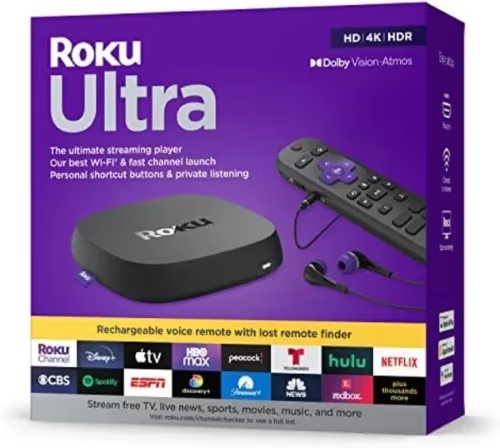
- Roku Ultra: $100, 4K Dolby Vision/Atmos, 100Mbps Ethernet, backlit rechargeable remote
#Google TV Streamer
One model. One price. The Google TV Streamer costs $99 and ships with a Voice Remote Pro that controls TV power and volume.
If you’re on a tight budget, Roku wins by default. The Stick 4K at $50 delivers Dolby Vision for half the price. The Google TV Streamer only makes sense if you want the hardware advantages or the Google ecosystem integration that comes with it.
#Is Google TV Streamer or Roku Easier to Set Up?
#Google TV Streamer Setup
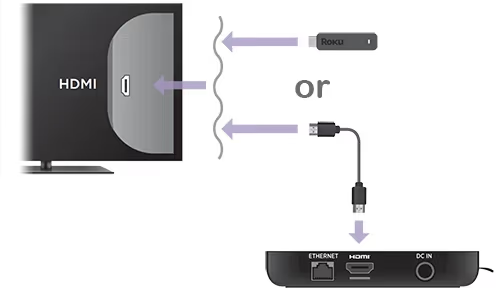
The Google TV Streamer is a set-top box, not a dongle. It sits next to your TV rather than plugging directly into the HDMI port. You connect it via HDMI 2.1, power it from a wall outlet (included adapter), and sign in with your Google account. Setup took me about four minutes on the first boot.
Unlike old Chromecast devices, there’s no phone required for setup. The included remote handles everything on-screen.
#Roku Setup
Roku sticks plug directly into your TV’s HDMI port and draw power from a wall adapter (or USB port on most TVs). You follow on-screen prompts with the included remote, no app required. For users switching from cable, Roku’s setup is the most familiar experience I’ve seen in this category.
Roku also lets you create a PIN to control purchases and app downloads, which is handy for households with kids.
Both devices are fast to set up. Neither requires technical knowledge.
#What Streaming Quality Does Each Device Deliver?
This is where the Google TV Streamer pulls ahead on paper, though it matters less than you’d think at the $99 price.
#Resolution and HDR Support
| Feature | Google TV Streamer | Roku Stick 4K | Roku Ultra |
|---|---|---|---|
| Max Resolution | 4K | 4K | 4K |
| Dolby Vision | Yes | Yes | Yes |
| HDR10+ | Yes | Yes | Yes |
| Dolby Atmos | Yes | No | Yes |
| HDMI Version | 2.1 | 2.0 | 2.0 |
The Google TV Streamer’s HDMI 2.1 port supports 4K at 120Hz, which is useful if you own a gaming-capable TV and want high-frame-rate content. The Roku Ultra and Stick 4K max out at 4K/60Hz through HDMI 2.0.
#Performance
Google TV Streamer has 4GB RAM and 32GB internal storage, which is more headroom than any Roku. In daily use, I found app launch times on the Streamer noticeably faster than the Roku Stick 4K. The Roku Ultra closes that gap with its quad-core processor and 100Mbps Ethernet producing smooth playback even during peak hours.
Roku publishes full specs for every current model if you want to compare processors and wireless specs before buying.
#Which Platform Has Better App Selection?
Roku has more apps. That’s been true for years and it’s still true in 2026.
#Channel and App Count
- Google TV Streamer: Google Play Store with 10,000+ Android TV apps
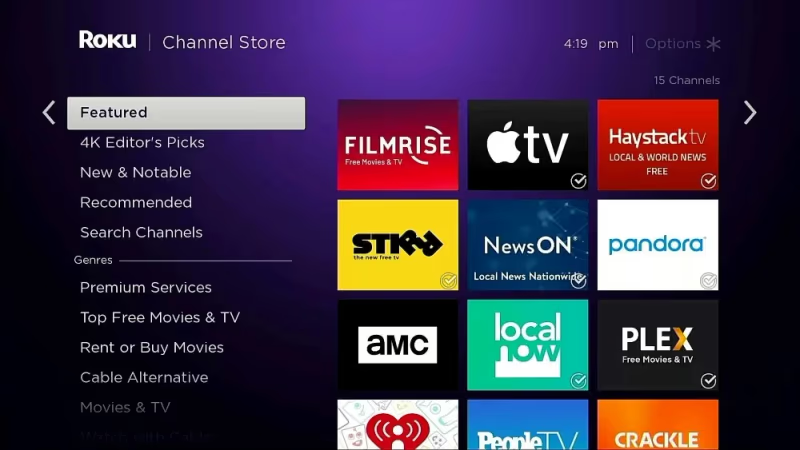
- Roku: 10,000+ channels in the Roku Channel Store
The raw numbers are similar now, but there’s a practical difference. Roku’s Channel Store includes niche sports apps and regional cable replacements that don’t always appear on Google Play. Conversely, Google Play has more utility apps and games.
Every major service works on both platforms: Netflix, Hulu, Disney+, Max, Amazon Prime Video, Apple TV+, Peacock, Paramount+, YouTube TV, Sling TV, Fubo, and Philo.
#Free Content
The Roku Channel is Roku’s biggest differentiator here. It’s free, ad-supported, and offers thousands of movies and TV episodes without any subscription. Google TV Streamer has free content through Google TV’s “Free” tab, but the library is smaller.
#Content Aggregation
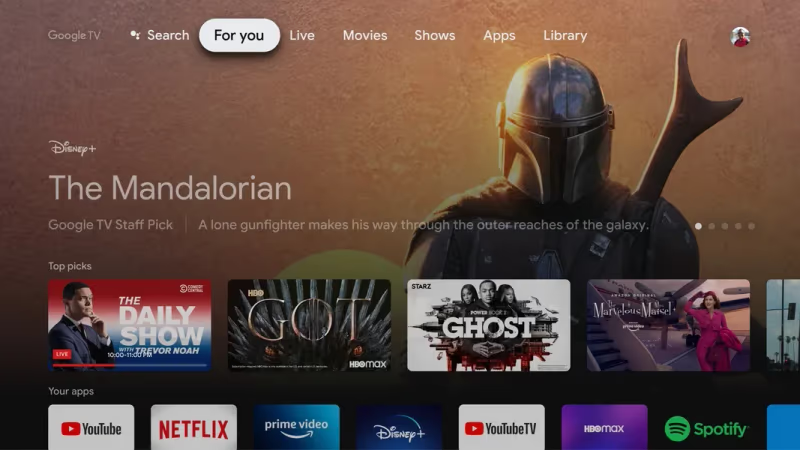
Google TV Streamer aggregates watchlists across all your subscribed services into a single “For You” home screen. You don’t have to open Netflix, then Hulu, then Max separately to find something to watch. Roku does this too through its home screen recommendations, but Google’s aggregation pulls from more sources and integrates better with YouTube.
#What Are the Smart Home and AI Differences?
This is where the two platforms diverge most clearly.
#Google TV Streamer Smart Home
Google TV Streamer is a Thread border router. Thread is the low-latency mesh protocol that Matter smart home devices use. If you have Matter-compatible lights, locks, or sensors, the Streamer controls them directly with no separate hub required.
Gemini AI was added to the Google TV Streamer in January 2026. You can ask it things like “find me a thriller from the 90s that’s free to watch tonight” and it’ll search across your subscriptions and the free tier simultaneously.
Google Assistant handles standard voice commands: adjust smart lights, view Nest camera feeds on your TV, control thermostat settings.
#Roku Smart Home
Roku integrates with both Google Assistant and Alexa, giving it broader compatibility than Google TV Streamer. You can control Roku playback from an Echo device or Google Home speaker. Roku also has its own smart home platform, but it doesn’t have native Thread support.
For Google Home users, the Streamer is the more cohesive choice. For households with Alexa or a mixed smart home setup, Roku’s dual compatibility is more practical.
#Which Device Has the Better Remote?
#Google TV Streamer Remote
The Voice Remote Pro that ships with the Google TV Streamer has dedicated buttons for YouTube, YouTube TV, and Google Play. It controls TV power and volume via HDMI-CEC. A built-in microphone triggers Google Assistant with a press of the button.
#Roku Remotes
Roku’s remote situation depends on the model. The Roku Express ships with a basic IR remote (point it at the TV, no pairing required). The Roku Stick 4K and Ultra use RF remotes that don’t need line-of-sight. The Roku Ultra ships with a backlit, rechargeable remote that has a headphone jack for private listening and a lost remote finder.
Higher-end Roku remotes also have shortcut buttons for popular services and private listening via the Roku app on your phone.

Both platforms support smartphone app control as a fallback. See Google’s setup guide for the Google TV Streamer remote for pairing details.
#Google TV Streamer vs Roku: Side-by-Side Comparison
| Google TV Streamer | Roku Stick 4K | Roku Ultra | |
|---|---|---|---|
| Price | $99 | $50 | $100 |
| Resolution | 4K Dolby Vision | 4K Dolby Vision | 4K Dolby Vision |
| Dolby Atmos | Yes | No | Yes |
| HDMI | 2.1 | 2.0 | 2.0 |
| RAM / Storage | 4GB / 32GB | 512MB / 512MB | 512MB / 512MB |
| Ethernet | 1Gbps (built-in) | No | 100Mbps |
| Thread | Yes (border router) | No | No |
| Gemini AI | Yes (Jan 2026) | No | No |
| App Store | Google Play | Roku Channel Store | Roku Channel Store |
| Free Content | Google TV Free tab | The Roku Channel | The Roku Channel |
| Smart Home | Google / Matter | Alexa + Google | Alexa + Google |
| Form Factor | Set-top box | Stick (HDMI) | Set-top box |
 Roku Ultra
Best Overall
Roku Ultra
Best Overall
Choose this if you want the most capable Roku with wired Ethernet and premium remote at the same price as Google TV Streamer.
- 4K Dolby Vision + Dolby Atmos
- 100Mbps Ethernet + USB port
- Backlit rechargeable remote with headphone jack
- 10,000+ apps + free Roku Channel content
 Google TV Streamer
Best for Google Homes
Google TV Streamer
Best for Google Homes
Choose this if you're already in Google's ecosystem and want Thread/Matter smart home integration plus Gemini AI.
- 4K Dolby Vision, HDMI 2.1, 4GB RAM
- Thread border router for Matter devices
- Gemini AI + Google Assistant built in
- 1Gbps Ethernet, 32GB storage
#Bottom Line
Roku is still the right call for most households. The Roku Stick 4K at $50 delivers Dolby Vision and 10,000+ apps for half the price of the Google TV Streamer. If you want to match the Streamer’s price point, the Roku Ultra at $100 is a dead heat with added Ethernet, a rechargeable remote, and a headphone jack.
Get the Google TV Streamer if you’re already buying Google Nest devices, plan to build out a Matter smart home, or want Gemini AI for hands-off content discovery. It’s a capable set-top box. But for everyday streaming, the Roku Ultra at the same price is the stronger buy.
The discontinued Chromecast HD and Chromecast 4K are still available used, but I wouldn’t buy one in 2026. Google dropped software support timelines, and the lack of Dolby Atmos makes them a worse deal than a new Roku Stick 4K at the same price point.
For more comparisons, see my breakdown of the Amazon Fire Stick vs Roku if you’re also considering Amazon’s lineup.
#FAQ
#Does Google TV Streamer work without a Google account?
No. A Google account is required during setup and for accessing Google Play apps. You can use most streaming apps after signing in, but core features like content recommendations, Gemini AI, and smart home controls are all tied to Google’s ecosystem.
#Can Roku cast content from my phone like Chromecast could?
Yes, newer Roku models support screen mirroring from Android and iOS devices, and several major apps (YouTube, Spotify) have native Roku casting built in. It’s not as polished as Chromecast casting was, but it works reliably for the most common use cases.
#Is the Google TV Streamer worth the $99 price?
It depends on your setup. If you already use Google Nest devices or have Matter-compatible smart home hardware, the Thread border router alone justifies the premium over a Roku. If you just want to stream Netflix and YouTube, the Roku Stick 4K at $50 is the smarter buy.
#Which device is better for live TV streaming?
Both support every major live TV service: YouTube TV, Hulu + Live TV, Sling TV, and Fubo. Roku has a slight edge because its home screen surfaces live TV more prominently and The Roku Channel includes some live news feeds for free.
#Do I need a subscription to use Roku or Google TV Streamer?
Neither device charges a monthly fee. You pay for individual streaming services you subscribe to. Both platforms have free ad-supported content built in: The Roku Channel on Roku, and a Free tab on Google TV Streamer.
#Does Google TV Streamer support Dolby Atmos?
Yes. The Google TV Streamer passes Dolby Atmos through to your soundbar or AV receiver via HDMI 2.1. The Roku Stick 4K does not support Dolby Atmos; you’ll need the Roku Ultra for that. See rtings.com’s streaming device comparisons for full audio codec breakdowns.
#How long will Google TV Streamer receive software updates?
Google has committed to three years of OS and security updates for the Google TV Streamer from its August 2024 launch date, which means support through at least August 2027. Roku typically supports devices for five or more years, giving it a longer expected lifespan.