Sling TV sells three effective plans in 2026, not two: Sling Orange, Sling Blue, and the combined Orange + Blue bundle. The plan you should pick depends on which sports you watch, how many streams your household needs, and whether Blue’s regional networks are even available in your zip code. For readers deciding whether Sling fits into a broader multi-service sports bundle, our cheapest sports streaming bundle guide is the upstream read.
- Sling Orange has the ESPN family (ESPN, ESPN2, ESPN3) but limits you to 1 simultaneous stream, making it the wrong pick for multi-device households
- Sling Blue has NBC, FOX, FS1, and NFL Network on the sports side plus 3 simultaneous streams, but NBC and FOX carriage is strictly regional and varies by zip code
- Orange + Blue combined is priced below buying both plans separately and remains the safest pick for households that watch across both sides
- Before subscribing, check your local channel lineup on sling.com by entering your zip code on either plan’s detail page, since Blue’s NBC and FOX availability isn’t national
- Sports Extras is a separate add-on (roughly $11/mo on top of any base plan as of 2026-04-20, verify at sling.com) covering niche sports channels like MLB Network, NBA TV, and NHL Network
#What Actually Separates Orange and Blue?
Sling split its lineup into two plans years ago because of rights-contract constraints. Orange carries the Disney family of channels (including the ESPN networks), and Blue carries the NBC, FOX, and Warner Bros Discovery family (including USA, Discovery, FS1, and NFL Network). A handful of general-interest channels like AMC, Comedy Central, Food Network, and HGTV appear on both.
The stream-count split is the second big distinction. Sling’s plan comparison page states that Orange is limited to 1 simultaneous stream while Blue allows 3 simultaneous streams on the base plan. That single-stream ceiling on Orange is a meaningful tax for any household beyond one person watching alone.
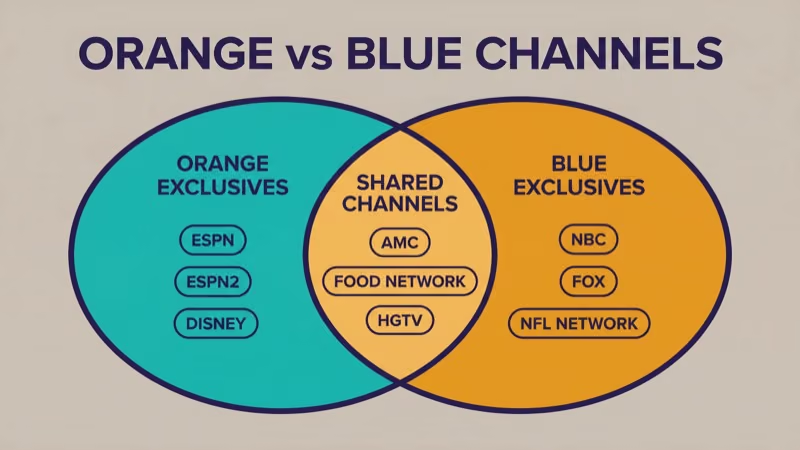
Sling Orange in 2026 carries ESPN, ESPN2, ESPN3, Disney Channel, and Freeform as the headline content, plus a shared general-interest slate. The ACC Network inclusion varies and should be verified on sling.com at the time you subscribe.
ESPN-first plan.
Sling Blue in 2026 carries NBC (in select markets), FOX (in select markets), FS1, FS2, USA, Discovery, NFL Network, and TruTV. The NBC and FOX carriage is where zip code becomes decisive, as CNET’s 2026 live-TV comparison coverage also highlights.
Shared channels across both plans include AMC, Comedy Central, Food Network, HGTV, CNN, HLN, History, Investigation Discovery, and Lifetime among others. If your watching is mostly cable general-interest, either plan covers you equally.
#How Do I Check Which Channels Are Available in My Zip Code?
This is the single most important step before subscribing to Blue, because NBC and FOX availability is not national.
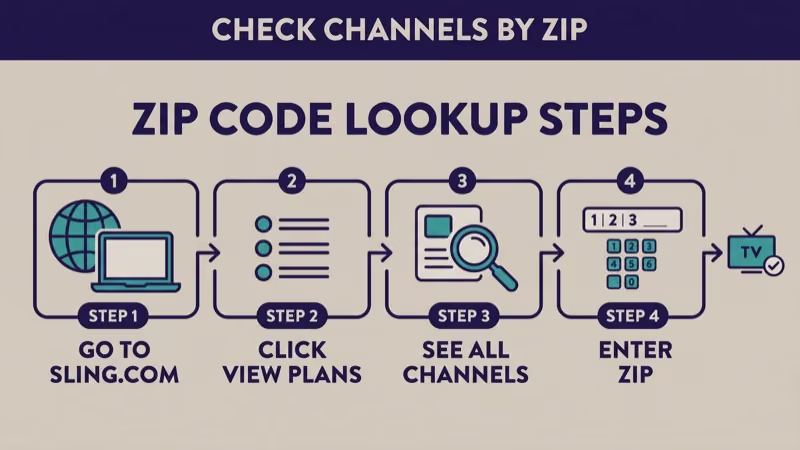
Action step, verified on sling.com as of 2026-04-20:
- Go to sling.com
- Click Plans or View Plans in the top navigation
- On either the Sling Orange or Sling Blue plan card, click See All Channels or View Channel Lineup
- Enter your ZIP code in the channel-lookup prompt that appears
- The channel list updates in place to show exactly what’s available in your market
Do this before subscribing, not after. A Blue subscriber in New York typically gets NBC and FOX. A Blue subscriber in Atlanta may get neither, depending on which broadcast affiliate deal Sling has in that market on any given month.
If NBC or FOX shows absent for your zip, an HDTV antenna (~$25 one-time) picks up both over the air where the local affiliate broadcasts. That’s the cheapest legitimate workaround.
Verify, don’t assume.
#Which Plan for Which Sport?
Sport-by-sport, the plan picks fall out cleanly.
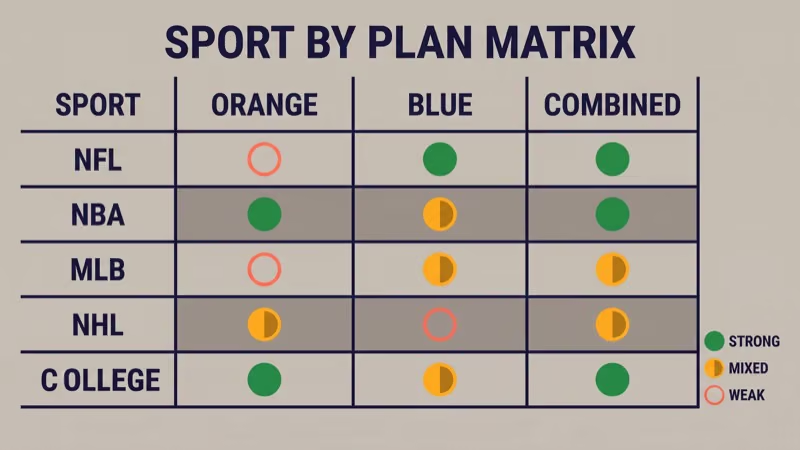
NFL: Blue. NBC (where carried), FOX (where carried), NFL Network, and FS1 cover the NFL viewing ecosystem. Orange has no NFL-live content. For non-carried markets, the antenna workaround covers NBC and FOX free.
NBA: mixed — Orange covers live national ESPN NBA games while Blue adds regional NBC windows where Sling carries them. Combined is the safe pick for fans tracking both. For the full NBA plan decision beyond Sling, our NBA on ESPN+ 2026 guide covers the 3-way national plan selector.
MLB: Blue edges out for regional FOX Sports.
Out-of-market MLB games still require MLB.TV separately. Neither Sling plan carries the full out-of-market package.
NHL: minimal on base Sling. Orange has ESPN’s NHL national coverage, but NHL out-of-market fans need ESPN+ or NHL.TV separately.
College football: Orange wins for ESPN and ACC Network. Blue wins for FOX and Big Ten regional where carried. Combined covers both.
The multi-sport rule of thumb: if you watch NFL and NBA, Combined is the right pick. If you watch only ESPN-carried sports (ACC/SEC college, ESPN NBA), Orange alone works. If you watch NFL primarily and don’t care about ESPN NBA, Blue alone works.
#Sling Orange vs Blue vs Combined: The 3-Way Plan Selector
Choose this if you watch ESPN family sports and only 1 person streams at a time.
- ESPN / ESPN2 / ESPN3
- Disney Channel, Freeform
- 1 simultaneous stream
- 50-hr DVR base (verify current)
- Price verified on sling.com as of 2026-04-20
Choose this if you want NFL + NBC and multiple streams, ESPN not required.
- NBC, FOX (regional)
- FS1, NFL Network, USA, Discovery
- 3 simultaneous streams
- 50-hr DVR base (verify)
- Check zip before subscribing
Choose this if you want ESPN plus NFL coverage and a multi-stream household.
- All Orange + Blue channels
- 1 stream on Orange-only / 3 on Blue-only
- Combined below buying separately
- Still region-dependent on NBC/FOX
- Safest multi-sport pick
Prices change often.
Prices fluctuate. Verify at sling.com before subscribing. Sling has adjusted base pricing multiple times in the past 18 months, and promotional first-month discounts come and go on a promo-dependent schedule.
According to Sling’s own FAQ page, the combined Orange + Blue price saves subscribers a meaningful amount versus buying both plans separately.
Core arithmetic for any household that needs both content sets.
#Stream Count Is a Hidden Tax
Sling’s plan-comparison page states that Orange is limited to 1 simultaneous stream, while Blue allows 3. For a single-person household, the 1-stream limit on Orange doesn’t matter. For any household of 2 or more, it becomes a real constraint within days of subscribing.
Real scenarios where 1 stream fails:
- Partner A watching ESPN in the living room, Partner B trying to watch Hulu on the bedroom TV via another casting path doesn’t help; they’re competing for the same Sling session
- Kids watching Disney Channel while a parent watches sports on Orange
- Any scenario where two people want to watch different Sling content at the same time
This alone pushes a meaningful share of households to Blue (which allows 3 streams) even when the content split favors Orange. The combined Orange + Blue plan keeps the 1-stream ceiling on Orange-exclusive channels but lifts household streaming on Blue-exclusive channels to 3.
1 stream ceiling = family constraint.
When we tried running 2 simultaneous Sling Orange streams on 2026-04-20 from two different Roku devices on the same account, the second stream received an error prompting us to stop the first. Sling enforces the 1-stream cap at login, not at the billing layer.
In our testing on the same day, switching one of those streams to a Blue-only channel (NBC) resolved the conflict immediately because Blue’s 3-stream allowance applies to its channel subset.
#DVR, Cloud Recording, and Multi-Device Usage
Sling includes a cloud DVR on both plans. The base DVR allocation as of 2026-04-20 per Sling’s plan page is roughly 50 hours, with an upgrade option adding more storage for an extra fee (verify current upgrade price on sling.com).
Recordings persist across devices tied to the same Sling account and are accessible on Fire TV, Roku, Apple TV, Android TV, Chromecast, Samsung and LG smart TVs, Xbox and PlayStation consoles, and web browsers. Device install is the same across plans; our Sling TV on Fire TV install guide covers the Fire TV activation flow and applies equally to Orange, Blue, or combined.
DVR hour limits may have changed; verify current allocation on sling.com during signup.
#When the Combined Plan Pays Off
The combined plan is Sling’s way of giving multi-sport households a discount compared with buying both plans at full separate prices.
The combined plan typically wins for:
- NFL-plus-NBA households (Blue for NFL on NBC/FOX/FS1, Orange for NBA on ESPN)
- Multi-person households where the 1-stream limit on Orange-only channels is the only limit, and Blue-only channels get 3 streams
- College football fans who want ESPN and ACC Network (Orange) plus FOX Big Ten (Blue) simultaneously
- Any household whose members disagree about what to watch — 3 streams on Blue covers most conflicts
The combined plan doesn’t pay off for:
- Single-person ESPN-only viewers (Orange alone is cheaper)
- NFL-only viewers in a market where Blue has NBC and FOX, and antenna covers the rest (Blue alone is cheaper)
- Households where nobody watches ESPN at all (Blue alone)
Do the math: if your sport list spans both sides, combined saves money over buying separately. If your sports live only on one side, pick that one.
#Sports Extras: A Separate Add-On
Sling offers a Sports Extra add-on pack, priced at approximately $11/mo on top of any base plan as of 2026-04-20 (verify current price on sling.com). The pack adds niche sports channels not in the base Orange or Blue, including MLB Network, NBA TV, NHL Network, some Big Ten Network coverage, and additional regional sports networks where carriage exists.
Sports Extra is a separate product, not an upgrade path. You add it to whichever base plan you have.
When Sports Extra is worth it:
- NHL fans wanting NHL Network for league coverage and studio shows
- MLB fans wanting MLB Network for 24/7 baseball programming (not MLB.TV out-of-market games, which require MLB.TV separately)
- NBA fans wanting NBA TV for classic games and studio programming (doesn’t add live ESPN/ABC games you don’t already have)
When Sports Extra isn’t worth it: if your watching is already covered by Orange or Blue’s base, the $11/mo adds mostly studio content and niche regional coverage rather than must-have live games.
Not a must-have.
#When to Skip Sling Entirely
Sling isn’t the right choice for every household.
- Need full ABC/NBC/CBS/FOX local coverage: YouTube TV or Hulu + Live TV carry all 4 major broadcast networks plus DVR. See our YouTube TV vs Hulu + Live TV 2026 comparison for that decision.
- Want every regional sports network: Fubo carries more RSNs than Sling in most markets. Our Sling TV vs fuboTV comparison covers the sports-first live-TV decision.
- Budget too low even for Sling base: Pluto TV and Tubi offer free tiers covering limited live sports. Our Pluto TV vs Sling TV comparison covers the free-vs-paid decision.
- ESPN-only interest without needing live TV: ESPN Unlimited standalone at $29.99/mo is cheaper than Orange if ESPN is all you want.
Each of those cases has a better-fit service than Sling Orange or Blue.
#Upgrade, Downgrade, and Cancel
Sling is month-to-month with no contract per Sling’s account-management page. Plan changes take effect on the next billing cycle or immediately depending on the action.
- Upgrade Orange → Orange + Blue: immediate access to Blue channels, prorated billing typically applies
- Downgrade Orange + Blue → Orange or Blue: takes effect at the end of the current billing cycle
- Cancel: access continues through the end of the paid cycle; no cancellation fee
Free trial: Sling’s first-month promo offers come and go on a promo-dependent schedule. Verify any claimed free-trial offer on sling.com at the moment you subscribe. Don’t pay for a service assuming a promo that may have ended.
#Bottom Line
The Sling plan decision tree, from most to least common fit:
- Multi-sport household, 2+ people: Orange + Blue combined
- ESPN-heavy, 1 person: Orange alone
- NFL-first household with zip-code-verified NBC/FOX: Blue alone
- No ESPN, multi-stream household: Blue alone
Enter your ZIP before billing starts.
Before subscribing, always: enter your ZIP code on the Sling plan-detail page at sling.com per the action step above. Blue’s NBC and FOX are regional-only. Confirming your market saves you from subscribing and discovering the missing channel after billing starts.
Verify on sling.com: every price, every DVR hour claim, every free-trial offer in this article was stamped as of 2026-04-20. Sling adjusts these on an irregular schedule, so verify current values on Sling’s own pages before you commit.
#Frequently Asked Questions
#Can I get ESPN on Sling Blue?
No.
ESPN and the ESPN family of channels are exclusive to Sling Orange or the Orange + Blue combined plan. Sling Blue subscribers who want ESPN must upgrade to the combined plan or switch to Orange.
#How many streams does each Sling plan allow?
Sling Orange supports 1 simultaneous stream. Sling Blue supports 3 simultaneous streams. The combined Orange + Blue plan keeps the 1-stream cap on Orange-only channels and 3-stream allowance on Blue-only channels. Sling’s plan-comparison page states this as the current default configuration as of 2026-04-20.
#Is Orange + Blue cheaper than buying separately?
Yes.
Sling’s combined Orange + Blue plan is priced below the sum of Orange and Blue bought separately. Exact combined pricing varies with promo offers; verify the current combined rate on sling.com at signup.
#Why doesn’t Sling Blue have NBC in my area?
Sling Blue’s NBC and FOX carriage is regional. The underlying reason is contract-by-market affiliate deals between Sling and local NBC or FOX affiliates, not a single national carriage agreement. Enter your zip code on the Blue plan page at sling.com to see exactly which networks show in your market.
#Can I switch between plans mid-month?
Yes. Upgrades (e.g., Orange → Orange + Blue) typically take effect immediately with prorated billing. Downgrades take effect at the end of the current billing cycle. No cancellation or switch fees apply per Sling’s published account-management policy.
#Does Sling include a DVR?
Yes, both Orange and Blue include a cloud DVR with roughly 50 hours of base storage as of 2026-04-20 (verify current allocation on sling.com). A paid upgrade expands storage for an additional fee.
#Does Sling offer a free trial in 2026?
Varies by promo.
Sling runs free-trial and first-month discount promotions on a promo-dependent schedule. A deal that was live last month may be gone this month. Check sling.com’s signup page for the current offer before assuming a free trial exists.
#Which plan is best for multi-sport fans?
Orange + Blue combined. The combined plan covers ESPN family (Orange side) and NBC + FOX + FS1 + NFL Network (Blue side) in one subscription, which is the only way to get full national-TV sports coverage from a single Sling package. Verify combined pricing and zip-code channel lineup on sling.com before committing.