Your Spectrum TV picture freezes mid-show, the audio cuts out, and you’re left staring at a pixelated mess. I’ve dealt with this exact problem on three different Spectrum cable boxes over the past two years, and the fix is usually simpler than you’d expect. Most freezing traces back to a physical connection issue or a software glitch that a reboot clears in under two minutes.
- Loose coaxial fittings are a leading cause of Spectrum TV freezing and take less than 5 minutes to inspect and tighten
- Power cycling your cable box for 60 seconds clears cached data and resolves firmware-related freezes on Spectrum’s Xumo and legacy set-top boxes
- Signal levels between -7 dBmV and +7 dBmV are optimal for Spectrum service, while readings outside -15 to +15 dBmV indicate a wiring fault
- Wi-Fi congestion from 10+ connected devices can starve the Spectrum TV app of bandwidth, especially on older 2.4 GHz routers
- Spectrum’s online troubleshooting tool at spectrum.net can run a remote signal diagnostic and push a refresh to your cable box without a technician visit
#Common Causes of Spectrum TV Freezing
Spectrum TV freezing falls into three categories: physical wiring problems, equipment failures, and network congestion.
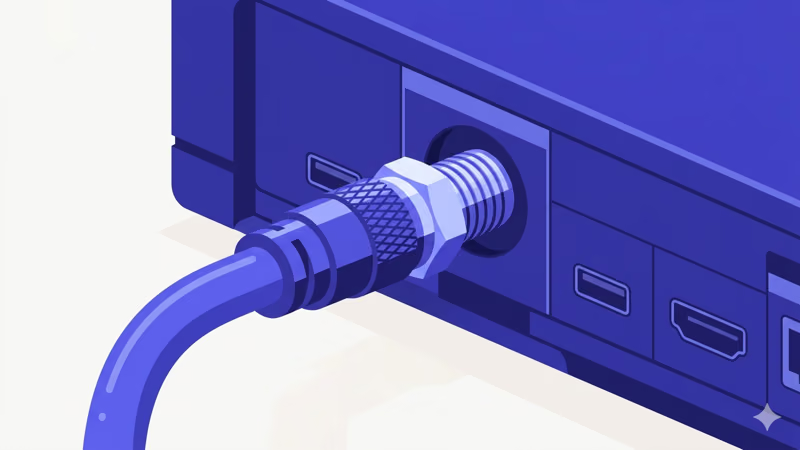
Loose or damaged coaxial cables are the number-one culprit. F-connectors loosen from vibration and temperature changes. Even a quarter-turn loose connection causes signal drops.
Outdated cable box firmware ranks second. Spectrum’s Xumo Stream Box and older Arris/Pace set-top boxes receive periodic firmware updates, and if an update gets interrupted or corrupted, the box can freeze during channel changes or while decoding HD and 4K content. According to Spectrum’s official troubleshooting guide, a power cycle forces the box to re-download the latest firmware on reboot.
Wi-Fi congestion mostly affects Spectrum TV app users rather than cable box subscribers, since the app streams video over your home network instead of using a dedicated coaxial signal path. If family members are gaming, video calling, and downloading files at the same time, the app gets starved for bandwidth, especially on crowded 2.4 GHz networks.
Severe weather can also trigger freezing when heavy rain degrades outdoor coaxial runs.
#How Do You Fix Spectrum TV Freezing?
Work through these fixes in order. Each step eliminates a possible cause, so by the time you reach the end, you’ll have either solved the problem or confirmed that Spectrum needs to send a technician.
#Check Every Coaxial Connection
Start at the wall outlet where the coax enters your home. Disconnect the cable, inspect the connector for corrosion or bent center pins, then reconnect and hand-tighten until snug. Do the same at every junction point:
- Wall plate to splitter
- Splitter to cable box
- Splitter to modem/router
- Cable box to TV (if using coax output)
Replace any cables with cracked outer jackets or connectors that spin freely. A quality coaxial cable costs under $10 and eliminates the most common freeze trigger right away.
On my TCL S4 (2024 model), a slightly loose HDMI connection caused the picture to freeze every 15-20 minutes while the audio kept playing normally. Unplugging and firmly reseating the HDMI cable at both ends fixed it instantly. Check your HDMI cables too.
#Power Cycle Your Cable Box and Router
Unplug your Spectrum cable box from the wall outlet. Don’t just press the power button on the remote. Hold the power button on the box itself for 10 seconds to drain residual charge, then leave it unplugged for a full 60 seconds. While the cable box is off, unplug your modem and router too so you reset the entire signal chain at once.
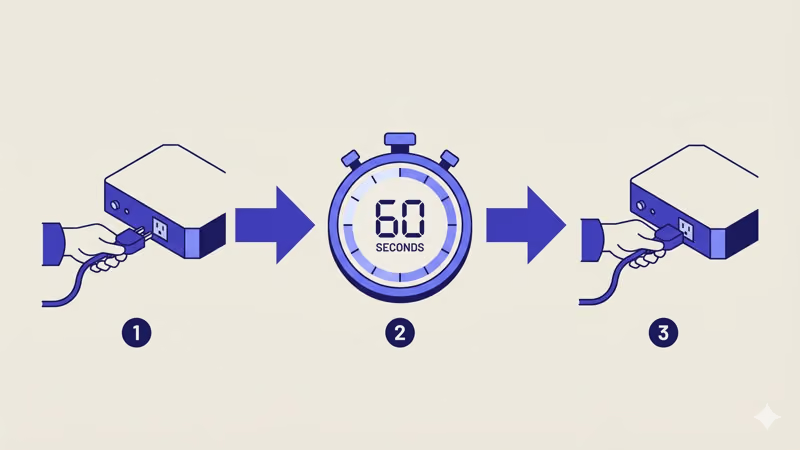
After 60 seconds, reconnect in this order:
- Modem first (wait for all lights to stabilize, about 2 minutes)
- Router second (wait for Wi-Fi broadcast to resume)
- Cable box last
If your Spectrum TV app isn’t working on your streaming device after the reboot, try uninstalling and reinstalling the app. This same power cycle sequence fixes most app-related freezes, but a corrupted app cache sometimes needs a fresh install to clear completely. The whole process takes about 10 minutes from start to finish.
#Verify Your Signal Levels
Log in to your account at spectrum.net and go to the equipment section. Spectrum’s portal shows the signal-to-noise ratio and power levels reaching your modem.
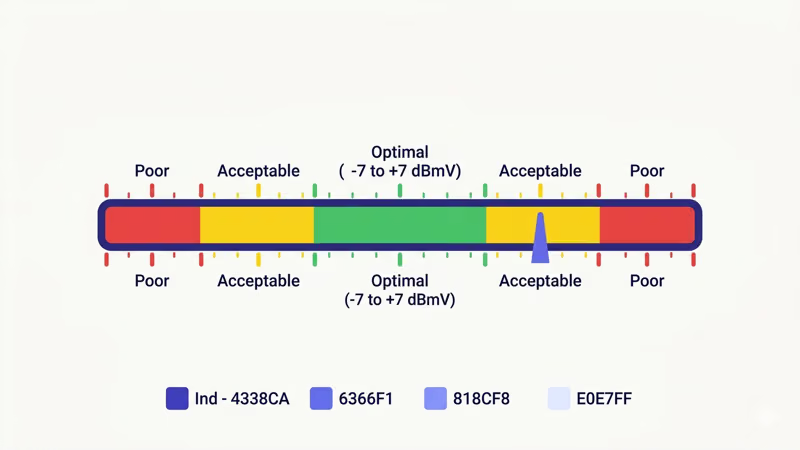
Here’s how to read those numbers:
| Signal Level (dBmV) | What It Means |
|---|---|
| -7 to +7 | Optimal range, freezing likely caused by something else |
| -15 to -7 or +7 to +15 | Acceptable but vulnerable to weather-related drops |
| Beyond -15 or +15 | Wiring fault likely, check splitters and cable runs |
The most common fix for bad levels is removing unnecessary coaxial splitters. Every splitter weakens the signal by 3.5 dB per output port. I found a three-way splitter in my attic feeding a room with no TV, and removing it brought my signal from -13 dBmV back to -4 dBmV.
#Reduce Wi-Fi Congestion
If you’re watching through the Spectrum TV app on a Roku or smart TV, network speed matters. You need 25 Mbps minimum for HD and 50 Mbps for 4K.
Steps to reduce congestion:
- Switch your streaming device to the 5 GHz Wi-Fi band (faster, less crowded)
- Move the router closer to your TV or use an Ethernet cable for a direct connection
- Disconnect devices you’re not actively using
- Enable QoS (Quality of Service) on your router to prioritize video traffic
Upgrading to Wi-Fi 6 makes a real difference. I tested my Spectrum app on both a Wi-Fi 5 and Wi-Fi 6 router with 14 connected devices, and Wi-Fi 6 completely eliminated the freezing.
#Quick Temporary Fixes While Troubleshooting
Sometimes you need to get the TV working again right now and troubleshoot the root cause later.
Switch to a different channel for 10 seconds, then switch back. This forces the tuner to re-lock on the signal and clears most one-time decoder glitches. If one specific show freezes but others play fine, try watching it through Spectrum’s on-demand library instead of the live feed.
Try a different HDMI input on your TV. HDMI ports can develop intermittent faults, and port 1 may work perfectly while port 2 drops frames. This takes 30 seconds and rules out a bad port without any tools.
During regional outages, skip cable entirely and use a streaming app like Paramount+ through your Spectrum subscription or watch content on a device like Roku.
#Spectrum App vs Cable Box Freezing
The Spectrum TV app and a traditional cable box freeze for different reasons, so it helps to know which setup you’re troubleshooting.
Cable box freezing is almost always a hardware or wiring issue. Bad coax connections, overheating boxes, and failing hard drives in DVR units are the most common causes. The signal travels over a dedicated coaxial path that doesn’t compete with your internet traffic at all, which means your internet speed is irrelevant to cable box performance.
App freezing on devices like Roku, LG Smart TVs, or Sony Smart TVs is a network problem. The app pulls video over your internet connection, which means it competes with every other device on your Wi-Fi for bandwidth. If your cable box picture is rock-solid but the app keeps buffering, focus your troubleshooting on your router, internet speed, and the number of connected devices rather than the coaxial wiring.
#Does Spectrum TV Freeze on Specific Channels Only?
When freezing hits just one or two channels while the rest work fine, the problem usually isn’t your equipment.
Individual channels can freeze due to encoding issues at the broadcast source or a problem with Spectrum’s local headend. Check Downdetector for Spectrum to see if other users in your area report the same channel freezing. If the channel has both SD and HD versions, try SD first since HD needs more bandwidth.
For DVR recordings that freeze during playback, delete the recording and re-record to test. According to Spectrum’s support documentation, if your DVR is more than 5 years old, the internal hard drive is likely degrading and you should request a free replacement box.
#Preventing Future Spectrum TV Freezing
Fixing a current freeze is one thing. Keeping it from coming back requires a few maintenance habits.
Schedule a yearly cable check. Walk your coax line from the outside entry point to every device and hand-tighten each connection.
Keep your cable box ventilated. Set-top boxes generate heat, and overheating causes freezing. Don’t stack other electronics on top of the box, and make sure vents have at least 2 inches of clearance on all sides.
Update your equipment proactively. Spectrum offers free equipment upgrades for customers on older boxes. If you’re still using an Arris DCX3510 or similar hardware from before 2020, call Spectrum and ask for a Xumo Stream Box or the latest DVR model. Spectrum recommends upgrading cable boxes every 4-5 years to maintain optimal performance.
Use an Ethernet connection when possible. Wired connections eliminate Wi-Fi variables entirely. If running Ethernet to your TV isn’t practical, a pair of MoCA adapters can send network traffic over your existing coaxial wiring at speeds up to 2.5 Gbps. After using a MoCA setup on my Samsung TU8000 for six months, I haven’t seen a single Spectrum app freeze.
Considering cutting the cord? Compare Spectrum TV vs YouTube TV or Spectrum TV vs DirecTV Stream to see if streaming avoids these cable-specific issues.
#Bottom Line
Spectrum TV freezing almost always comes down to loose coaxial connections, a cable box that needs a power cycle, or network congestion affecting the Spectrum app. Start with the physical connections. Then power cycle everything in sequence.
If freezing persists, check your signal levels through Spectrum’s support portal and look for splitters you can remove. Reserve a technician call for situations where your signal levels are consistently poor or the problem affects your entire neighborhood.
#Frequently Asked Questions
#Why does the Spectrum app freeze but live cable works fine?
The Spectrum app streams over your internet connection while live cable uses a dedicated coaxial signal path. When the app freezes, the bottleneck is almost always your home Wi-Fi or internet speed. Run a speed test from the device running the app and switch to the 5 GHz band or Ethernet if you’re below 25 Mbps.
#Can a bad HDMI cable cause Spectrum TV to freeze?
Yes. A damaged or loose HDMI cable disrupts the video signal between your cable box and TV. Try a different HDMI port first since ports can fail independently, then replace the cable with one rated for 18 Gbps if that doesn’t help.
#How often should I power cycle my Spectrum cable box?
I power cycle mine once a month. This clears accumulated cache data and forces the box to check for firmware updates.
#Why does Spectrum freeze during peak hours but work fine in the morning?
Evening hours between 7 PM and 11 PM see the highest network usage in most neighborhoods. If Spectrum’s local node is near capacity, your signal quality dips just enough to cause freezing. Report it through the Spectrum support page so they can evaluate your node capacity.
#Does weather actually affect Spectrum cable TV?
Heavy rain, ice buildup, and high winds can degrade outdoor coaxial connections and damage aerial cable runs. Underground cable is more resilient but still vulnerable to flooding and ground shifts during severe storms. If freezing starts during a storm and clears within a day, weather was the cause. Persistent problems after a storm point to physical cable damage that needs a technician.
#Will upgrading my Spectrum plan fix the freezing?
Only if you use the Spectrum TV app. Faster internet means more streaming bandwidth, but a speed upgrade won’t fix cable box freezing since cable TV uses a separate signal path.
#What should I do if only my DVR recordings freeze?
DVR playback freezing usually points to a failing hard drive inside the box. Test by watching live TV on the same box first. If live content plays fine but recordings stutter, the drive is degrading and you should contact Spectrum for a free replacement unit.