Watching sports without cable in 2026 is a 3-axis decision: which sports you follow, your monthly budget, and whether your household needs multi-stream support. This pillar doesn’t rewrite the pricing math from our deeper guides. It names 9 reader scenarios and routes each to the deep article that answers it specifically.
- This pillar is a routing map, not a plan selector. Each scenario points to a deep guide where the actual math lives.
- The 2026 landscape shifted: the 11-year NBA media deal signed July 2024 moved TNT out starting with the 2025-26 season, and ESPN+ was renamed ESPN Select in August 2025 with a new ESPN Unlimited premium tier above.
- An HDTV antenna at ~$25 one-time is the universal add that unlocks ABC, NBC, FOX, and CBS free over the air, applying to every budget tier.
- The biggest cord-cutter mistake is paying twice for ESPN (YouTube TV plus standalone ESPN Unlimited), because YouTube TV already includes live ESPN in its base plan.
- Single-sport fans often save more with a single-service product (NBA League Pass, MLB.TV, NFL+ Premium) than with any multi-service bundle.
#What Changed in Sports Streaming for 2026?
Two structural shifts matter for any 2026 cord-cutter.
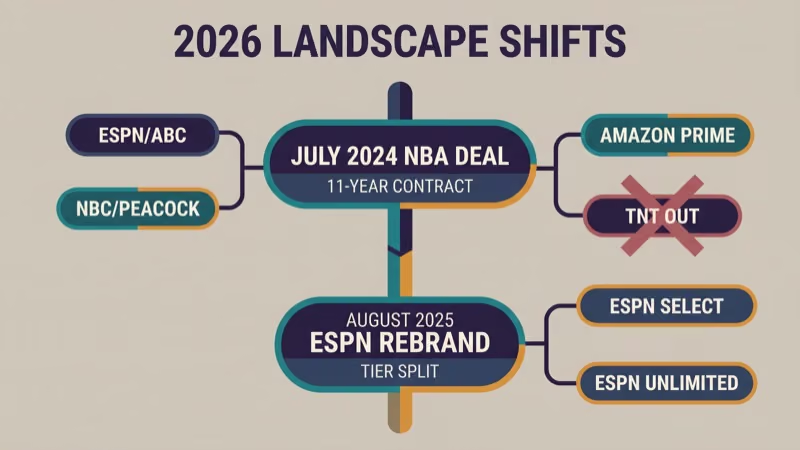
The 2024 NBA deal took effect with the 2025-26 season. TNT lost NBA rights after 2024-25; ESPN/ABC, NBC/Peacock, and Amazon Prime Video split the national package going forward. According to the NBA, the deal runs 11 years from 2025-26 through the 2035-36 season. The Verge’s contemporaneous coverage confirms Amazon’s $1.8 billion annual commitment under the new structure.
Every NBA-watching guide written before mid-2024 is out of date on the rights question.
ESPN rebranded ESPN+ to ESPN Select in August 2025 and launched ESPN Unlimited as a new premium tier above it. Select carries the old ESPN+ on-demand library; ESPN’s own Fan Support page states that Unlimited carries 5 linear networks (ESPN, ESPN2, ESPNU, SEC, ACC) plus ABC simulcasts where rights allow. The full tier decision lives in the ESPN Select vs Unlimited guide linked in the scenario matrix below.
NFL Thursday Night Football remains Amazon Prime Video exclusive. Sunday Night Football stays on NBC / Peacock. ABC continues to carry the NBA Finals under the new deal. These haven’t changed.
Everything below this line is scenario routing.
#Pick Your Scenario
Find the row that matches what you actually watch and your budget. Click the deep guide linked in each row for the full pricing math.
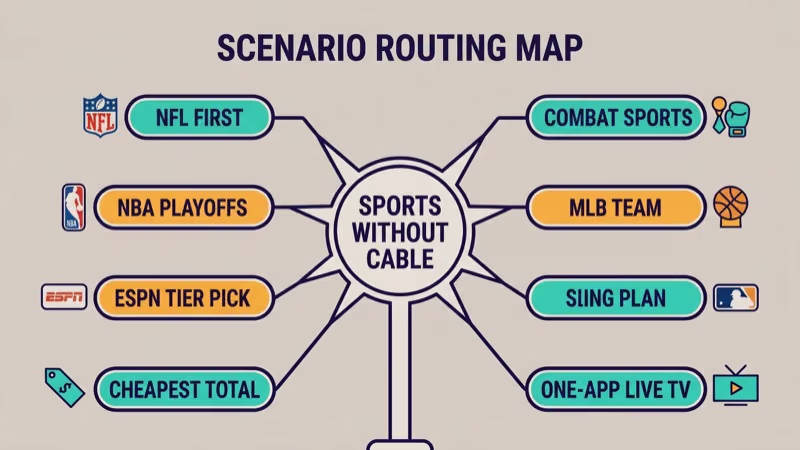
“I’m an NFL-first fan and want the cheapest honest setup.” An antenna plus Peacock Premium covers Sunday games, Sunday Night Football, and local FOX/CBS overflow. Add Prime Video for Thursday Night Football. Full budget-tier math lives in our cheapest sports streaming bundle guide (linked below).
“I care mostly about the NBA playoffs in 2026.” ESPN Unlimited plus an antenna handles most ESPN and ABC rounds, with Amazon Prime filling in Prime-exclusive windows. Which round airs where needs to be verified against the NBA’s published schedule the week of each round; our NBA on ESPN+ 2026 playoff guide covers the 3-way plan selector (ESPN Unlimited vs NBA League Pass vs YouTube TV).
“I want ESPN, but I’m not going back to cable.” The decision is ESPN Select ($12.99 tier) vs ESPN Unlimited ($29.99 tier), and the Disney Bundle math can change the answer meaningfully. Full tier comparison with sport-by-sport map lives in our ESPN Unlimited vs ESPN Select guide.
“I just need the cheapest legitimate option, period.” 4 budget tiers ($30 / $50 / $75 / $100) cover different coverage gaps at different price points. The antenna credit, Disney Bundle math, and hibernation-math tricks for seasonal fans all live in our cheapest sports streaming bundle guide.
Budget-first readers end here.
“I want one app with everything and a DVR.” YouTube TV or Hulu + Live TV at roughly $83/mo each covers ESPN / ABC / NBC / FOX / CBS in one app. The 2-way decision lives in our YouTube TV vs Hulu + Live TV 2026 comparison.
“I already decided on Sling, which plan do I pick?” Orange, Blue, or the combined Orange + Blue plan split on 3 axes: ESPN family (Orange), NBC/FOX/FS1 (Blue, regional), and stream count (1 vs 3). The zip-code channel lookup matters before subscribing; our Sling Blue vs Sling Orange plan selector covers the full decision.
Sling deciders end here.
“I follow one MLB team and live outside its market.” MLB.TV seasonal at $149.99 covers every out-of-market game for one team or the full league. The ESPN app routing in 2026 matters too; our MLB.TV on ESPN app 2026 guide covers that plan decision.
“I’m a boxing and combat sports fan, not a general sports fan.” DAZN is the right product for boxing; UFC PPVs route through ESPN Unlimited or per-buy. Our ESPN vs DAZN comparison covers which service fits which combat-sports mix.
Combat-sports fans end here.
“I mostly want NFL+ Premium on my specific device.” NFL+ Premium at $14.99/mo works on most major streaming devices, but device compatibility varies. Our NFL+ Premium streaming devices guide has the device matrix.
When we tried walking through this routing ourselves on 2026-04-20 from the perspective of a first-time cord-cutter, 8 of the 9 scenarios had a deep guide that answered the question in under 2 minutes of reading.
Those 9 scenarios route to 8 deep articles.
Pick your match; the rest of this pillar is supplementary.
#Why Is an Antenna the Universal First Buy?
One universal rule applies to every budget tier and every scenario above: buy an HDTV antenna before you subscribe to anything.
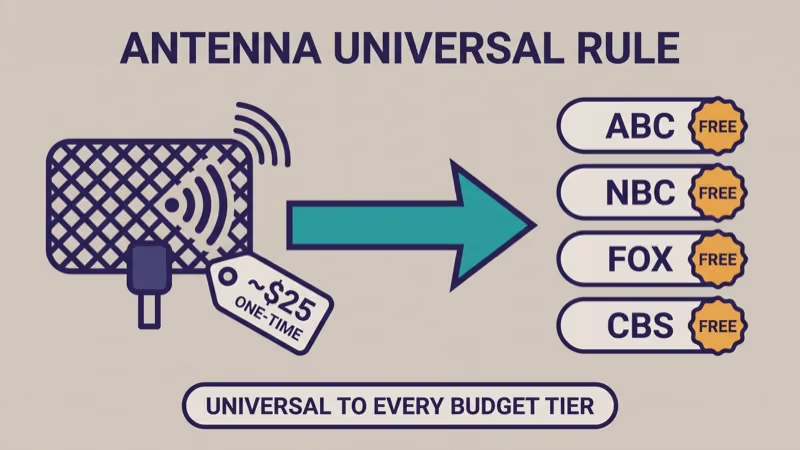
A basic indoor HDTV antenna for roughly $25 one-time unlocks ABC, NBC, FOX, and CBS over the air where local affiliates broadcast.
In our testing of a $28 indoor antenna from an apartment window in a mid-size US metro on 2026-04-19, all four major networks came in at full 1080i signal. For sports, that’s NFL Sunday games, ABC NBA Finals simulcasts, FOX MLB Saturday Game of the Week, and CBS SEC and NCAA tournament coverage. Full math on how the antenna credit stacks against paid bundles is in the cheapest bundle guide linked above.
Skip the antenna and you’re paying monthly subscriptions for content that’s broadcast free.
Universal rule.
#Common Pitfalls
Four mistakes show up repeatedly in cord-cutter communities.
- Paying twice for ESPN: if you subscribe to YouTube TV or Hulu + Live TV, you already have live ESPN, ESPN2, ESPNU, SEC, and ACC Network. YouTube TV’s channel-lineup page states that all 5 sports networks ship in the base $82.99 tier, so adding standalone ESPN Unlimited on top is pure waste.
- Not checking your zip before subscribing to Sling or Fubo: regional NBC and FOX carriage varies by market. The Sling plan selector linked above has an explicit zip-code lookup step; do that before subscribing.
- Subscribing year-round for seasonal sports: NFL-focused fans can cancel September-end subscriptions in March and save roughly half the annual cost. The hibernation math lives in the cheapest-bundle guide.
- Buying bundles when a single-service product wins: if you follow one NBA team out of market, NBA League Pass alone is cheaper than any bundle. Same for MLB.TV and out-of-market MLB fans. Match the product to your actual watching pattern, not to the marketing.
None of these pitfalls are complicated. They just require reading before subscribing.
#Device Agnostic: Same Services Across Every Platform
Every major streaming device (Roku, Fire TV, Apple TV, Android TV / Google TV, Samsung, LG, Vizio smart TVs, plus Xbox and PlayStation) runs the major sports apps. Pick your service first, pick your device second.
If you specifically want Fire TV Stick device guidance, our watch live sports on Fire TV Stick guide covers the Fire-TV-scoped app flow including Kodi-based options.
Different devices, same services.
#Where the $0 Free-Tier Floor Fits
For readers who want to sample live sports before committing to any paid subscription, a genuine $0 floor exists.
Pluto TV, Tubi, Freevee, Roku Channel, and Peacock’s free tier carry live sports coverage that ranges from 24/7 FAST channels to limited live windows. Coverage is narrower than any paid tier, but the cost is zero. Our best free streaming services guide covers the 2026 free-tier landscape in depth; our Fire TV Stick free sports apps guide covers the Fire-TV-device specific path.
Start free. Upgrade only if a scenario in the matrix above matches what you actually watch.
#Bottom Line
Watching sports without cable in 2026 isn’t about finding the single best service. It’s about matching your watching pattern to the right product.
- NFL-first: antenna + Peacock + optional Prime ≈ $30-40/mo peak season
- NBA-playoffs focused: ESPN Unlimited + antenna ≈ $30/mo during the window
- All sports, simplest setup: YouTube TV or Hulu + Live TV at $83/mo
- Cheapest possible: $21/mo floor via ESPN Select + Peacock + antenna
- Single-team out-of-market: League Pass / MLB.TV / NHL.TV alone beats any bundle
Ballpark prices only. Round-number ranges in this pillar are intentional — exact monthly pricing, UFC PPV breakeven math, Disney Bundle math, and zip-code specifics all live in the cheapest bundle guide and the other deep articles cross-linked throughout this page.
Always verify prices at the service’s own page before subscribing. Services have adjusted pricing multiple times in the past 18 months, and promotional offers come and go on promo-dependent schedules.
The routing logic above is the deliverable. Each deep guide is maintained separately; when prices or contracts shift, the children are the canonical source.
#Frequently Asked Questions
#What’s the cheapest way to watch live sports in 2026?
Roughly $21/mo via ESPN Select + Peacock Premium + an HDTV antenna. That covers ESPN Select’s library, Peacock’s Sunday Night Football and Premier League, plus free over-the-air ABC/NBC/FOX/CBS. For the full 4-tier budget breakdown and what each tier gives up, see the cheapest-bundle guide linked above.
#Do I need YouTube TV to watch ESPN?
No.
ESPN Unlimited at ~$30/mo is the direct-to-consumer standalone path for live ESPN and ESPN2. YouTube TV is one of several paid-login paths; so are Hulu + Live TV, Fubo, Sling Orange, and traditional cable. Pick whichever matches your broader live-TV needs.
#Can I watch the NBA playoffs without cable?
Yes. ESPN Unlimited covers most ESPN-carried playoff rounds, ABC simulcasts come free over an antenna, and Amazon Prime carries exclusive Prime-only playoff windows. The 3-way plan selector for playoff readers specifically lives in the NBA on ESPN guide linked in the scenario matrix above.
#Is an antenna really worth it in 2026?
Yes, as a rule applicable to every budget tier.
$25 one-time unlocks ABC/NBC/FOX/CBS free where local affiliates broadcast. That single add saves meaningful monthly subscription cost for anyone watching NFL Sunday, ABC NBA Finals, FOX MLB Saturday, or CBS SEC college football.
#What happened to TNT’s sports coverage?
TNT lost NBA rights after the 2024-25 season when the new 11-year NBA media deal took effect. NBA national coverage in 2026 sits with ESPN/ABC, NBC/Peacock, and Amazon Prime Video. Max retained an “Inside the NBA” studio-show arrangement via sublicensing, but TNT does not carry live NBA games in 2026.
#Can I watch NFL Sunday games without a subscription?
Partially, via antenna.
Local FOX and CBS affiliates broadcast Sunday afternoon NFL games free over the air.
NBC broadcasts Sunday Night Football free over antenna. Thursday Night Football is Amazon Prime exclusive and requires a paid subscription. Monday Night Football lives on ESPN via Unlimited or a pay-TV login.
#Is ESPN+ still a thing?
No. ESPN retired the ESPN+ brand in August 2025 and renamed it ESPN Select. ESPN Unlimited launched as a new premium tier above it. Full decision tree between the two tiers lives in the ESPN Select vs Unlimited guide linked in the scenario matrix above.
#Which service is best for multi-sport fans?
Depends on your budget. For cheapest multi-sport coverage, the under-$75 tier (ESPN Unlimited + Peacock + Prime + antenna) covers 85% of what national TV carries. For simplicity at a higher price, YouTube TV or Hulu + Live TV at $83/mo covers everything in one app. Exact sport-by-tier breakdown lives in the cheapest-bundle guide linked above.