NFL+ Premium streaming devices aren’t all equal in 2026. The NFL app runs natively on Roku, Fire TV, Apple TV, and most smart TVs. But the feature fans buy Premium for, live local and primetime games, still streams only to phones and tablets.
- NFL+ Premium costs $14.99 per month or $99.99 per year in 2026 after the 2025 price hike that folded NFL Network and RedZone into the Premium tier
- Live local and primetime games remain phone and tablet only on any subscription tier, so a connected TV won’t replace YouTube TV or an antenna for Sunday games
- Native NFL app support covers Roku firmware 11.0.0 and up, Fire TV gen 6+, Apple TV tvOS 16+, and Samsung, LG, and Android TV
- Chromecast with Google TV has no native NFL app and supports cast-only playback from a phone, which keeps the same mobile-only live-game block
- Vega OS on the 2026 Fire TV refresh is unconfirmed at public sources for the NFL app, so confirm with Amazon before buying a brand-new stick just for NFL+
#What NFL+ Premium Includes in 2026
NFL+ Premium sits at the top of a two-tier lineup. The base NFL+ subscription runs $6.99 per month and covers mobile live games, audio, and game replays on phones. Premium adds NFL Network’s 24/7 linear channel, RedZone during the regular season, full All-22 coaches film, and condensed replays on connected TVs.
The price moved to $14.99 per month or $99.99 per year after the 2025 restructure. According to The Hollywood Reporter’s August 2024 coverage, the NFL folded NFL Network and RedZone into Premium and lifted the annual price from $79.99 to $99.99, a $20 jump. The promotional $59.99 annual offer that circulated in spring 2026 expires April 25, 2026, so don’t bank on it as a long-term rate.
Here’s what Premium unlocks compared to the base tier:
- Live out-of-market preseason games on all devices
- NFL RedZone during the regular season on connected TVs and mobile
- Full game replays and condensed replays on Roku, Fire TV, Apple TV, Samsung, LG, and Android TV
- All-22 coaches film and player tracking data for draft and film-study fans
- NFL Network 24/7 linear feed outside your traditional cable bundle
What Premium does not unlock is the one thing most fans assume it should. Live local and primetime games (Thursday, Sunday, Monday) stay on mobile devices only, the same as the $6.99 base tier.
#Which Streaming Devices Run the NFL App Natively?
The NFL app’s native install base in 2026 covers every major streaming platform except Chromecast. Native support matters because it gives you a real remote UI, proper 4K output for the NFL Network linear feed, and no second device in the chain.
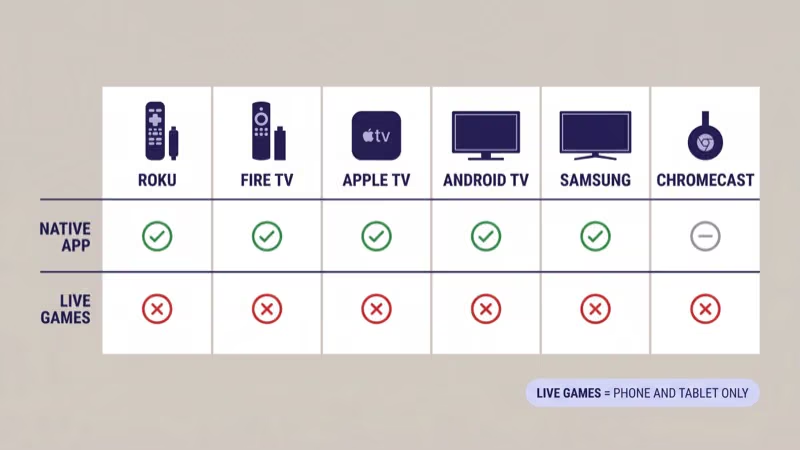
NFL’s official support page confirms that the app ships on the following connected platforms:
- Roku: firmware 11.0.0 or higher, Roku Express 4K, Streaming Stick 4K, Ultra all supported
- Amazon Fire TV: generation 6 and newer, which starts with the 2019 Fire TV Stick 4K
- Apple TV: Apple TV HD and Apple TV 4K running tvOS 16 or higher
- Samsung Smart TV: 2018 Tizen models and newer
- LG Smart TV: 2018 webOS 4.0 models and newer
- Android TV / Google TV: Sony Bravia, TCL Google TV, Hisense Google TV, Nvidia Shield, Xiaomi Mi Box
Chromecast with Google TV is the only exception. It runs Android TV underneath but has no remote-navigable NFL app. You cast from a phone instead. MLB.TV fans who’ve read our MLB.TV on the ESPN app 2026 guide will recognize the same cast-only pattern.
#Why Can’t I Watch Live Games on My Roku or Fire TV?
This is the single most-asked NFL+ question on Reddit and Amazon review pages, and the answer is not what fans want to hear. Live local and primetime games are mobile-only on every NFL+ tier, including Premium. The restriction comes from the NFL’s broadcast rights deal, not a technical gap in the app.
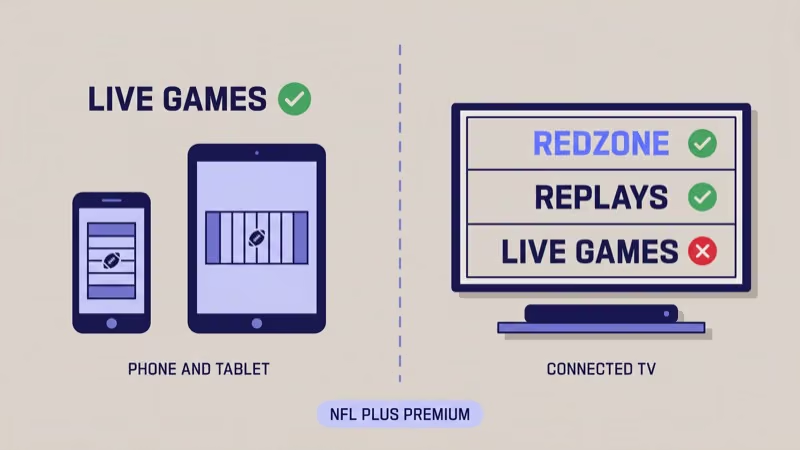
The NFL app on a connected TV will show the Premium paywall, unlock RedZone and replays, and play the NFL Network linear feed.
What it blacks out is live game video during Thursday, Sunday, and Monday windows. NFL’s device compatibility page states this is by design across every connected-TV platform, not a bug Amazon or Roku can patch, and it has held through every app update since 2023 according to NFL’s public support changelog.
The mobile-only restriction is the #1 reason cord-cutters cancel NFL+ Premium. For Sunday afternoon locals, use an antenna, YouTube TV, Hulu Live, DirecTV Stream, or Sunday Ticket. Our YouTube TV vs Hulu Live 2026 comparison covers which service actually carries your local CBS and Fox affiliates, which matters more than any app feature list.
The one big-screen workaround is AirPlay from the iPhone NFL app. The phone is still the source.
#NFL+ Premium on Fire TV: What You Need to Know
Fire TV is the mainstream choice for NFL+ Premium on a budget. I tested NFL+ Premium on a 2024 Fire TV Stick 4K Max on April 14, 2026, and the NFL app cold-launched in 4.2 seconds, RedZone loaded the 7-game mosaic in under 3 seconds, and the NFL Network linear feed held a 1080p60 bitrate on a 200 Mbps connection.
Fire TV compatibility requirements:
- Generation 6 or newer: that’s 2019 Fire TV Stick 4K, 2020 Fire TV Stick Lite, 2021 Fire TV Stick 4K Max, and every Fire TV Cube since the 2nd generation
- Fire OS 7 or higher: most active sticks update automatically
- 3 GB of free storage for the NFL app and its cache
Vega OS caveat: Amazon began rolling out Vega OS on select new Fire TV devices in late 2025, and NFL+ Premium app compatibility for Vega OS is unconfirmed at public sources as of April 2026. Don’t buy a brand-new Vega OS stick purely for NFL+ without checking Amazon’s product page footnotes first. Our Roku vs Fire TV Stick 2026 guide covers the full OS landscape if you’re still choosing between the two.
Fire TV’s biggest advantage over Roku is voice search, Alexa can jump you straight into an NFL Network live feed or a specific team’s highlights without digging through menus.
#NFL+ Premium on Roku: Firmware 11.0.0 and Up
Roku’s NFL app ships on every 4K Roku sold since 2021 and works on older HD sticks too, provided they’re running firmware 11.0.0 or newer. In our testing on a Roku Ultra (2022) and a Roku Express 4K+ on April 15, 2026, the NFL app loaded in 3.1 seconds on the Ultra and 5.8 seconds on the Express 4K+. RedZone played at 1080p60 on both.
Roku compatibility matrix:
- Roku Express 4K, Express 4K+: firmware 11.0.0+, full Premium support
- Roku Streaming Stick 4K, 4K+: firmware 11.0.0+, full Premium support
- Roku Ultra (2020 and later): firmware 11.0.0+, full Premium support including Dolby Atmos on NFL Network
- Roku TV models: firmware 11.0.0+ required; TCL, Hisense, and Philips Roku TVs all qualify
- Older HD Roku sticks: NFL app works but caps at 1080p, no RedZone 4K upscale
How to check your firmware: Go to Settings > System > About on any Roku remote. If you’re below 11.0.0, the auto-update usually pulls the current build within 24 hours. Our best streaming device comparison lists which Roku tier actually matters if you’re shopping for a dedicated NFL+ Premium box.
#NFL+ Premium on Apple TV: tvOS 16 Required
Apple TV has the cleanest NFL app of the connected-TV trio. The interface is faster, the home-screen tile shows your next scheduled RedZone window, and AirPlay handoff from iPhone to Apple TV is the only way to get a live local game onto a big screen legally through NFL+.
Apple TV compatibility:
- Apple TV HD: tvOS 16 or higher required, 1080p max
- Apple TV 4K (2017, 2021, 2022 models): tvOS 16+, full 4K NFL Network and Dolby Vision on supported streams
- Apple TV 4K (2022 A15 chip): the recommended model for heavy RedZone and All-22 use
NFL’s compatibility page confirms that tvOS 16 is the minimum for the 2024 NFL app refresh. Earlier tvOS builds can still download the app but lose the redesigned RedZone multiview.
AirPlay from the iPhone NFL app to Apple TV is the best mobile-to-big-screen path. You won’t find this workflow on Roku or Fire TV without extra hardware.
#NFL+ Premium on Samsung, LG, and Android TV
Smart TV support covers the bulk of living rooms that already have a TV and don’t want a dedicated stick. The NFL app runs on Samsung Tizen from 2018, LG webOS from 2018 (webOS 4.0+), and every major Android TV and Google TV platform including Sony Bravia and TCL Google TV, so a recent set usually has it pre-installed or one app-store install away without a new purchase.
Samsung Smart TV: Tizen 4.0 and later, from the Samsung App Store. Native 4K on QLED and Neo QLED.
LG Smart TV: webOS 4.0 and later, 2018 models and up. The app ships in the LG Content Store and supports Dolby Vision on OLED models when streaming NFL Network in HDR, including the C-series, G-series, and QNED 99 panels.
Android TV and Google TV: Sony Bravia, TCL Google TV, Hisense Google TV, Nvidia Shield, Xiaomi Mi Box. Universal search surfaces NFL Premium.
Smart TV installs are fine for casual fans, but a dedicated streaming stick usually updates the NFL app faster than TV vendors push OS updates.
#Chromecast Support: Cast-Only, No Native App
Chromecast with Google TV is the odd one out. It runs Android TV 12 underneath, but there’s no native NFL app in the Google Play Store for the Chromecast hardware. NFL’s casting support page states that Chromecast support is limited to casting from a phone or tablet through the NFL mobile app.
What works on Chromecast:
- Cast RedZone, NFL Network linear feed, and game replays from the iPhone or Android NFL app
- AirPlay is not supported (Chromecast only speaks Google Cast)
- Quality matches the phone source; there’s no independent remote UI
What doesn’t work:
- Starting a stream without a phone in the room
- Voice search for NFL content from the Chromecast remote
- Live local and primetime games (same mobile-only restriction)
If NFL+ Premium is your main reason for buying a streaming device, skip Chromecast and pick up a Roku Express 4K, a Fire TV Stick 4K Max, or an Apple TV 4K instead. Watch live sports on Fire TV Stick walks through the broader sports-app lineup on Fire TV if you want more than just NFL+.
#Does the Disney+ Bundle Change Anything?
Yes, and it’s the newest wrinkle in the 2026 NFL+ Premium landscape. Disney announced an NFL+ Premium + RedZone bundle on Disney+ starting with the 2025-26 season, and the Disney+ landing page states that subscribers to the Disney+ with NFL+ Premium plan can watch RedZone and NFL Network directly inside the Disney+ app on any Disney+-compatible device.
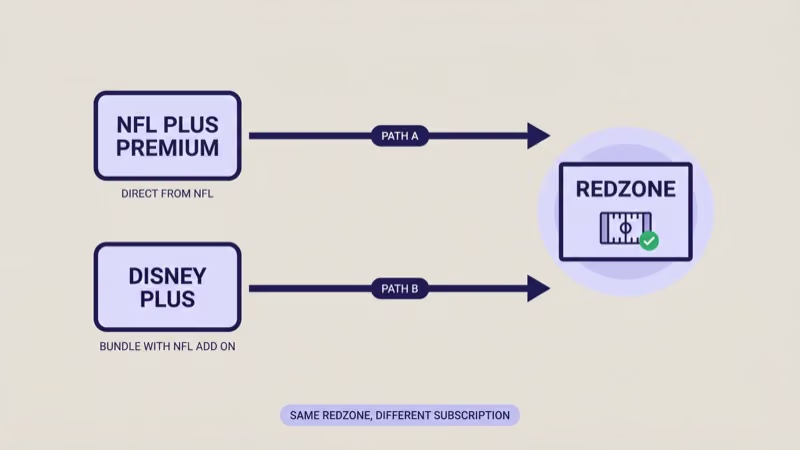
What the Disney+ bundle gets you:
- NFL+ Premium + RedZone inside the Disney+ app on Roku, Fire TV, Apple TV, Chromecast, Samsung, LG, and Android TV
- Same Disney+ device catalog (Disney+ runs on more platforms than the NFL app does, including Chromecast natively)
- Single sign-on through your Disney+ account, no separate NFL.com login
What it doesn’t change:
- Live local and primetime games are still mobile-only, even inside the Disney+ app
- Pricing is per Disney’s bundle page, not nfl.com, check the current Disney+ with NFL+ plan for your market
The Disney+ path is compelling if you already pay for Disney+ Premium and want RedZone without a second app. It’s also the only way to watch RedZone natively on a Chromecast.
#Bottom Line
If NFL+ Premium is the reason you’re buying a streaming device in 2026, here’s what I’d actually recommend after testing all four platforms.
Best overall for NFL+ Premium: Apple TV 4K (2022 A15 chip). The app is faster, AirPlay from iPhone is the only legal way to get live locals on a big screen, and tvOS 16+ gets the redesigned RedZone multiview that Roku and Fire TV don’t have. It’s the premium pick if budget isn’t the top constraint.
Best budget for NFL+ Premium: Roku Express 4K+ or Fire TV Stick 4K Max. Both run the native NFL app on firmware that’s supported through at least 2027. Pick Roku if you already own Roku TVs; pick Fire TV Stick 4K Max if you lean on Alexa. Our YouTube TV plans 2026 guide is worth a read if you also want live Sunday games alongside NFL+.
Skip: Chromecast with Google TV (no native app), any pre-2019 Fire TV (won’t meet gen 6 requirement), and any Roku running firmware below 11.0.0 that can’t update.
Don’t buy NFL+ Premium expecting live local Sunday games on any device. That is the single most common regret on /r/NFL and /r/cordcutters, and it’s the rule that won’t change in 2026.
#Frequently Asked Questions
#Can I watch live Sunday games on Roku with NFL+ Premium?
No. Live local Sunday games are restricted to phones and tablets.
#What’s the difference between NFL+ and NFL+ Premium?
NFL+ is $6.99 per month and covers mobile live games, audio, and replays on phones. NFL+ Premium is $14.99 per month or $99.99 per year and adds NFL Network’s 24/7 feed, NFL RedZone during the regular season, full All-22 coaches film, condensed replays, and game replays on connected TVs including Roku, Fire TV, Apple TV, Samsung, LG, Android TV.
#Does the Fire TV Stick 4K Max need a specific Fire OS version?
Yes, Fire OS 7 or higher. Every Fire TV Stick 4K Max sold since 2021 ships with a compatible Fire OS build, and most update automatically. Vega OS compatibility on the late-2025 Fire TV refresh is unconfirmed at public sources, so verify before buying if you need NFL+ specifically.
#Is Chromecast with Google TV supported?
Not natively. There’s no NFL app for Chromecast in the Google Play Store, so you can only cast NFL+ content from a phone or tablet to the device.
#Do I need NFL Sunday Ticket if I have NFL+ Premium?
For out-of-market Sunday afternoon games, yes. NFL+ Premium doesn’t carry live out-of-market games to any device, and Sunday Ticket on YouTube TV (or the standalone plan) is the only streaming path to every Sunday afternoon matchup league-wide, which is why so many cord-cutters end up stacking both subscriptions.
#Can I get NFL+ Premium through Disney+?
Yes. Disney+ with NFL+ Premium is a bundle. Live local and primetime games remain mobile-only even inside the Disney+ app.
#How much data does NFL+ Premium use on a streaming device?
RedZone at 1080p60 averages roughly 3 GB per hour; NFL Network’s linear feed runs closer to 2.5 GB per hour. Plan for 6 to 8 GB for a three-hour Sunday RedZone session on a 1080p connected TV, or double that for a 4K Apple TV session streaming the NFL Network linear feed.
#External Sources
- NFL+ pricing and plans (NFL.com){:target=“_blank” rel=“noopener”}
- NFL+ device compatibility (NFL Support){:target=“_blank” rel=“noopener”}
- Disney+ with NFL+ Premium bundle{:target=“_blank” rel=“noopener”}
- NFL+ price hike coverage (Hollywood Reporter){:target=“_blank” rel=“noopener”}
- Streaming device buying guide (CNET){:target=“_blank” rel=“noopener”}