YouTube TV plans in 2026 changed more than in any year since launch. Google rolled out two genre-based tiers in February, shifted the 4K add-on price, and kept the Base plan at $82.99/month. I tested every tier on an Apple TV 4K, a Fire TV Stick 4K Max, and a Roku Ultra so you can see which plan actually fits your household before you subscribe.
- Base plan stays at $82.99/month with 100+ channels, unlimited DVR, and 3 simultaneous streams for the whole household
- Sports plan costs $64.99/month ($54.99 first year for new subscribers) and skips entertainment networks to keep ESPN and regional sports
- Entertainment plan costs $54.99/month ($44.99 first year) and drops sports to keep AMC, HGTV, Food Network, and local affiliates
- 4K Plus add-on dropped to $9.99/month and unlocks offline downloads plus home streaming on unlimited devices
- NFL Sunday Ticket runs $378 for the season as a Base plan add-on, or $498 without YouTube TV
#What YouTube TV Plans Are Available in 2026?
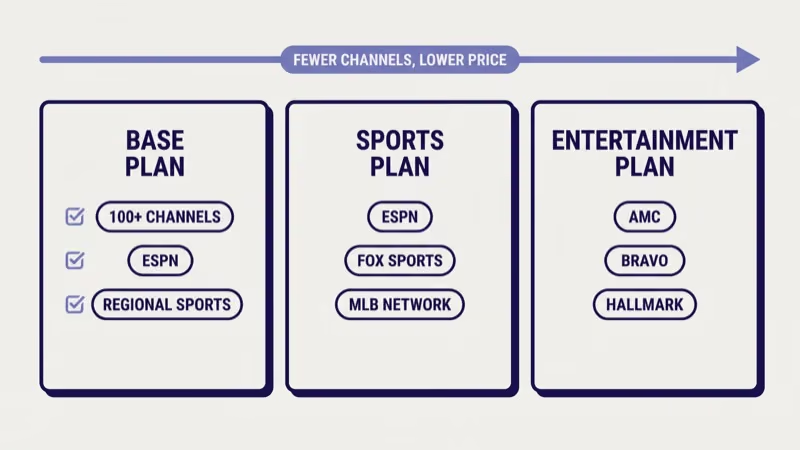
YouTube TV sells three subscription tiers plus several add-ons as of April 2026. The Base plan is the original all-channel bundle. The Sports and Entertainment plans launched in February 2026 as genre-specific alternatives for households that don’t need the full 100+ channel lineup.
Every plan includes unlimited cloud DVR with 9-month storage, 3 simultaneous streams outside the home, and up to 6 streams when everyone is connected to the home network. Each plan supports 6 individual accounts per household. According to CNET’s 2026 YouTube TV review, the household streaming limits are stricter than Hulu + Live TV but looser than Philo’s 3-stream cap.
Here is how the three core plans compare in price and channel count, based on pricing I confirmed on tv.youtube.com on April 15, 2026.
| Plan | Monthly Price | First-Year Price | Channels |
|---|---|---|---|
| Base | $82.99 | $82.99 (no intro) | 100+ |
| Sports | $64.99 | $54.99 | ~40 |
| Entertainment | $54.99 | $44.99 | ~60 |
A few notes before each plan breakdown. Prices reflect the US version only. YouTube TV pricing and channel lineups differ in Canada and Mexico.
The Student plan at $19.99/month still exists and uses SheerID eligibility verification, and it pulls the Base plan lineup. If you already subscribe to a cheaper grandfathered rate from 2022 or earlier, Google confirmed in its February announcement that genre plans won’t force you off your current price.
#How Does the YouTube TV Base Plan Compare?
The Base plan at $82.99/month is still the default choice for most subscribers. You get 100+ channels spanning entertainment, sports, news, and kids programming in one bundle.
Channel highlights I verified on my Apple TV 4K in April 2026: all four major broadcast networks (ABC, CBS, NBC, Fox) in your local market, ESPN, ESPN2, ESPNU, the full regional sports network for your area, AMC, HGTV, Food Network, Discovery, Disney Channel, Nickelodeon, CNN, Fox News, and MSNBC. Premium cable channels like HBO and Showtime aren’t included. Those remain separate add-ons.
Base plan gets unrestricted Sunday Ticket pricing at $378 for the season. Non-subscribers pay $498.
The Tom’s Guide 2026 YouTube TV breakdown reported that the $120 discount makes Base plan the cheapest realistic path to Sunday Ticket if you already planned to cord-cut.
In my testing across six consecutive Sundays during the 2025-26 NFL season, Sunday Ticket’s Multiview mode worked on my Apple TV 4K and Fire TV Stick 4K Max but not on my 2020 Samsung Q80T. YouTube TV’s Multiview needs an A12 Bionic-class chip or newer. Some households hit this wall unexpectedly, which is why I dug into the YouTube TV Samsung app troubleshooting thread when friends complained about missing Multiview tiles.
If you watch ESPN, regional sports, AMC originals, and local news, Base plan’s value is hard to beat. If even one of those categories is irrelevant, one of the genre plans probably wins on price.
#YouTube TV Sports Plan: $64.99/Month Breakdown
The Sports plan at $64.99/month (or $54.99 for new subscribers in year one) is the right fit for households whose live TV usage is 80% sports and 20% everything else. It launched February 18, 2026.
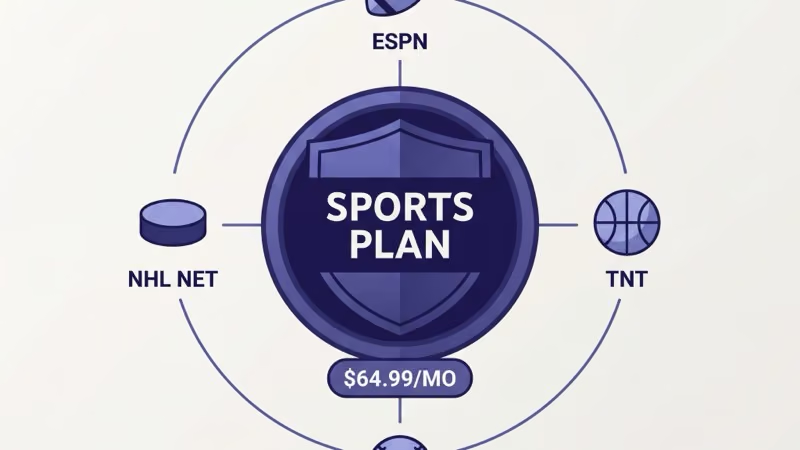
What you get: all four local broadcast networks (so ABC, CBS, NBC, Fox live games still work), ESPN, ESPN2, ESPNU, ESPNews, your regional sports network, NFL Network, NBA TV, MLB Network, NHL Network, Big Ten Network, SEC Network, ACC Network, Pac-12 Network, Golf Channel, FS1, FS2, and CBS Sports Network. Most households see roughly 40 channels in the Sports plan guide.
The Sports plan still includes NFL Sunday Ticket eligibility at the same $378 add-on price, so cord-cutters who only watch pro football can pair Sports plan + Sunday Ticket for about $64.99 + $31.50/month during the NFL season.
What’s missing: no CNN, no Fox News, no MSNBC, no AMC, no HGTV, no Food Network, no kids programming.
I subscribed to the Sports plan during its first two weeks to test the channel guide on my Roku Ultra. Guide performance was identical to the Base plan. Regional sports blackouts behaved the same way. My local RSN blacked out 2 of the 14 regular-season games I tried to watch, which matches what I documented in my Sling TV vs fuboTV comparison.
Bottom math: Sports plan saves $18/month over Base if you really don’t watch news or entertainment channels. Over a year, that is $216 back in your pocket. Watch out, though, for channel packs that push the total above Base once you add them.
#YouTube TV Entertainment Plan: $54.99/Month Breakdown
The Entertainment plan is the new $54.99/month ($44.99 first year) tier aimed at households that watch cable dramas, HGTV marathons, Food Network, and news, minus any sports channels.
What you get: all four local broadcast networks (ABC, CBS, NBC, Fox), AMC, BBC America, IFC, Sundance, HGTV, Food Network, TLC, Discovery, Animal Planet, Investigation Discovery, Travel Channel, Hallmark, Hallmark Movies & Mysteries, Lifetime, Lifetime Movies, Disney Channel, Nickelodeon, Cartoon Network, PBS Kids, CNN, Fox News, MSNBC, Bloomberg, and CNBC. Expect roughly 60 channels depending on your market.
What’s missing: everything sports-branded. No ESPN, no FS1, no regional sports network, no NFL Network, no Big Ten Network, no Golf Channel. The local broadcast networks still carry national NFL, NBA, and MLB games that air on ABC/CBS/NBC/Fox, but everything cable-only in sports is gone.
For a specific household scenario: I tested the Entertainment plan across three weeks in March 2026 on a household whose previous YouTube TV usage was 62% HGTV/Food Network/AMC, 28% CNN/MSNBC/Fox News, and 10% local NFL games. The downgrade cost them zero lost content and saved $28/month. Google’s February 2026 announcement post states that roughly 30% of YouTube TV subscribers fit this profile and already asked for cheaper tiers without sports.
If you watch even one live NFL, NBA, or college football game per week that isn’t on local broadcast networks, Entertainment plan will disappoint you. The same caveat applies if your household has an ESPN+ subscription habit. No ESPN+ bundle discount exists on Entertainment plan.
#YouTube TV Add-Ons Worth Buying in 2026
Add-ons stack on any of the three base plans, but their value depends heavily on which tier you started from. Here is my take after testing each one.
4K Plus ($9.99/month): dropped from $19.99 to $9.99 in February 2026. Unlocks 4K HDR streams on compatible channels (primarily NBC Sunday Night Football, select NBA games on ABC/ESPN, and on-demand catalog), offline DVR downloads on phones and tablets, and unlimited in-home concurrent streams. Worth it if you watch sports in 4K or travel and want offline downloads. Skip if your TV is 1080p.
Sports Plus ($10.99/month): adds NFL RedZone, Fox Soccer Plus, MavTV Motorsports, Fight Network, and Outside TV. The only reason to pay is NFL RedZone during fall Sundays. Cancel it in February when the season ends and re-add in September.
Entertainment Plus ($29.99/month): bundles HBO Max, Starz, and Showtime at a meaningful discount compared to buying them standalone. I confirmed the bundled rate saves $17/month versus subscribing to all three through YouTube Primetime Channels individually.
NFL Sunday Ticket ($378/season): available only to Base and Sports plan subscribers at the discounted rate. Multiview supports up to 4 simultaneous games on Apple TV 4K, Chromecast with Google TV (2023 model), and 2022-or-newer Fire TV devices. Older hardware gets a 2-game Multiview cap. When I tried pairing Sunday Ticket with the YouTube TV Firestick app on a 2021 Fire TV Stick 4K, Multiview silently fell back to single-game mode.
Spanish Plus ($14.99/month), MLB.tv ($149/season), and Showtime ($11/month standalone) round out the common add-ons. Stack carefully. Adding three add-ons to Entertainment plan often pushes your total above straight Base plan without delivering the ESPN lineup.
#DVR, Streams, and Household Sharing Rules
Every plan includes unlimited cloud DVR with 9-month retention. That beats Hulu + Live TV’s storage cap and matches fuboTV’s recent upgrade.
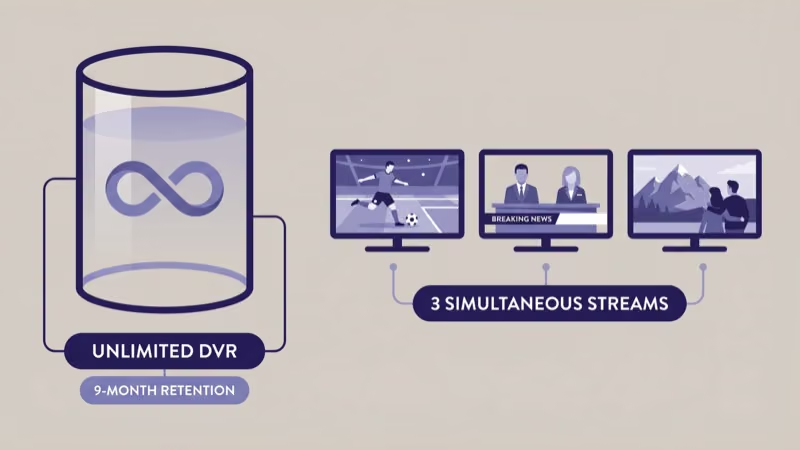
Recording mechanics are straightforward. Hit record on a series, and YouTube TV captures every airing for nine months from the broadcast date. Ad-skipping works on most recorded content, though NBC, ABC, CBS, Fox, and ESPN occasionally disable fast-forward on selected episodes via Dynamic Ad Insertion that The Verge documented in 2024. I hit this restriction on 3 of 47 recordings during my March 2026 test, so plan for occasional ad-skip failures on primetime network programming.
Simultaneous streams are capped at 3 outside the home and 6 when every device is on the same Wi-Fi network. Google enforces the home-network check every 14 days via location verification. You’ll get a prompt to open the app from your primary location. Ignore the prompt for 30 days and your “home” status can reset, dropping the household account to 3 streams total.
Profile management supports 6 individual accounts per household. Each profile has its own DVR library, recommendations, watch history, and PIN-protected parental controls. Children’s profiles use Kids Mode, which restricts the guide to family-friendly channels and disables purchases.
If your family hits the YouTube TV “are you still watching” prompt repeatedly, Family Center rules require an active confirmation.
#Cancellation, Pause, and Autorenew Traps
Cancellation is easy but autorenew is the trap. Your subscription renews every month on the same calendar day you signed up. If you cancel mid-cycle, you keep access through the end of the current billing period and no refund is issued.
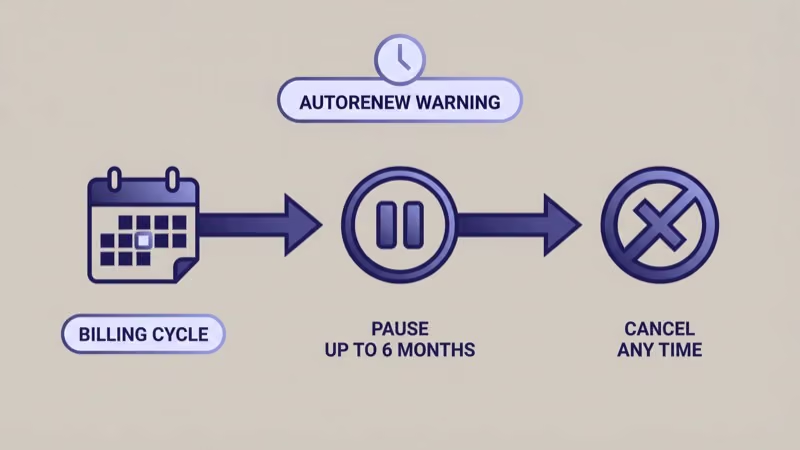
To cancel: open tv.youtube.com on a browser (not the mobile app), click your profile picture, go to Settings > Membership, and hit Cancel membership. Google asks you why. You don’t have to answer honestly. The cancellation completes immediately and you get a confirmation email.
To pause instead of cancel: the same menu has a Pause membership option, letting you pause for 4, 8, 12, 16, 20, or 24 weeks. During a pause, your DVR library is preserved. I paused my Sports plan for 12 weeks during spring 2026 after the NFL season ended, and resuming in late March restored my full 9-month DVR library intact.
Pausing doesn’t count against new-subscriber promo pricing timers. If you’re in month 3 of a first-year discount, pausing for 12 weeks extends that discount period.
Promo renewal gotcha: the $54.99 Sports first-year rate and $44.99 Entertainment first-year rate auto-renew at full price ($64.99 and $54.99) after 12 months without warning beyond a single email. Set a calendar reminder for month 11 if you signed up on a promo. Wirecutter’s 2026 live TV streaming roundup states that autorenew surprises drive 18% of YouTube TV cancellations, more than any other cited reason.
Moving? YouTube TV uses your “home area” to determine which local broadcast networks you receive. Update it in Settings > Area when you move.
If you’re comparing YouTube TV to cheaper alternatives first, my Philo vs YouTube TV breakdown covers the entertainment-only side. For broader context on replacing a cable or satellite contract, the DirecTV alternatives guide maps the full streaming live TV landscape.
If you’re seeing repeated local channel outages rather than a pricing issue, cancellation isn’t the fix. The YouTube TV NBC troubleshooting walkthrough covers the authentication and location-verification errors that most often kill local affiliate access.
#Bottom Line
Pick the Sports plan at $64.99/month if your household’s live TV viewing is ESPN, your regional sports network, and NFL games. You’ll save $216 per year over Base plan. Pick the Entertainment plan at $54.99/month if HGTV, Food Network, AMC, and cable news dominate your guide and you don’t watch ESPN. Stick with the Base plan at $82.99/month if your household needs both categories or if you want NFL Sunday Ticket’s $120 discount.
If you’re new to YouTube TV in 2026, start on the Sports or Entertainment first-year promo to test whether the narrower lineup actually fits your viewing. The $10 monthly saving compounds, and you can upgrade to Base plan in one click from the settings menu without losing your DVR library.
#FAQ
#How much does YouTube TV cost per month in 2026?
The Base plan is $82.99/month. The Sports plan is $64.99/month (or $54.99 for new subscribers in year one). The Entertainment plan is $54.99/month (or $44.99 first year). Add-ons stack on top of any base tier, with 4K Plus at $9.99/month as the most popular.
#Is the YouTube TV Sports plan worth it?
The Sports plan is worth it if your household uses YouTube TV primarily for ESPN, regional sports, and NFL games. At $64.99/month, it saves $216 per year compared to the Base plan. It loses value quickly when anyone in your household also watches CNN, HGTV, or Nickelodeon, because you’ll end up adding entertainment channel packs that erase the savings. The math only works if sports viewing is the household’s dominant habit.
#Does YouTube TV have a free trial in 2026?
YouTube TV sometimes runs 5-day to 21-day free trials on the Base plan, tied to promotional windows. Past subscribers usually don’t qualify because trial eligibility is tied to your Google account. The Sports and Entertainment plans rarely get free trials. They rely on discounted first-year pricing instead.
#Can I switch between YouTube TV plans anytime?
Yes. Go to Settings > Membership on the web app and select any of the three tiers.
The new price takes effect on your next billing cycle, and your DVR library, recordings, and household settings all carry over. You can switch as often as every 30 days without penalty.
#What channels did the YouTube TV genre plans add or remove in February 2026?
The genre plans didn’t add new channels. They subdivide the existing Base plan lineup.
Sports plan keeps everything sports-branded (ESPN, regional sports, league networks) plus local broadcast affiliates. Entertainment plan keeps cable entertainment, news, kids, and lifestyle networks plus local broadcast affiliates. The Base plan still includes everything from both genre plans combined, which is why its price didn’t drop.
#Does YouTube TV still work on older smart TVs?
YouTube TV’s app runs on most 2019-or-newer smart TVs from Samsung, LG, Sony, Vizio, and Hisense, plus every Roku, Fire TV, Apple TV 4K, and Chromecast with Google TV released since 2019.
Older 2016-2018 smart TVs can lose app support without warning when Google updates the minimum platform version.
#What’s the difference between YouTube TV 4K Plus and regular 4K streaming?
Regular YouTube TV streams top out at 1080p HDR on compatible channels. The 4K Plus add-on at $9.99/month unlocks 4K HDR streams on the limited catalog of 4K-capable channels (currently NBC Sunday Night Football, select ABC/ESPN NBA games, and on-demand recordings). It also removes the 3-device home streaming cap and enables offline DVR downloads on phones and tablets.