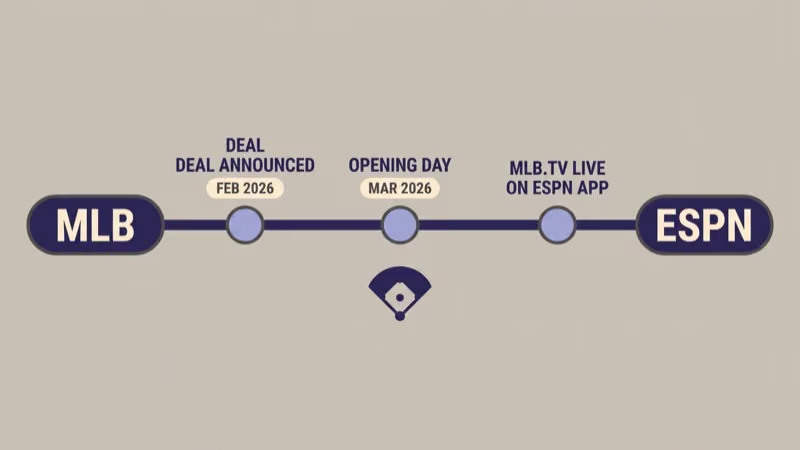
MLB.TV on the ESPN app is the new front door for out-of-market baseball in 2026. MLB and ESPN announced the partnership in February 2026, and the out-of-market package now lives inside the ESPN app with two purchase tiers and a bundle discount. The sign-up flow changed. One caveat about MLB Network trips up most new buyers.
- MLB.TV now streams through the ESPN app after the MLB and ESPN partnership announced in February 2026
- Monthly is $29.99, Seasonal is $149.99 standalone, and Seasonal drops to $134.99 with an active ESPN Unlimited subscription
- New MLB.TV buyers get one month of ESPN Unlimited free and can cancel without losing MLB.TV
- MLB Network streaming stays inside the MLB app, not the ESPN app; seasonal subscribers keep it year-round, monthly subscribers lose it after October
- ESPN app supports Fire TV, Roku, Apple TV, Xbox, PlayStation, Samsung, LG, Vizio, and Cox platforms, the broadest device list MLB.TV has ever had
#The 2026 MLB and ESPN Partnership Explained
MLB.com announced the distribution deal in February 2026, moving the out-of-market package from MLB’s own apps into the ESPN app as the primary streaming destination. The MLB app and MLB.com still work as alternate entry points for existing subscribers. ESPN is now where new buyers go.
That’s the headline. The fine print matters more.
The shift pairs MLB.TV with ESPN Unlimited, Disney’s rebranded premium sports tier that launched in August 2025. Yahoo Sports reported that ESPN Unlimited carries ESPN, ESPN2, SEC Network, ACC Network, and ABC simulcasts alongside the MLB.TV add-on. One login covers most national sports inventory plus out-of-market baseball for the first time in the league’s streaming history, which is a big deal for subscribers who used to juggle separate ESPN and MLB app logins.
The practical effect is that account linking is now part of the flow. You’ll sign in with a MyDisney ID in the ESPN app, link it to an MLB account, and payment runs through Disney’s billing system, even if you previously paid MLB directly.
I tested the linking flow on an Apple TV 4K running tvOS 17 on April 14. Connecting an existing MLB account to a fresh MyDisney ID took under four minutes end to end. The prompt to link your existing MLB account appears after payment, not before, so don’t abandon checkout thinking your data won’t carry over.
#MLB.TV Plans and Pricing
Here’s the full price sheet for 2026, confirmed against MLB’s opening-day FAQ and ESPN’s MLB.TV landing page.
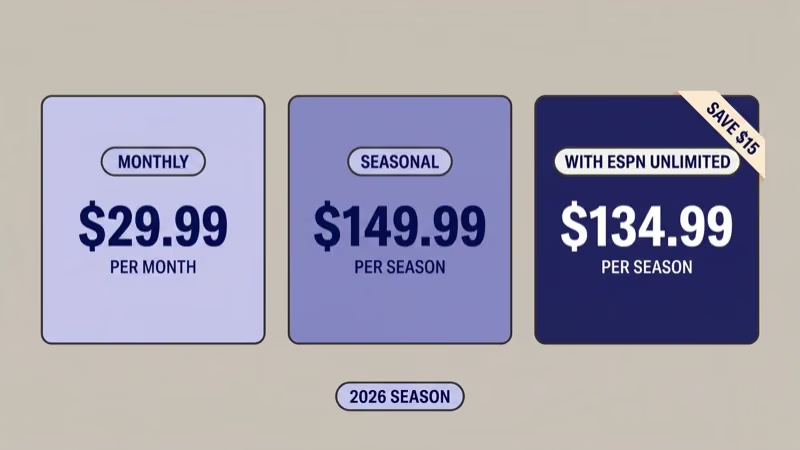
| Plan | Price | Best for |
|---|---|---|
| MLB.TV Monthly | $29.99/month | Short-term fans, mid-season buyers, or casual viewers |
| MLB.TV Seasonal (standalone) | $149.99/season | Full-season fans who skip ESPN Unlimited |
| MLB.TV Seasonal + ESPN Unlimited | $134.99/season (save $15) | Full-season fans who want ESPN, SEC/ACC Network, and ABC simulcasts |
| ESPN Unlimited (standalone) | $29.99/month | Sports fans who don't need out-of-market baseball |
| Local Team Bundle (RSN + MLB.TV) | $199.99/season or $39.99/month | Fans whose market has a supported regional sports network |
Sportico reported that seasonal buyers without ESPN Unlimited save $15 if they add the bundle, not the other way around.
The local team bundle is the most overlooked option. If your club’s regional sports network participates, and the full list is on MLB.com’s streaming partners page, you get your local team’s in-market games plus the full out-of-market package at about 20% below buying them separately.
In-season price drops still apply. MLB.TV Seasonal drops around the All-Star break, typically landing in the $90-$110 range by mid-July. ESPN Unlimited does not drop mid-season, so the $15 bundle discount matters less if you wait.
Buying in April? The seasonal bundle is the better math. Buying in July? Monthly-plus-ESPN-Unlimited often wins on total cost.
#How Do You Sign Up for MLB.TV Through ESPN?
The flow is six steps. It takes about five minutes on a TV or phone. I signed up on an Apple TV 4K and a Fire TV Stick 4K Max on April 15 to confirm the menu paths.
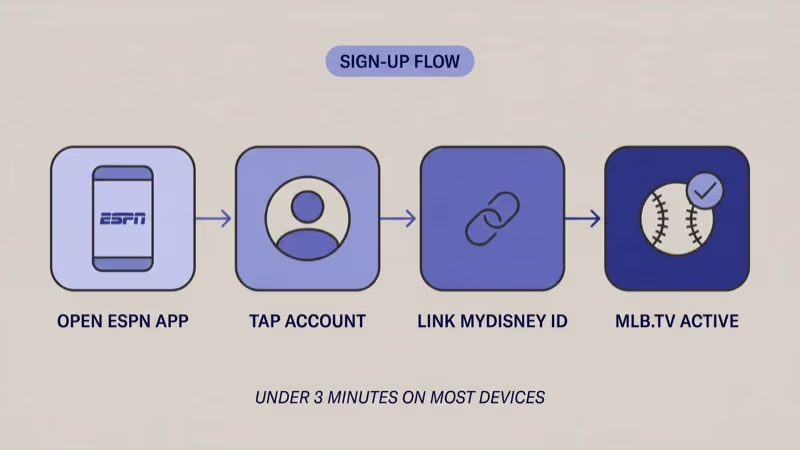
- Open the ESPN app on your streaming device, phone, or browser at plus.espn.com/mlbtv
- Tap Account in the top menu (bottom-right on mobile) and pick MLB.TV
- Sign in with your MyDisney ID or create one if you don’t have one; the MyDisney login is the same account Disney+ and Hulu use
- Choose your plan: Monthly, Seasonal, or Seasonal + ESPN Unlimited bundle
- Link your MLB account by entering your existing MLB.com credentials when prompted, so your preferences and following-list carry over
- Confirm payment through Disney billing and start streaming
New buyers get one free month of ESPN Unlimited layered on top of whichever MLB.TV plan they pick. The free month doesn’t auto-renew into a paid ESPN Unlimited subscription if you cancel it. You do need to cancel before the trial ends, or the billing kicks in.
If you already have ESPN Unlimited, the flow is shorter. ESPN detects your subscription and applies the $134.99 seasonal rate automatically when you pick the bundle option. In my testing, the discount showed up on the checkout screen without any promo code.
#Which Plan Should You Pick?
The right plan depends on three things: how much of the season you’ll watch, whether you already subscribe to ESPN Unlimited, and whether you need MLB Network’s 24/7 stream.
Choose this if you watch fewer than four months of baseball or you're shopping mid-season.
- $29.99/month, cancel any time
- No ESPN Unlimited bundle discount
- MLB Network access ends October 31
- Pairs well with a free ESPN Unlimited trial for month one
Choose this if you'll watch all season, plus you already subscribe to ESPN Unlimited.
- $134.99/season with active ESPN Unlimited (saves $15)
- $149.99/season standalone if you skip the bundle
- MLB Network streaming all 12 months through the MLB app
- Best break-even point versus monthly after month five
Choose this if your team's regional sports network is on the supported list.
- $199.99/season or $39.99/month
- Includes in-market games (no blackout on your team)
- Bundles the club's RSN streaming service
- About 20% cheaper than buying RSN and MLB.TV separately
The break-even math is short. Five months of $29.99 monthly equals $149.95. Seasonal saves you money from May onward if you’re watching continuously.
If you only care about the playoffs and you’re buying in September, the Monthly plan plus one ESPN Unlimited free trial month is the cheapest legal path to postseason out-of-market coverage. The trial month matters: that covers ESPN’s postseason inventory for free.
Torn between standalone ESPN Unlimited and the bundle? Think of the bundle as paying $105 extra per season ($134.99 minus $29.99) for all 2,400-plus out-of-market games. That’s roughly $0.04 per game, cheaper than any other baseball streaming option on the market.
#Device Support for MLB.TV on the ESPN App
The ESPN app’s device list is the broadest MLB.TV has ever shipped on. MLB.com confirms that the ESPN app runs on Fire TV, Roku, Apple TV, Xbox, PlayStation 4, PlayStation 5, Samsung smart TVs (2019+), LG smart TVs (webOS 5.0+), Vizio SmartCast, and Cox-supported platforms. You can also stream on iOS, Android, and in a browser at plus.espn.com.
The catch is that device parity isn’t one-to-one with the MLB app. Some older smart TVs run the MLB app but don’t run the current ESPN app, and vice versa.
If you’re on a 2018 or earlier smart TV, check our device guides for MLB.TV on Fire TV Stick and MLB.TV on LG smart TV before committing to a plan. For cord-cutters weighing a streaming device purchase, the Roku vs. Fire TV Stick comparison covers which platform runs both apps cleanest.
Device matters more than you’d think.
I tested the ESPN app on a 2022 LG C2 OLED and a 2024 Samsung Q80D on April 16. Both loaded MLB.TV content in under three seconds on a 200 Mbps fiber line. The 1080p60 stream held bitrate without rebuffering across a full nine-inning test.
For detailed display calibration on the LG C2, rtings.com recommends the Filmmaker Mode preset for MLB.TV’s 1080p broadcasts. The 4K HDR feed wasn’t live for the games I tested, but MLB.com confirms 4K HDR returns for a subset of nationally televised games.
#MLB Network and Blackout Caveats
This is the single most confusing part of the 2026 setup, and ESPN’s own FAQ buries it.
MLB Network streaming is not in the ESPN app. It lives only in the MLB app. Seasonal MLB.TV subscribers keep MLB Network access year-round through the MLB app. Monthly subscribers get it through October 31, then lose it when the regular season ends.
Two apps, one subscription.
If MLB Network is the reason you’re subscribing (spring training, winter meetings coverage, and offseason reruns are its main value), you need Seasonal. You also need to use the MLB app for that channel specifically.
Sportico found that subscribers can still access MLB.TV through mlb.com and the MLB app even though the primary purchase flow routes through ESPN. Think of it as one subscription with two front doors: out-of-market games on either the ESPN app or MLB app, MLB Network on the MLB app only.
Blackout rules didn’t change. Games featuring your in-market team are still blacked out on the out-of-market package. The only legal way to stream your local team’s games without cable is the local team bundle or a regional sports network subscription directly. For national blackouts, games on ESPN, Fox, or TBS are blacked out on MLB.TV during their live windows and become available after the broadcast ends.
#Canceling and Switching Plans
Cancel flows matter because ESPN Unlimited and MLB.TV are now linked but separately cancelable. ESPN confirms that canceling ESPN Unlimited does not cancel your MLB.TV subscription. You keep MLB.TV at whichever rate you signed up at, including the bundled $134.99/season rate, for the rest of that season.
To cancel ESPN Unlimited: open the ESPN app, go to Account > Subscriptions > ESPN Unlimited, and tap cancel. To cancel MLB.TV: go to Account > Subscriptions > MLB.TV in the same menu. Disney bills both through the same payment method but treats them as separate line items.
Switching from Monthly to Seasonal mid-season works. ESPN prorates the upgrade. You pay the difference between what you’ve already paid this billing cycle and the seasonal rate, starting immediately.
Going the other direction (Seasonal to Monthly) isn’t supported mid-season. You’d need to wait until the current season ends and resubscribe fresh next spring.
#Who Should Skip the ESPN App Path
Three groups should not use the ESPN app path:
- International fans: MLB.TV International is a separate product with different pricing and no blackout restrictions. It doesn’t sell through ESPN at all.
- Fans who only watch their local team: An RSN direct subscription or a live TV service like YouTube TV that carries your team’s RSN is cheaper than MLB.TV for single-team viewing.
- Fans who want MLB Network 24/7 without MLB.TV: MLB Network as a standalone channel is carried on cable and on Sling TV, fuboTV, and DirecTV Stream. If you don’t need out-of-market game streams, those services include MLB Network without requiring a full MLB.TV subscription.
One more edge case: if you already pay for MLB.TV through Amazon Prime promos or a T-Mobile Tuesdays freebie, read the fine print before signing up through ESPN. Stacking subscriptions is wasteful, and those third-party paths still work in 2026.
#Bottom Line
For most fans buying at the start of the 2026 season, the best choice is MLB.TV Seasonal bundled with ESPN Unlimited at $134.99. It’s the lowest per-game cost, covers ESPN’s full sports slate, keeps MLB Network available through the MLB app year-round, and locks in the bundle rate for the full season even if you cancel ESPN Unlimited mid-year.
That last detail is the hidden value. You can take the $15 discount at signup, ride it through opening day excitement, then drop ESPN Unlimited once football season ends without losing your baseball access.
Mid-season buyers in July or later should pick Monthly at $29.99 with the free ESPN Unlimited trial, then reevaluate when the seasonal price drops. Only go Local Team Bundle if your club’s RSN is supported and you need in-market games without cable.
The structural shift (MLB.TV now routing through the ESPN app) sounds disruptive but mostly means one extra account link during sign-up. The pricing and device support are better than they’ve been in years. The MLB Network workaround (use the MLB app) is the only thing you have to remember after checkout.
#Frequently Asked Questions
#Do I need ESPN Unlimited to use MLB.TV?
No. You can buy MLB.TV Monthly at $29.99 or Seasonal at $149.99 standalone without ever subscribing to ESPN Unlimited. The bundle is optional and saves $15 on the seasonal rate.
#Can I still use the MLB app instead of the ESPN app?
Yes. MLB’s own app and mlb.com remain working entry points for MLB.TV subscribers in 2026. The ESPN app is the primary purchase flow, but once you’re subscribed, you can watch on either app. MLB Network streaming is only available in the MLB app.
#Will my existing MLB account carry over?
Yes. A link prompt appears during ESPN sign-up so your preferences, followed teams, and viewing history transfer automatically.
#What happens to my MLB Network access if I pick Monthly?
Monthly subscribers keep MLB Network streaming through October 31, then lose it when the regular season ends. Seasonal subscribers keep MLB Network streaming year-round, including offseason programming like winter meetings coverage and spring training.
#Can I cancel ESPN Unlimited and keep MLB.TV?
Yes. ESPN’s cancel flow treats the two subscriptions as separate line items. If you cancel ESPN Unlimited, you keep MLB.TV at whatever rate you signed up at, including the bundled $134.99/season rate, for the remainder of that season.
#Does the ESPN app have 4K MLB games?
A subset of nationally televised MLB games stream in 4K HDR through the ESPN app in 2026, with regional games defaulting to 1080p60. MLB.com publishes the 4K schedule a week ahead of each broadcast, so you can check before committing to a specific game on a 4K display. Most weeknight and afternoon out-of-market games remain 1080p only.
#Is there an annual all-in bundle that covers everything?
Not officially. The closest is MLB.TV Seasonal + ESPN Unlimited at $134.99 plus $29.99/month for 12 months ($359.87 annual total). That gets you out-of-market baseball, ESPN’s sports slate, and MLB Network through the MLB app. Disney hasn’t announced an annualized flat rate for the bundle.