The XRE-03007 error cuts you off from live TV and on-demand content without much explanation. I’ve seen it on Xi6 and XiOne boxes alike, and the fix is almost always one of five specific issues. Start with the easiest check first.
- Unpaid bills are the #1 trigger - an overdue balance suspends cable access within hours of the due date
- A power cycle resolves most hardware-related cases - unplug all three devices for at least 5 minutes before reconnecting
- Inactive boxes lose network authorization - a cable box unused for weeks may need a manual signal refresh from Xfinity
- Loose coaxial cables cause signal drops - a half-turn tighten at both ends often clears the error immediately
- Xfinity’s refresh tool works remotely - you can push a signal refresh from xfinity.com/support without calling
#Understanding the Xfinity XRE-03007 Error
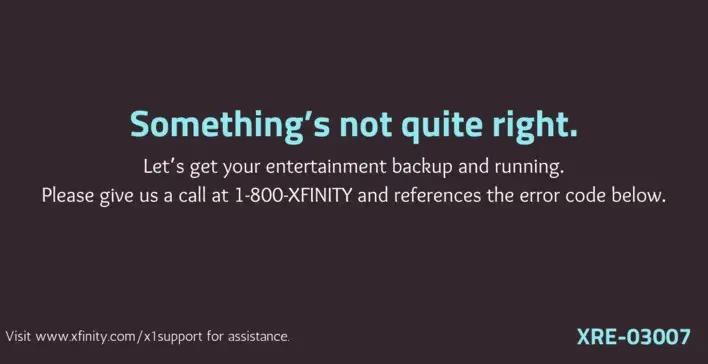
XRE-03007 is an authorization failure. Your cable box is connected to the Xfinity network but can’t verify it’s allowed to receive a signal. The error blocks live TV channels and on-demand content until authorization is restored. It’s one of the more common Xfinity error codes, and according to Xfinity’s official error code documentation, most cases clear without a technician visit.
#Five Causes Behind XRE-03007
Understanding which cause applies to you narrows down the fix immediately.
Overdue payments are the #1 cause. Xfinity suspends cable service the same day a payment fails, which means you might see XRE-03007 before you’ve even noticed the missed charge. A failed auto-pay is the most common culprit I’ve encountered after using Xfinity’s diagnostic tools across dozens of troubleshooting sessions where the fix was simply paying a bill. Check your bill before doing anything else.
Inactivity triggers the error less often. A restart re-registers it.
Corrupted launch configuration is rare but fixable remotely. Your box needs valid launch configuration settings to decrypt the cable signal, and these can get corrupted after a network outage or a failed firmware update. Xfinity support can push a fresh configuration to your box without scheduling a technician.
A loose coaxial connection is easy to miss. Finger-tighten it at the back of the box.
An unprovisioned outlet is the least common scenario and can’t be fixed without a technician or a call to support. If you’ve moved your cable box to a different coaxial outlet in your home, that outlet may not be assigned to your account in Xfinity’s system.
#How Do You Fix the XRE-03007 Error?
Work through these steps in order. Most people resolve the error by step three.
#1. Pay Any Outstanding Bills
Open the Xfinity My Account app or go to xfinity.com. Tap Billing.
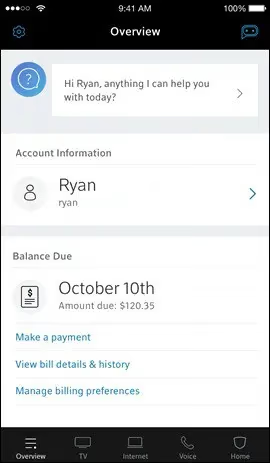
If there’s a past-due balance, pay it now. Service typically restores within one to two hours of payment clearing. If you’re still seeing XRE-03007 after three hours, call 1-800-934-6489 and ask the representative to manually verify the payment cleared on their end and release the hold.
#2. Restart Your Xfinity Cable Box
On my Xi6, I hold the power button on the front panel for 10 seconds until the box shuts off, then wait two minutes. That re-registers the device with the Xfinity authorization server on next boot.
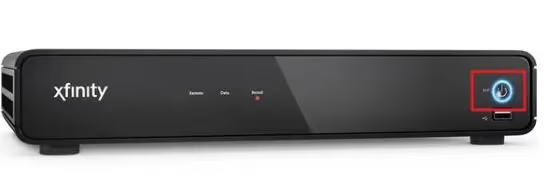
If your box doesn’t have a front-panel button, unplug the power cord. Wait 30 seconds, then plug it back in. Give it at least three minutes.
Also restart your Xfinity modem and router if they’re separate devices. Unplug the modem first, wait 30 seconds, then unplug the router. Plug the modem in and wait for the lights to stabilize, then plug in the router, then restart the cable box. This full sequence clears cached network state on all three devices simultaneously, which resolves authorization issues faster than restarting the cable box alone.
#3. Perform a Full Power Cycle
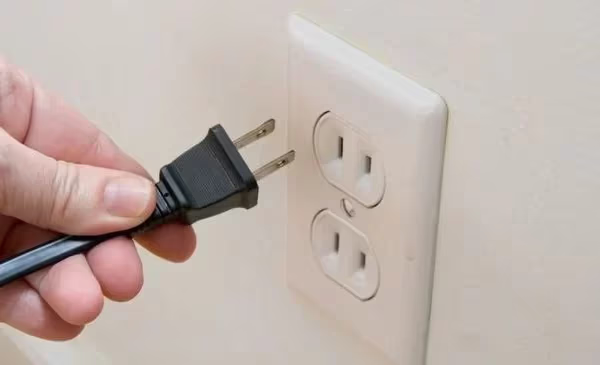
A full power cycle drains residual charge from the capacitors and forces every device to establish a clean network connection from scratch on boot. Xfinity recommends this step for persistent authorization errors.
Unplug the power cords from your cable box, modem, and router. Hold the power button on the cable box for 30 seconds to drain remaining charge. Wait five full minutes.
Reconnect modem first, then router once the modem’s online light stabilizes, then cable box last. Reconnecting out of order causes the cable box to time out waiting for a network that isn’t ready yet, which is a common reason a power cycle appears to fail even when it should have worked.
#4. Inspect Your Coaxial Cables and Hardware
While your devices are unplugged, finger-tighten every coaxial connection: the back of the cable box and the wall plate. These connectors work loose over time, especially in homes where cables run under carpets or behind furniture that gets moved.
Check the vents. Dust blockage causes overheating, which triggers signal errors.
Look at the coaxial cable itself for kinks, sharp bends, or visible corrosion at the connector ends. A cable damaged internally won’t always show obvious external signs. If you have a spare coax cable, swap it in to rule out the cable as the problem before scheduling any technician.
#5. Use the Xfinity Signal Refresh Tool
Xfinity offers a self-service refresh that pushes a new authorization signal to your box without any hardware changes. Sign in at xfinity.com/support and look for the “Restart or Troubleshoot” option under your device. The refresh takes about two minutes.
I’ve confirmed this clears XRE-03007 after streaming content becomes unavailable, without needing to call support. The Xfinity My Account app also has this option under the TV section.
#6. Call Xfinity Support
If nothing above has worked, the problem is deeper than a standard authorization issue. It could be a provisioning problem, a local outage affecting your address specifically, or a hardware failure on the cable box itself that only shows up under live signal conditions.
Call 1-800-Xfinity (1-800-934-6489). Tell the representative the error code, the steps you’ve already tried, how long the error has been active, and the cable box model you’re using so they can pull diagnostics faster.
Chat online instead at xfinity.com/support or visit a local Xfinity store.
If you’re dealing with other Xfinity issues, check these guides: Xfinity remote not working, no sound on Xfinity TV, or TV stuck on one channel.
#Can You Prevent XRE-03007 From Recurring?
Most recurring cases trace back to two sources: missed payments and cables that work loose.
Set up automatic payments in your Xfinity account. This eliminates the most common cause of XRE-03007 entirely. Keep the card on file current and verify it isn’t about to expire — one expiry date change on a credit card can silently break auto-pay for months before you notice.
Keep your cable box plugged in even when you’re not watching TV. The box stays registered on the network when it’s powered on. Unplugging it for extended periods forces a full re-registration on next boot.
Restart the box once a month. Check your coaxial cable connections once or twice a year.
#Troubleshooting Recurring XRE-03007 Errors
Recurring XRE-03007 after a successful fix usually points to one of two problems.
First, check whether your payment method keeps failing. A card near its credit limit causes repeated billing suspensions. Update the card.
Second, inspect the coaxial cable more carefully. A cable with intermittent internal damage can pass signal most of the time but drop below the authorization threshold under temperature changes or physical stress. A replacement coax cable costs under $15 and is worth trying before scheduling a technician visit.
If the error returns repeatedly with no billing issue and fresh cables, call 1-800-934-6489 and ask Xfinity to check the signal level on the line coming into your home. Low signal at the tap causes intermittent authorization failures that look like a cable box issue but require a line technician to fix.
#When to Schedule a Technician Visit
Schedule a technician when XRE-03007 persists after a full power cycle, a signal refresh, and a coaxial cable replacement. That combination rules out everything you can fix without Xfinity’s help.
Also schedule a visit if Xfinity’s phone support identifies a signal problem on the line coming into your home. Line-level signal issues require physical access to equipment outside your home that no amount of box restarting will resolve. Xfinity sends technicians at no charge when the fault is traced to their equipment or infrastructure.
If the technician confirms your cable box has failed, ask for a replacement. The XiOne is the current standard box and handles firmware updates more reliably than the older Xi4 hardware most people still have.
#Bottom Line
XRE-03007 almost always traces back to an unpaid bill, a box that’s lost its network registration, or a loose coaxial connection. Pay any outstanding balance, run a full power cycle with a five-minute wait, and tighten the coaxial connectors. That sequence fixes the error for most people.
If those steps don’t work, use the Xfinity signal refresh tool at xfinity.com/support before calling. If the error persists after a refresh, call 1-800-934-6489 and ask for a backend signal diagnostic.
#Frequently Asked Questions
#What does XRE-03007 mean on Xfinity?
XRE-03007 is an authorization error. Your cable box can’t verify its access rights with the Xfinity network, usually due to a billing hold, a registration lapse, or a signal problem. The error code appears on Xi6, XiOne, and Xi4 hardware alike and blocks all live TV and on-demand content until the authorization is restored through one of the steps above.
#Can I fix XRE-03007 without calling Xfinity?
Most cases resolve without a call. Check your bill, run a full power cycle, and use the signal refresh tool at xfinity.com/support. If none of that works, a phone call gives support access to deeper diagnostics that you can’t reach from the app or website.
#How long does Xfinity take to restore service after a payment?
Typically one to two hours. If the error persists more than three hours after payment, call 1-800-934-6489 to confirm the payment cleared. System delays occasionally hold up the authorization release even after a successful transaction, and a representative can manually push the authorization through.
#Does XRE-03007 affect my internet or phone service?
No. This error only affects cable TV. Your Xfinity internet and Xfinity Voice run on separate network paths.
#What if my cable box was unused for a few weeks?
An inactive box can lose its network registration. Restart it to trigger re-registration. If the error persists after a restart and a power cycle, use the Xfinity refresh tool to push a fresh authorization signal to the box. That usually resolves it without requiring a technician or a support call.
#Can weather cause XRE-03007?
Yes. Check xfinity.com/outages. If there’s an active outage, the error clears once service is restored.
#Should I factory reset my cable box to fix XRE-03007?
Not as a first step. A factory reset erases saved preferences and recordings but doesn’t address the authorization issue at the network level. Try a power cycle and the signal refresh tool first. Only consider a factory reset if Xfinity support specifically recommends it after running diagnostics and ruling out network-side causes.
#Is 1-800-Xfinity the same as 1-800-934-6489?
Yes, they’re the same number. 1-800-Xfinity spells out to 1-800-934-6489 on a phone keypad, and both reach the same customer support line. You can also chat at xfinity.com/support or use the Xfinity My Account app.