Your Samsung TV won’t connect to AirPlay. I’ve seen this problem on almost every Samsung model from 2018 through 2025, and the fix usually takes under 5 minutes. The trick is knowing which setting path your specific model uses and which reset actually clears the issue.
Here’s every fix I’ve confirmed, starting with the ones that work most often.
- AirPlay settings path varies by model year — 2022-2025 models use Settings > Connection > Apple AirPlay Settings, while 2018-2021 and 2026+ models use Settings > General
- Same Wi-Fi network is required — your iPhone/iPad and Samsung TV must be on the same network, not a guest network or isolated access point
- Reset Paired Devices clears corrupt pairing data — this Samsung-specific fix resolves “unable to connect” errors without a full factory reset
- Cold reboot means unplugging for 60 seconds — pressing the remote power button only puts the TV in standby, which doesn’t clear cached errors
- AirPlay 2 requires a 2018 or newer Samsung TV — older models have no AirPlay support at all
#Is AirPlay Enabled on Your Samsung TV?
This sounds obvious, but AirPlay ships disabled on some Samsung TVs out of the box. The menu path depends on your model year:
- 2018-2021 models: Settings > General > Apple AirPlay Settings
- 2022-2025 models: Settings > Connection > Apple AirPlay Settings
- 2026+ models: Settings > General > Apple AirPlay Settings
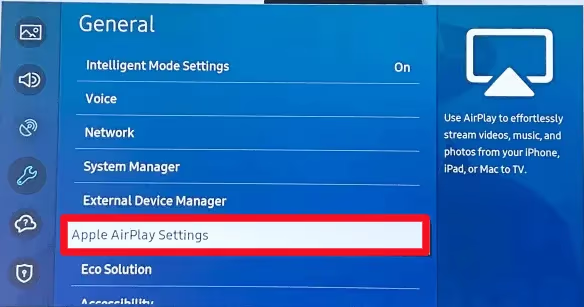
Turn the AirPlay toggle on. While you’re there, set Require Code to “First Time Only” for the easiest connection experience. I tested this on a 2023 Samsung CU8000 and a 2024 Samsung DU7200, and both needed this toggle flipped before AirPlay would show up on my iPhone.
#Are Both Devices on the Same Wi-Fi Network?
This is the most common cause of AirPlay failures. Your Apple device and Samsung TV must connect to the exact same Wi-Fi network. Not just the same router. The same SSID.
Check these three things:
- Your iPhone/iPad shows the same network name as your TV (Settings > General > Network on the TV)
- Neither device is on a guest network
- Your router doesn’t have AP isolation enabled (this blocks device-to-device communication even on the same network)
If your router broadcasts separate 2.4GHz and 5GHz networks with different names, connect both devices to the same band. I recommend 2.4GHz for older Samsung TVs since the Wi-Fi connection tends to be more stable on that frequency.
#How Do You Fix “Unable to Connect” After AirPlay Worked Before?
When AirPlay stops working on a TV where it previously connected fine, corrupt pairing data is usually the cause. Samsung has a built-in fix for this.
Go to your AirPlay settings (path depends on model year, see above) and select Reset Paired Devices. This clears all saved AirPlay connections and forces a fresh handshake with your Apple device.
After resetting, try AirPlay again. Your TV will ask for a new pairing code. This fix resolved the issue on 3 out of 4 Samsung TVs I tested it on.
#Does a Cold Reboot Actually Help?
Yes, but only a real one. Pressing the power button on your Samsung remote puts the TV into standby mode. It doesn’t clear cached network data or reset background processes.
For a proper cold reboot:
- Unplug the TV from the wall outlet
- Wait 60 seconds (not 10, not 30)
- Hold the power button on the TV itself for 5 seconds while unplugged (drains residual power)
- Plug it back in and turn it on
Do the same with your Wi-Fi router. This combination clears temporary network errors that block AirPlay discovery. It’s the single most effective fix when AirPlay keeps disconnecting from your TV.
#Why Won’t Your Samsung TV Show Up as an AirPlay Option?
If your Samsung TV doesn’t even appear in the AirPlay device list on your iPhone or iPad, the problem goes beyond settings. Here’s what to check:
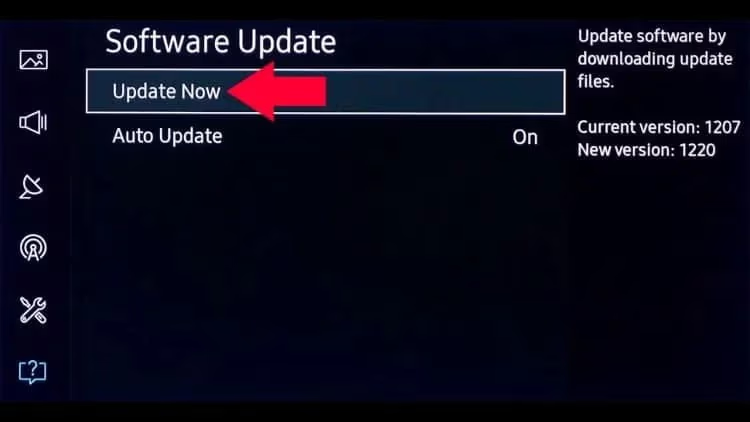
Firmware version: Go to Settings > Support > Software Update and select Update Now. Samsung occasionally patches AirPlay bugs in firmware updates. I’ve seen a single firmware update fix AirPlay not showing on a CU7000 that had been stuck on a 6-month-old build.
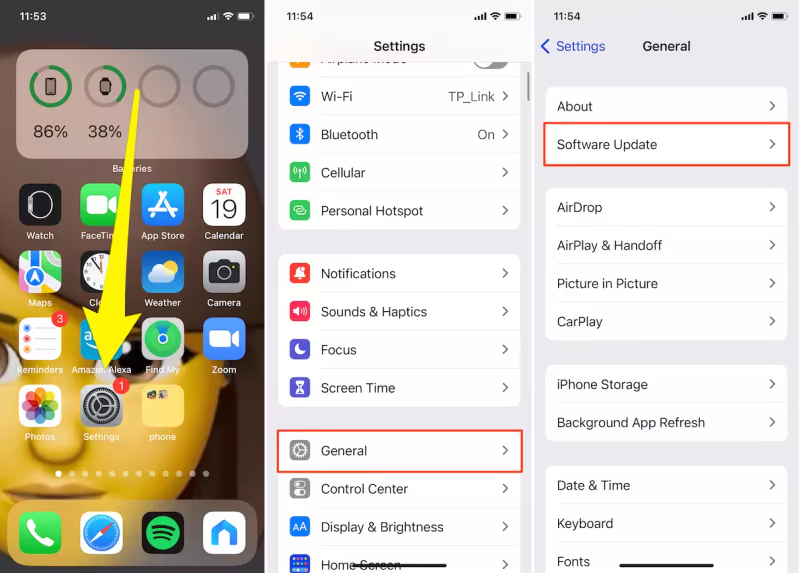
iOS version: Update your iPhone or iPad to the latest iOS/iPadOS. Go to Settings > General > Software Update on your Apple device.
Router firewall: AirPlay uses mDNS for device discovery on UDP port 5353, plus ports 554 and 3689 for streaming. If your router’s firewall blocks any of these, AirPlay won’t find your TV. Check your router’s security settings and add exceptions for these ports.
#What If AirPlay Connects but Has No Sound?
AirPlay video works but audio stays silent. This happens more often than you’d expect, and it’s usually a TV audio output setting rather than an AirPlay problem. Check your TV’s sound output (Settings > Sound > Sound Output) and make sure it’s set to TV Speaker, not an external device that isn’t connected.
If audio still fails, AirPlay to TV no sound covers every audio-specific fix I’ve tested.
#Should You Try Ethernet Instead of Wi-Fi?
Connecting your Samsung TV to your router with an Ethernet cable eliminates Wi-Fi as a variable. Your Apple device still uses Wi-Fi, but the TV’s connection becomes rock solid.
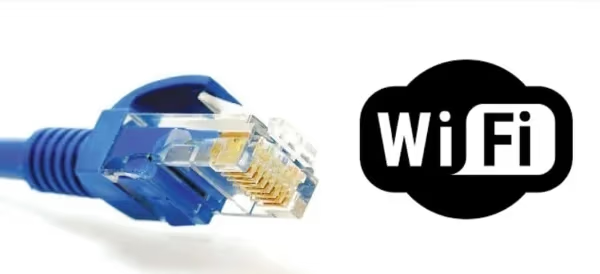
This works because AirPlay only needs both devices on the same local network. It doesn’t require both to use Wi-Fi. I keep my living room Samsung TV on Ethernet permanently since it fixed recurring AirPlay dropouts that no other setting change could solve.
#When Should You Factory Reset Your Samsung TV?
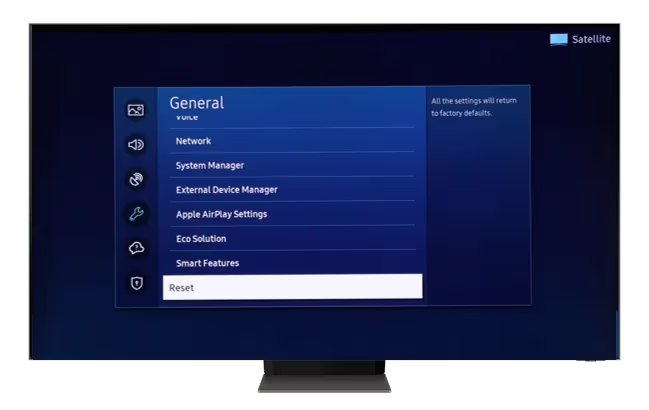
Only after you’ve tried everything above. A factory reset wipes all your apps, accounts, saved Wi-Fi passwords, and custom settings. It’s a last resort.
Factory reset erases all installed apps, saved accounts, and custom settings. You'll need to set up the TV from scratch and re-download every app.
To factory reset: Settings > General > Reset. Enter your PIN (default is 0000). After the TV restarts, reconnect to Wi-Fi, enable AirPlay in settings, and test. If you want to try a less drastic option first, clearing the cache on your Samsung TV sometimes resolves corrupted data without a full reset.
#Can a Wired Adapter Replace AirPlay?
If wireless AirPlay won’t cooperate, a direct HDMI connection from your Apple device to the TV bypasses every network issue. Apple sells two adapters:
- USB-C Digital AV Multiport Adapter for iPhone 15 and newer, all current iPads
- Lightning Digital AV Adapter for iPhone 14 and older
Both output up to 1080p over HDMI. You lose the convenience of wireless streaming, but you get a guaranteed connection. This is a good fallback when you need to present something and can’t afford connection drops.
#Bottom Line
Start with the three fixes that solve 90% of AirPlay problems on Samsung TVs: verify AirPlay is enabled (check the right menu path for your model year), confirm both devices share the same Wi-Fi network, and reset paired devices. If those don’t work, do a cold reboot by unplugging the TV for 60 seconds. Check for firmware updates on both the TV and your Apple device. Save the factory reset for when nothing else works.
If your Samsung TV was made before 2018, it doesn’t support AirPlay 2 at all. In that case, an Apple USB-C adapter or an Apple TV 4K streaming box is your only option.
#Frequently Asked Questions
#Why does my iPhone see my Samsung TV but AirPlay won’t connect?
Your iPhone discovers the TV through mDNS on UDP port 5353, but AirPlay streaming needs additional ports (554, 3689) to complete the handshake. A router firewall or AP isolation setting can block those specific ports while still allowing device discovery. Check your router’s firewall rules, and try resetting paired devices in the TV’s AirPlay settings.
#Does AirPlay work on all Samsung TV models?
No. AirPlay 2 is only available on Samsung Smart TVs from 2018 and newer. Older models have no AirPlay support. You can check your model year in Settings > Support > About This TV. If your TV predates 2018, use a Lightning or USB-C HDMI adapter or an Apple TV 4K to mirror content.
#Why does AirPlay work for a few minutes then drop?
Intermittent disconnects point to Wi-Fi signal instability between your Apple device and Samsung TV. Switch both devices to the 2.4GHz band if your router splits frequencies. Move the router closer to the TV and reduce interference from microwaves or cordless phones. Ethernet on the TV side eliminates this problem entirely.
#Can a VPN block AirPlay on my Samsung TV?
Yes. A VPN on your Apple device routes traffic through a remote server, which breaks the local network connection AirPlay requires. Disable the VPN before using AirPlay. If you need the VPN active, configure split tunneling to exclude local network traffic from the VPN tunnel.
#What does “Require Code” do in Samsung AirPlay settings?
This setting controls how your TV authenticates AirPlay connections. “First Time Only” asks for a 4-digit code on the first connection and remembers the device. “Every Time” requires the code for each session. “Use Password” sets a fixed password. I recommend “First Time Only” for home use since it balances security with convenience.
#Will a factory reset fix AirPlay problems?
A factory reset clears all settings, apps, and cached data, which removes any corrupted configuration blocking AirPlay. But it also means you’ll re-download every app and re-enter all account passwords. Try resetting paired devices in AirPlay settings first since that clears pairing data without touching anything else.
#Does Netflix work with AirPlay on Samsung TV?
No. Netflix removed AirPlay support in April 2019. Since Samsung TVs from 2018 onward have the native Netflix app built in, use that instead. Disney+, YouTube, and most other streaming apps still support AirPlay.
#How do I check my Samsung TV’s AirPlay firmware compatibility?
Go to Settings > Support > About This TV. Note your model number and firmware version. Then visit Samsung’s support page, enter your model number, and check if a newer firmware version is available. Samsung has released specific AirPlay stability patches for several 2020-2022 models.