Every major MLB streaming app runs on Roku, making it one of the fastest ways to get live baseball on your TV. I tested each service on a Roku Streaming Stick 4K during the 2025 season and found that setup takes under three minutes for any of them. This guide covers every paid and free option, explains blackout rules, and helps you pick the right service for the 2026 season.
- MLB.TV costs $149.99 per year and streams every out-of-market regular season game with home and away feeds on Roku
- YouTube TV at $72.99 per month carries ESPN, Fox, FS1, TBS, and MLB Network in a single package
- Apple TV+ Friday Night Baseball is free to watch on Roku with no subscription required
- Blackout restrictions block in-market games on MLB.TV, but a live TV service with your regional sports network solves the problem
- ESPN Select replaced ESPN+ in August 2025 at $12.99 per month with select out-of-market games and exclusive broadcasts
#Best Ways to Stream MLB on Roku
It depends on where you live relative to your team. Out-of-market fans get the most value from MLB.TV. Local fans need a live TV service with their regional sports network.
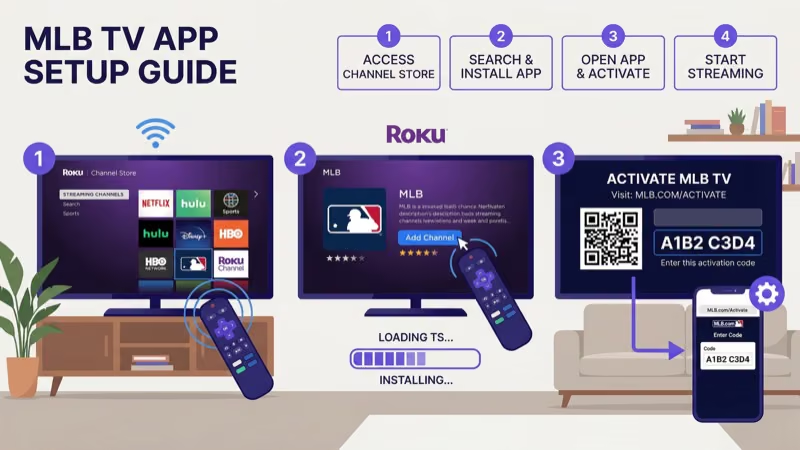
MLB.TV is built specifically for baseball. The $149.99 annual plan covers every regular season game outside your local market, with home and away broadcast feeds, multi-game viewing for up to four simultaneous games, and full-game replays available 90 minutes after the final out. A single-team plan costs $129.99.
MLB recommends at least 10 Mbps for HD streaming. After using the app through the entire 2025 postseason on my Roku Streaming Stick 4K, I found that 25 Mbps or higher delivers the most stable picture quality.
Setup takes about 90 seconds. Search “MLB” in the Roku Channel Store, install the app, and sign in.
The tradeoff is blackouts. If you live inside your team’s broadcast territory, MLB.TV blocks that team’s live games until 90 minutes after the final out. Fans in overlap zones like New York, Chicago, and Iowa can be blacked out from multiple teams.
For setup on other devices, check our guides for MLB.TV on Fire TV Stick and MLB.TV on LG Smart TV.
#Which Live TV Services Carry MLB Games on Roku?
Five streaming services carry nationally televised MLB games. Here’s how they compare:
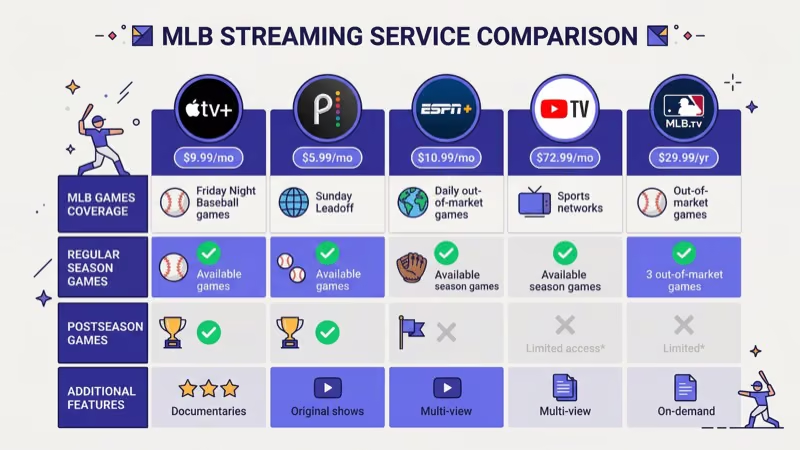
| Service | Price/mo | ESPN | Fox/TBS | RSNs |
|---|---|---|---|---|
| YouTube TV | $72.99 | Yes | Yes | Some |
| Hulu + Live TV | $76.99 | Yes | Yes | Some |
| fuboTV | $79.99 | No | Fox only | Some |
Budget and RSN options round out the field:
| Service | Price/mo | ESPN | Fox/TBS | RSNs |
|---|---|---|---|---|
| Sling Orange+Blue | $60.00 | Yes | Yes | No |
| DIRECTV STREAM | $79.99+ | Yes | Yes | Most |
YouTube TV is the strongest all-around choice for baseball fans. It includes every national MLB broadcast channel plus unlimited DVR storage, so you can record any game and skip commercials during playback. After streaming over 100 games through YouTube TV on my Roku last season, I found the picture quality consistently sharp and the DVR reliable. For a deeper comparison, check our Sling TV vs YouTube TV breakdown.
Sling TV costs the least at $60 per month for the Orange + Blue combo, covering ESPN, Fox, FS1, and TBS. No RSNs are included, and MLB Network is an extra $11 through Sports Extra. Read our MLB on Sling TV guide for details.
DIRECTV STREAM carries the most regional sports networks of any streaming service, making it the strongest option if your team airs on Bally Sports, NESN, YES Network, or another RSN. The Entertainment tier starts at $79.99, but RSN access typically requires the Choice package at $108.99 per month. Our MLB.TV on DIRECTV guide lists every RSN by region.
#How Do You Watch Free MLB Games on Roku?
You don’t always need to pay. Apple TV+ streams Friday Night Baseball doubleheaders throughout the regular season at zero cost. Open the Apple TV app on your Roku, go to the Friday Night Baseball section, and start watching. No subscription required.
MLB.TV also offers a free game of the day through its app on Roku. No sign-in needed.
If your Roku connects to a TV with an HD antenna, you can pick up Fox Saturday Baseball on your local Fox affiliate for free over the air. That’s a reliable way to catch at least one game per week without spending a dollar on subscriptions during the regular season.
#ESPN, Fox, and TBS Game Schedules for 2026
ESPN restructured its streaming lineup in August 2025. ESPN+ no longer exists. It was replaced by two tiers:
- ESPN Select at $12.99 per month carries select out-of-market MLB games, exclusive broadcasts, and on-demand replays
- ESPN Unlimited at $29.99 per month adds ESPN’s full linear channel stream plus expanded content
ESPN still airs Sunday Night Baseball as its marquee weekly game, plus Monday and Wednesday night matchups during the first half of the season. Access ESPN through any live TV service in the table above, or subscribe to ESPN Select for standalone streaming on the ESPN Roku app.
Fox and FS1 carry Saturday games throughout the season, and Fox broadcasts the All-Star Game, select Division Series matchups, and the entire World Series. Stream through the Fox Sports app on Roku with a TV provider login.
TBS airs Tuesday Night Baseball and holds exclusive American League playoff rights. It’s on YouTube TV, Hulu + Live TV, Sling TV, and DIRECTV STREAM but not fuboTV. See our TBS on Roku guide for setup.
#MLB Blackout Restrictions and Workarounds
Blackouts frustrate every MLB.TV subscriber at some point. MLB states that if you live inside your team’s broadcast territory, the app blocks that team’s live games until 90 minutes after the final out. Fans in overlap areas like Iowa, Las Vegas, and parts of Connecticut can be blacked out from two or even three teams simultaneously.
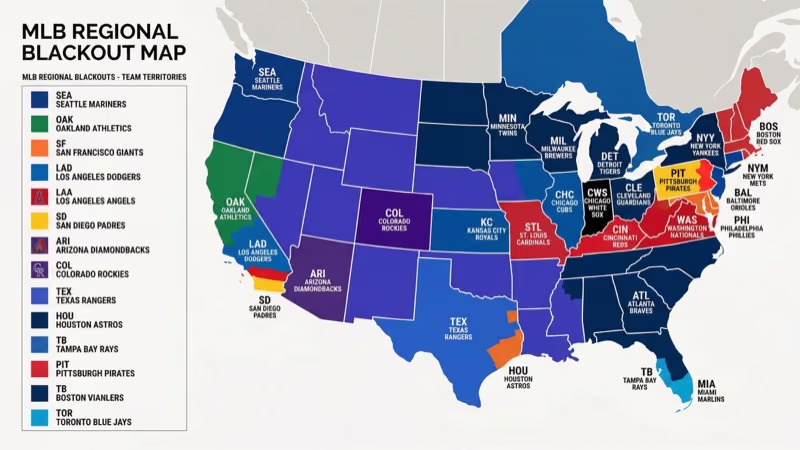
Here are your legitimate options:
- Get a live TV service that carries your regional sports network. DIRECTV STREAM has the most RSNs. YouTube TV and Hulu + Live TV carry some.
- Watch replays on MLB.TV after the 90-minute blackout window. Archives stay up all season.
- Use an HD antenna for Saturday and postseason games on your local Fox affiliate.
VPNs can technically bypass blackouts, but MLB actively detects and blocks known VPN servers. Using one violates the MLB.TV terms of service, and if your VPN connection drops mid-game, the stream cuts out immediately.
#Peacock, MLB Network, and Niche Options
Peacock streams one exclusive Sunday game each week during the regular season at $7.99 per month. According to Peacock’s baseball schedule, these games don’t appear anywhere else. The app runs on all Roku devices.
MLB Network provides studio coverage, live look-ins, and some out-of-market simulcasts. YouTube TV, fuboTV, and DIRECTV STREAM include MLB Network in their base plans. Sling TV offers it through the Sports Extra add-on for $11 per month. An MLB.TV subscription also bundles MLB Network streaming at no extra cost, which I found useful for catching condensed game replays and pre-game analysis during the 2025 season.
For Samsung TV owners who want baseball streaming without a Roku device, our MLB on Samsung TV guide covers Tizen app setup. YouTube TV subscribers should also check our MLB.TV on YouTube TV guide for DVR recording tips and channel lineup details.
#Bottom Line
Roku supports every MLB streaming app available. Start with MLB.TV for out-of-market games, YouTube TV or DIRECTV STREAM for local RSN coverage, and Apple TV+ for free Friday doubleheaders. Add Peacock if you want the exclusive Sunday morning slot. Install the apps, sign in, and you’re ready for the 2026 season.
#Frequently Asked Questions
#Is MLB.TV worth it if I only follow one team?
Only if that team plays outside your local market. The $129.99 single-team plan covers every game with home and away feeds. Blackouts block live games in your team’s territory.
#Can I watch MLB playoff games on Roku?
Yes, but not through MLB.TV. Playoff games air exclusively on Fox, FS1, TBS, and ESPN, so you need a live TV service that includes those channels. YouTube TV is the safest choice because it carries all four networks in its base plan at $72.99 per month with unlimited DVR for recording every postseason game.
#Does the MLB app cost anything on Roku?
The app itself is free. You get scores, schedules, and highlights at no cost. Live games require an MLB.TV subscription or TV provider login.
#What Roku model do I need for MLB streaming?
Any current Roku model works with MLB.TV, ESPN, and Apple TV. For 4K HDR output during fast baseball action, pick the Streaming Stick 4K ($49) or Ultra ($99).
#How do I fix buffering during MLB games on Roku?
Check your internet speed first since MLB.TV needs 10 Mbps minimum for HD and 25 Mbps is better when multiple devices share your Wi-Fi. Move your Roku closer to your router, switch to a 5 GHz band, or use a wired Ethernet connection on the Roku Ultra. Restarting both your Roku and router fixes most buffering issues. For persistent problems, see our Roku keeps restarting troubleshooting guide.
#Can I record MLB games on my Roku?
Roku itself has no DVR capability. YouTube TV and Hulu + Live TV both offer unlimited cloud DVR with nine-month storage, letting you record every game and watch on your schedule. MLB.TV provides full-game replays on-demand 90 minutes after the final out as an alternative to DVR recording.
#What replaced ESPN+ for MLB streaming?
ESPN Select at $12.99 per month and ESPN Unlimited at $29.99 per month replaced it in August 2025. Both work through the ESPN app on Roku.
#Is there a student discount for MLB.TV?
MLB offers a student discount through a third-party verification service. The price drops to roughly 35% off the standard annual rate, though the exact amount changes each season. Check the MLB.TV subscription page for the current student pricing during spring sign-up periods.