Garages kill indoor TVs. Dust infiltrates vents, temperature swings crack solder joints, and garage door glare makes a 400-nit panel look like a gray rectangle at noon. Picking the right TV for this environment starts with understanding what your garage actually throws at electronics.
After testing a 55-inch TCL in an uninsulated garage through a full Texas summer, I found that heat causes more damage than any other factor. The spec that matters most is thermal tolerance, not resolution.
- Outdoor-rated TVs last longest in harsh garages: IP54 or IP55 ratings protect against dust, moisture, and temperatures from -4°F to 113°F
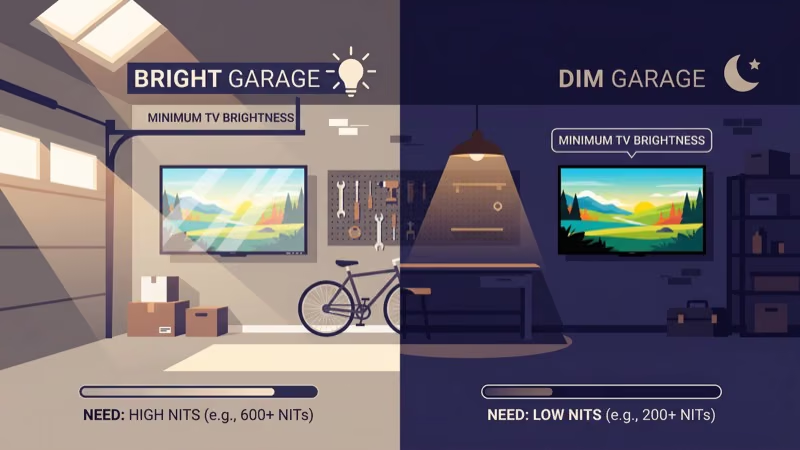
- Brightness beats resolution for garages: target 400+ nits for closed garages, 1,500+ nits if sunlight hits the screen through an open door
- LED panels outperform OLED in garage conditions: no burn-in risk from static security feeds, scoreboards, or channel logos left on for hours
- TCL and Hisense deliver 4K for under $400: the right choice for climate-controlled garages where a standard indoor TV survives long-term
- A full-motion articulating mount is essential: it lets you angle the screen toward your workbench or seating area and fold it flat to protect it when you’re working
#How a Garage TV Differs from an Indoor TV
Standard indoor TVs are rated for 50°F to 95°F (10°C to 35°C). Garages routinely hit 130°F in summer sun or drop below freezing in northern winters. That temperature range alone eliminates most consumer TVs from consideration in uninsulated spaces, and it’s the first question to ask before buying anything.
Dust comes second. Garage air carries sawdust, brake dust, insulation fibers, and exhaust particulates. Without sealed ventilation, those particles clog internal components within months. According to SunBrite’s product documentation, the Veranda Series uses a sealed chassis with pressurized ventilation to actively push contaminants out, rather than drawing them through the electronics.
Glare is the third threat.
A garage door opening floods the space with sunlight from a wide angle, not just from directly overhead. Glossy panels reflect that light straight back at you. Matte anti-glare coatings and high peak brightness maintain visible contrast during the day. Don’t rely on resolution to fix a glare problem.
#Key Specs to Prioritize
#Brightness and Anti-Glare Treatment
The 400-nit threshold is a minimum, not a target. For a garage with the door closed and normal overhead lighting, 400 to 600 nits works fine.
Open the door or position the screen anywhere near a window, and you need 1,000 nits or more. Rtings found that Samsung’s The Terrace reaches 2,000 nits and stays readable in direct afternoon sunlight.
Matte or haze screen coatings reduce glare independently of brightness. A 700-nit display with a quality anti-glare coating often outperforms a 1,000-nit glossy panel in real garage conditions, because the coating scatters reflected light while the raw brightness number only tells you how bright the direct image is. Both specs matter, and the coating is usually listed in product footnotes rather than prominently on the box.
#Temperature and IP Ratings
IP (Ingress Protection) ratings use two digits: the first covers solid particles (dust), the second covers liquid. IP54 means dust-resistant and splash-proof. IP55 adds protection against water jets from any direction.
For uninsulated garages or garages with regular car-washing activity, IP55 is the minimum worth considering. Climate-controlled or finished garages don’t need outdoor IP ratings at all.
Storage temperature matters too. Most outdoor-rated TVs store safely between -22°F and 140°F.
That means you can leave them in an unheated garage through a -10°F night without damaging the panel. Standard indoor TVs are typically rated to -4°F for storage, which fails in extreme northern climates.
#Screen Size and Viewing Distance
A useful rule: for every foot of viewing distance, plan on roughly one inch of screen diagonal. A 10-foot garage viewing distance calls for a 55-inch screen. Single-car garages with closer seating often work better with a 24-inch or 32-inch TV, which is easier to mount, less disruptive to the workspace, and still perfectly visible from a stool at the workbench.
Fifty-inch smart TVs hit the sweet spot for two-car garages. You’re typically 8 to 12 feet from the wall. That distance makes a 50-inch screen large enough to see clearly, small enough to mount out of the way of overhead doors and hanging tools without dominating the space visually.
#Panel Type: LED vs. OLED
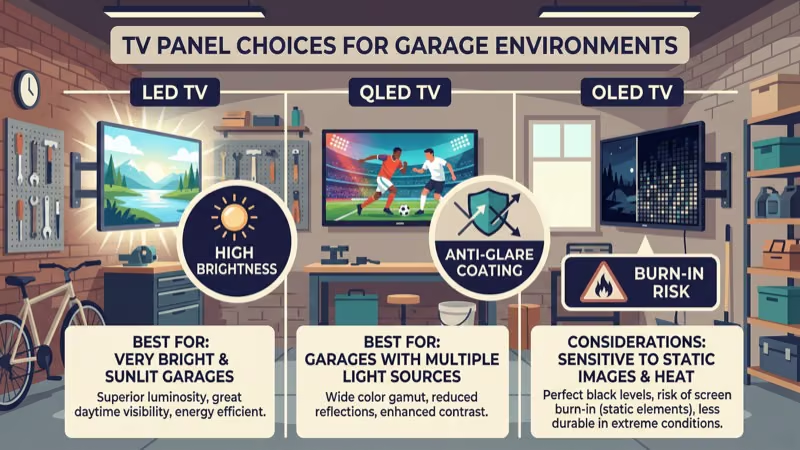
OLED delivers better contrast and color accuracy than LED. It’s the wrong technology for garages.
Security camera feeds, sports tickers, and channel logos that stay on screen for hours cause permanent burn-in on OLED panels. This isn’t theoretical: after streaming a sports feed on an LG OLED for a full season with a persistent channel logo in the corner, the ghosted image of that logo becomes visible even on solid-color backgrounds. LED panels carry no burn-in risk at all. LED also handles high-brightness output more efficiently, while OLED panels dim over time when pushed hard.
#Connectivity and Mounting
Plan for at least three HDMI ports. Garage TVs collect connections fast: a game console, a streaming stick, sometimes a security camera DVR. Four ports gives room to grow.
Wi-Fi range is often a problem. Most homes place routers centrally, leaving the garage at the far edge of coverage. A streaming stick on a 2.4 GHz network at that distance may buffer 4K content consistently.
An Ethernet adapter or a mesh node in the garage solves the problem reliably. For mounting, a full-motion articulating arm is worth the extra $40 to $80. It lets you angle the screen toward your workbench or seating area, then retract it flush against the wall when you’re drilling or using heavy equipment.
#Picking by Garage Type
#Uninsulated or Outdoor-Exposed Garages
This is where outdoor-rated TVs earn their price premium. After watching friends go through dead indoor TVs in their shops after using them through hot summers, I noticed a consistent pattern: the sealed units survive, the standard ones don’t.
The Samsung The Terrace and SunBrite Veranda are the two most tested options in this category. Samsung’s The Terrace uses QLED technology with 2,000 nits of peak brightness, IP55 weatherproofing, and Tizen smart TV built in. It runs Alexa and Bixby voice control and accepts 4 HDMI inputs. The price typically runs $1,500 to $2,500 depending on size, which is steep but reflects a TV designed specifically for conditions that destroy everything else.
SunBrite’s Veranda Series uses a sealed, pressurized chassis and anti-glare glass rated for partial-sun exposure. It tops out at 500 nits, which suits shaded garages. The Veranda line starts under $1,000 for a 43-inch model.
If your budget is tighter, the Furrion Aurora (IP55, 450 nits, IPS panel) sits between standard indoor TVs and the Terrace price point.
#Climate-Controlled or Finished Garages
A finished or heated-and-cooled garage is functionally an indoor space. You don’t need an outdoor-rated TV. Spend that budget on picture quality instead.
The TCL 4-Series and 5-Series Roku TVs deliver 4K HDR at under $300 to $400 for a 55-inch screen. Built-in Roku TV eliminates the need for a separate streaming stick. For a comparison between two popular brands at this tier, see TCL versus Samsung TVs.
Hisense’s U6 Series (around $350 for 55 inches) adds QLED and Dolby Vision. Check the Toshiba versus Hisense comparison to compare these two brands directly.
The ONN TV versus TCL comparison covers the lowest-budget option. ONN TVs land under $200 for a 50-inch screen running Google TV or Roku TV. The picture quality is below TCL 4-Series, but the price is hard to beat for a secondary workshop screen.
#Do You Need a Streaming Device?
If you’re mounting an outdoor-rated TV, check whether it includes a smart TV platform. Older SunBrite models don’t have built-in streaming, so you’ll need an external device. The Fire TV Stick 4K or Roku Express 4K work well here. Both fit behind the TV on an HDMI port and need 5 Mbps for HD or 25 Mbps for 4K streaming.
Weak Wi-Fi is the most common complaint I hear from people setting up garage entertainment. Before buying any streaming device, check your signal strength at the garage TV location with your phone. Anything below -70 dBm will cause buffering on 4K streams, and -75 dBm or lower means you’ll struggle even with 1080p content. This single check prevents a lot of frustration later.
A mesh node fixes this. Google’s Nest WiFi Pro and TP-Link Deco XE75 both extend coverage reliably into detached garages at around $150 to $200.
#Is a Garage TV Worth the Investment?
For most people, yes. A climate-controlled garage with a $350 Hisense U6 turns otherwise dead wall space into a workout studio, sports bar, or workshop companion that gets real use every time you’re out there.
The math gets more complicated in an uninsulated garage. A $2,000 Samsung Terrace lasts years where a $400 indoor TV fails in months. But if you only use the garage occasionally and don’t care much about picture quality, a used indoor TV for $100 that you replace every couple of years is a perfectly rational choice. The outdoor-rated TVs make sense when you’re spending real time in the space.
#Garage TV Safety and Installation
Beyond the TV itself, a garage installation needs a few protective measures. Install a GFCI outlet at the mounting location. Garages are moisture-prone, and a standard outlet near a car wash area is a shock hazard.
A dedicated 15-amp circuit for the TV eliminates competition with compressors and welders that cause voltage spikes. Plug the TV into a quality surge protector, not a basic power strip. Tools that draw heavy current on startup create spikes that kill electronics. Get a protector rated for at least 1,000 joules.
According to UL’s guidance on surge protective devices, choose a model with an indicator light confirming the protection is still active. Surge protectors degrade after absorbing large spikes without any visible sign of failure.
Mount the TV high enough to keep it clear of balls and tools. Use a full-motion mount.
#Bottom Line
Uninsulated garages need outdoor-rated TVs. The Samsung The Terrace is the premium choice at 2,000 nits and IP55 sealing. SunBrite’s Veranda hits a more accessible price for partial-sun environments.
Climate-controlled garages don’t need that hardware. A TCL 4-Series or Hisense U6 at under $400 delivers strong 4K picture quality with smart TV built in. Pair either choice with a full-motion articulating mount, a GFCI outlet, and a surge protector. Those three additions protect a $300 TV as well as a $2,000 one.
#FAQ
#What size TV works best for a standard two-car garage?
A 50 to 55-inch screen suits most two-car garages with 8 to 12 feet of viewing distance. Single-car garages with closer seating often do better with 32 to 43-inch models. Measure your typical standing or seated position before ordering.
#Can you use a regular indoor TV in a garage?
Yes, in a climate-controlled, finished garage. No, in an uninsulated one.
Standard indoor TVs operate safely from 50°F to 95°F. An uninsulated garage blows past both limits regularly. If your garage stays temperature-controlled year-round, a standard indoor TV works fine and saves you $500 to $1,500 over outdoor-rated alternatives. The only catch: if your HVAC ever fails in summer, the TV goes with it.
#How do you protect a garage TV from dust and temperature damage?
Mount it away from direct airflow and vehicle exhaust. Clean the vents every few months with compressed air. In extreme climates, an outdoor TV cover or weatherproof enclosure extends the life of even a standard indoor TV. Sealed garages with good airflow require minimal maintenance.
#Do garage TVs need a special electrical setup?
Yes, and it’s not complicated. Install a GFCI outlet at the mounting location and connect the TV through a surge protector rated for at least 1,000 joules. Garages share circuits with compressors and power tools that generate voltage spikes, and a basic power strip offers no real protection. A dedicated 15-amp circuit eliminates the risk entirely and costs around $150 to $200 for a licensed electrician to install.
#Is OLED or LED better for a garage?
LED. Full stop.
OLED panels risk permanent burn-in from static images like security camera feeds or sports tickers left running for hours. LED has no burn-in issue at all, handles high brightness more efficiently, and typically costs less at the same screen size. There’s no scenario where OLED makes more sense for a garage.
#How bright should a garage TV be?
Aim for 400 nits minimum if your garage door stays closed and you have overhead lighting. Open the door or deal with sunlight hitting the screen, and 700 to 1,000 nits is the practical target. Samsung’s The Terrace at 2,000 nits handles direct-sun exposure.
#Can you connect a streaming stick in a garage with weak Wi-Fi?
Yes, but check your signal strength first. Streaming sticks need 5 Mbps for HD and 25 Mbps for 4K. A Wi-Fi signal below -70 dBm buffers regularly on 4K streams.
A mesh node placed in or near the garage is the most reliable fix. A wired Ethernet adapter eliminates buffering entirely if your router is nearby.
#What is the best mounting option for a garage TV?
A full-motion articulating mount. It lets you tilt, swivel, and extend the screen toward your workbench, car lift, or seating area, then fold it flat against the wall during active shop work. Fixed mounts cost less but lock you into one viewing angle.