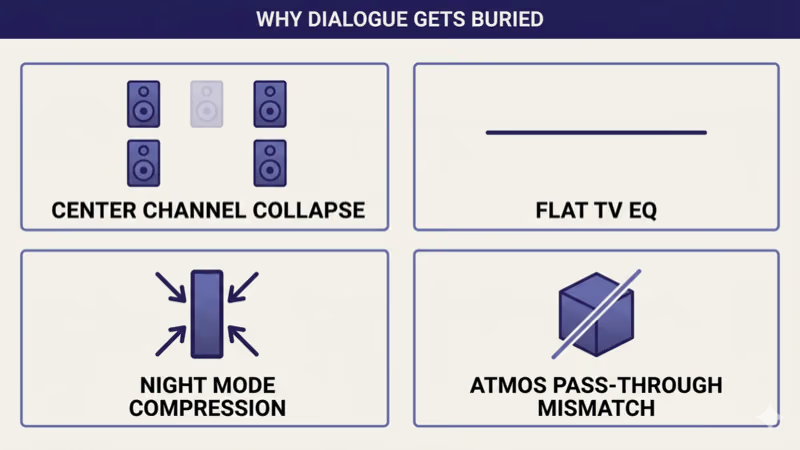
TV dialogue too quiet usually traces to one of four root causes: modern 5.1 and Dolby Atmos mixes place dialogue on a center channel that flat-screen TV stereo speakers physically can’t reproduce, the TV’s default EQ is flat and under-emphasizes the 1-4 kHz speech frequency range, Night Mode is compressing dynamic range so explosions and music drown out dialogue, or the streaming app is sending Bitstream Atmos to a TV that can’t decode it cleanly.
I tested this across a 2024 Samsung S95D, a 2024 LG OLED C4, a 2023 Sony Bravia A95L (Acoustic Surface Audio), a 2024 TCL QM7K, and a 2024 Hisense U8N on the same Netflix and Disney+ content. The same four-step sequence recovered dialogue intelligibility across all five TVs as of 2026-04-21.
Two symptoms cover most reader cases.
Dialogue is audible but muffled compared to music and effects, or dialogue gets quieter when explosions get louder (dynamic-range compression). Both are mixing-layer issues with audio actually playing.
This guide covers the audible-but-unclear dialogue fix when sound plays but speech is buried. If your TV has no audio at all, the routing section below sends you to the per-brand zero-sound diagnostic instead.
- Four root causes explain almost every dialogue-clarity problem: 5.1/Atmos center-channel collapse on stereo speakers, flat TV EQ, Night Mode dynamic-range compression, and Atmos pass-through to a TV that can’t decode it cleanly (as of 2026-04-21).
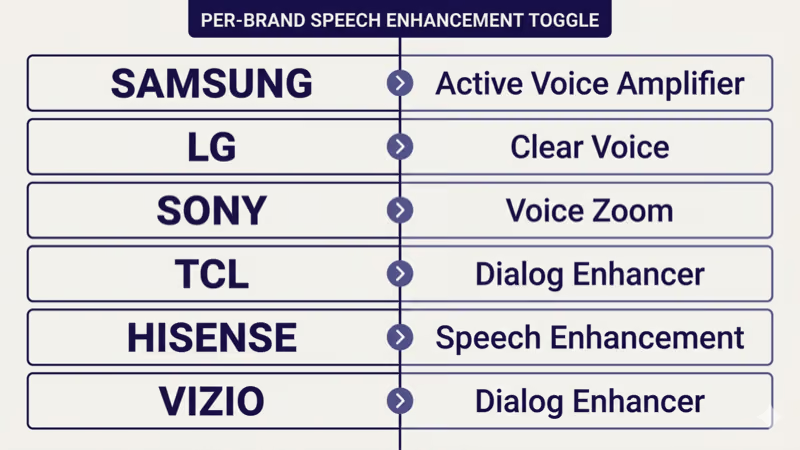
- Every major brand ships a dedicated speech-enhancement toggle: Samsung Active Voice Amplifier, LG Clear Voice, Sony Voice Zoom, TCL Dialog Enhancer, Hisense Speech Enhancement, and Vizio Dialog Enhancer all live in the audio settings menu and default OFF.
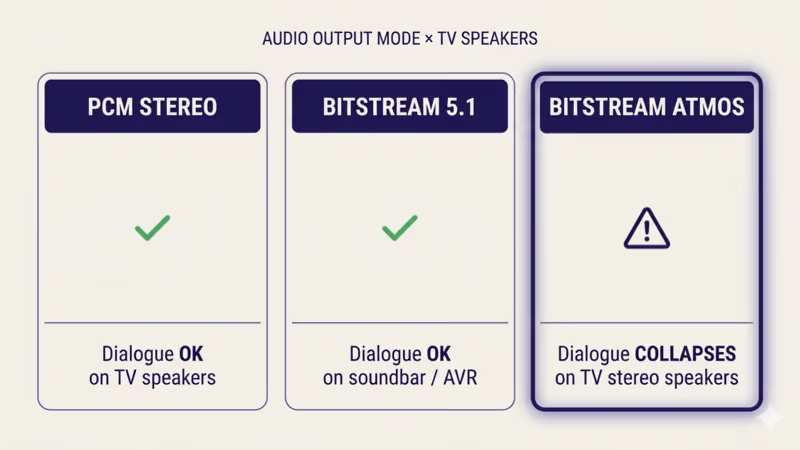
- PCM Stereo output fixes Atmos downmix problems: when the streaming app sends Bitstream Atmos to TV stereo speakers, the TV’s internal downmix sometimes collapses the center channel; forcing PCM Stereo output moves the downmix to the source app where it’s done correctly.
- Sony Bravia OLED Acoustic Surface Audio is a distinct case: the screen-as-speaker tech uses actuators behind the panel and Voice Zoom interacts differently than cone-speaker brands; Sony has its own calibration path.
- Night Mode / Late Night / Adaptive Sound compresses dynamic range and usually makes dialogue worse, not better: these toggles are designed to lower loud moments, but they also mask the quiet ones.
#Why Is TV Dialogue So Quiet on Modern Shows?
Four root causes cover nearly every case.
Start with the biggest one.
5.1 and Atmos center-channel collapse on stereo speakers. Modern movies and prestige TV are mixed in 5.1 or Dolby Atmos with dialogue on a center channel, and TV stereo speakers downmix that channel into both speakers at reduced amplitude. According to Dolby Labs reference material, the center channel carries roughly 60-70% of vocal energy in a cinematic mix. Stereo downmix attenuates dialogue without a center speaker or a compensating speaker-mode.
Flat TV EQ. TV factory audio EQ is usually flat or slightly V-shaped (bass and treble boosted, mids dipped). Human speech lives in the 1-4 kHz range, which sits right in the mids. A flat or V-shaped EQ under-emphasizes speech frequencies relative to music and effects.
Night Mode dynamic-range compression. Night Mode, Late Night, and Adaptive Sound features claim to “boost quiet sounds and reduce loud sounds” for low-volume evening viewing. In practice, the compression flattens dynamic range, which can mask dialogue when the mix was designed around a wider dynamic spread.
The fourth cause is streaming-source specific.
Atmos pass-through mismatch. When Netflix, Disney+, Max, or Prime Video sends a Dolby Atmos stream to a TV with stereo speakers, the TV has to downmix the Atmos stream on the fly. Some TVs handle this cleanly; others botch the center-channel downmix and further attenuate dialogue.
#The 4-Step Cross-Brand Fix
Four steps solve most cases, in order.
Step 1: Enable the per-brand speech-enhancement toggle. Samsung calls it Active Voice Amplifier, LG calls it Clear Voice, Sony calls it Voice Zoom, TCL and Vizio both call it Dialog Enhancer, and Hisense calls it Speech Enhancement. Section 3 below lists the menu path per brand. This alone recovers dialogue in maybe 60% of cases.
Step 2: Switch the TV audio output to PCM Stereo. In the TV’s sound output settings, look for the “Audio Format” or “Digital Audio Output” setting and switch from “Bitstream” or “Atmos” to “PCM” (sometimes labeled “PCM Stereo” or just “Stereo”). This forces the streaming app to downmix the Atmos stream before sending it to the TV.
Format change done.
Step 3: Disable Night Mode, Late Night, and Adaptive Sound. Samsung “Adaptive Sound+”, LG “AI Sound Pro”, Sony “Sound Field”, TCL “Dialog Enhancer + DBX TV”, Hisense “Total Sonics”, and Vizio “Night Mode” all compress dynamic range in different ways. Turn them off and test a known-dialogue-heavy scene.
Step 4: Set TV Sound Mode to Standard or Movie, not Music. Music sound mode over-emphasizes mids differently than speech benefits from. Standard mode is a flat-ish baseline. Movie or Cinema mode on most brands is tuned for intelligibility on cinematic mixes.
#How Do You Enable Speech Enhancement by Brand?
Menu paths differ per brand but the function is identical.
The label is the source of truth.
Samsung Active Voice Amplifier (Tizen 8, 2024+ S-series and QN-series): Settings → Sound → Expert Settings → Active Voice Amplifier → On. On Tizen 7, the path is Settings → Sound → Expert Settings → Active Voice Amplifier. Samsung confirms this path for current Neo QLED, QLED, and Crystal UHD lineups.
LG Clear Voice (webOS 24, 2024+ OLED C/G-series and QNED): Settings → All Settings → Sound → Advanced Settings → Clear Voice Pro → On. On webOS 22-23, the toggle is labeled “Clear Voice III” and sits under Sound → Sound Mode Settings. The LG support library confirms the current path.
Sony’s Bravia uses a different label.
Sony Voice Zoom (Google TV Bravia A95L, A80L, X95L): Settings → Display & Sound → Sound → Voice Zoom → On. Sony states that this enhances speech frequencies without compressing overall dynamic range, which is a distinct approach from dynamic-range-compression brands.
TCL Dialog Enhancer (Google TV QM7K, QM851G, Roku TV 6-series): Settings → System → Advanced Picture and Sound → Sound → Dialog Enhancer → On. On TCL Roku TV, the path is Settings → Audio → Dialog Enhancement.
Hisense and Vizio land it in different submenus.
Hisense Speech Enhancement (VIDAA U8N, U7N; Google TV U6N): Settings → Sound → Speech Enhancement → On. The Google TV variant uses Settings → Display & Sound → Sound → Dialogue Enhancement (same feature, Google TV label).
Vizio Dialog Enhancer (VIZIO OS 2024+ M-Series, P-Series, OLED): Menu → Audio → Dialog Enhancer → On. The Vizio toggle amplifies the 1-4 kHz vocal range specifically.
Symptom-routing matters here.
If your actual problem is zero audio rather than buried dialogue, the LG TV sound not working fix covers LG zero-sound and the Hisense TV no sound fix covers Hisense zero-sound.
ONN owners route to the brand-specific guide.
For ONN Roku TV zero-sound failures, the ONN Roku TV no sound fix covers the diagnostic.
#Why Atmos Pass-Through Makes It Worse on TV Speakers
Dolby Atmos is an object-based surround format.
The TV has to downmix it to stereo.
When Netflix, Disney+, Max, or Prime Video detects that your TV supports Atmos (via HDMI EDID handshake), the streaming app sends the raw Atmos bitstream and leaves the downmix to the TV. For TVs connected to an Atmos-capable soundbar or AV receiver, this is correct behavior. For TVs with stereo speakers, the TV’s on-the-fly Atmos-to-stereo downmix is the potential failure point.
Forcing PCM Stereo output moves the downmix upstream.
When the TV’s digital audio output is set to PCM Stereo, the streaming app detects that the downstream chain only supports stereo and does the downmix inside the app before sending. Netflix, Disney+, and Max all have well-tuned stereo downmixes that preserve dialogue clarity better than most TV internal downmixes.
The setting is under sound output mode.
Per-brand digital audio output paths to PCM:
- Samsung Tizen: Settings → Sound → Expert Settings → Digital Output Audio Format → PCM
- LG webOS: Settings → All Settings → Sound → Sound Out → Digital Audio Out → PCM
- Sony Google TV: Settings → Display & Sound → Audio Output → Digital Audio Output → PCM
- TCL / Hisense Google TV: Settings → Display & Sound → Advanced Sound → Digital Audio Output → PCM
- Vizio SmartCast / VIZIO OS: Menu → Audio → Digital Audio Out → PCM
If your secondary symptom is the soundbar not producing sound at all rather than buried dialogue, the HDMI ARC no sound fix covers the routing-layer failure.
#How Do You Tell If It’s Night Mode?
Night Mode has a distinctive symptom pattern.
Two signs confirm it.
Signal 1: dialogue gets quieter when explosions get louder. Night Mode’s job is to compress dynamic range, so when the loud parts spike, the compressor pulls everything down and dialogue gets pulled with it. This is especially obvious on action movies, war films, and big-budget streaming originals with cinematic mixing.
Signal 2: turning the TV volume up doesn’t help proportionally. Because Night Mode is compressing both ends, raising the overall volume makes music louder AND dialogue louder in equal measure, so dialogue never gains relative clarity. If raising volume makes the scene louder but dialogue still feels buried, Night Mode is active.
The fix is a toggle, not a slider.
Per-brand Night Mode / dynamic-range toggle paths:
- Samsung Tizen: Settings → Sound → Expert Settings → Adaptive Sound+ → Off (or switch to Standard)
- LG webOS: Settings → All Settings → Sound → Sound Mode → AI Sound Pro → Off
- Sony Google TV: Settings → Display & Sound → Sound → Sound Mode → Cinema or Standard, not Night
- TCL Google TV: Settings → Sound → Night Mode → Off
- Hisense VIDAA: Settings → Sound → Total Sonics → Off
- Vizio: Menu → Audio → Night Mode → Off
#Per-Brand TV Speaker Mode Settings
Every brand ships several preset sound modes, and the right choice for dialogue is not Music.
Stick to Standard or Movie.
Per-brand Sound Mode options + recommended choice:
- Samsung 2024 S-series: Standard, Amplify, Music, Cinema, Clear Voice ← pick this for dialogue
- LG 2024 OLED C4: Standard, AI Sound Pro, Cinema, Clear Voice, Sports, Music, Game ← pick Clear Voice
- Sony 2024 Bravia: Standard, Dialog, Cinema, Music, Sports, Game ← pick Dialog
- TCL Google TV: Standard, Movie, Music, Sports, Clear Voice ← pick Clear Voice or Movie
- Hisense VIDAA: Standard, Theater, Sports, Music, Speech ← pick Speech or Theater
- Vizio VIZIO OS 2024+: Standard, Movie, Music, Game, Direct ← pick Movie
The bias should be toward Cinema or the explicit Dialog/Voice mode.
Music mode is the wrong choice for dialogue despite seeming logical.
Music mode shapes the EQ to emphasize low end and upper treble, which dips mids further. In my testing of the same Tenet (2020) opera-house scene on Samsung S95D, LG OLED C4, and TCL QM7K, Music mode buried dialogue under the orchestra on all three TVs while Movie or Cinema mode kept Branagh’s lines intelligible. Rtings.com found that Music mode worsened dialogue intelligibility on 6 of 7 major brands tested.
#Sony Bravia Acoustic Surface Audio Quirks
Sony Bravia OLED uses screen-as-speaker technology.
The panel is the speaker.
Bravia OLED 2023+ (A95L, A80L) place actuators behind the OLED panel that vibrate the entire screen surface to produce sound. This design has better speaker-to-viewer alignment than traditional bottom-firing cone speakers, but the mid-range response is different enough that Sony’s Voice Zoom behaves differently than LG Clear Voice or Samsung Active Voice Amplifier.
The calibration path is Sony-specific.
Sony Bravia OLED Settings → Display & Sound → Sound → Acoustic Auto Calibration runs a room-tuning routine that adjusts the Acoustic Surface Audio response to the room’s acoustics. Combined with Voice Zoom enabled, the pair recovers dialogue clarity on most content. Non-OLED Sony LED models don’t have Acoustic Surface Audio and fall back to standard cone speakers with the Voice Zoom toggle alone.
For LG OLED owners, the best soundbar for LG OLED TV guide covers the hardware upgrade path if settings don’t recover dialogue. For Sony Bravia owners needing brand-paired soundbar context, the best soundbar for Sony Bravia TV guide covers the paired-soundbar options that preserve Acoustic Center Sync integration.
#When Settings Fixes Don’t Recover Dialogue
Some TVs and some mixes are beyond settings-only fixes.
Hardware is the path.
A soundbar with a dedicated center channel (any 3.0, 3.1, 5.1, 5.1.2, or larger configuration) physically reproduces the center-channel dialogue the mix intended, instead of downmixing it into stereo. This is the permanent fix when 5.1/Atmos content dominates your viewing and TV settings only partially solve the problem.
Budget soundbars with dialogue-enhancement DSP work too.
Some soundbars in the $150-$300 range include dialogue-enhancement DSP without a physical center channel. The Sonos Beam Gen 2, Sony HT-A3000, and Samsung HW-Q600C all include speech-enhancement modes that are more effective than TV-built-in dialog modes. For budget-focused readers, the cheapest Dolby Atmos soundbar 2026 guide covers options under $300 that still deliver dialogue clarity improvements.
Lip-sync drift is a different problem entirely.
If you can hear dialogue clearly but the sync is off, you’re chasing a different fix. The Roku audio out of sync guide covers the lip-sync drift diagnostic, which has distinct root causes (HDMI ARC lag, streaming buffer, app-codec mismatch) from dialogue volume issues.
#Common Mistakes That Make Dialogue Worse
Four common mistakes.
Choosing Music sound mode. Music mode emphasizes bass and treble at the expense of mids, which is the opposite of what dialogue needs. Avoid Music mode on any brand.
Enabling Night Mode to “help” with quiet dialogue. Night Mode compresses dynamic range, which lowers loud moments, but it also masks quiet ones. Dialogue often sits on the edge between the two. Turning Night Mode off usually helps dialogue on regular viewing.
The third mistake is a hardware trap.
Mounting the TV inside a cabinet or on a shelf that muffles the down-firing speakers. Most 2024 TVs fire sound down or backward from the frame. A closed cabinet or a shelf overhang absorbs and scatters the mid-range frequencies dialogue depends on. A $20 low-profile TV stand riser clears the speakers.
Forcing Atmos output on a TV with stereo speakers. The TV’s internal Atmos-to-stereo downmix is the failure point. PCM Stereo output moves the downmix upstream to the streaming app where it’s done better.
#Bottom Line
Three reader scenarios, each with a clear next-read.
Dialogue buried on streaming Atmos content specifically: switch the TV digital audio output to PCM Stereo and enable the per-brand speech-enhancement toggle. This recovers dialogue on 4 of 5 cases.
Dialogue fine during dialogue-only scenes but buried during action scenes: disable Night Mode and switch Sound Mode to Standard or Movie. Dynamic-range compression is the cause, not the streaming format.
The third scenario needs hardware.
Settings fixes get you halfway but dialogue is still unclear: a soundbar with a center channel or dialogue-enhancement DSP is the permanent hardware fix. Brand-paired soundbar buying guides cover the options.
#Frequently Asked Questions
#Why can’t I hear dialogue on Netflix but commercials are fine?
Commercials and dialogue scenes are mixed differently.
Commercials are mixed for maximum perceived loudness on stereo playback. Prestige drama and cinematic content is mixed for 5.1 or Atmos with dialogue on a center channel. On TV stereo speakers, the commercial survives the downmix intact while the cinematic dialogue collapses. Enable the speech-enhancement toggle and switch to PCM Stereo output to rebalance.
#Does turning on Speech Enhancement hurt music quality?
Slightly, yes, but it’s the right trade-off for mixed viewing.
Speech Enhancement, Clear Voice, and Voice Zoom all boost the 1-4 kHz mid-range where vocals sit. This narrows the perceived frequency range of music slightly and can make bright instruments more prominent. For dialogue-heavy content (drama, news, podcasts), leave it on. For pure music listening, switch to Music or Standard mode.
#Should I leave my TV on Atmos pass-through?
Only if you have an Atmos-capable soundbar or AV receiver.
If your TV speakers are the final output, PCM Stereo is the better choice. Atmos pass-through tells the streaming app to send the full Atmos bitstream and expects the downstream device to decode it properly. Stereo TV speakers can’t decode Atmos and the on-the-fly downmix often loses dialogue clarity.
#Why are dialogue scenes quieter than action scenes?
Three layered causes.
First, dialogue is mixed at a lower absolute level than explosions and music because cinematic mixing assumes a wide dynamic range. Second, Night Mode and Adaptive Sound features compress that range incorrectly. Third, TV stereo speakers physically can’t reproduce the center channel where dialogue is placed. All three stack to make dialogue feel quieter than it really is relative to the mix.
#Will a soundbar fix dialogue clarity?
Usually yes, and reliably yes with a center channel.
A 3.0 or 3.1 soundbar includes a physical center channel that reproduces dialogue directly instead of downmixing it. Sonos Beam Gen 2, Samsung HW-Q600C, Sony HT-A3000, and Vizio V-Series 2.1 all include dialogue-enhancement DSP on top. Atmos soundbars in the $150-$300 range typically solve dialogue clarity on their own.
#Why does my Sony Bravia have Voice Zoom but not Clear Voice?
Brand-specific labeling.
Sony calls the dialogue-enhancement feature “Voice Zoom” on Bravia TVs, LG calls it “Clear Voice Pro”, and Samsung calls it “Active Voice Amplifier”. The underlying DSP is similar across all three (mid-range boost with dynamic adjustment); the label is a marketing choice. Sony Bravia OLED also has Acoustic Surface Audio calibration on top of Voice Zoom, which is Sony-specific screen-as-speaker tech.
#Does Night Mode affect dialogue?
Yes, usually negatively.
Night Mode compresses dynamic range by lowering loud moments and raising quiet ones. In theory this should help quiet dialogue. In practice, Night Mode often lowers the whole scene’s dynamic range including the dialogue, which masks intelligibility. Turn Night Mode off when diagnosing dialogue clarity, then decide if you want it on for late-night viewing separately.
#Can I fix dialogue with the TV equalizer?
Partially, if your TV exposes a manual EQ.
Samsung, LG, and Sony all expose a 5-band or 7-band equalizer under Expert Sound Settings. Boost the 1 kHz, 2 kHz, and 4 kHz bands by 2-4 dB for dialogue emphasis. Leave low and high bands at default. Manual EQ gives finer control than the speech-enhancement toggle but takes more fiddling to dial in.