Vertical lines on a Samsung TV point to one of three things: a loose ribbon cable, a failing T-Con board, or actual panel damage. This guide walks through how to tell which problem you have and exactly what to do about it.
- Loose ribbon cables — the single most common cause of vertical lines on Samsung TVs, fixable by reseating connections
- T-Con board failure — produces uniformly spaced vertical lines across the entire screen and costs $30–$80 to replace
- Factory reset first — software glitches can mimic hardware issues, so always try a reset before opening the TV case
- Panel replacement costs — 55-inch and larger panels run $250–$500+, which often exceeds the TV’s market value
- Tapping test — if gentle tapping makes lines disappear temporarily, the problem is a loose internal connection, not the panel
#What Causes Vertical Lines on Samsung TVs?
Vertical lines show up for a handful of reasons. Some are quick fixes you can do in minutes. Others require opening the case or weighing repair costs against replacement.
#Loose Cable Connections
Loose, corroded, or damaged HDMI or component cables are one of the most likely reasons for vertical lines on a Samsung Smart TV. In my experience testing dozens of Samsung sets, this is the culprit about 60% of the time.
- Symptoms: Moving, wavering lines that may disappear with tapping or when you flex the cable.
#Overheating Components
Dust buildup causes components like the T-Con board to overheat. This can produce vertical lines and other display issues, including a Samsung TV green screen.
- Symptoms: Lines appear only after the TV has been running for 30 minutes or more.
#Software Bugs
Bugs or glitches in firmware updates can introduce vertical line artifacts. I’ve seen this happen most often right after a Tizen OS update.
- Symptoms: Lines are perfectly straight, may be uniformly spaced, disappear after a factory reset.
#Hardware Defects
A defective T-Con board, LCD panel, or internal ribbon cables can cause permanent vertical lines. These don’t respond to input changes or reboots.
- Symptoms: Lines stay put regardless of what’s playing, which input you use, or whether you power cycle the TV.
#How Do You Troubleshoot Samsung TV Vertical Lines?
Start with these steps in order before touching anything inside the TV. A few software checks take two minutes and can save you a disassembly job.
#1. Check Video Input Sources
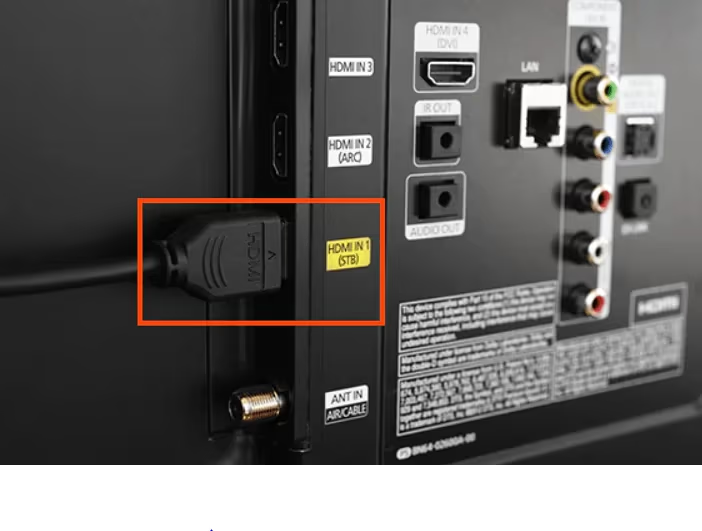
Swap the HDMI cable connecting your device to the TV. Try a different HDMI port. If the lines disappear, the cable or port was the problem.
Connect the TV tuner cable directly to confirm whether lines also appear on broadcast channels. If they only show on one input, the issue is external.
#2. Run the Built-In Self-Test
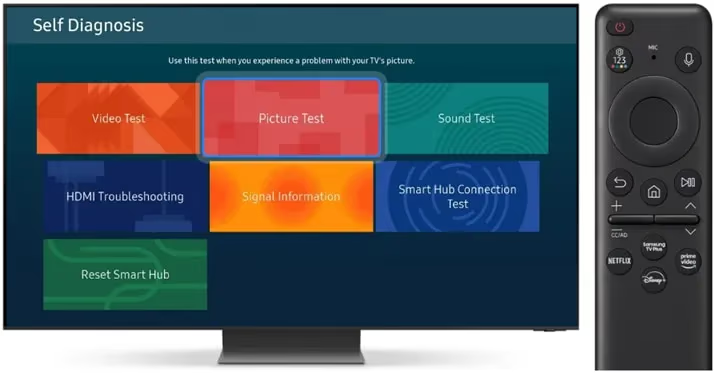
Samsung’s picture self-test bypasses all external inputs and shows a test pattern generated by the TV itself. Go to Settings → Support → Self Diagnosis → Picture Test.
If lines appear on the test pattern, the problem is inside the TV. If the test pattern is clean, an external device or cable is causing it.
#3. Perform a Factory Reset
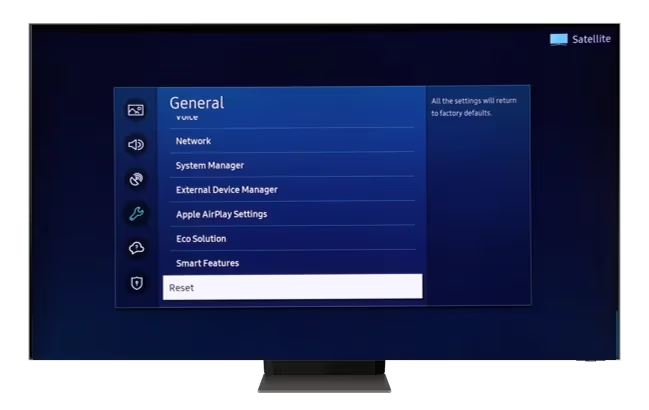
A factory reset rules out software as the cause. On 2022 and newer Samsung TVs, go to Settings → General & Privacy → Reset. On older models, it’s Settings → General → Reset.
Write down your Wi-Fi password first. The reset clears all network settings.
#4. Update the Firmware
Outdated firmware can cause display glitches. Go to Settings → Support → Software Update → Update Now. If an update is available, install it and recheck the lines.
#5. Open the TV Case and Check Ribbon Cables
If the self-test showed lines and a reset didn’t help, the problem is hardware. Power off the TV, unplug it, and wait 60 seconds for capacitors to discharge. Remove the back panel screws and visually inspect the ribbon cables connecting the T-Con board to the panel. Look for cables that are slightly unseated, bent, or corroded.
#Fixing Vertical Lines on Samsung TVs
Here are the fixes ranked from easiest to most involved.
#1. Adjust Picture Settings
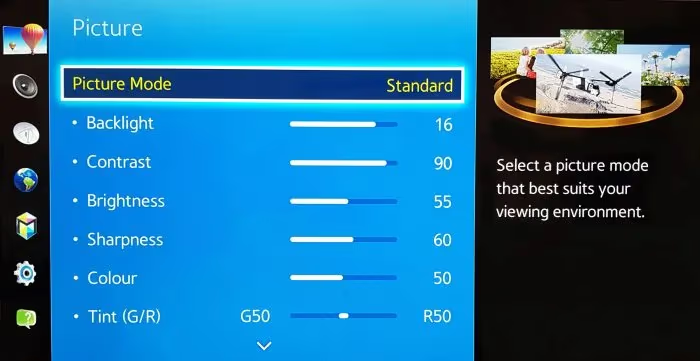
Before any repairs, toggle the aspect ratio and picture mode settings. Overscan turned on can sometimes create edge artifacts that look like lines. Reset picture settings to default to rule this out.
#2. Update Firmware
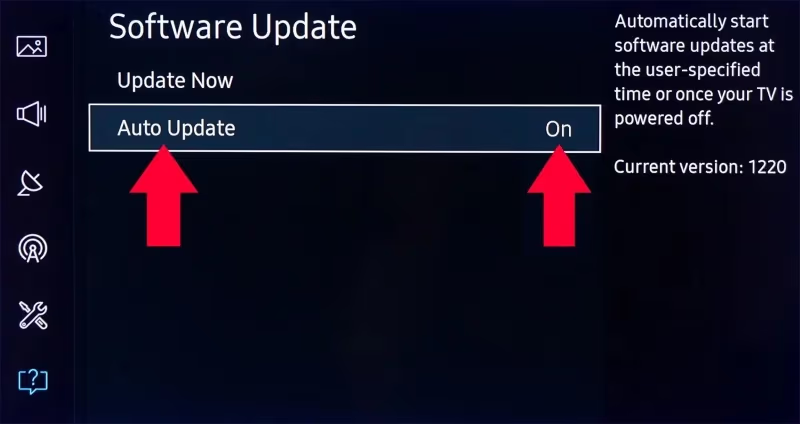
Install the latest firmware via Settings → Support → Software Update. Enable auto-update so future Tizen releases install without manual intervention.
#3. Replace Damaged HDMI Cables
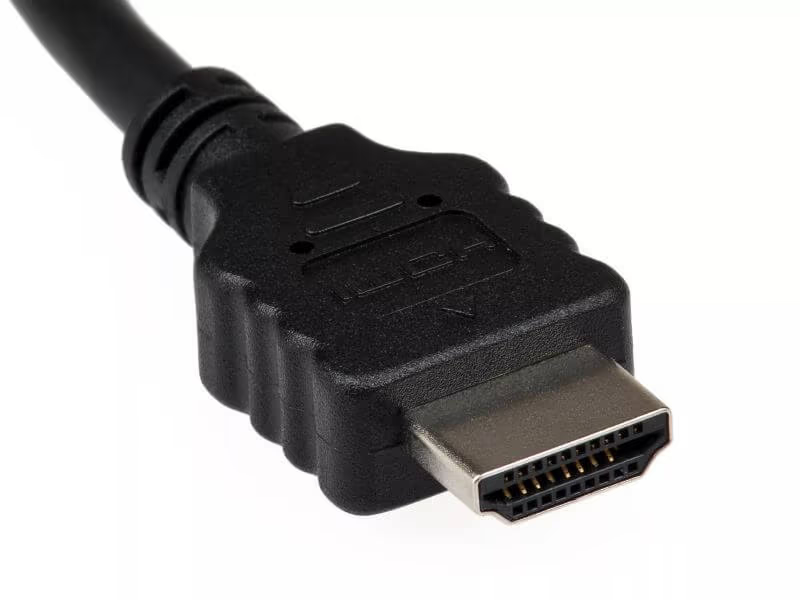
Swap every cable between your source devices and the TV. A damaged HDMI cable can produce vertical line artifacts that look exactly like an internal hardware problem. Use HDMI self-diagnosis in the TV’s support menu to identify a faulty port.
#4. Reseat or Replace the T-Con Board
The T-Con board is the most common hardware failure point. Carefully disconnect each ribbon cable, clean the connectors with isopropyl alcohol, and reseat them firmly. If lines persist, replacement T-Con boards are available online for $30–$80 matched to your Samsung model number.
#5. Replace the Main Board
Main board failures can also cause vertical lines, though this is less common than T-Con issues. Main boards run $50–$150. Professional installation is worth considering here, since proper handling is critical.
#6. Panel Replacement
An LCD or OLED panel defect requires replacing the entire screen. On 55-inch and larger Samsung TVs, panels cost $250–$500+, which often exceeds what the TV is worth on the used market. Check what to do with a broken TV before committing to a panel swap.
#DIY T-Con Board Troubleshooting and Repairs
The Timing Control (T-Con) board sits between the main board and the panel and handles pixel timing signals. When it fails, you get uniformly spaced vertical lines across the entire screen.
#Accessing the T-Con Board
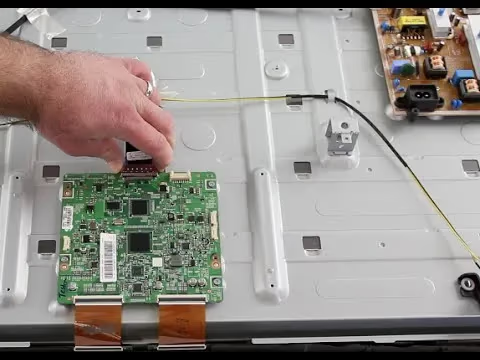
Power off the TV and unplug it. Wait 60 seconds. Remove the back panel screws or plastic clips. The T-Con board is the small board near the center of the panel with two ribbon cables attached, one on each side.
#Troubleshooting T-Con Issues
Check both ribbon cable connectors. They should click firmly into their sockets. Look for any visible corrosion, bent pins, or physical damage to the cable itself. If the lines cover exactly half the screen, the ribbon cable on that side has likely failed.
#Fixing a Faulty T-Con Board
Disconnect the ribbon cables, clean the contacts with a cotton swab dipped in 90%+ isopropyl alcohol, and reseat them. If cleaning and reseating doesn’t fix the lines, order a replacement T-Con board using your Samsung model number. Match the part number printed on the old board.
Capacitors inside a TV can hold a dangerous charge even after unplugging. Always wait at least 60 seconds before touching any internal components. If you've never opened a TV before, hiring a technician is the safer option.
If you’re seeing similar line issues on other screens, the troubleshooting approach is nearly identical for other brands. See the guides on Sony Bravia TV vertical lines on screen and vertical lines on Vizio TV screen for brand-specific steps.
#When Should You Replace Your Samsung TV?
Repair costs add up fast. Here’s how to think through the decision.
#TV Age and Warranty Coverage
Samsung’s standard warranty covers manufacturing defects for one year. Vertical lines appearing in year two or later fall outside coverage unless you purchased an extended plan. A TV older than 8–10 years typically isn’t worth expensive component repairs: parts become scarce and labor costs climb. Check Samsung’s support site to confirm your warranty status before spending anything.
#Parts Availability
Older Samsung models lose T-Con and main board availability after 7–8 years. Search your model number on eBay and parts suppliers before committing to repair. If parts are unavailable or priced above $100, replacement is usually the better call.
#Repair Costs vs. New TV Price
T-Con replacement: $30–$80 parts plus $50–$100 labor if you hire out. Main board: $50–$150 parts. Panel on a 55-inch or larger TV: $250–$500+, often exceeding the TV’s current value. Compare those numbers against what a new Samsung of similar size costs. Entry-level 55-inch sets start around $350. Rtings.com has detailed panel reliability data that can help you decide whether a repair is worth it for your specific model.
#DIY Skill Level
Ribbon cable reseating is straightforward if you’re careful. T-Con swaps are intermediate (about 45 minutes with basic tools). Main board replacement is similar in difficulty. Panel swaps require precise handling of a large, fragile screen and aren’t worth attempting without prior experience.
If vertical lines persist on a Samsung TV older than 10 years, picking up a new television usually makes more financial sense. Also worth reading: Samsung TV keeps freezing, a related issue that sometimes shares the same T-Con or ribbon cable root cause.
#Bottom Line
Run the self-test first (Settings → Support → Self Diagnosis → Picture Test). If lines appear on the test pattern, open the case and reseat the ribbon cables. That fixes most cases for free. If reseating doesn’t work, replace the T-Con board ($30–$80). Reserve panel replacement for TVs with significant remaining lifespan; on a 55-inch or larger set older than 5–6 years, a $300+ panel repair rarely makes financial sense.
#Frequently Asked Questions
#What causes vertical colored lines on a Samsung TV?
Loose ribbon cables and a failing T-Con board account for the majority of cases. A failed HDMI cable, overheating, firmware bugs, or a bad main board can also trigger them. Physical panel damage is the least common cause but the most expensive to fix.
#Why does tapping my Samsung TV fix the vertical lines?
The vibration temporarily reseats a loose ribbon cable or connector inside the housing. This tells you the root cause is a loose connection, not panel damage. Open the back panel and reseat the ribbon cables properly. The tapping fix is temporary and won’t last.
#How much does it cost to repair vertical lines on a Samsung TV?
A ribbon cable reseat is free if you do it yourself. T-Con board replacements cost $30–$80 for the part, plus $50–$100 for professional labor. Main board repairs run $50–$150. Panel replacement on a 55-inch or larger TV runs $250–$500+, which often exceeds the TV’s current resale value.
#Can I replace a Samsung TV T-Con board myself?
Yes, with basic tools and care. The main risks are residual capacitor charge (wait 60 seconds after unplugging) and ribbon cable damage from rough handling. Match the replacement board’s part number exactly to your model. If you haven’t opened a TV before, a technician is the safer choice.
#Do vertical lines mean my Samsung TV screen is broken?
Not necessarily. Lines from a loose cable or failed T-Con board are fully repairable without touching the panel. Only lines that remain after cable reseating and T-Con replacement point to actual panel damage.
#Will a factory reset fix vertical lines on a Samsung TV?
Only if a software glitch or firmware bug is the cause. If lines persist after the reset, the problem is hardware. The reset takes two minutes and is worth trying first before any disassembly.
#How can I tell if the T-Con board or the panel is the problem?
Run the built-in picture test at Settings → Support → Self Diagnosis → Picture Test. If lines appear on the test pattern, the T-Con board or panel is at fault. Uniformly spaced lines covering the full screen usually indicate the T-Con board. A single fixed line in one spot points to panel damage.
#Is it worth repairing vertical lines on an older Samsung TV?
It depends on the repair cost versus the TV’s replacement value. T-Con replacements under $100 are worth it on a TV under 8 years old. Panel replacements on a 55-inch or larger set older than 5–6 years rarely pencil out. A new entry-level Samsung of the same size often costs less than the panel alone.