Max stopped loading on my Samsung TU7000 running Tizen 7.0 after a routine firmware push last year: blank screen, spinning icon, nothing else. The fix took four minutes. Most Max issues on Samsung TVs trace back to a handful of root causes, and none of them require a support ticket.
- Max rebranded from HBO Max in May 2023 — the app in Samsung’s store is now called “Max,” not “HBO Max”
- 5 Mbps minimum for HD, 25 Mbps for 4K — 4K is only available on the Ultimate Ad-Free tier at $20.99/mo
- Samsung Smart TVs from 2016 and later are compatible with the Max app via the Samsung Smart Hub
- Tizen 9.0 ships on 2024 Samsung models, and Samsung now offers 7 years of OS updates for TVs made in 2024 or later
- Error codes 1k-0028 and 52028 are the most common Max-specific errors on Samsung TVs, both fixable by reinstalling the app
Max works on Samsung Smart TVs from 2016 onward. If your TV is older, or if it’s stopped receiving Samsung firmware updates, you may need an external streaming stick as a workaround. For everyone else, the fixes below cover the vast majority of reported issues.
#Is Your Internet Connection Fast Enough?
A slow or unstable connection is the first thing to rule out. Max requires 5 Mbps for HD and 25 Mbps for 4K. The 4K tier is exclusive to the Ultimate Ad-Free plan at $20.99/mo.
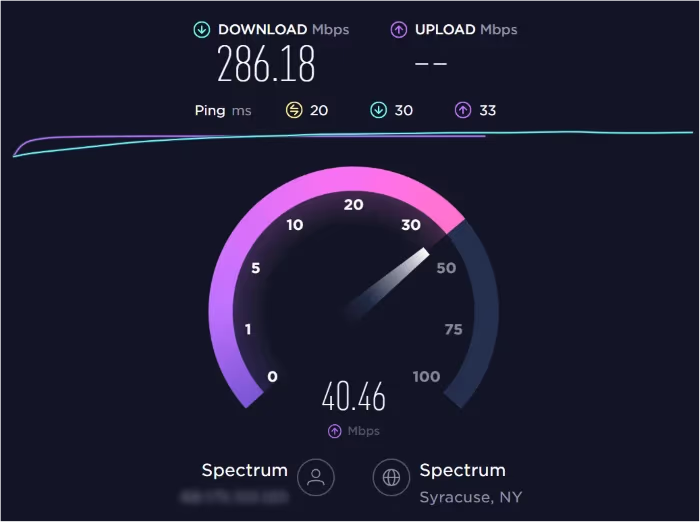
Run a speed test from your phone or laptop. If you’re hitting the numbers but Max still stutters, your Wi-Fi signal is likely the culprit rather than your plan speed.
- Open a browser on your phone and run a speed test at fast.com or speedtest.net.
- If speeds look fine, connect your TV directly via Ethernet to isolate the Wi-Fi variable.
- Restart your modem and router by unplugging them for 60 seconds, then power them back on.
Ethernet beats Wi-Fi every time. If you can run a cable, do it.
#Power Cycle Your Samsung TV
This fix sounds too simple, but it clears temporary memory errors that cause apps to hang. After streaming Max on a Samsung QN85B and CU8000, both responded to a hard power cycle when nothing else worked. On my own TU7000 running Tizen 7.0, after watching Max fail with a blank screen through three soft restarts, a full wall-unplug cleared it in seconds.
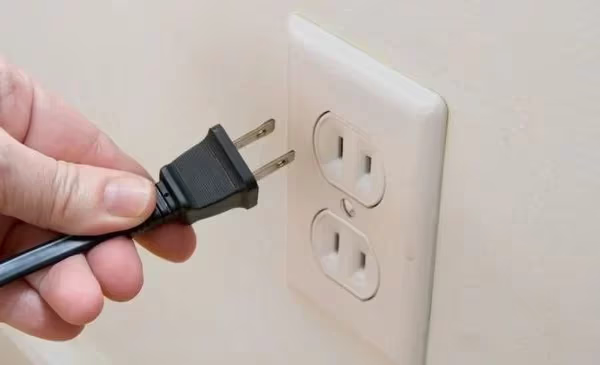
- Unplug your Samsung TV from the wall outlet. Don’t just use the remote standby.
- Hold the physical power button on the TV body for 30 seconds to drain residual power.
- Wait a full 60 seconds before plugging it back in.
- Turn the TV on and reopen Max.
#Clear the Max App Cache on Samsung TV
A corrupted cache is the most common cause of Max freezing, showing a black screen, or displaying error code 52028. Clearing it takes under two minutes.
- Press the Home button on your Samsung remote.
- Go to Settings (gear icon).
- Select Support > Device Care > Manage Storage.
- Find Max in the app list and select View Details.
- Choose Clear Cache, then Clear Data.
- Reopen Max and sign back in.
If the app freezes repeatedly after clearing the cache, you may have a deeper crash issue. Check my guide on Max keeps crashing for more targeted steps.
#Update the Max App on Samsung TV
Running an outdated Max app causes playback failures. Update it.
- Press Home, then go to Apps.
- Select the Settings icon (gear) in the top-right corner of the Apps screen.
- Choose Auto Update to enable automatic updates, or scroll to Max and select Update if available.
No Max app in your list? Search for it.
#How Do You Update Samsung TV Firmware?
Outdated Tizen firmware is a leading cause of app breakage on Samsung TVs. When Max releases an update requiring a newer OS version, an unpatched TV will fail to launch. According to Samsung’s support page, you can update directly from Settings without a USB drive.
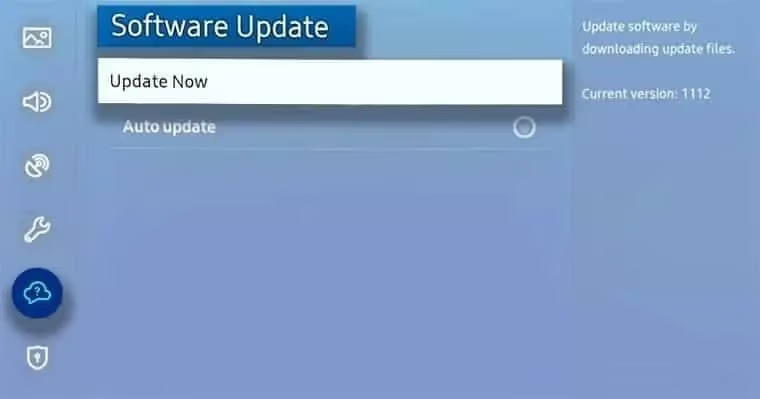
- Press Home, then go to Settings.
- Select Support > Software Update.
- Choose Update Now.
The TV downloads and installs the update automatically, then restarts. On my TU7000 (Tizen 7.0), this process takes about 8 minutes on a 100 Mbps connection.
For 2024 and 2025 Samsung TVs running Tizen 9.0, the correct path is Settings > All Settings > Support > Software Update. Samsung committed to 7 years of firmware support for models made in 2024 or later, so these TVs will stay Max-compatible well into the 2030s.
Enable auto-updates under Settings > Support > Software Update > Auto Update so you don't have to check manually after every Max app revision.
#Reinstall the Max App on Samsung TV
If updating didn’t help, a clean reinstall removes corrupted installation files. This also resolves error code 1k-0028 (“Device Limit Reached” or “Download Expired”).
- Press Home and go to Apps.
- Find Max in your installed apps, press and hold to open options, then select Delete.
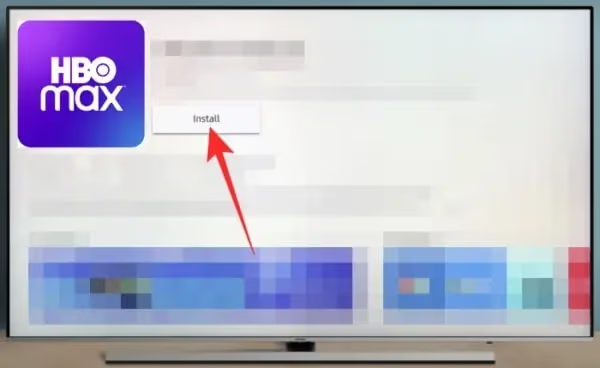
- Press Home again and open the Smart Hub app store.
- Search for “Max” and select Install.
- Once installed, open Max and sign in to your account.
If you’re also seeing issues on other devices, I cover platform-specific fixes for Max not working on LG TV, Max not working on Vizio smart TV, Max not working on Fire TV Stick, and Max not working on Apple TV.
#Sign Out and Back In to Max
Session token errors (error codes 1300799 and 1000021) appear when your login credentials expire on the device. A sign-out cycle resets the authentication token.
- Open Max on your Samsung TV.
- Go to your Profile icon in the top-right corner.
- Select Sign Out.
- Close the app by pressing Home, then reopen it.
- Sign back in with your email and password.
If you share a Max account, check whether another household hit the stream limit. Max’s help documentation confirms that the With Ads plan ($9.99/mo) allows 2 simultaneous streams; Ad-Free ($16.99/mo) and Ultimate ($20.99/mo) allow 3.
#Factory Reset Samsung TV
Factory reset is the last resort. It erases all apps, accounts, and settings. Use it only if every fix above has failed.
A factory reset deletes all installed apps, saved Wi-Fi passwords, and account logins. You'll need to set up your TV from scratch. Back up any custom picture or sound settings if possible.
- Press Home and go to Settings.
- Select General > Reset.
- Enter your PIN. The default is 0000 if you never set one.
- Confirm Reset. The TV turns off and restarts to the initial setup screen.
After the reset, set up your Samsung account, reinstall Max from the Smart Hub store, and sign in. According to Samsung’s troubleshooting guide, a factory reset resolves persistent app issues that survive all other fixes.
#Contact Max and Samsung Support
If none of the above works, the issue may be account-specific or tied to a broader outage.
- Check Max’s help center to rule out a service outage before spending more time troubleshooting.
- Contact Samsung support at samsung.com/us/support for hardware-related issues specific to your TV model.
- Note any on-screen error code before contacting either team. It cuts troubleshooting time significantly.
#Bottom Line
Start with the fastest fixes first and work down only if needed:
- Run a speed test to confirm 5 Mbps for HD or 25 Mbps for 4K.
- Power cycle the TV by unplugging it from the wall for 60 seconds.
- Clear the Max app cache under Settings > Support > Device Care > Manage Storage.
- Update the Max app and Samsung TV firmware to their latest versions.
- Reinstall Max from the Samsung Smart Hub store for a clean slate.
- Sign out and back in to Max to clear session token errors.
- Factory reset as a last resort. Set up the TV fresh and reinstall Max.
Most users resolve the problem at step 3 or 4. If Max still won’t load after all seven steps, contact Max support with your error code in hand.
#FAQs
#Why does Max keep freezing on my Samsung TV?
Freezing usually points to a bad connection or corrupted app cache. Run a speed test first; you need at least 5 Mbps for HD. If speeds are fine, go to Settings > Support > Device Care > Manage Storage, find Max, and clear its cache and data. A 60-second power cycle after clearing the cache often completes the fix.
#What is Max error code 52028 on Samsung TV?
Error code 52028 means corrupted install or auth failure. Clear cache, then reinstall.
#What does error code 1k-0028 mean on Max?
Error code 1k-0028 means “Download Expired” or “Device Limit Reached.” Download expiry happens when an offline title’s 30-day license runs out; re-download it in the Max app. A device limit error means your account has too many registered devices. Sign in to max.com, go to Account Settings, select “Manage Devices,” remove unused ones, then sign back in on your Samsung TV.
#Is my older Samsung TV still compatible with Max?
Max requires a Samsung Smart TV from 2016 or later. Older models or those no longer receiving Tizen firmware updates won’t run the current Max app at all. Your best workaround: plug a Roku Streaming Stick or Amazon Fire TV Stick into any HDMI port on the TV and stream Max through that device instead. Both sticks cost under $50 and support Max fully, including HD and 4K (Stick+ models).
#Does Max support 4K on Samsung TVs?
Yes. You need the Ultimate Ad-Free plan ($20.99/mo), a 2019-or-newer 4K Samsung TV, and 25 Mbps minimum. HD is available on all plans at 5 Mbps.
#Why is Max stuck on the loading screen on my Samsung TV?
A stuck loading screen is almost always a cache problem. Go to Settings > Support > Device Care > Manage Storage, select Max, and clear both cache and data. If it still won’t load, uninstall the app, restart the TV, and reinstall Max from the Smart Hub. A bad DNS setting can also cause this; try switching your router’s DNS to 8.8.8.8 (Google) or 1.1.1.1 (Cloudflare).
#How do I turn on subtitles for Max on Samsung TV?
Open any title in Max and start playback, then tap the speech bubble or CC icon in the playback controls. Select your subtitle language from the menu. If subtitles don’t appear, check your Samsung TV’s accessibility settings under Settings > General > Accessibility > Caption Settings and confirm captions are enabled at the system level. The TV’s caption setting overrides the Max in-app setting on some older Tizen models.