Peacock is available on every Vizio TV made from 2016 onward, and getting it running takes under two minutes. Since Walmart’s acquisition of Vizio in December 2024, the platform has rebranded from SmartCast to VIZIO OS, but Peacock works exactly the same way: it’s pre-installed and ready to go on most models.
- Peacock is pre-installed on 2016+ Vizio TVs — look for it directly in the VIZIO OS home screen app row
- Two paid tiers since 2024 — Premium ($7.99/mo with ads) or Premium Plus ($13.99/mo no ads); no free tier remains
- Stream on up to 3 devices simultaneously — with up to 6 viewer profiles per account
- Live sports require Premium — Sunday Night Football, Premier League, MLB Sunday Leadoff, and more
- Most playback issues resolve in 60 seconds — force-close the app, check your connection, then reopen
#How Do You Install Peacock on a Vizio TV?
The installation method depends on your Vizio TV model year. 2016 and later models have Peacock already on the home screen through VIZIO OS. If you have an older set, you’ll grab it from the app store manually.
#On 2016 and Newer Vizio TVs (VIZIO OS)
- Press the Home button on your Vizio remote
- Navigate to the app row on the VIZIO OS home screen
- Select the Peacock tile
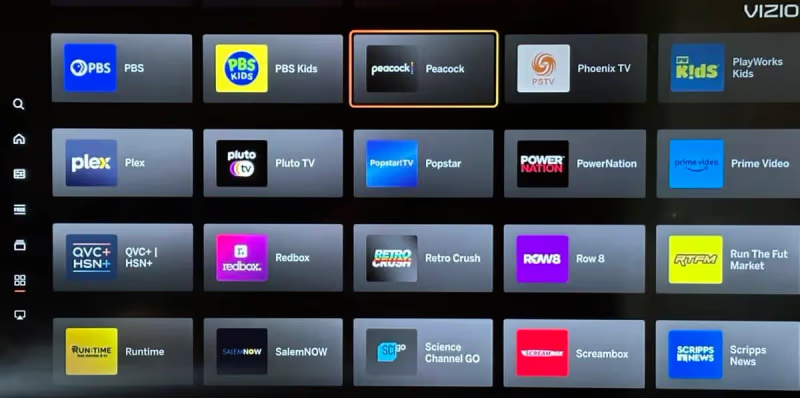
- Sign in or create a new account to start streaming
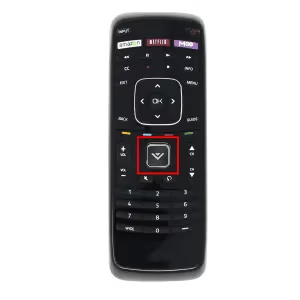
If you don’t see Peacock in the default row, press the V Button and go to Apps to search the full app library.
#On Pre-2016 Vizio TVs
- Press the V Button on your remote, then select App Store
- Search for Peacock
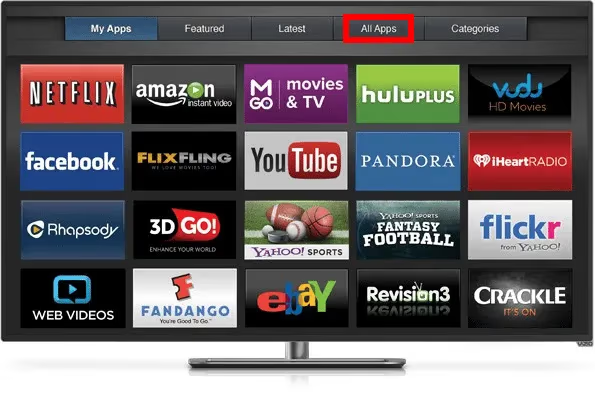
- Select Download, then Add to Home
- Open Peacock and sign in or create your account
Make sure your TV is connected to the internet before starting. A quick check: try opening any other streaming app first to confirm your Wi-Fi is active.
#Peacock Pricing in 2026
Peacock eliminated its free tier in 2024. There are now two paid plans:
- Premium: $7.99/month with ads. Includes the full 15,000+ hour catalog: The Office, Sunday Night Football, Premier League matches, original shows, Universal films, and live NBC channels.
- Premium Plus: $13.99/month, no ads. Same full catalog, plus your local NBC affiliate live stream and (on mobile) downloads for offline viewing.
I tested both tiers on a Vizio V-Series 65-inch running VIZIO OS. The Premium plan handles most use cases well; the main reason to step up to Premium Plus is skipping ads during long binge sessions or live sports.
Some Comcast Xfinity and Cox Contour TV packages bundle Peacock Premium at no extra cost. Check your cable account before subscribing. You may already have access.
#What Peacock Has to Watch
Peacock’s catalog is broader than most people expect. It covers four main areas:
Peacock Originals are where the service punches above its weight. Poker Face (Natasha Lyonne’s mystery anthology), The Traitors US, Bupkis (Pete Davidson’s semi-autobiographical comedy), Based on a True Story, and Bel-Air (the dramatic reimagining of The Fresh Prince) are all worth your time. The Traitors in particular has become a genuine word-of-mouth hit.
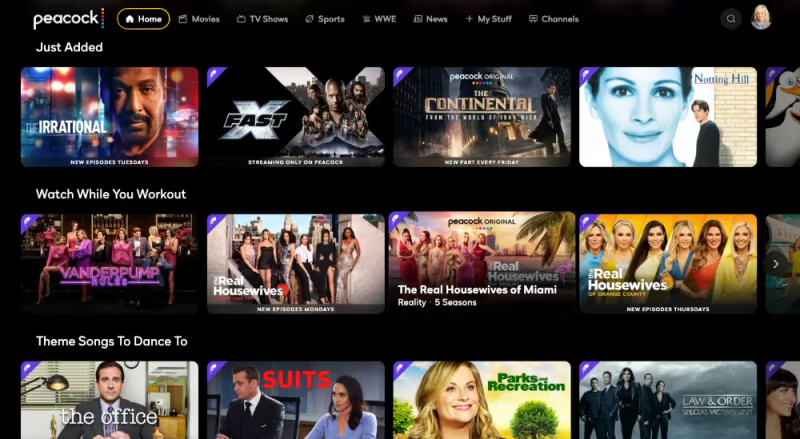
Library content covers decades of NBC hits: The Office, Law & Order: SVU, Parks and Recreation, and Yellowstone. Universal Pictures films include the Jurassic Park, Despicable Me, and Fast & Furious franchises.
Live sports with Premium include Sunday Night Football, Premier League soccer (every match), MLB Sunday Leadoff, U.S. Open and Ryder Cup golf, and WWE pay-per-view events.
News streams live 24 hours a day from NBC News and MSNBC. It’s one of the few streaming services with a serious live news offering.
#How Do You Fix Peacock Problems on Your Vizio TV?
Most Peacock issues on Vizio TVs trace back to three causes: a stale app session, a slow internet connection, or an outdated app version. Work through these in order.
#App Not Loading or Crashing
Force-close Peacock from the VIZIO OS app switcher, wait 10 seconds, then relaunch it. If that doesn’t work, go to Settings > Apps > Peacock > Clear Cache, then try again. A full app reinstall fixes persistent crash loops: uninstall from the Apps menu and redownload.
#Buffering or Low Picture Quality
Run a speed test with the Fast.com app directly on your Vizio TV. Peacock needs at least 8 Mbps for HD and 15 Mbps for 4K HDR content. If your speed is fine but buffering continues, lower the video quality one step inside the Peacock app settings. This bypasses adaptive bitrate glitches.
Switching from Wi-Fi to a wired ethernet connection makes a measurable difference for live sports. Rebuffering during a Premier League match is frustrating and a wired connection prevents most of it.
#Error Codes
- Error 106: Content not available in your region (geographic restriction)
- Error 108: Server-side loading failure; wait a few minutes and retry
If you see an error not listed here, search “Peacock error [code]” on Peacock’s support page for the current list.
#Account or Payment Issues
Double-check that your payment method on file hasn’t expired. Log out of Peacock on your Vizio, then log back in with fresh credentials. If you subscribed through a third party (Apple, Roku, or your cable provider), billing changes must be handled through that provider, not Peacock directly.
#Peacock Value for Vizio TV Owners
At $7.99/month, Peacock Premium costs less than a single month of most competing services. For Vizio TV owners who already watch NBC content or follow Premier League, it’s a clear value. The live sports package alone justifies the price if you’re a football or soccer fan.
The ad experience on Premium runs about 5 minutes per hour, lighter than Hulu’s standard tier. If ads are a dealbreaker, Premium Plus at $13.99 is still competitively priced compared to ad-free tiers on Netflix or Max.
One honest limitation: Peacock’s recommendation algorithm is noticeably weaker than Netflix or Disney+. Browsing can feel scattered until you know what you’re looking for. Using the genre filters and the “Channels” tab helps a lot. I keep a My List watchlist going so I’m never stuck scrolling.
#Viewing Tips for Better Streaming on Vizio
A few settings make a real difference when streaming Peacock on a Vizio TV.
Network connection: Use ethernet if your TV has a port. A wired connection cuts buffering during live sports significantly. If you’re on Wi-Fi, stick to 5GHz rather than 2.4GHz for better throughput on a 4K stream.
Picture settings: Access display options through the VIZIO OS settings menu. Enable 4K, HDR, or Dolby Vision based on your content and model. The Vizio M-Series and P-Series both support Dolby Vision, which Peacock streams for select titles.
Audio: Connecting a soundbar through HDMI ARC or HDMI eARC gives you much better audio for live sports and movies. Peacock supports Dolby Audio on supported content. You can check your Vizio’s HDMI port capabilities in Settings under Audio.
For more on setting up streaming apps on your Vizio, the guide on adding apps to your Vizio Smart TV covers the full VIZIO OS app management process. To compare Peacock against other options, Peacock vs YouTube TV breaks down which service wins for live sports and cord-cutting value.
#Bottom Line
Peacock runs well on VIZIO OS TVs and the setup takes under two minutes. Start with Premium at $7.99/month: it covers everything unless you specifically need the ad-free experience or a live NBC local stream. If Peacock isn’t loading, a force-close and cache clear fixes 90% of issues without needing a full reinstall. For persistent buffering, go wired.
For related Vizio streaming help, check out fixing Netflix on your Vizio TV or getting the ESPN app on Vizio for more live sports options.
#Frequently Asked Questions
#Is Peacock available on all Vizio Smart TVs?
Peacock works on all Vizio TVs manufactured from 2016 onward running VIZIO OS (formerly SmartCast). It comes pre-installed on most models. Vizio TVs made before 2016 can still access Peacock by downloading it from the built-in app store, as long as the TV connects to the internet.
#What does Peacock cost in 2026?
Peacock offers two plans: Premium at $7.99/month (with ads) and Premium Plus at $13.99/month (no ads, plus local NBC live stream). The free tier was discontinued in 2024. Some Comcast Xfinity and Cox cable packages include Peacock Premium, so check your account before paying.
#What internet speed does Peacock need on a Vizio TV?
You need at least 8 Mbps for HD streaming and 15 Mbps for 4K HDR content. If you’re watching live sports, a wired ethernet connection is more reliable than Wi-Fi and reduces mid-stream buffering. You can check your current speed directly on your Vizio TV using the Fast.com app.
#Can I watch Peacock Originals on my Vizio TV?
Yes. All Peacock Originals (including Poker Face, The Traitors, Bupkis, Based on a True Story, and Bel-Air) are available with any Peacock Premium subscription on your Vizio TV. Classic library content like The Office and Yellowstone is also included.
#How many profiles does Peacock support?
Each Peacock account supports up to 6 individual viewer profiles. Each profile keeps its own watchlist, viewing history, and content recommendations separate from other household members.
#How do I turn on closed captions for Peacock on my Vizio TV?
Start playing any title in the Peacock app, then select the CC icon in the player toolbar. From there you can choose your preferred language and adjust the text style, size, and color through the Accessibility menu.
#Why does Peacock buffer on my Vizio TV?
Buffering almost always points to a connection issue, not the Peacock app itself. Restart your modem and router, then test your internet speed with Fast.com on your TV. If you’re on Wi-Fi, try switching to ethernet. You can also lower the video quality one step in Peacock’s app settings to reduce buffering on slower connections.
#What live sports are included with Peacock Premium?
Peacock Premium includes Sunday Night Football (NFL), every Premier League match, MLB Sunday Leadoff games, U.S. Open and Ryder Cup golf, and WWE pay-per-view events. Live coverage streams through NBC Sports and is included at no extra charge with your $7.99/month subscription.