I’ve spent months testing both Plex and Jellyfin on my home server, and the gap between them shifted dramatically after Plex’s 2025 pricing overhaul. This Plex vs Jellyfin comparison covers features, pricing, transcoding, privacy, and device support so you can pick the right media server for your setup. If you’re exploring other options too, check out my Plex alternatives and Jellyfin alternatives guides.
- Jellyfin is completely free — no subscriptions, no paywalls, every feature unlocked including hardware transcoding and remote access
- Plex Pass prices doubled in 2025 — now $6.99/mo, $69.99/yr, or $249.99 lifetime, up from the old $4.99/$39.99/$119.99 tiers
- Plex paywalled remote streaming in April 2025 — free users can no longer stream outside their home network without paying
- Jellyfin now has official Samsung Tizen and LG webOS apps — closing the biggest device-support gap with Plex as of early 2026
- Privacy gap is significant — Jellyfin stays fully local while Plex collects streaming activity, device data, and requires a central account
#What Are Plex and Jellyfin?
Both Plex and Jellyfin let you host and stream your personal media collection across devices. They share the same core purpose but take very different approaches to pricing, privacy, and extensibility.
#Plex Overview

Plex has dominated the DIY media server market for over a decade. It started as a simple media player and grew into an ambitious hub that blends your personal libraries with ad-supported content and third-party streaming services.
Today, Plex lets you organize movies, TV shows, music, photos, podcasts, and audiobooks in one slick interface. It also offers live TV with DVR capabilities, cross-device playback syncing, and a catalog of free ad-supported movies and shows.
The catch? Plex’s free tier got much more restrictive in 2025. Remote streaming now requires a paid subscription, and hardware transcoding, watch syncing, and most premium features still sit behind the Plex Pass paywall.
#Jellyfin Overview

Jellyfin is a fully open-source media server that forked from Emby in 2018. The project exists to give users complete control over their data without any corporate strings attached.
Jellyfin handles movies, TV shows, music, photos, ebooks, and audiobooks right out of the box. The current stable release is Jellyfin 10.10.x (shipped late 2025), which includes SyncPlay for group watching, hardware transcoding, and DLNA support without any extra configuration.
Every feature is free. No subscriptions, no paywalls, no upsells. You can extend functionality through community-built plugins, and the entire codebase is open for anyone to audit or modify.
#Key Differences at a Glance
Here’s a quick comparison of how these two servers stack up in 2026:
| Plex | Jellyfin | |
|---|---|---|
| Pricing | Freemium ($6.99/mo or $249.99 lifetime Plex Pass) | 100% free |
| Remote Access | Paywalled (free tier = local only since April 2025) | Free, no restrictions |
| Top Features | Library management, Live TV/DVR, ad-supported content | Full personal media hosting, SyncPlay |
| Device Support | Extensive (nearly all platforms) | Strong (now includes Samsung Tizen and LG webOS) |
| Transcoding | Software free; hardware requires Plex Pass | Full software + hardware, free |
| User Interface | Highly polished | Clean, functional |
| Privacy | Central account required, data collection | Fully private, self-hosted |
| Customization | Limited (plugins fully deprecated) | Extensive (open source, active plugin system) |
#How Do Plex and Jellyfin Compare on Features?
When it comes to playing your owned media files, both servers handle virtually any mainstream audio and video format. Each one makes it simple to organize movies, TV shows, music collections, and personal photo archives.
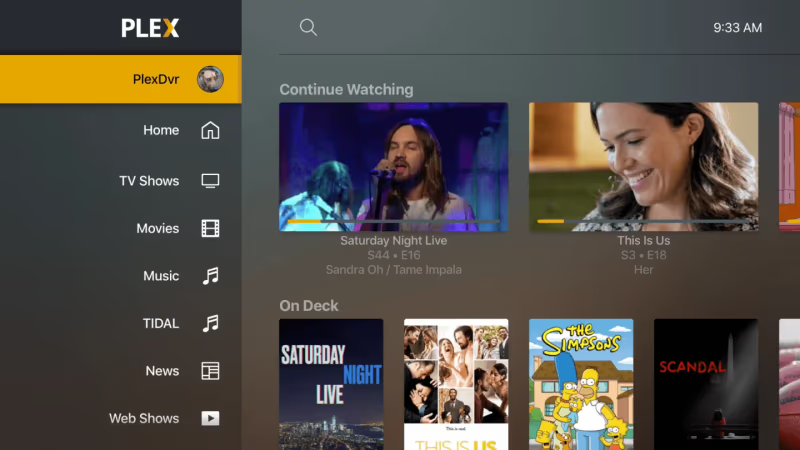
For cord-cutters, either server works as a DVR with compatible TV tuners. Stream live television or schedule recordings to expand your on-demand catalog.
Plex does provide some extras that Jellyfin doesn’t match. You can browse an ad-supported library of free movies and shows, aggregate podcasts and web shows, manage audiobooks, and integrate third-party services like Netflix and Prime Video into a unified hub. Cross-device watch tracking syncs your progress across every screen (though it requires a Plex Pass).
Jellyfin sticks to hosting your own media. There are no plans to add hosted content or advertising. The upshot is total control over your files with no ecosystem lock-in. Jellyfin 10.10.x added SyncPlay for synchronized group watching, which is a feature Plex still doesn’t offer for free.
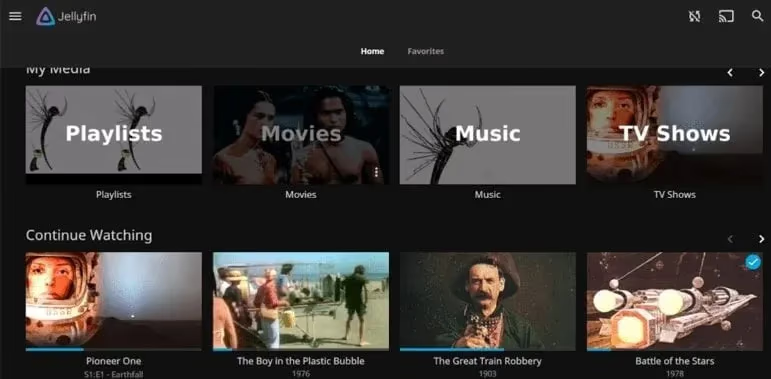
If you just want to play your files without extras, Jellyfin provides a leaner, no-cost experience. Choose Plex if you like the idea of an all-in-one media center blending your private and subscription content.
#Setup and Ease of Use
Both Plex and Jellyfin are straightforward to install, with thorough guides available. Plex takes the edge for user-friendliness though.
With Plex, you download the app, follow the initial prompts, and you’re streaming within minutes. Installers exist for virtually all operating systems and NAS devices. No command-line work needed in most cases.
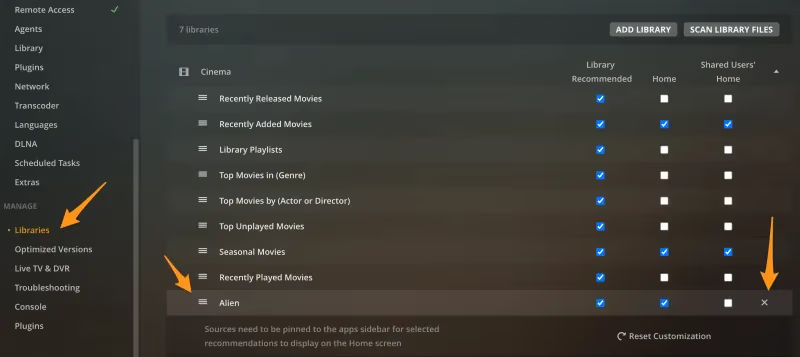
Jellyfin setup also starts with downloading the server app for your platform. But it can require extra steps on some systems, like installing dependencies, configuring the server through config files, or compiling from source on less common distros. The Jellyfin docs walk you through everything, and Docker deployments are dead simple. Still, it’s more involved than Plex’s “it just works” onboarding for first-timers.
Once running, both servers handle library importing the same way. Point them at your media folders, and they pull metadata, artwork, and episode info automatically.
#Apps and Device Support
To access your server, you need client apps for your TVs, streaming boxes, phones, and PCs. Plex has historically dominated here, but the gap narrowed considerably in 2026.
You’ll find native Plex apps for nearly every platform:

- Android and iOS phones/tablets
- Android TV, Apple TV, and Fire TV (see my guide to Plex on Amazon Fire Stick)
- Roku, Chromecast, and smart TVs
- Gaming consoles (PlayStation and Xbox)
- Windows, Mac, Linux PCs (including Plex on Chromebook)
Jellyfin’s client selection used to be its weakest point. That changed. The project now offers:
- Official Samsung Tizen app and LG webOS app (released February 2026)
- iOS and Android mobile apps
- Apple TV (Jellyfin on Apple TV guide) and Android TV apps
- Roku channel and Fire TV app (Jellyfin on Firestick walkthrough)
- Kodi add-on and web client
The Samsung and LG apps were the two biggest gaps Jellyfin had versus Plex. With those filled, Jellyfin now covers the vast majority of living room setups. Plex still wins on niche platforms like gaming consoles, but for most households, the device support difference is minor.
#User Interface
Plex delivers flashier aesthetics. The colorful posters, smooth transitions, and stylized player controls feel lifted straight from Netflix.
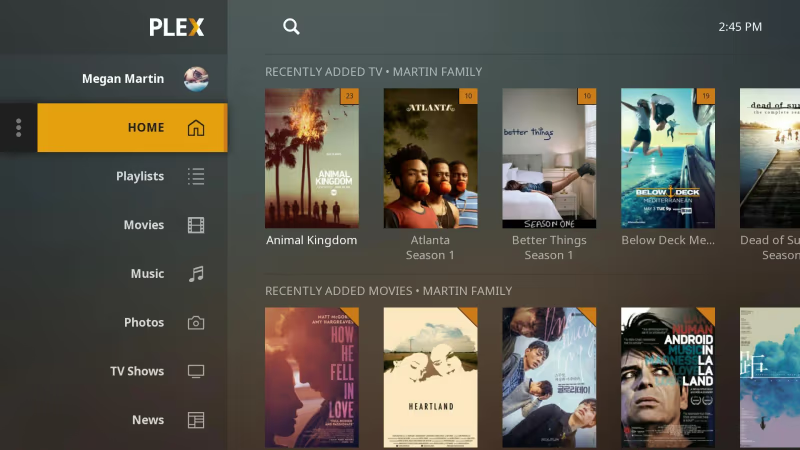
Jellyfin’s looks are more understated. The layout is clean and intuitive but lacks Plex’s visual polish. No fancy animations or artwork galleries. The design targets functionality over form.
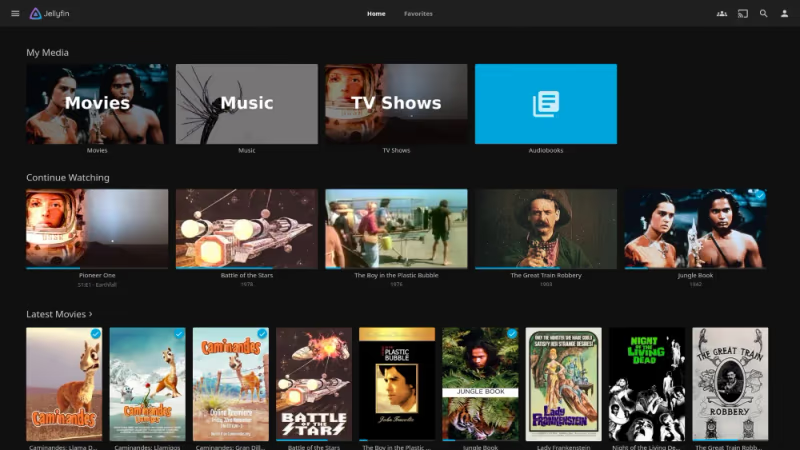
Both servers get the job done for finding and playing content. I actually prefer Jellyfin’s lighter, snappier UI for daily use, but Plex is the clear winner if you want to impress non-technical family members with a premium-looking interface.
#What Does Each Server Cost in 2026?
No contest here. Jellyfin is entirely free, forever. There are no costs of any kind.
Plex, on the other hand, doubled its Plex Pass prices in 2025. Current plans:
- Monthly: $6.99/month
- Annual: $69.99/year
- Lifetime: $249.99 one-time
On top of that, Plex paywalled remote streaming on April 29, 2025. Free users can now only stream within their home network. If you want to watch your own media while traveling or share your library with friends, you’ll need either a full Plex Pass or the new Remote Watch Pass at $1.99/month, which unlocks just remote access without the other premium features.
This is a major shift. Remote streaming used to be Plex’s killer free feature. Jellyfin still offers remote access at no cost, which makes it far more appealing for anyone who streams outside their house.
#Transcoding Capabilities
Transcoding converts media formats in real time when your client device can’t play the original file. It’s critical if you have older TVs, limited bandwidth, or high-bitrate 4K files.
Both servers offer software transcoding out of the box. Hardware-accelerated transcoding offloads the work to your GPU, allowing more simultaneous streams while keeping CPU usage low.
Here’s the difference. Jellyfin includes hardware transcoding for free. Plex locks it behind the Plex Pass. In my tests, Jellyfin consistently handled more simultaneous 4K HDR transcodes thanks to its efficient hardware implementation. You can also create custom transcode profiles optimized for specific clients.
#How Private Is Each Server?
Plex drew major scrutiny after a December 2022 data breach that exposed a subset of users’ encrypted data. By design, every Plex server must connect with Plex HQ. There’s no way to use it fully locally.
According to their privacy policy, Plex collects data on your streaming activity, server usage, and account/device details. Some data sharing can be disabled, but you’re still trusting Plex to protect the information they do collect.
Jellyfin collects nothing. It’s completely self-contained on your local network by default. There are no external phone homes or forced cloud integrations. You can audit the entirety of Jellyfin’s open-source code to verify it respects your privacy, and with minor configuration changes, you can lock down your server to block all outside access.
For maximum ownership over your media and data, Jellyfin is the clear choice.
#Extensibility and Plugins
Plex’s plugin system is fully deprecated. The Plugin Directory has been removed, and most legacy plugins no longer work. Third-party tools like Tautulli still function alongside Plex, but they’re standalone applications, not Plex plugins. Plex has shifted focus toward being a closed, all-in-one product rather than an open platform.
Jellyfin takes the opposite approach. Its plugin ecosystem is active and growing, with community-built extensions for metadata providers, subtitle downloaders, notifications, library sync tools, and custom player themes. Tight integration with tools like Sonarr, Radarr, and Ombi makes automating your media pipeline straightforward.
If you like to tinker and customize your server, Jellyfin is far more accommodating.
#Which Media Server Should You Pick?
Having tested both platforms extensively, it’s clear they target different users. Here’s my recommendation:
#You Should Use Plex If…
- You want a highly polished, Netflix-like interface
- You’re a beginner who values easy setup over flexibility
- You need gaming console support (PlayStation, Xbox)
- You want free ad-supported movies and shows in the same app
- You don’t mind paying $6.99/mo or $249.99 lifetime for premium features
#You Should Use Jellyfin If…
- You only need to stream your own media
- You refuse to pay for a media server, period
- You want remote streaming without a subscription
- You need total control over your files and data
- You enjoy customizing your server through plugins and open-source tools
#Frequently Asked Questions
#Is Jellyfin better than Plex?
Neither is universally better because they target different users. Jellyfin is free, more private, and more customizable, while Plex has flashier apps and easier setup. The 2025 pricing changes tipped the value equation further toward Jellyfin, though, since remote streaming and hardware transcoding both cost money on Plex now.
#Can I use Jellyfin and Plex together?
Yes, and they can share the same media folders on your server. I run both simultaneously to compare features and target different devices. The two servers don’t conflict as long as you assign them different ports. It’s a good way to test Jellyfin before fully migrating away from Plex.
#Is Jellyfin still actively developed?
Jellyfin is under very active development. The 10.10.x stable branch shipped in late 2025 with SyncPlay, improved hardware transcoding, and DLNA support. New client apps land frequently, including the official Samsung Tizen and LG webOS apps that arrived in February 2026.
#Does Jellyfin work on Samsung and LG smart TVs?
Yes. Jellyfin released official apps for Samsung Tizen and LG webOS in February 2026. You can install the Samsung app directly from the app store or sideload it. This was one of the biggest missing pieces compared to Plex, and it’s now resolved.
#What is Plex’s Remote Watch Pass?
It’s a new $1.99/month tier Plex introduced alongside the remote streaming paywall in April 2025. The Remote Watch Pass unlocks just remote access without the full Plex Pass feature set. If you only need to stream outside your home network, it’s cheaper than the $6.99/month Plex Pass.
#Can I migrate my Plex library to Jellyfin?
Point Jellyfin at your existing Plex media folders during setup and it’ll scan them automatically. You may need to recreate collections and custom playlists manually. Metadata and artwork typically carry over without issues since both servers pull from the same online databases.
#What hardware do I need to run Plex or Jellyfin?
Any modern PC, NAS, or even a Raspberry Pi 4 can run either server for direct-play streaming. If you need real-time transcoding for multiple users, a CPU with Intel Quick Sync or a dedicated GPU makes a big difference. Jellyfin has the edge here because hardware transcoding is free, while Plex locks it behind a Plex Pass.
#What are the best alternatives to both?
If neither fits, Emby sits between them as a paid-but-polished option. I’ve also compared Stremio vs Plex, Plex vs Infuse, and Kodi vs Jellyfin if you’re exploring other media server options.
#Bottom Line
The Plex vs Jellyfin comparison looks very different in 2026 than it did a year ago. Plex doubled its prices, paywalled remote streaming, and fully killed its plugin system. Jellyfin responded by shipping official Samsung and LG apps, stabilizing its 10.10.x release, and staying completely free.
Plex still wins on interface polish, beginner-friendly setup, and ad-supported content. It’s the right pick for someone who wants a premium “just press play” experience and doesn’t mind paying for it.
Jellyfin wins on cost, privacy, remote access, hardware transcoding, and extensibility. If you’re comfortable with a bit more setup work, it’s hard to justify paying Plex when Jellyfin does everything most self-hosters need for $0.
For most readers of this site, I’d go with Jellyfin. The savings add up fast, especially after Plex’s price hike, and the device support gap that used to hold Jellyfin back is mostly gone.