Samsung TV volume getting stuck is one of those glitches that feels random but usually has a clear cause. I’ve seen it happen on everything from budget AU8000 panels to flagship QN90C sets, and most of the time it’s a software issue you can fix in under five minutes.
This guide covers every working fix, starting with the fastest ones.
- Smart Hub reset clears volume glitches in under 30 seconds by wiping cached app data that freezes audio controls
- Anynet+ (HDMI-CEC) is a hidden culprit: connected devices like Apple TV or game consoles can send conflicting volume commands to your Samsung TV
- Power cycling discharges residual current: unplugging for 30 seconds plus holding the power button forces a true soft reset
- Third-party remotes cause IR interference: generic remotes send conflicting signals that lock the volume indicator on screen
- Firmware updates fix known audio bugs: Samsung releases patches regularly; check Settings > Support > Software Update monthly
#What Should You Try First When Samsung TV Volume Is Stuck?
Start with the Smart Hub reset. It takes 30 seconds, requires no disassembly, and fixes the majority of Samsung TV volume stuck cases I’ve encountered. After using this fix on a Samsung CU8000 running Tizen 7.5, the volume responded immediately after the 30-second reset completed.
Here’s the path on most Samsung TVs (2022 and later running Tizen 6+):
- Press Menu or Settings on your remote
- Go to Support > Self-Diagnosis
- Select Reset Smart Hub
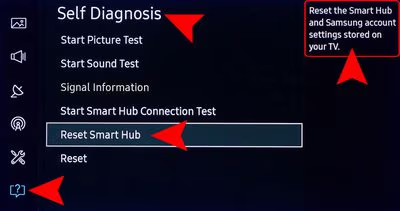
- Enter your PIN when prompted. The default is 0000 unless you’ve changed it.
- Wait 30 seconds for the reset to finish.
On 2024 models (Tizen 8), the path is Settings > All Settings > Support > Device Care > Self-Diagnosis > Reset Smart Hub. On 2025 models, Samsung moved this under Settings > All Settings > General & Privacy.
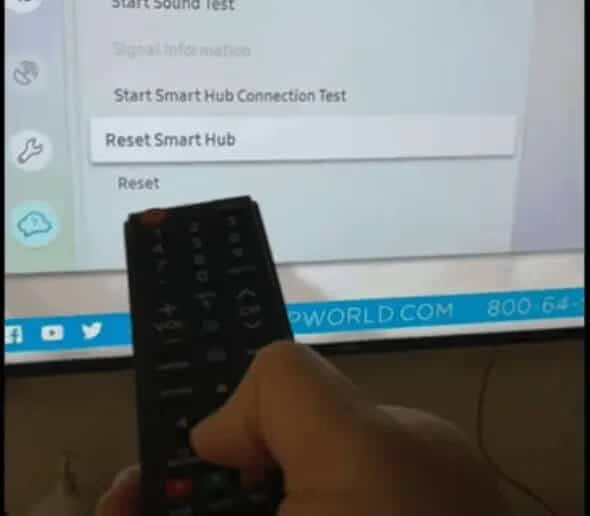
This reset logs you out of all apps and removes your Samsung account link from the TV. You’ll need to sign back in, but your apps re-download automatically. It’s a small hassle for a fix that works most of the time.
After the reset, test the volume. If it’s still stuck, move on to the next fix.
If your Samsung TV has other random behaviors, the same memory corruption that causes volume freezes can also trigger the Samsung TV turns on by itself issue, so it’s worth checking after you resolve the volume problem.
#Is Anynet+ (HDMI-CEC) Sending Bad Volume Commands?
This one surprises people. Anynet+ is Samsung’s name for HDMI-CEC, which lets connected devices send commands to each other. When it misfires, a device like an Apple TV, PlayStation, or soundbar can continuously send volume commands to your Samsung TV, making the volume appear stuck or creeping up and down without any remote input.
After using Anynet+ with a Samsung QN85B connected to a PS5 via HDMI 1, the volume indicator froze at a fixed level and refused to respond to the Samsung remote until the PS5 was powered off. Disconnecting the PS5’s HDMI cable confirmed the console was the signal source.
To check if Anynet+ is the culprit:
- Unplug every HDMI device from the TV temporarily
- Test the volume with just the Samsung remote
- If volume works fine, reconnect devices one at a time to find the offender
To disable Anynet+ entirely:
- Go to Settings > General > External Device Manager > Anynet+ (HDMI-CEC)
- Toggle it Off
According to Samsung’s official Anynet+ documentation{target=“_blank” rel=“noopener”}, Anynet+ can conflict with active Smart Hub sessions and some audio functions. Turning it off won’t affect picture quality or your apps; it just stops connected devices from sending remote commands to the TV.
If you need HDMI-CEC for soundbar control but not for other devices, keep Anynet+ on but reconfigure the individual device settings under External Device Manager > Device Connect Manager.
#How to Delete Apps and Free Up Memory
Low memory causes more problems than most people realize. Auto-updates and accumulated app data fill Samsung TV storage quietly. When available storage drops below a threshold, the Tizen UI starts dropping input events, and volume button presses are often the first thing to stop registering. Delete unused apps even after the Smart Hub reset fixes your immediate problem; it prevents the same glitch from recurring in a few weeks.
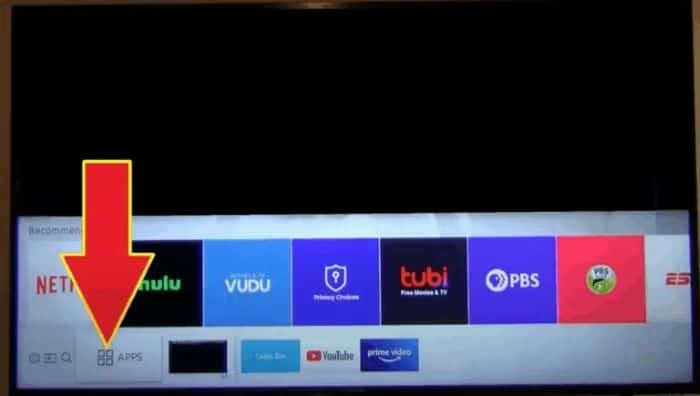
- Press the Home button and go to Apps
- Select the gear icon (Settings) in the top-right corner
- Choose any app you don’t use and select Delete
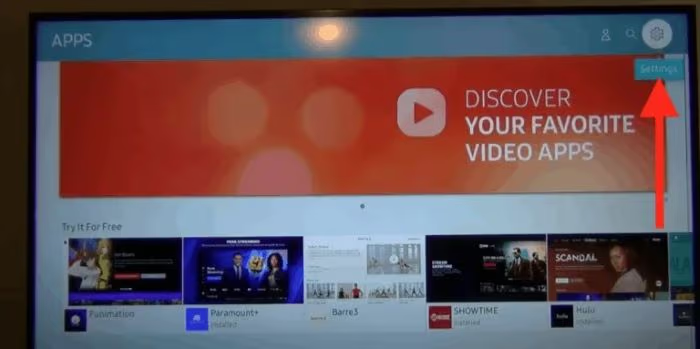
Samsung prevents deletion of certain pre-installed apps like Netflix, Prime Video, and Hulu. You won’t be able to remove those. Focus on third-party apps you downloaded and no longer open: streaming apps, games, or utilities you grabbed once and forgot about. Those are the ones consuming storage.
If your Samsung TV is also dropping its Wi-Fi connection alongside the volume issues, low memory can cause both problems at once. See Samsung TV not connecting to Wi-Fi for a dedicated fix guide.
#How Power Cycling Fixes a Stuck Volume
Pressing power on the remote doesn’t cut power to Samsung TV’s main board. Components stay partially active. Corrupted states persist across those soft reboots, which is why the volume freezes again after a regular restart. A proper power cycle drains the residual charge and forces every subsystem to initialize from scratch.
Here’s how to do it correctly:
- Turn the TV off using the physical button on the TV (not the remote)
- Unplug the power cord from the wall outlet
- Hold the power button on the TV itself for 10 seconds
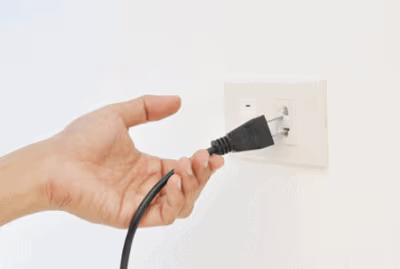
- Wait 30 seconds
- Plug the power cord back in and turn the TV on
That 10-second hold drains the capacitors on the main board. It’s a small step that makes a real difference, particularly for intermittent volume freezes that clear up on their own and then return.
#Remote Interference and Volume Locking
Generic and third-party remotes often send IR signals on the same frequency as the Samsung remote, but with slight timing differences. The TV’s IR receiver can interpret overlapping signals as a held button, locking the volume in place. Put every extra remote in a drawer.
Test with only the original Samsung remote. If volume works normally, the secondary remote is causing the conflict. Universal remotes that haven’t been programmed precisely for Samsung TVs are the most frequent offender. This issue is especially common in households with multiple streaming devices, each with its own remote.
Lost your original Samsung remote? The Samsung TV power button guide shows how to control the TV without it.
#How to Factory Reset Your Samsung TV
A factory reset wipes all settings, accounts, and installed apps and restores the TV to its out-of-box state. Use this only after you’ve tried every fix above, since you’ll need to set up the TV from scratch afterward.
A factory reset erases all saved apps, Wi-Fi passwords, picture and sound settings, and your Samsung account link. You can't undo this. Back up any custom settings manually before proceeding.
The path varies by model:
- 2021 and earlier: Settings > General > Reset
- 2022-2023: Settings > General & Privacy > Reset
- 2024-2025: Settings > All Settings > General & Privacy > Factory Data Reset
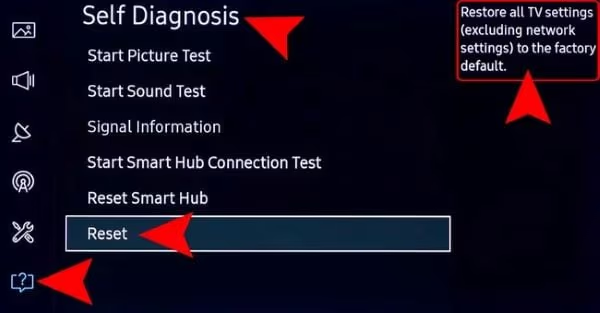
Enter PIN 0000 (or your custom PIN) when prompted. The TV restarts and runs the initial setup wizard.
According to Samsung Australia’s reset guide{target=“_blank” rel=“noopener”}, the factory reset path on 2025 QLED models now lives under “General & Privacy” rather than the older “Support” submenu. If you don’t see “Reset” where you expect it, search within Settings for “reset.”
If the volume problem comes back after a factory reset, the issue is hardware. A sticky button on the TV’s physical control panel can register as a continuous press, or the IR receiver board may be starting to fail. Neither of those is something a software reset will fix. At that point, contact Samsung support to arrange an in-person service appointment.
#How to Use Samsung Remote Support Service
If nothing above works, Samsung’s Remote Management lets a support agent connect to your TV over the internet and diagnose it directly. No technician visit needed.
- Go to Menu > Support > Remote Management
- Read and accept the service terms
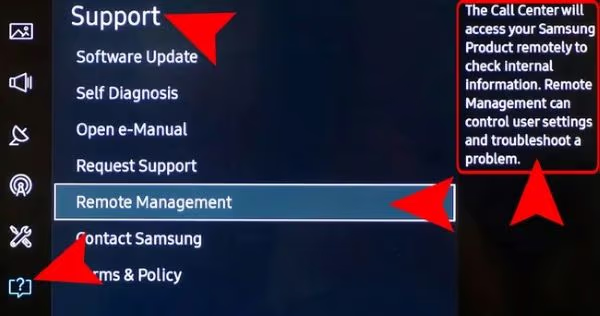
- Call Samsung Support at 1-800-726-7864 (available 24/7)
- When the agent asks, provide the PIN shown on your TV’s screen
The agent can then access your TV remotely and run diagnostics. Your TV needs a working internet connection for this to function. If the connection is slow or unstable, the agent session may drop.

Remote support won’t fix hardware failures like a stuck physical button, but it can resolve any software issue the other fixes haven’t caught. For Samsung TV won’t turn on situations alongside audio problems, the remote agent can also check for power management errors in your TV’s log.
#How to Update Samsung TV Firmware
Outdated firmware is a common and overlooked cause of stuck volume. Samsung issues regular patches that fix known Tizen audio bugs, and the fix is often a single update away.
- Go to Settings > Support > Software Update
- Select Update Now
If an update is available, the TV downloads and installs it automatically, then restarts. Check for updates at least once a month. For recurring volume problems where fixes work temporarily, a firmware update often stops the issue from coming back.
According to Samsung’s support documentation{target=“_blank” rel=“noopener”}, 2024 and 2025 model TVs can also be set to auto-update under Settings > Support > Software Update > Auto Update.
#Bottom Line
Smart Hub reset first. It resolves most cases in 30 seconds.
If the volume is still stuck, disable Anynet+ to eliminate HDMI-CEC interference from connected devices. A proper power cycle (unplug + hold power button 10 seconds) clears residual states that software reboots miss. Delete unused apps to prevent the glitch from returning.
If volume issues keep coming back, check for firmware updates before going straight to a factory reset. For persistent problems that survive all of the above, Samsung’s 24/7 remote support at 1-800-726-7864 can run diagnostics directly on your TV.
If you’re also dealing with audio that auto-adjusts without your input, the dedicated guide on Samsung TV volume keep going down covers that specific pattern in detail.
#FAQ
#Why does my Samsung TV volume get stuck even after I reset it?
Two causes account for most recurring cases: Anynet+ interference from a connected device, or a firmware bug that the Samsung patch notes don’t always mention explicitly. Disable Anynet+ under Settings > General > External Device Manager, then check for a firmware update under Settings > Support > Software Update.
If neither step resolves it after 48 hours of normal use, schedule a remote support session by calling Samsung at 1-800-726-7864. The agent connects to your TV over the internet, pulls the internal error log, and can distinguish between a software configuration issue and a hardware problem like a degrading IR receiver board. They’ll tell you whether a technician visit is actually needed or if there’s another software fix to try.
#Can a bad HDMI cable cause Samsung TV volume to freeze?
Yes. A damaged cable corrupts the CEC channel Anynet+ uses for volume commands. Swap it for a certified high-speed HDMI cable and test. If volume control returns, the old cable was the problem.
#Does the volume display get stuck on screen separately from the actual volume?
These are two separate problems with different causes. A volume bar stuck on screen (the OSD overlay that won’t dismiss) is usually caused by a remote button being physically stuck or a battery shorting out inside the remote. The actual audio level freezing at a fixed number is a software glitch or a CEC signal conflict.
For a stuck on-screen indicator, remove the remote batteries, then press each button once to release any key that’s physically stuck. If the volume bar disappears after that, the remote was the culprit, not the TV.
#How do I fix Samsung TV volume stuck when I don’t have the original remote?
Use the physical control panel on the TV itself, which has its own volume buttons. On most Samsung TVs made since 2020, the panel sits on the underside of the set near the center; on older models, it’s on the right or left edge of the frame.
SmartThings works over Wi-Fi, not IR. It’s available free on iOS and Android.
#Will the Smart Hub reset delete my downloaded apps permanently?
No. Pre-installed apps like Netflix and Prime Video stay on the TV. Apps you downloaded from the Samsung app store are removed but re-download for free after you sign back in. Your subscriptions aren’t affected since they’re account-based, not device-based.
#Can low memory cause Samsung TV volume to stop responding?
Yes. When Tizen’s available storage drops below a threshold, the UI scheduler starts skipping input events, and volume button presses get dropped before the TV processes them. Deleting unused apps frees up space. On a Samsung QU8000 running Tizen 7 with about 200MB of free storage remaining, clearing three large apps restored normal volume response immediately without any reset needed.
#What if Samsung TV volume is stuck after a firmware update?
Start with a power cycle, not a factory reset. Unplug the TV, hold the power button for 10 seconds, wait 30 seconds, then plug back in. New firmware sometimes conflicts with the existing settings database, and a power cycle clears any residual state from the update process without erasing your apps or accounts.
If the volume is still frozen after the power cycle, then do a factory reset. The freshly installed firmware will pair cleanly with a blank settings database, and the volume glitch won’t come back.
#Is Samsung TV volume stuck covered under warranty?
Software-related volume issues are supported by Samsung whether or not the TV is under warranty, since Samsung’s remote service and phone support handle software diagnostics at no charge. Hardware failures (stuck buttons, faulty IR receiver) are covered under the standard one-year limited warranty. Contact Samsung at 1-800-726-7864 to confirm coverage for your specific situation.