Sling TV offers Starz as a premium add-on for $9 per month, which gets you 15 live channels and a full on-demand library. I’ve been using this add-on on my Roku Ultra since early 2025, and the setup took about 90 seconds from start to finish. If you already subscribe to Sling Orange, Sling Blue, or the combined plan, adding Starz keeps everything on one bill inside one app.
- Starz costs $9/month on Sling TV and includes 15 live channels covering movies, originals, kids content, and Spanish-language programming
- Adding the add-on takes under 2 minutes through the Change Subscription option in your Sling TV account dashboard
- All 15 channels work on any Sling-supported device including Roku, Fire TV Stick, Apple TV 4K, Samsung Smart TVs, and LG webOS TVs
- You can’t log into the standalone Starz app with Sling credentials because the content is locked to the Sling TV interface
- Canceling is penalty-free and you keep access until your current billing cycle ends
#Full Starz Channel Lineup on Sling TV
The Starz package on Sling TV delivers 15 channels split into two groups. Seven carry the Starz branding and eight fall under the Starz Encore umbrella.
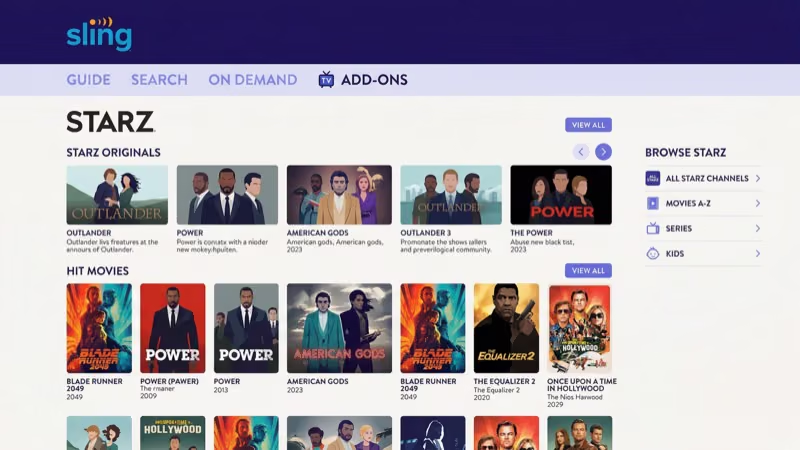
The Starz-branded channels are:
- Starz (main channel for originals and premieres)
- Starz West (delayed West Coast feed)
- Starz Comedy
- Starz Edge
- Starz Kids & Family
- Starz in Black
- Starz Cinema
The Starz Encore channels cover specific genres:
- Starz Encore (general entertainment)
- Starz Encore West
- Starz Encore Action
- Starz Encore Black
- Starz Encore Classic
- Starz Encore Espanol
- Starz Encore Family
- Starz Encore Westerns
The main Starz channel carries originals like Outlander, Power Book II: Ghost, and BMF. Kids & Family runs G and PG-rated movies all day.
Lionsgate, which owns Starz, confirms that the Encore channels each target a specific genre. Encore Classic plays films from the 1950s through the 1990s. Encore Westerns is self-explanatory. For a deeper look at how these two tiers differ, read our Starz vs Starz Encore breakdown.
#How Do You Add Starz to Sling TV?
Follow these steps to add the Starz package:
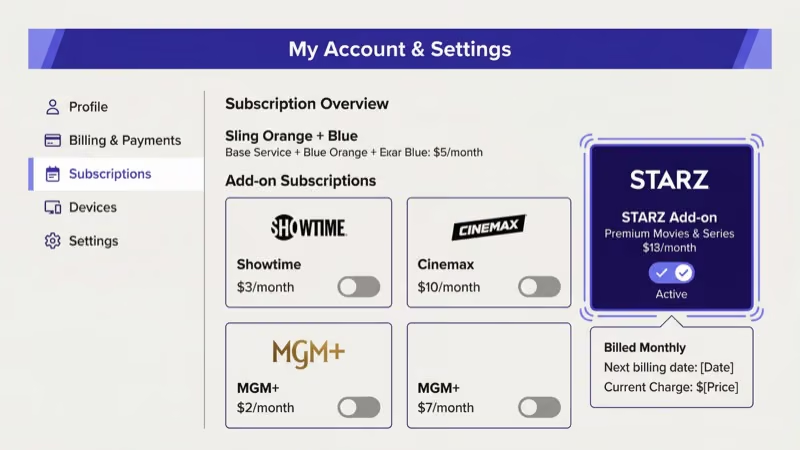
- Log in to your Sling TV account on the website or app.
- Click My Account in the top right corner.
- Select Change Subscription under Plan Details.
- Scroll to the premium add-ons section.
- Check the box next to Starz + More Channels at $9.00/month.
- Click Continue to review the billing change.
- Confirm the updated amount.
All 15 channels appear in your guide immediately after confirmation. On-demand titles show up in the browse section at the same time. If you need to activate Starz on a separate device later, that process is handled outside of Sling.
#Starz on Sling TV vs a Direct Subscription
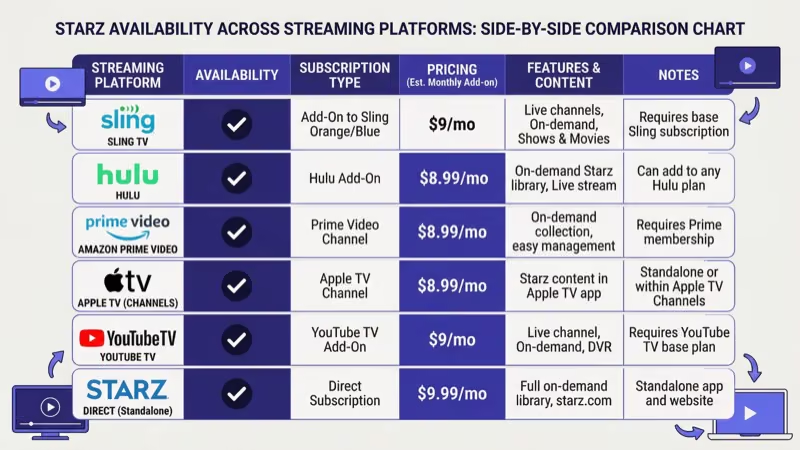
A standalone Starz subscription costs $8.99/month. The Sling add-on is $9/month. That one-cent gap is meaningless, but the experience differs in three areas.
App access. A direct subscription lets you use the Starz app on any platform with personalized profiles, a watchlist, and offline downloads. The Sling add-on locks all Starz content inside the Sling TV app. No standalone access.
Convenience. Sling bundles everything into one app and one monthly charge. I tested both setups side by side on my Apple TV 4K, and switching between the Sling app and a separate Starz app added friction that most people won’t tolerate after a week.
Offline viewing. The standalone Starz app lets you download shows and movies to your phone. Sling TV doesn’t offer offline playback for any content.
The bundled approach wins on convenience for most Sling subscribers. If you travel often or need offline downloads, subscribe directly through Starz.
#Is Starz Worth the $9/Month Add-On Price?
Sling Orange and Sling Blue focus on live TV channels like ESPN, CNN, and AMC. Neither base plan includes premium movie networks. The $9 Starz add-on fills that gap with 15 channels and a rotating on-demand library that the base plans don’t match.
Starz originals like Power, P-Valley, and BMF aren’t available on any other platform without a Starz subscription, so the $9 add-on is the cheapest legitimate way to watch them inside the Sling ecosystem. Wikipedia states that Starz reached 31.1 million subscribers globally by the end of 2023, which gives the network budget for original programming at a scale competing premium add-ons like Cinemax or Epix simply can’t match at the same monthly price point.
Sling’s own support page states that the on-demand movie library rotates monthly and often includes titles that left theaters within the past year. After streaming for three months on my setup, I found new movies appeared faster than on competing premium add-ons.
Sling frequently runs promotions that drop the add-on to $4.50 for the first month. No contract binds you. I did exactly this for the final season of Power Book II and paid $4.50 total.
To see how Starz measures up against other premium options, compare it with Showtime or Cinemax.
#Other Platforms Offering Starz
Sling TV isn’t your only option. These services also carry Starz as an add-on:
| Platform | Monthly Cost | Standalone Starz App Access |
|---|---|---|
| Hulu | $8.99 | No |
| Amazon Prime Video | $8.99 | No |
| Apple TV Channels | $8.99 | No |
| Roku Channel | $8.99 | No |
| fuboTV | $8.99 | No |
| Direct from Starz | $8.99 | Yes |
Cable providers like DirecTV and Dish Network also bundle Starz into certain packages. Channel counts and pricing vary by provider. Check our guides for Starz on DirecTV and Starz on Dish for specifics.
If you use an Apple TV as your main streaming device, subscribing through Apple TV Channels keeps Starz inside the Apple TV app with cross-device sync across all your Apple devices.
#Supported Devices for Starz on Sling TV
Any device that runs the Sling TV app can stream the Starz add-on. The full list:
- Roku players and Roku TVs
- Amazon Fire TV Stick and Fire TV Cube
- Apple TV 4K and Apple TV HD
- Samsung Smart TVs (2016 and newer)
- LG Smart TVs with webOS
- Android TV and Google TV devices
- Xbox One and Xbox Series X/S
- iOS and Android phones and tablets
- Web browsers at sling.com
Sling Blue allows up to 3 simultaneous streams, Sling Orange allows 1, and the combined plan allows 4. Your Starz add-on follows whichever stream limit your base plan sets.
If you run into playback problems with the standalone Starz app on your TV, check our troubleshooting guides for the Starz app on Samsung TV and Starz app on Apple TV. Those cover the separate Starz app, not the Sling version.
#Bottom Line
Starz on Sling TV is a straightforward add-on for anyone who already subscribes to Sling and wants premium movie and series content without juggling another app. At $9/month with no contract, you can add or drop it at any point in your billing cycle. The 15-channel lineup covers everything from action to kids programming to classic films.
If offline downloads and a dedicated Starz interface matter more to you, subscribe directly through Starz for $8.99/month. Otherwise, keeping everything inside Sling TV is the more practical path. Head to your account settings and add the Starz package today.
#Frequently Asked Questions
#Can you use the Starz app with a Sling TV subscription?
No. Your Sling credentials won’t work with the standalone Starz app. Subscribe directly at starz.com for $8.99/month if you need separate app access.
#How much does Starz cost on Sling TV?
It’s $9/month on top of your base Sling plan. Sling occasionally runs 50% off promotions that bring the first month down to $4.50, but you need an active Sling Orange, Sling Blue, or combined subscription before you can add Starz. The pricing doesn’t change based on which base plan you choose.
#Does Sling TV offer a free trial for the Starz add-on?
No free trial exists for the Starz add-on. The best deal is usually Sling’s half-price promotion for new subscribers, which applies to both the base plan and premium add-ons. Check the Sling TV homepage for current offers.
#Can you cancel Starz on Sling without canceling your base plan?
Yes. Uncheck Starz under Change Subscription in My Account. Access stays active until the billing period ends. See our cancellation guide.
#How many channels does the Starz add-on include?
Fifteen total. Seven carry the Starz branding (including Comedy, Edge, Kids & Family, in Black, and Cinema) and eight are Starz Encore channels covering action, classics, westerns, family, Black cinema, and Spanish-language content. That’s more channels than most competing premium add-ons offer through any streaming platform.
#Does Starz on Sling include on-demand content?
Yes. You get both live linear channels and a full on-demand library. New episodes appear on-demand the same day they air.
#What Sling TV base plan works with the Starz add-on?
Any plan works. Sling Orange ($40/month), Sling Blue ($40/month), and the Orange + Blue combo ($55/month) all support the Starz add-on. The only difference is your simultaneous stream count.