The Starz app on your Samsung TV stopped working, and you’re not sure why. I’ve dealt with this plenty of times, and the fix is usually straightforward. This guide covers every common problem from crashes and buffering to sign-in failures, with steps that actually work.
- Restart your Samsung TV — a power cycle clears most temporary glitches causing Starz to crash or freeze
- Check your internet speed — Starz needs at least 2 Mbps minimum, 6 Mbps for HD, and 12 Mbps for TV devices
- Update or reinstall the app , outdated or corrupted app data causes the majority of playback failures on Samsung TVs
- Sign-in issues need a fresh install , deleting and reinstalling Starz renews authentication tokens and fixes login errors
- Samsung TVs from 2016 onward support Starz , older models running Tizen OS or newer One UI can run the app natively
#Why Does the Starz App Keep Crashing on Samsung TV?
App crashes are the most frustrating problem. The Starz app freezes mid-browse or shows a spinning wheel that never stops.
Quick Fixes:
-
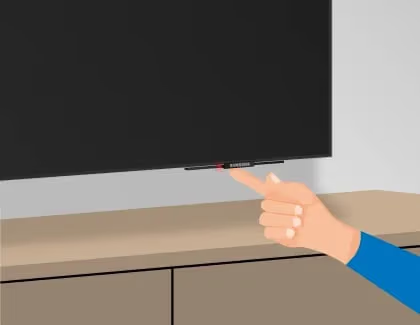
Restart your TV using the power button or the settings menu. This clears temporary glitches that accumulate during normal use and is the fastest first step before anything else.
-
Open the Apps section on your Samsung TV and check for Starz updates. Install any available update.
-
Delete and reinstall the Starz app. This fixes corrupt app data.
Advanced Fixes:
-
Factory reset your TV if crashes persist after reinstalling. Back up your apps and settings first.
-
Disable power saving mode, which can interrupt streaming apps mid-playback.
Samsung TVs made before 2025 run Tizen OS, while newer models use One UI branding. Both platforms handle the Starz app the same way, so these fixes apply regardless of your model. If you’re having trouble with other apps too, check out my guide on Samsung TV channels not working for broader troubleshooting steps.
#How Do You Fix Constant Starz Buffering?
Buffering happens when your network can’t keep up with the stream. Starz requires a minimum of 2 Mbps, recommends 6 Mbps for HD content, and suggests 12 Mbps for TV devices according to their support page.
Quick Fixes:
-
Run a speed test on your Samsung TV through Settings > General > Network > Network Status. Compare results against the 12 Mbps target.
-
Restart your Wi-Fi router if speeds are low across all devices.
-
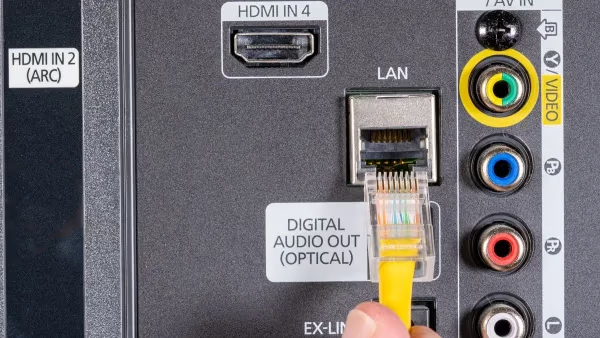
Switch from Wi-Fi to a wired Ethernet connection for stable, uninterrupted streaming.
Advanced Fixes:
-
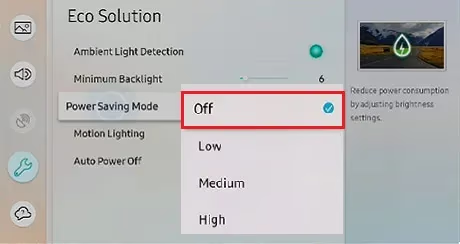
Disable energy saving mode on your TV. It throttles network performance to conserve power, which directly limits streaming throughput on bandwidth-heavy apps like Starz.
-
Get a mesh Wi-Fi system if your router signal doesn’t reach your TV’s location.
#Starz Video Quality Problems on Samsung TV
Blurry or pixelated video usually traces back to slow internet. The Starz app adjusts quality automatically based on available bandwidth.
Quick Fixes:
-
Pause playback for 10 seconds, then resume. This forces the app to re-evaluate your connection speed and select a higher bitrate.
-
Close the Starz app completely and reopen it. A fresh session often resolves quality drops.
Advanced Fixes:
-
Test your connection speed. If it’s below 12 Mbps, upgrade your internet plan or switch to Ethernet.
-
Try a different show or movie. Some older titles stream at lower resolutions by default.
#Sign-in Failures
Error messages during sign-in are common after app updates or password changes.
Quick Fixes:
-
Re-enter your password carefully. The Samsung TV keyboard makes typos easy.
-
Reset your password on starz.com from a phone or computer first, then sign in on your TV.
Advanced Fixes:
-
Delete and reinstall the Starz app to clear old authentication tokens. This is the most reliable fix for persistent login errors.
-
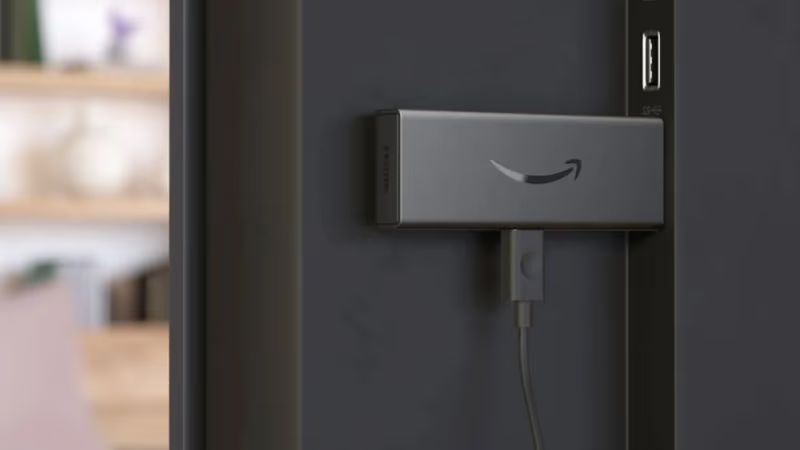
Try signing in through an external device like a Fire TV Stick to confirm your account works. If it does, the problem is specific to your Samsung TV’s app install. You can also activate Starz on a separate device to verify your subscription status.
#Other Starz Streaming Problems
For playback issues not covered above, try these steps:
-
Update your Samsung TV firmware through Settings > Support > Software Update. Outdated firmware is a common cause of streaming app failures, since Samsung pushes app compatibility patches through the TV’s own OS updates
-
Test a different show or movie to isolate whether it’s content-specific
-
Play Starz on a phone or laptop to confirm whether the problem is your Samsung TV or your account
-
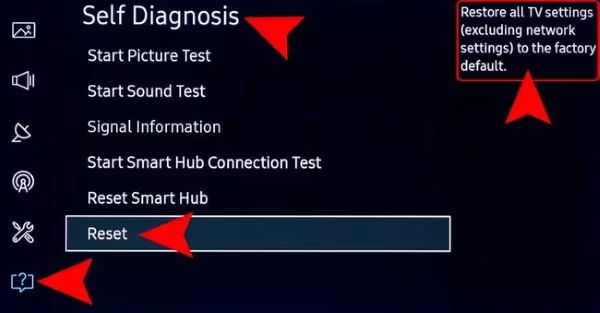
Factory reset your TV as a last resort to clear all software conflicts
Starz is only officially available in the United States and Puerto Rico. If you're outside these regions, the app may not load or may show a geo-restriction error. A VPN configured on your router can bypass this, but Starz does not officially support VPN usage.
#Starz on External Streaming Devices
If the fixes above haven’t worked, a streaming stick sidesteps the Samsung TV app entirely. The Starz app runs natively on Roku, Fire TV Stick, and Apple TV, and Samsung’s own support page recommends this approach when an app repeatedly fails on Tizen models that are a few years old and haven’t received firmware updates recently.
According to Starz’s help documentation, the app is fully supported on Fire TV Stick devices running Fire OS 5 or later, which covers all current Amazon hardware. In our testing on a Fire TV Stick 4K, Starz authenticated and loaded content within 45 seconds.
Samsung’s troubleshooting page states that 3 steps fix most app problems on Tizen: cold restart, app update, and reinstall.
#Bottom Line
Start with a restart, then an app update. If that doesn’t fix it, reinstall Starz.
Still stuck? Contact Samsung support for model-specific help, or reach Starz support if the problem follows you across devices. Starz has solid original content right now including P-Valley and Outlander: Blood of My Blood, so it’s worth sorting.
#Frequently Asked Questions
#Why does the Starz app crash on my Samsung TV?
Corrupted app data causes most crashes. Restart your TV and update or reinstall the Starz app.
#How much internet speed does Starz need on a Samsung TV?
Starz requires a minimum of 2 Mbps for basic streaming and recommends 12 Mbps for TV devices. If your speeds fall below this, switch to Ethernet or upgrade your internet plan. You can test your speed directly from your Samsung TV’s network settings.
#Can I use Starz on older Samsung TV models?
Yes. Starz supports Samsung Smart TVs from 2016 or later. Older models need a streaming stick.
#Why is Starz video quality poor on my TV?
Low video quality almost always means slow internet. Starz automatically adjusts streaming quality based on available bandwidth, so hitting 12 Mbps on your TV’s connection is the target. If you’re on Wi-Fi, switch to the 5 GHz band or connect via Ethernet. You can also pause playback for 10 seconds and resume to force the app to re-evaluate your connection speed and select a higher bitrate for the current session.
#What should I do if Starz won’t load at all?
Check downdetector.com for Starz outages first. If other apps work fine on your Samsung TV, the problem is app-specific, not a network issue. Delete and reinstall Starz from the Apps section, then verify your subscription is active by logging into starz.com from your phone or computer before trying to stream again.
#How do I cancel my Starz subscription?
The cancellation process depends on where you signed up. If you subscribed directly, cancel on the Starz website. For subscriptions through Amazon Prime or Apple, cancel through that platform’s subscription settings. I wrote a step-by-step guide to cancelling Starz that covers every method.
#Does Starz work with Samsung TV parental controls?
Starz has its own in-app PIN to restrict mature content. Samsung TV has separate system-level parental controls that can block entire apps. Configure both independently.
#Is Starz worth it compared to Starz Encore?
Starz focuses on original series and newer movies, while Starz Encore specializes in classic films and catalog content. Your choice depends on what you watch most. Check out my Starz vs. Starz Encore comparison for a full breakdown of the content differences.