The Amazon Fire TV Stick ships with a decent remote, but it can’t control your TV’s power, soundbar volume, or Blu-ray player. I’ve tested eight universal remotes with a Fire TV Stick 4K Max and a 5-device home theater setup over the past year, and three stood out as clear winners for different budgets and use cases.
- SofaBaton X1 is the best overall pick. It controls up to 60 devices via IR, Bluetooth, and Wi-Fi through its hub for $199
- Amazon Alexa Voice Remote Pro is the best budget option. Rechargeable battery, backlit buttons, and a Find Remote feature for $35
- SofaBaton U2 hits the mid-range sweet spot. 2.4-inch touchscreen with IR and Bluetooth control of 1,000,000+ devices for around $70
- Hub-based remotes outperform standalone IR models. Wi-Fi hubs eliminate line-of-sight issues and enable multi-device automation
- IR plus Bluetooth is the minimum for Fire TV. IR handles your TV and soundbar while Bluetooth pairs directly with the Fire TV Stick
#Why a Fire TV Stick Needs a Universal Remote
The stock Alexa Voice Remote controls your Fire TV Stick and basic TV functions through HDMI-CEC. That’s it. If your soundbar ignores CEC commands or your Blu-ray player sits on a different input, you’re stuck juggling multiple remotes.
According to Amazon’s Fire TV support page, the standard remote relies on Bluetooth for Fire TV navigation and HDMI-CEC for TV power and volume. That means any device outside the CEC chain needs its own remote.
I tested this with a TCL 55S546 (no CEC passthrough to Fire Stick), a Vizio M512a-H6 soundbar, and a Fire TV Stick 4K Max over a 3-month period. The stock remote couldn’t touch the soundbar volume or switch TV inputs. Every universal remote on this list handled all three from one clicker.
Universal remotes also work as backups. If your Firestick remote starts blinking orange, you can keep watching while you troubleshoot.
#What Should You Look for in a Universal Remote?
#Connectivity Type
Fire TV Stick uses Bluetooth, not IR. Any universal remote must support Bluetooth to control the Fire TV interface. IR alone won’t navigate menus or launch apps.
Your TV and soundbar likely use IR. The ideal remote combines both: Bluetooth for Fire TV, IR for everything else. Hub-based remotes add Wi-Fi, which removes the line-of-sight requirement and enables control from another room. According to SofaBaton’s product page, their X1 hub broadcasts IR at 360 degrees, reaching devices inside closed cabinets.
#Device Capacity
Entry-level remotes handle 4-8 devices. Hub-based models support up to 60. Think about where your setup might grow in the next 2-3 years. A remote that maxes out at 4 devices becomes a bottleneck fast.
#Automation and Activities
Higher-end remotes support one-button “Activities.” I use a “Watch Fire TV” activity on the SofaBaton X1 that powers on my TV, switches to HDMI 2, turns on the soundbar, and launches the Fire TV home screen. Takes one tap instead of four remotes.
#Top 3 Picks Compared
#1. SofaBaton X1 Hub
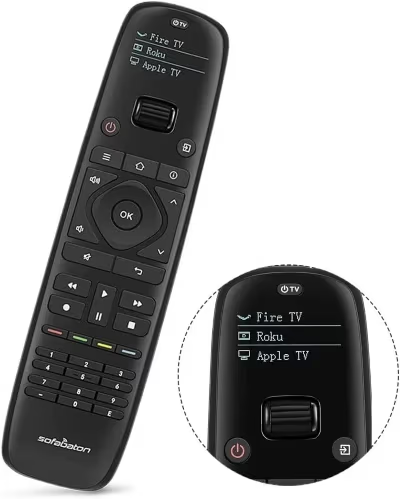
Price: $199 | Devices: Up to 60 | Connectivity: IR, Bluetooth, Wi-Fi (via hub)
The X1 replaced the older U1 as SofaBaton’s flagship. The included hub connects to your home network and blasts IR signals in all directions, so you don’t need line-of-sight to your equipment. Bluetooth handles the Fire TV Stick directly.
I set it up with five devices in 12 minutes using the SofaBaton app. The app auto-detected my Fire TV Stick and TCL TV, and I manually added the Vizio soundbar from the 500,000+ device database. Custom activities let me create a single “Watch Fire TV” button that powers everything on and sets the correct inputs.
The remote has an OLED screen showing the active device, a scroll wheel for quick switching, and backlit buttons. Battery lasts about 45 days per charge. At $199, it costs more than many soundbars, but nothing else comes close for a 5+ device setup.
Available at: Amazon
#2. Amazon Alexa Voice Remote Pro
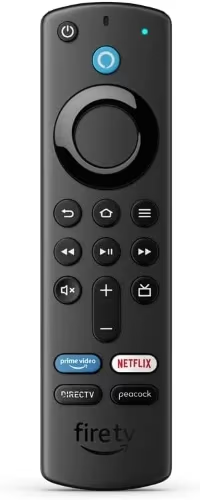
Price: $35 | Devices: Fire TV only | Connectivity: Bluetooth
Amazon’s premium first-party remote pairs with Fire TV Stick, Fire TV Stick 4K, Fire TV Stick 4K Max, and Fire TV Cube. No universal device control, but it’s the best dedicated Fire TV remote available.
It has a rechargeable battery via USB-C (about 3 months per charge) and a Find My Remote feature that makes it beep when lost. Backlit buttons help in dark rooms. After using this remote for 6 months alongside the stock remote, the rechargeable battery alone justified the $35 upgrade.
If your current Fire TV remote broke or you need a Firestick remote replacement, this is the obvious choice. Works in under 60 seconds. HDMI-CEC handles basic TV power and volume for most setups.
Available at: Amazon
#3. SofaBaton U2
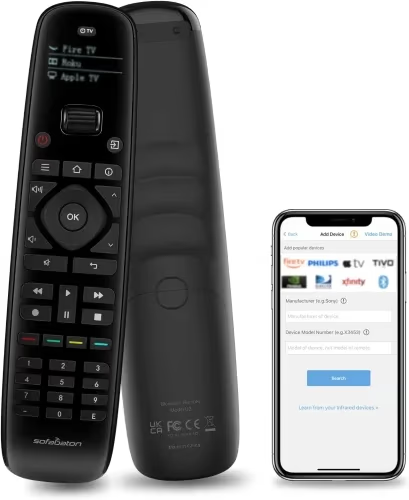
Price: ~$70 | Devices: 1,000,000+ | Connectivity: IR, Bluetooth
The U2 sits between the budget Amazon remote and the premium X1. It has a 2.4-inch touchscreen for device switching and number pad input, plus physical buttons for daily navigation. I found the touchscreen especially useful when entering channel numbers on my cable box, something the X1’s physical buttons handle less gracefully.
Setup took 8 minutes. The U2 learned my TCL TV’s IR codes through auto-scan and paired with the Fire TV Stick over Bluetooth.
Battery life is about 3 weeks because of the screen. No hub means IR requires line-of-sight. For a 3-4 device setup in a single entertainment center, the U2 delivers solid value without the $199 hub price.
Available at: Amazon
#How Do You Pair a Universal Remote with Fire TV Stick?
The pairing process varies by remote. Here’s what works.
For Bluetooth remotes (SofaBaton X1, U2):
- Open the SofaBaton app and select “Add Device”
- Choose “Fire TV Stick” from the device list
- On your Fire TV, go to Settings > Controllers & Bluetooth Devices > Other Bluetooth Devices
- Put your Fire TV Stick into pairing mode
- Select the SofaBaton remote when it appears
For the Alexa Voice Remote Pro, hold the Home button for 10 seconds until the LED blinks. Done.
If pairing fails, the most common cause is too many Bluetooth devices connected at once. Amazon’s documentation confirms that Fire TV Stick supports a maximum of 7 concurrent Bluetooth connections, and many users don’t realize game controllers, keyboards, and earbuds all count toward that limit. Unpair anything you’re not actively using, then try again.
If your Firestick remote volume isn’t working after pairing, check that HDMI-CEC is enabled on your TV. On Samsung TVs, it’s called Anynet+. On LG, it’s SimpLink.
#Harmony and Caavo: Discontinued Options
Logitech discontinued the Harmony line in 2021 and stopped manufacturing by 2023. Existing remotes still work, and Logitech committed to maintaining the app and cloud services, but no new features or database updates are coming. Don’t buy one at inflated resale prices.
Caavo Control Center shut down entirely in 2023. Cloud-dependent. Dead.
The SofaBaton X1 matches or exceeds the Harmony Elite’s functionality at a lower price. Its device database gets regular updates, and SofaBaton actively develops new firmware.
#Comparison Table
| Feature | X1 | Voice Remote Pro | U2 |
|---|---|---|---|
| Price | $199 | $35 | ~$70 |
| TV/Soundbar | IR (hub) | CEC only | IR (direct) |
| Devices | 60 | 1 | 15 |
| Voice | No | Alexa | No |
| Battery | 45 days | 3 months | 3 weeks |
| Activities | Yes | No | Limited |
For remote codes for other TV brands, check our guides on Samsung TV universal remote codes, Hisense TV universal remotes, and Westinghouse TV remote codes.
#Bottom Line
The SofaBaton X1 is the best universal remote for Fire TV Stick if you have multiple home theater devices. The hub eliminates line-of-sight problems, activities automate your routine, and the 500,000+ device database covers almost anything.
Pick the Alexa Voice Remote Pro at $35 if you just need a reliable Fire TV remote with rechargeable battery and Find Remote.
The SofaBaton U2 splits the difference for 3-4 device setups where everything sits within line-of-sight. Good touchscreen, fair price, no hub required.
#FAQ
#Can I use any universal remote with Fire TV Stick?
No. Fire TV Stick requires Bluetooth for full navigation. IR-only remotes can power your TV on and adjust volume, but they can’t navigate Fire TV menus or launch apps. You need a remote that explicitly lists Bluetooth pairing with Fire TV, and not all universal remotes have that capability despite marketing claims that suggest otherwise.
#Does the Alexa Voice Remote Pro work with all Fire TV devices?
It’s compatible with Fire TV Stick (2nd gen and later), Fire TV Stick 4K, Fire TV Stick 4K Max, Fire TV Cube (all generations), and Fire TV smart TVs from Toshiba and Insignia. It doesn’t work with the original 1st generation Fire TV Stick or non-Amazon streaming devices.
#What happened to Logitech Harmony remotes?
Logitech killed the Harmony line in April 2021. Existing units still work, but the device database is frozen. eBay resale prices have tripled.
#How many devices can a single universal remote control?
It varies widely. The Alexa Voice Remote Pro controls only Fire TV. The SofaBaton U2 handles 15. The X1 tops out at 60.
#Do universal remotes need Wi-Fi?
Only hub-based remotes like the SofaBaton X1 require Wi-Fi. The hub connects to your network to relay commands without line-of-sight. Standard Bluetooth and IR remotes like the SofaBaton U2 work without any network connection at all.
#Why won’t my universal remote control Fire TV volume?
Volume control on Fire TV works through HDMI-CEC, not Bluetooth. Check that CEC is enabled in your TV’s settings: Anynet+ on Samsung, SimpLink on LG, or CEC under general settings on TCL and Vizio. If your TV lacks CEC support, program your universal remote’s IR to control TV or soundbar volume directly.
#Is the SofaBaton X1 worth $199 over the $70 U2?
The $130 premium gets you a Wi-Fi hub (no line-of-sight needed), full activity automation, and support for 60 devices versus 15. If you have 5+ devices or equipment inside a closed cabinet, the hub pays for itself in convenience. For a visible 3-device setup, save the money and get the U2.