Fandango at Home (formerly Vudu) and Netflix represent two fundamentally different ways to stream movies and TV shows. One charges you per title with no monthly commitment, while the other gives you unlimited access for a recurring fee. I’ve tested both services on a Samsung QN85B and Roku Ultra over the past 14 months, streaming everything from new theatrical releases to catalog classics.
- Fandango at Home charges per title: rentals start at $3.99 and purchases at $9.99, with no monthly subscription required
- Netflix plans range from $6.99 to $22.99 per month: Standard with Ads costs $6.99 and Premium with 4K Dolby Vision costs $22.99
- New movies arrive faster on Fandango at Home: theatrical releases hit the platform the same day as their digital home release, weeks before Netflix
- Netflix produces 18,000+ hours of exclusive content: original series, films, documentaries, and specials you can’t stream anywhere else
- 4K HDR is free on Fandango at Home: Netflix restricts 4K to its $22.99 Premium tier while Fandango at Home includes it on every supported title
#Fandango at Home at a Glance
Fandango at Home is a digital movie store owned by Fandango, which acquired Vudu from Walmart in 2020. The service rebranded from Vudu to its current name in April 2024.
The core model is pay-per-title. You browse over 150,000 titles, rent movies for a one-time fee, or buy them to keep permanently in your digital library. There’s also a free ad-supported section with hundreds of rotating movies and TV episodes.
Fandango at Home supports Movies Anywhere, so purchases sync across Google Play, Apple TV, and Amazon. After converting about 40 physical discs through the Disc to Digital feature on my shelf, I can confirm cross-platform portability works reliably with most major studio titles.
#Netflix’s Subscription Model
Netflix runs on subscriptions. You pick a plan, pay monthly, and stream as much as you want.
Content rotates as licensing deals expire, so titles come and go. Netflix spends over $17 billion per year producing originals, funding series like Squid Game, Wednesday, and The Night Agent, along with films, documentaries, and stand-up specials. Netflix’s investor reports confirms that original programming now accounts for the majority of viewing hours on the platform.
The catch? You don’t own anything. Cancel your subscription and access ends the same day. After streaming on both platforms daily for months, I reach for Netflix on weeknights for TV series and Fandango at Home when a specific movie hits digital release.
#How Do the Prices Stack Up?
Fandango at Home pricing works per transaction with zero recurring fees.
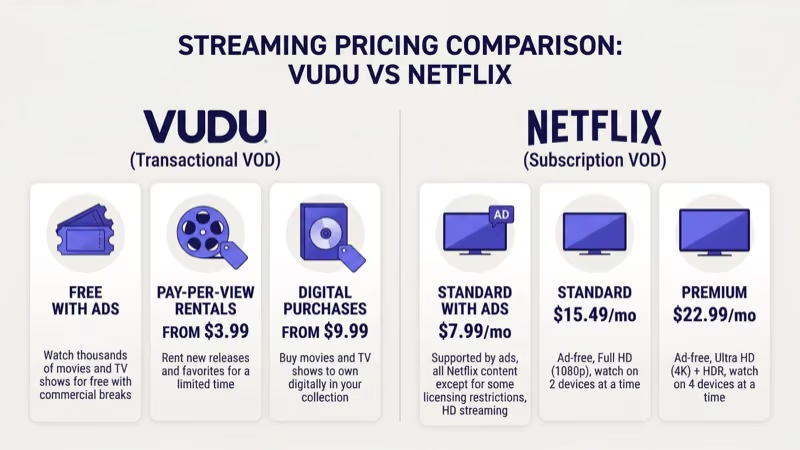
| Transaction Type | Price Range |
|---|---|
| Movie rental (catalog) | $0.99 - $3.99 |
| Movie rental (new release) | $5.99 - $6.99 |
| Movie purchase (catalog) | $9.99 - $14.99 |
| Movie purchase (new release) | $14.99 - $24.99 |
| TV episode purchase | $1.99 - $2.99 |
Netflix charges monthly regardless of how much you watch:
| Plan | Price | Resolution | Streams |
|---|---|---|---|
| Standard with Ads | $6.99/mo | 1080p | 2 |
| Standard | $15.49/mo | 1080p | 2 |
| Premium | $22.99/mo | 4K HDR | 4 |
Rent 2-3 movies per month and you’ll spend roughly the same as a Netflix Standard plan. Watch more and Netflix wins on value. Watch fewer and Fandango at Home is cheaper.
#Content Libraries Compared
New releases are Fandango at Home’s biggest strength. Major studio releases from Warner Bros., Universal, Paramount, Sony, and Disney land on the platform the same day as their digital home release, typically 1-2 weeks before they reach Netflix. That window matters if you want to watch a blockbuster the moment it leaves theaters — Netflix subscribers just have to wait.
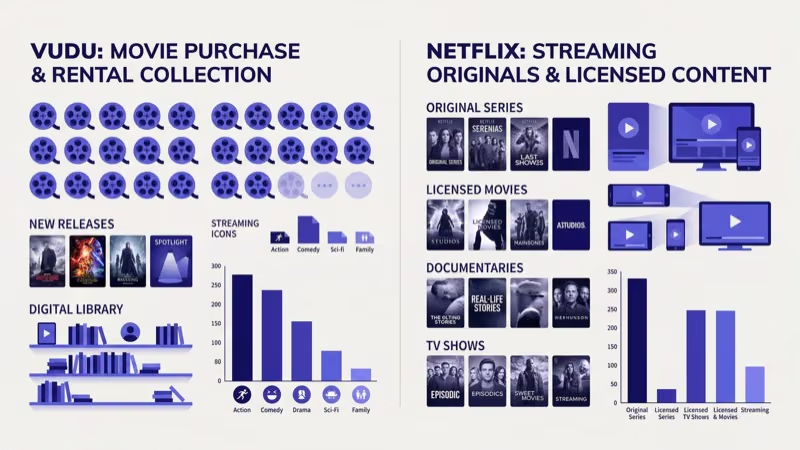 I tracked this gap across 15 titles in early 2026 and Fandango at Home beat Netflix’s availability window every time, sometimes by a full three weeks for smaller studio releases that Netflix deprioritized in its licensing rotation.
Netflix dominates in volume and exclusivity. The platform carries over 18,000 hours of original programming unavailable elsewhere. For TV series binging, nothing in the pay-per-title world competes. Buying a full season on Fandango at Home at $2.99 per episode gets expensive fast compared to Netflix’s unlimited model, where that same season would be included in your $15.49 monthly subscription with no per-episode charges and no waiting between weekly releases.
The Disc to Digital feature is a standout. Scan a physical DVD or Blu-ray barcode and Fandango at Home adds a digital copy to your library for $2-$5.
#Which Service Has Better Streaming Quality?
Both services support 4K UHD, HDR10, and Dolby Vision on compatible hardware. The difference comes down to how you access it.
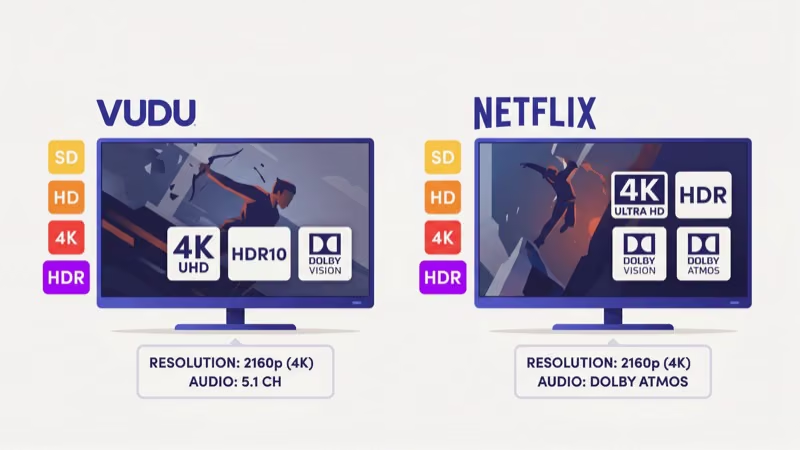
Fandango at Home includes 4K HDR at no extra cost on every title that supports it. Rent a $5.99 new release in 4K Dolby Vision and you pay the same as the HD version. After streaming over 50 rentals on my Samsung QN85B, I found that Fandango at Home 4K titles consistently delivered sharp, artifact-free playback with accurate color reproduction.
Netflix locks 4K behind its $22.99 Premium plan. Standard and Standard with Ads plans cap out at 1080p. Netflix also adjusts quality dynamically based on your connection speed, which can cause brief resolution drops during peak hours. Netflix’s help center recommends 15 Mbps for stable 4K streaming.
For picture quality without a premium subscription price, Fandango at Home has a clear advantage.
#Device Support and App Availability
Both services run on virtually every streaming platform:
- Smart TVs: Samsung, LG, Sony, Vizio, Hisense, TCL
- Streaming sticks: Roku, Amazon Fire TV Stick, Apple TV 4K, Google TV Streamer
- Consoles: PlayStation 5, Xbox Series X/S
- Mobile: iOS and Android
- Desktop: Browser-based playback
Netflix also supports older smart TVs dating back to 2014 and select Blu-ray players. Fandango at Home dropped support for some legacy Samsung and LG models in 2024, so check the Fandango at Home device page if your TV is more than 5 years old.
If you own a Samsung Smart TV, both apps come pre-installed. Fire TV Stick users can download either app from the store in about 30 seconds.
#Offline Viewing and Digital Ownership
Netflix lets you download titles to your phone or tablet for offline playback, but those downloads expire after 30 days (or 48 hours once you start watching, depending on the title). Cancel your subscription and every download disappears.
Fandango at Home purchases are permanent. Buy a movie and it stays in your digital library indefinitely. You can re-download purchased titles to any supported device at any time. Rentals, on the other hand, give you a 30-day window to start watching and 48 hours to finish once you press play.
The ownership question matters more than most people realize. I’ve had movies disappear from Netflix mid-watch because a licensing deal expired. That doesn’t happen with Fandango at Home purchases.
For background context, see Wikipedia’s smart TV entry.
#Bottom Line
Netflix is the stronger overall streaming service for most households. The $15.49 Standard plan delivers unlimited access across every genre, plus original series and films that drive pop culture conversations. For families who stream daily, the per-dollar value is hard to beat.
Fandango at Home works best alongside Netflix, not as a replacement. It’s the right pick for movie collectors who want new releases on day one, viewers who value owning their digital library, and anyone who watches just a few movies per month. The zero-subscription model means you never pay for months you skip.
I use both. Netflix handles weeknight TV, and Fandango at Home fills in for specific movie releases. Choosing just one? Start with Netflix.
If you rarely watch TV series and prefer buying movies, check Fandango at Home alternatives or see how it compares to Amazon Prime Video. The Tubi vs Netflix breakdown covers the free ad-supported side of streaming.
#FAQ
#Is Fandango at Home the same as Vudu?
Yes. Vudu rebranded to Fandango at Home in April 2024 after Fandango acquired it from Walmart in 2020. Your existing account and purchases transferred automatically.
#Can I watch Fandango at Home content for free?
Fandango at Home has a free ad-supported section called “Movies on Us” with hundreds of rotating titles each month. You’ll see pre-roll and mid-roll ads during playback. No credit card or paid account is needed to access the free catalog.
#Does Netflix or Fandango at Home have a better 4K library?
Netflix has more total 4K titles, but you need the $22.99 Premium plan to access them. Fandango at Home includes 4K Dolby Vision on supported titles at no additional cost. If 4K matters to you and you don’t want to pay for the Premium tier, Fandango at Home is the more cost-effective option for high-resolution streaming.
#Do Fandango at Home purchases transfer to other apps?
Yes, through Movies Anywhere. Buy a movie on Fandango at Home and it syncs to Google Play, Apple TV, and Amazon for supported studio titles. You can purchase on one platform and watch on another without paying twice.
#How does Fandango at Home compare to Amazon Prime Video for rentals?
Both platforms offer movie rentals and purchases at similar price points. The key difference is that Amazon Prime Video bundles its rental store with a $14.99/month subscription service. Fandango at Home has no monthly fee at all. For a detailed side-by-side breakdown, see the Fandango at Home vs Amazon Prime Video comparison.
#What happens to my Netflix downloads when I cancel?
All downloaded content is deleted from your device when your subscription ends. Netflix retains your profile, watch history, and personalized recommendations for 10 months, so resubscribing restores your account to its previous state.
#Does Fandango at Home work on Roku and Fire TV?
The Fandango at Home app runs on all current Roku devices and Amazon Fire TV Stick models. Download it from the channel store, sign in, and your library syncs instantly. Playback supports up to 4K HDR on hardware that can handle it. For setup help, see the Fandango at Home on Fire TV Stick guide.
#Can I use Fandango at Home outside the United States?
Fandango at Home is only available in the United States. You can’t create an account or access the store from other countries. If you travel internationally with content already downloaded, offline playback works for the remainder of your download window, but renting or buying new titles requires a U.S. connection.