MSNBC is available on Roku through the free MSNBC channel in the Roku Channel Store. I’ve set it up on a Roku Streaming Stick 4K and a Roku Express, and the process takes about two minutes. You do need cable or live TV streaming credentials for full access, but a limited selection of clips is available without signing in.
- One install method — the MSNBC channel and app are the same thing in the Roku Channel Store, so there’s only one channel to add
- Cable or streaming login required — full live and on-demand access needs a TV provider like Xfinity, YouTube TV, or Hulu + Live TV
- Free content is limited: without authentication, only short clips and highlights are available on the MSNBC channel
- Screen mirroring works as backup, so cast MSNBC from a phone or laptop to your Roku if the channel has issues
- 10 Mbps minimum recommended for reliable MSNBC streaming on Roku at full quality
#What You Need Before Starting
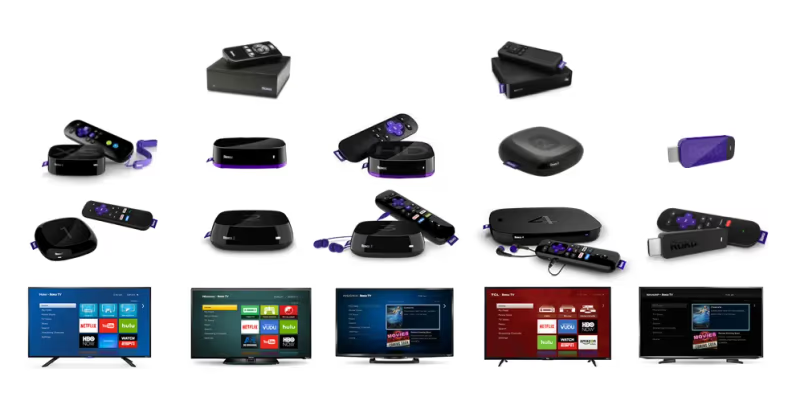
Make sure you have a Roku device running Roku OS 9.0 or later (most models sold after 2018 qualify). You also need a stable internet connection with at least 10 Mbps download speed. If you want full live and on-demand access, have your cable, satellite, or live TV streaming service login ready before opening the MSNBC channel. Roku’s official support page confirms that all current Roku devices support live news streaming apps including MSNBC.
#How Do You Add the MSNBC Channel on Roku?
The MSNBC channel is free to add from the Roku Channel Store. Here’s the process:
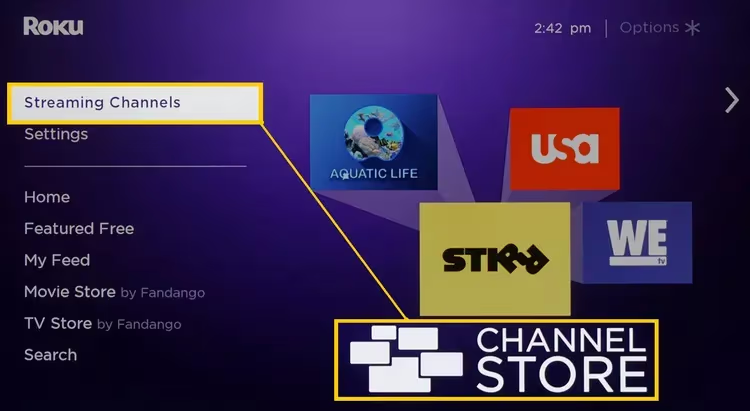
- From your Roku home screen, scroll to Streaming Channels in the left sidebar.
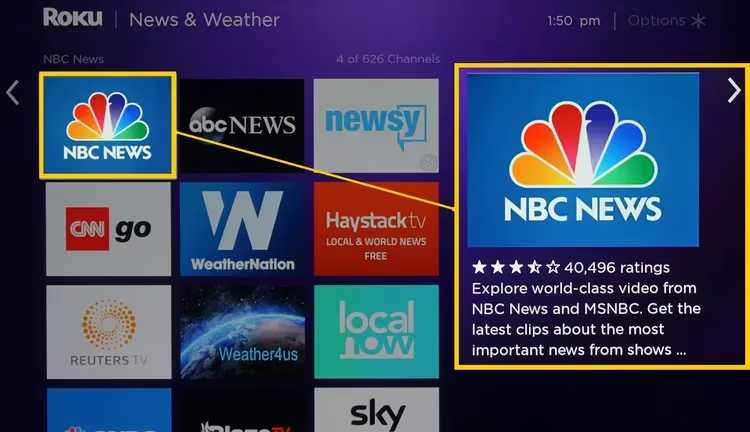
- Select Search Channels and type MSNBC.
- Select the MSNBC channel from the results list.
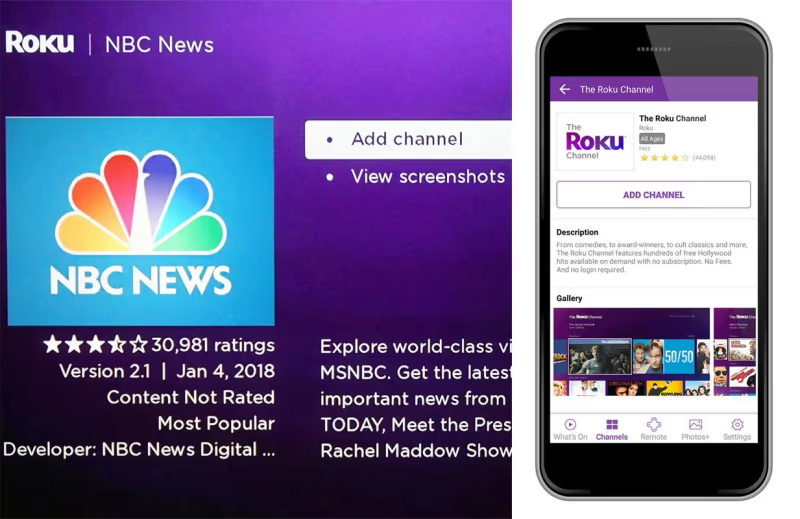
- Click Add Channel on the MSNBC detail page.
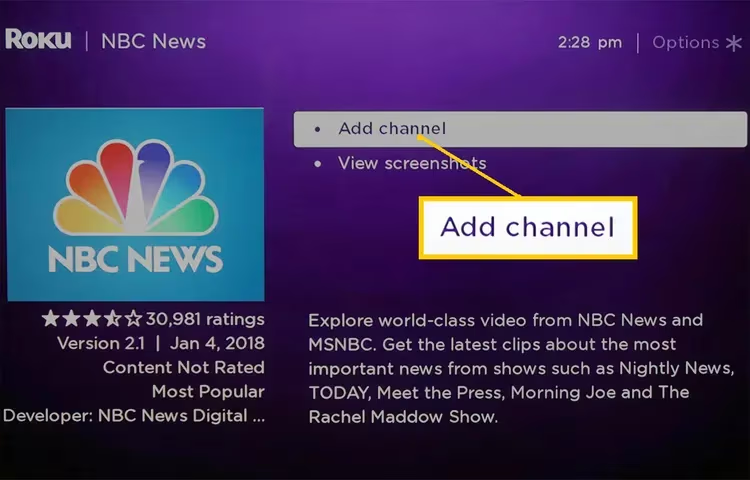
- Enter your Roku PIN if prompted.
- Wait for the channel to finish installing, then press the Home button.
- Open the MSNBC tile from your home screen.
After launching, MSNBC asks you to sign in with a TV provider. Skip this step to browse free clips, or enter your credentials for full access (covered in the authentication section below).
Note: some older articles refer to an “MSNBC app” and an “MSNBC channel” as two separate things. They’re the same. Roku’s Channel Store lists one MSNBC entry. That single install covers both live programming and on-demand content without any additional steps.
#What TV Provider Credentials Work With MSNBC on Roku?
Without signing in, MSNBC on Roku only shows a handful of short clips. Full access requires authentication through one of these provider types:
Cable and satellite providers such as Xfinity, Spectrum, DirecTV, Cox, and Optimum all work. Select your provider from the list in the MSNBC channel, then enter your username and password.
Live TV streaming services also work. YouTube TV, Hulu + Live TV, Sling TV (Blue plan), Fubo, and DirecTV Stream all include MSNBC in their channel lineups. I tested with YouTube TV credentials on a Roku Express and authentication took about 30 seconds. According to NBC’s authentication support documentation, authentication sessions remain active for 30 days before requiring re-login.
Once verified, restrictions are removed and you get the full live stream plus on-demand episodes of shows like Morning Joe and The Rachel Maddow Show.
#How to Screen Mirror MSNBC to Roku
If the MSNBC channel gives you trouble, screen mirroring from a phone or laptop is a solid backup. This approach works regardless of channel availability.
- Make sure your Roku and your phone/laptop are on the same Wi-Fi network.
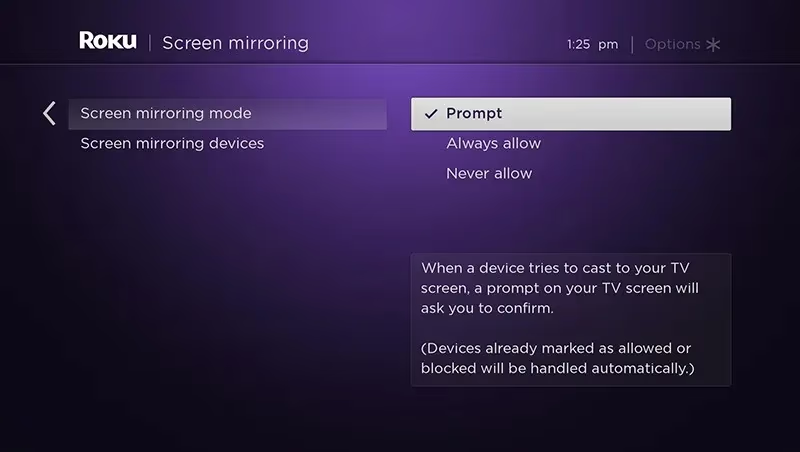
- On your Roku, go to Settings > System > Screen Mirroring and set it to Prompt or Always Allow.
- Open the MSNBC app or msnbc.com/live on your phone, tablet, or laptop.
- Start screen mirroring from your device. On Android, look for Cast or Smart View in quick settings. On Windows, press Win + K.
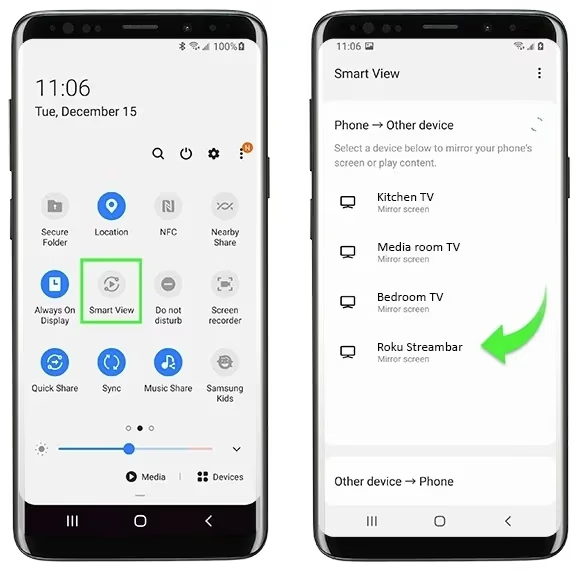
- Select your Roku from the available devices list.
Screen mirroring adds slight input lag and drops quality compared to the native channel. Use it only when the MSNBC channel itself isn’t cooperating. Roku’s support documentation states that AirPlay is available on models running Roku OS 9.4 or later, which delivers better quality than standard Android mirroring. iPhone users should take advantage of AirPlay specifically for this reason.
#Troubleshooting MSNBC on Roku
Can’t find MSNBC in the Channel Store
Double-check the spelling. If it still doesn’t appear, your Roku model may need a software update. Go to Settings > System > System Update and install any available updates, then search again.
MSNBC won’t open or crashes on launch
Remove the channel first: highlight the MSNBC tile on your home screen, press the star (*) button, and select Remove Channel. Then reinstall it from the Channel Store. On my Roku Streaming Stick 4K, this fixed a crash loop that started after a Roku OS update.
“Content not available” or authentication errors
Sign out of the MSNBC channel completely, then sign back in with your TV provider credentials. If your provider recently changed your account password, the old session token won’t work until you re-authenticate. This is the most overlooked cause of this error. Also confirm your subscription plan actually includes MSNBC, since some budget cable tiers drop MSNBC to cut licensing costs.
Buffering or poor video quality
Run a network speed test on your Roku: Settings > Network > Check Connection. MSNBC needs at least 10 Mbps for a stable stream. Restart your router if speeds are low. For persistent buffering, try connecting your Roku to your router with an ethernet adapter instead of Wi-Fi.
If none of these steps help, contact Roku support or MSNBC’s help page with your device model and the specific error message.
#MSNBC Alternatives on Roku
If MSNBC access stays restricted or you want more news coverage, these Roku channels are worth adding:
- NBC News covers the same breaking stories as MSNBC with a more straight-news format, and it’s free without authentication.
- CBS News offers 24/7 free streaming through CBS News Streaming (formerly CBSN) on Roku.
- ABC News has a free live channel on Roku with ABC News Live, covering breaking news and special reports around the clock.
- FOX News requires cable credentials like MSNBC but provides a different editorial perspective on the same political stories.

NBC News and CBS News are the strongest free alternatives since they don’t require any sign-in at all.
#Frequently Asked Questions
#Is MSNBC free on Roku?
Partially. The MSNBC channel is free to install, and a small selection of clips plays without signing in. Full live streaming and on-demand episodes require cable, satellite, or live TV streaming service credentials.
#Can I watch MSNBC without cable on Roku?
Yes. YouTube TV ($72.99/mo), Hulu + Live TV ($76.99/mo), Sling TV Blue ($45/mo), and Fubo ($79.99/mo) all include MSNBC. Sign up for any of these, then use those login credentials to authenticate the MSNBC channel on Roku.
#Why does MSNBC require TV provider verification on Roku?
MSNBC’s licensing agreements with cable and satellite companies restrict live and on-demand content to paying subscribers. Authentication confirms your active subscription status. Once verified, all content unlocks with no further prompts until your credentials expire, your provider changes your account status, or you manually sign out of the MSNBC channel on your Roku device.
#Why does MSNBC keep buffering on my Roku?
Slow internet causes most buffering. Run a speed test at Settings > Network > Check Connection and confirm 10 Mbps minimum. Restart your router if speeds are low, or connect your Roku via ethernet adapter.
#Does MSNBC on Roku support closed captions?
Yes. While watching MSNBC, press the star (*) button on your Roku remote and select Closed Captioning from the options menu. You can set captions to On, Off, or On Replay. Caption language and style are configurable in Roku’s global accessibility settings too.
#Can I watch MSNBC live on Roku?
Yes, the MSNBC channel supports live streaming on Roku. It’s 24/7.
#How do I fix MSNBC error messages on Roku?
Sign out of the MSNBC channel and sign back in with your TV provider. If errors persist, remove the channel from your Roku home screen and reinstall it from the Channel Store. Check that your TV provider subscription is still active and includes MSNBC in its channel lineup. Contact Roku support at roku.com/support if the error continues after reinstalling.
#Bottom Line
Getting MSNBC on Roku comes down to two steps: install the channel from the Roku Channel Store and sign in with your TV provider. The whole setup takes under three minutes. If you don’t have cable, services like YouTube TV and Sling TV Blue include MSNBC and work as authentication providers on Roku. For free news without any login, NBC News and CBS News are the closest alternatives available on Roku right now.