When your Westinghouse TV won’t turn on, the problem is almost always something you can fix at home without calling a technician. This guide walks you through seven targeted steps to diagnose and resolve power failures on Westinghouse models running Roku OS or Xumo OS.
- The standby LED tells you everything: solid red means normal standby, blinking red means an error, no light means no power is reaching the TV
- Power cycle must use the wall outlet: unplugging from a power strip won’t fully discharge the capacitors; go directly to the wall
- Backlight failures show a specific symptom: the TV appears to turn on (you hear sounds), but the screen stays completely black
- Repair vs. replace threshold is around $75–$200: Westinghouse TVs retail for $100–$400, so a repair quote above half the replacement cost isn’t worth it
- Roku OS Westinghouse TVs have a USB recovery option: if software corruption prevents boot, Roku’s recovery tool can reinstall firmware without a working screen
#What Does the Standby LED Tell You?
Before touching a single cable, look at the small LED indicator on the front or bottom edge of your TV. It’s the fastest diagnostic tool you have.
Solid red: The TV is in normal standby mode. Power is reaching the board. The issue is likely a remote, input, or software problem, not a hardware failure.
Blinking red: The TV detected an internal error and shut itself down protectively. This often points to a power supply board fault or overheating.
No light at all: Power isn’t reaching the TV. Start with the outlet and power cord before assuming anything internal has failed.
Knowing which of these three states you’re in cuts the troubleshooting time in half. If you see a solid red light, skip ahead to Step 3. No light at all? Start at Step 1.
#Step 1: Check the Power Source
The most common cause of a Westinghouse TV not turning on has nothing to do with the TV itself. It’s the power source.
Unplug the TV and plug a lamp or phone charger into the same outlet to confirm it’s live. If the outlet is dead, check your breaker box for a tripped circuit. Bypass any surge protector or power strip and connect the TV cord directly to the wall outlet. Surge protectors can fail silently after absorbing a voltage spike, cutting power to everything plugged in without any visible sign of damage.
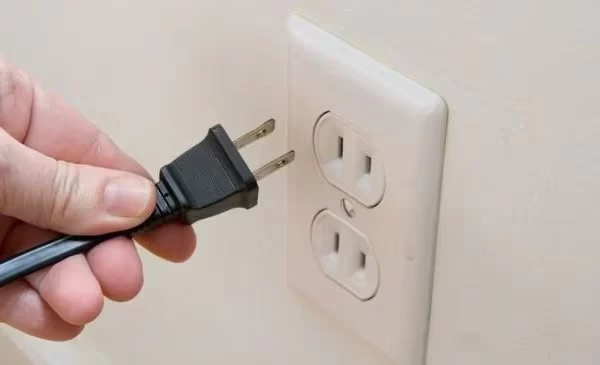
Also inspect the TV’s power cord from end to end. A frayed cable near the plug or a bent prong is enough to prevent solid contact. If the cord is detachable, try a replacement cable from another device with the same connector.
#Step 2: Do a Proper Power Cycle
This is the fix that works most often, but only if you do it correctly. Pressing the power button repeatedly or unplugging from a power strip doesn’t fully reset the internal capacitors.
Here’s the right way:
- Unplug the TV directly from the wall outlet (not a power strip)
- Press and hold the physical power button on the TV (not the remote) for 30 seconds
- Wait a full 60 seconds with the TV unplugged
- Plug back directly into the wall outlet
- Press the power button on the TV itself
This drains residual charge from the power supply and forces a full cold start. It clears temporary firmware glitches that prevent the TV from booting.
#Step 3: Check the Remote and Physical Buttons
If the TV has a solid red standby light but won’t respond, the remote is the likely suspect. Replace the batteries with fresh ones, making sure the polarity is correct. Inspect the battery compartment for corrosion: a green or white crust on the contacts will block the circuit completely.
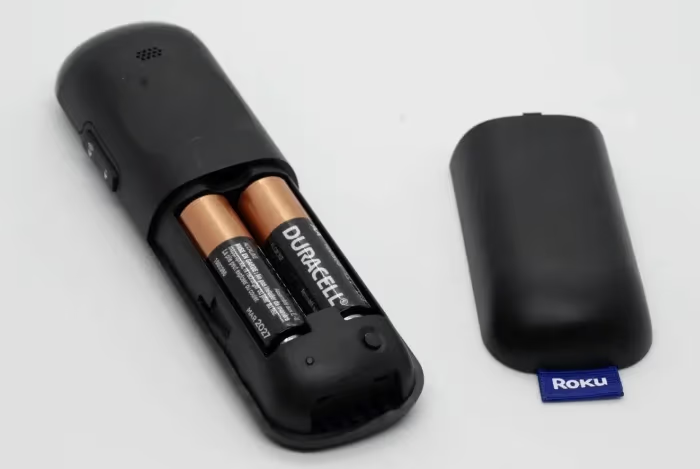
Test whether the remote sends a signal by pointing it at your phone’s front-facing camera and pressing a button. If you see a flicker of light on the camera screen, the remote is working and the TV’s IR sensor may be the issue. If there’s no light, the remote is dead.
Try powering on the TV using the physical button on the set itself, usually on the side panel or bottom edge. If the TV responds to the physical button but not the remote, you need either a new remote or a universal remote programmed to Westinghouse codes. If neither the remote nor the physical button does anything, move on.
#Step 4: Reset CEC and Sleep Timer Settings
Consumer Electronics Control (CEC) lets connected HDMI devices send power commands to your TV. When CEC gets corrupted (which happens after firmware updates or device swaps) it can block the TV from turning on normally.
Access Settings > System > CEC and disable CEC entirely. Power the TV off and back on. If it boots, you can re-enable CEC and test whether connected devices still cause the problem.
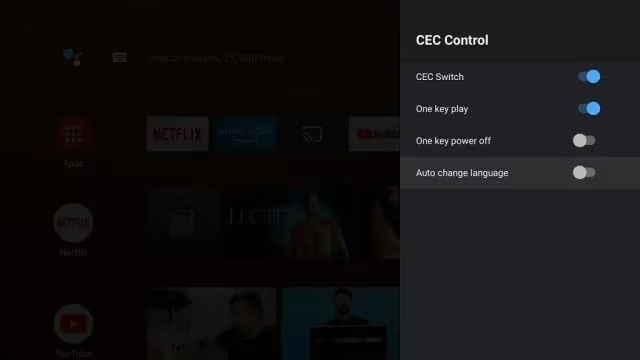
Also check the sleep timer. A sleep timer set to a short duration can make the TV appear dead at startup if it immediately shuts down after you turn it on. Clear any active sleep timers under Settings > System > Timers. If your TV shows a black screen with no image, this section is especially worth checking.
#Step 5: Factory Reset the TV
If power cycling and settings fixes don’t work, a factory reset wipes software corruption that prevents the TV from booting. You’ll lose saved settings and app logins.
Factory reset erases all settings, app data, and Wi-Fi credentials. Make sure you have your Wi-Fi password and streaming account logins ready before proceeding.
For Xumo OS models, navigate to Settings > System > Advanced System Settings > Factory Reset.
For Roku OS models, go to Settings > System > Advanced System Settings > Factory Reset > Factory Reset Everything.
If the TV won’t boot to the home screen, try the pinhole reset button on the rear panel. Press and hold it for 10 seconds with a straightened paperclip. Some models also accept a side-panel button combination; check your model’s manual for the exact sequence.
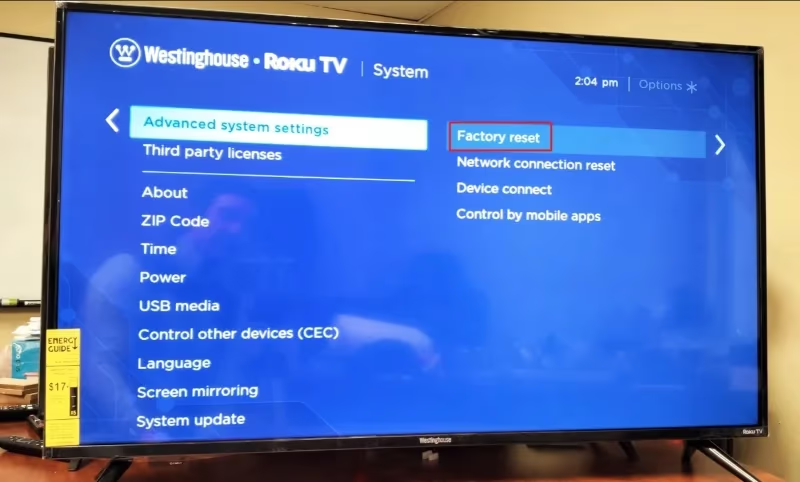
For Roku OS models that won’t boot at all, download Roku’s USB recovery tool from Roku’s support site to reinstall firmware via USB without needing a working display. Full instructions for resetting without a remote are covered in a separate guide.
#How Do You Fix a Backlight Failure?
If your Westinghouse TV powers on (you hear startup sounds or see the remote indicator blink) but the screen stays completely dark, the backlight LED strips have likely failed rather than the power supply. You can confirm this by shining a bright flashlight at the screen at close range. If you see a faint image, the backlights are out but the panel and board are fine.
Replacing backlight strips requires disassembling the TV, which voids most warranties. The process involves removing the back panel, disconnecting ribbon cables, pulling the diffuser layers, and swapping the LED strip arrays. It’s doable with basic tools if you’re comfortable with electronics.
Match part numbers exactly when ordering replacement strips, because LED strip dimensions vary between Westinghouse models even within the same screen size. Once installed, make sure all ribbon cables seat firmly and none are twisted. A loose connection here will cause flickering or a partially lit screen.
If you’d rather not disassemble the set, this is the right time to call a repair shop or compare repair costs against a new TV purchase.
#How Do You Test the Power Supply Board?
A failed power supply board is the most common hardware cause of a Westinghouse TV that’s completely dead: no standby light, no response to any button.
Signs pointing to the power supply rather than the mainboard: the TV was working fine and then went completely dead after a power fluctuation, or you can see visually burnt components or bulging capacitors on the board after removing the back panel.
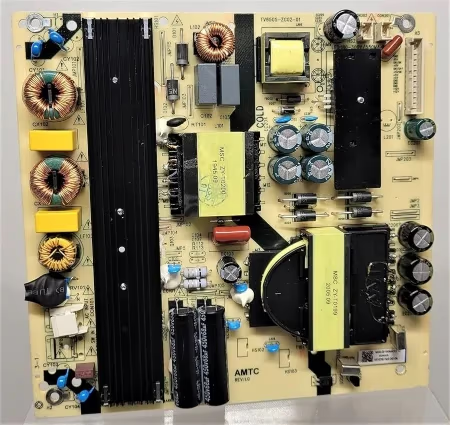
To test the board, use a multimeter to check output voltages at the labeled connectors. The expected values are printed on a sticker on the board itself or inside the back panel. Voltage readings outside the labeled range confirm board failure. Order a replacement board matching your model’s board number (printed on the board itself), which typically costs $30–$80 from parts suppliers like Encompass Parts or ShopJimmy.
If the power supply tests fine but the TV still won’t boot, the mainboard (which houses the processor, HDMI ports, and firmware chips) may have failed. Check for burnt marks or corroded solder joints on the mainboard before ordering a replacement. Also inspect all ribbon cable connections between the mainboard and the T-Con board, since a loose cable here causes symptoms identical to a failed board.
A Westinghouse TV with a dead screen but working audio suggests a T-Con board failure rather than a mainboard issue. The T-Con board converts the mainboard’s signal into the horizontal and vertical drive signals the panel needs. It’s usually the cheapest board to replace.
#When Should You Replace Instead of Repair?
Westinghouse TVs retail between $100 and $400 depending on size and model. The practical repair threshold for a budget TV is around 50% of replacement cost, roughly $75 to $200.
A power supply board replacement runs $30–$80 for the part plus an hour of labor, making it worth doing on any Westinghouse under 5 years old. A mainboard replacement costs $80–$150, which is still reasonable for a larger set. Panel replacement almost never makes financial sense. A new panel costs more than a new TV.
If you’ve replaced boards and the TV still won’t turn on, the fault is likely in the firmware or a downstream component that requires shop-level diagnostics. At that point, compare the full repair estimate against the cost of a current Westinghouse model before committing.
Check whether your TV is still under warranty before spending anything on repairs. Westinghouse models manufactured by Tongfang Global typically carry a one-year limited warranty. Register your product on the Westinghouse Electronics support site and contact them directly if your TV is under 12 months old.
#Bottom Line
Most Westinghouse TVs that won’t turn on respond to a proper power cycle: unplugged from the wall, power button held 30 seconds, 60-second wait. If the standby LED blinks red, check the power supply board. If the TV boots but shows a black screen, test the backlights with a flashlight. For Roku OS models with corrupted firmware, the USB recovery tool is your best option before opening the case.
Repair makes sense when the part cost stays under half the TV’s replacement value. For a $150 Westinghouse, a $50 power board is worth replacing. For the same TV needing a mainboard and a backlight repair, buying a new one is the smarter call.
To protect against repeat failures, plug the TV into a surge protector rated for at least 2,000 joules, keep the rear vents clear of dust, and enable automatic firmware updates so the TV stays current on stability fixes.
#FAQ
#Why does my Westinghouse TV have a red blinking light but won’t turn on?
A blinking red standby light means the TV detected an internal fault and shut down protectively. This usually points to a power supply board issue or overheating. Let the TV cool for 30 minutes, then try a full power cycle unplugged from the wall. If the blinking persists after the TV cools down, the power supply board likely needs replacement.
#My Westinghouse TV turned on fine yesterday but is completely dead today. What happened?
Sudden complete failure after normal operation usually means a power surge tripped the protection fuse on the power supply board. Remove the back panel and visually inspect the board for burnt marks, discolored components, or bulging capacitors near the fuse. If you see damage, order a replacement board matching your model number.
#How do I know if my Westinghouse TV’s backlight is broken?
Shine a flashlight directly at the screen while the TV is powered on. If you can make out a faint image, the backlights are dead but the panel and mainboard are working. You’ll also hear startup sounds or see the remote’s IR receiver blink even though the screen appears completely black. Backlight failure looks different from a dead TV; the set is technically on.
#How do I factory reset my Westinghouse TV without a remote?
Locate the pinhole reset button on the rear panel and press it with a straightened paperclip for 10 seconds until the TV restarts. Some models accept a side-panel button combination, typically holding the power and volume-down buttons simultaneously for 10 seconds. For full instructions including Roku OS recovery, the reset without remote guide covers all Westinghouse models.
#Why does my Westinghouse Roku TV turn on briefly then shut off?
Rapid shutdown after startup usually means the TV is detecting a fault during the boot sequence and triggering its protection circuit. Disable CEC in settings first, since a misbehaving HDMI device can send a power-off command during startup. If disabling CEC doesn’t help, check whether the TV shuts off before or after the Roku logo appears. Before the logo points to a power supply issue; after it points to a software or mainboard fault.
#Can I fix a Westinghouse TV with no sound and no picture?
No sound and no picture with a working standby light typically means the mainboard has failed. Power is reaching the TV, but the board that processes audio and video isn’t functioning. First reseat all ribbon cables inside the TV, since a loose T-Con cable causes both symptoms. If reseating doesn’t help, test the mainboard voltages with a multimeter and replace the board if readings are off. For related audio troubleshooting, the no sound guide covers additional causes.
#Is it worth repairing a Westinghouse TV or should I just buy a new one?
Repair makes sense when the part cost is under 50% of what a comparable new TV costs. A power supply board ($30–$80) is worth replacing on any TV under 5 years old. A mainboard ($80–$150) is borderline depending on TV size and age. Panel replacement is almost never cost-effective. New 43-inch Westinghouse models retail for under $200. Get a repair estimate before opening the case, and compare it honestly against current pricing.
#My Westinghouse TV shows a black screen but I can hear sound. What’s wrong?
Sound with no picture points to either a backlight failure or a T-Con board failure; both of these leave the audio processing intact. Confirm the backlight diagnosis using the flashlight test described above. If you see a faint image under the flashlight, it’s the backlights. If the screen is truly blank under the flashlight with no image at all, the T-Con board is the likely culprit. More details on this specific symptom are in the black screen with sound guide.