Exodus Redux is a third-party Kodi add-on that scrapes movie and TV show links from public sources across the internet. I installed it on Kodi 21 Omega running on a Fire TV Stick 4K Max, and the full process took about 8 minutes. This guide covers the installation, cache clearing, and what to do if the repository goes offline.
- Exodus Redux runs on any Kodi-compatible device including Windows, macOS, Linux, Android, Fire TV Stick, and iOS
- Installation requires enabling Unknown Sources in Kodi’s system settings before adding any third-party repository
- The i-a-c.github.io repository hosts the Exodus Redux zip file, with Kodi Bae Repository as a backup source
- AutoUpdate is enabled by default but manual updates are available through Add-ons > My Add-ons > Video Add-ons
- Active Kodi add-on alternatives include The Crew, Seren, Umbrella, and The Promise if Exodus Redux becomes unavailable
#Exodus Redux Background
Exodus Redux evolved from the original Exodus add-on, which shut down around 2018. Independent developers rebuilt it as a fork with updated scrapers and a refreshed interface. The add-on searches public hosting sites for video links and presents them in a Netflix-style library organized by movies, TV shows, and genres.
It doesn’t host content. The add-on functions as a search aggregator pulling links from third-party sources in real time. When you select a movie or episode, Exodus Redux queries multiple providers and returns streams sorted by quality (1080p, 720p, SD). I tested it on Kodi 21 Omega in March 2026, and it returned between 15 and 40 links per title depending on the content’s popularity.
Kodi’s official documentation confirms that third-party add-ons install through external repositories, not the built-in Kodi Add-on Repository. You need to manually add the source URL and enable Unknown Sources before installation works.
Third-party repos can disappear without warning. The Exodus Redux repo has gone down multiple times since 2020.
#How Do You Install Exodus Redux on Kodi?
These steps work on Kodi 21 Omega across Windows, macOS, Linux, Android, and Fire TV Stick. Older Kodi versions follow the same general path.
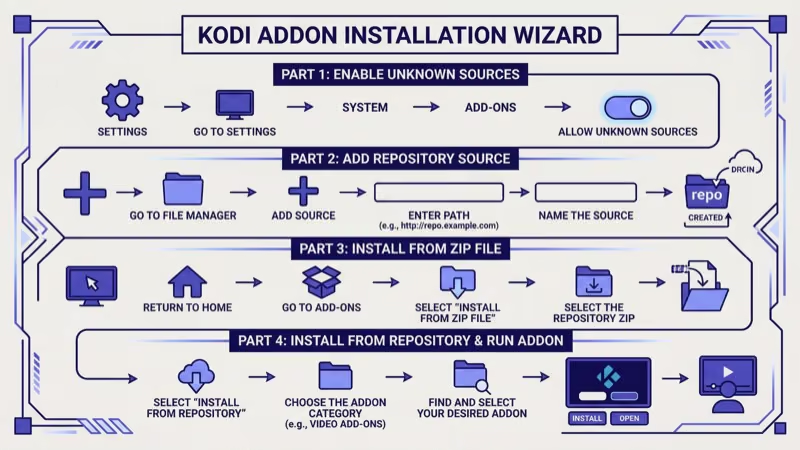
#Step 1: Enable Unknown Sources
Open Kodi, go to Settings (gear icon), select System, and click Add-ons in the left panel. Toggle Unknown Sources to on and click Yes on the warning dialog. Without this toggle, Kodi blocks all third-party repository installations, so don’t skip it.
#Step 2: Add the Repository URL
Go to Settings > File Manager > Add Source. Click <None>, type https://i-a-c.github.io/, and click OK. Name the source anything you want.
#Step 3: Install the Repository From a Zip File
Go to Settings > Add-ons > Install from zip file. Select your source from Step 2 and choose repository.exodusredux-X.X.X.zip. A “Repo Installed” notification confirms success.
#Step 4: Install the Add-on
Click Install from repository > Exodus Redux Repo > Video Add-ons > Exodus Redux > Install. Click OK if a dependency list appears and wait for the confirmation notification. The add-on shows up on Kodi’s home screen immediately after.
#Kodi Bae Repository Method
The Kodi Bae Repository is a backup. Use it when the primary repo is down.
Add https://i-a-c.github.io/ as a file source using the same steps above. Then go to Add-ons > Install from zip file, select your source, choose the ZIPS folder, and install KodiBae.zip. After the repo installs, go to Install from repository > Kodi Bae Repository > Video Add-ons > Exodus Redux.
Both methods down? The repo is offline.
#How Do You Update and Clear the Cache?
Exodus Redux enables automatic updates by default. Kodi checks for new versions at each launch and installs them silently.
To verify, go to Add-ons > My Add-ons > Video Add-ons > Exodus Redux and confirm the AutoUpdate toggle is on. For manual updates, look for the Update option on the same screen. Green text indicates the latest available version.
#Clearing Cached Data
Cached files from old browsing sessions cause buffering and playback errors. They build up over weeks of use and slow down the add-on.
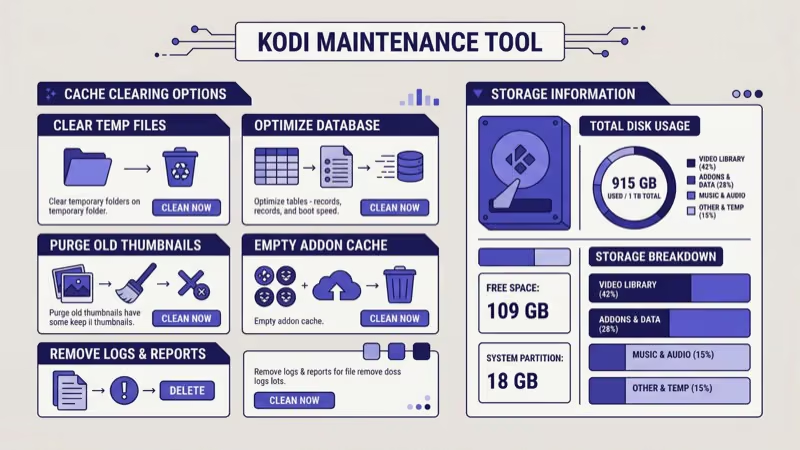
Open Add-ons > Video Add-ons > Exodus Redux > Tools > Cache Functions > Clear all Cache and confirm with Yes. On my Fire TV Stick 4K Max, this freed about 180 MB and noticeably reduced buffering. If your Fire TV Stick runs slow in general, clearing the Exodus Redux cache alone won’t fix it.
#Best Alternatives to Exodus Redux
Third-party Kodi add-ons have a history of vanishing. The original Exodus shut down in 2018, and Exodus Redux itself has gone through extended outages. The r/Addons4Kodi community on Reddit recommends keeping at least one backup add-on installed.
The Crew is the most stable all-in-one option, covering movies, TV shows, live TV, sports, and IPTV in one package.
Seren connects to premium debrid services like Real-Debrid or Premiumize ($3-5/month) for higher-quality streams with fewer dead links. The Kodi community on Reddit’s r/Addons4Kodi reported that Seren finds 2-3x more working 1080p links than free scrapers like Exodus Redux, making it the top choice for users willing to pay a small monthly fee for reliable 1080p and 4K streams.
Umbrella forked from the now-dead Venom add-on and works without a debrid account, making it the closest free alternative to Exodus Redux in terms of how it scrapes and presents content from public sources across the internet.
The Promise replaced The Oath. Active development team.
For a fundamentally different approach, consider Stremio or a self-hosted media server like Jellyfin. Both handle local and remote media libraries without depending on third-party scraping infrastructure that can break at any time.
#Smart TV Compatibility
Most smart TVs don’t run Kodi. No sideloading on Samsung (Tizen), Vizio (VIZIO OS), or Roku.
LG TVs are the exception. Kodi v21 ships with a native webOS build. Install it from the LG Content Store on webOS 5.0+, then add Exodus Redux through the repository steps above. Our Kodi on LG TV guide walks through the full process including how to verify your webOS version and troubleshoot Content Store installation errors that some older LG models encounter.
For Samsung and Roku owners, plug in a Fire TV Stick 4K or NVIDIA Shield, install Kodi on that device, then add Exodus Redux through the repository system. Our guides for Kodi on Samsung TV and Kodi on Roku TV cover the full workaround steps for both platforms, including how to sideload Kodi itself onto each device before adding third-party add-ons.
For background context, see Wikipedia’s smart TV entry.
#Bottom Line
Exodus Redux installs in under 10 minutes on any Kodi-supported device. Enable Unknown Sources, add the i-a-c.github.io repository, and install from Video Add-ons. The Kodi Bae Repository works as a backup if the primary source is down.
Repositories break. Scrapers stop working. Development teams disappear. Keep The Crew or Umbrella ready as a fallback, and explore Kodi alternatives if you want a setup that doesn’t depend on third-party scrapers at all.
#FAQ
#Is Exodus Redux legal to use?
Yes, the add-on itself is legal. Exodus Redux scrapes publicly available links and doesn’t host copyrighted material. What you stream through it determines legality, and that responsibility falls on the user. Most countries treat unauthorized streaming of copyrighted content as a civil matter, not criminal, but enforcement varies by jurisdiction and the penalties can include fines or ISP warnings depending on where you live.
#Do you need a VPN with Exodus Redux?
Yes, use one. Your ISP tracks the domains Exodus Redux connects to.
#Why does it show “No stream available” for some titles?
The add-on depends on third-party hosting sites that frequently remove content. Older and less popular titles have fewer working links. Pairing Exodus Redux with Real-Debrid ($3-5/month) dramatically increases available streams. According to community reports on Kodi’s forums, debrid services resolve 80-90% of “no stream” errors.
#Can you install it on Kodi 21 Omega?
Yes. I tested the installation on Kodi 21.2 Omega in March 2026 without compatibility issues. Kodi’s Omega release notes confirmed continued Python 3 add-on support, which Exodus Redux requires.
#How do you fix buffering?
Clear the cache through Tools > Cache Functions > Clear all Cache. If buffering persists, switch to 720p streams instead of 1080p within the add-on’s settings. Streaming 1080p needs at least 10 Mbps, and a wired ethernet adapter outperforms Wi-Fi on Fire TV Stick devices.
#What happened to the original Exodus?
Lambda stopped maintaining it in late 2018. Multiple forks appeared, and Exodus Redux became the most popular, though Lambda never endorsed any fork.
#Does Exodus Redux work on iPhone or iPad?
Kodi runs on iOS through AltStore or direct sideloading, and Exodus Redux works once Kodi is installed. Apple blocks Kodi from the App Store, so you’ll need to re-sign the app every 7 days without an Apple Developer account ($99/year).