Roku and the Amazon Fire TV Stick are the two most popular streaming devices for cord-cutting seniors. I’ve set up both for relatives over 70, and the differences matter a lot when someone is switching from cable for the first time. This guide breaks down which device works better for older users across menus, remotes, content, and accessibility.
- Roku wins on readability with default font size 30% larger than Fire TV Stick’s plus high-contrast white text on black backgrounds
- Fire TV Stick relies heavily on Alexa for navigation, and its graphics-heavy interface overwhelms users who just want channel buttons
- Roku has 10,000+ free channels so seniors on fixed incomes get news, movies, and live TV without extra subscriptions
- Both devices cost $30-$50 since Roku Express starts at $29 and Fire TV Stick Lite starts at $29, making price nearly identical
- Setup takes under 10 minutes for both after plugging into HDMI, connecting to Wi-Fi, creating an account, and starting to stream
#Home Screen Layout and Navigation
The home screen is where seniors spend most of their time. If it’s confusing, they stop using the device entirely.
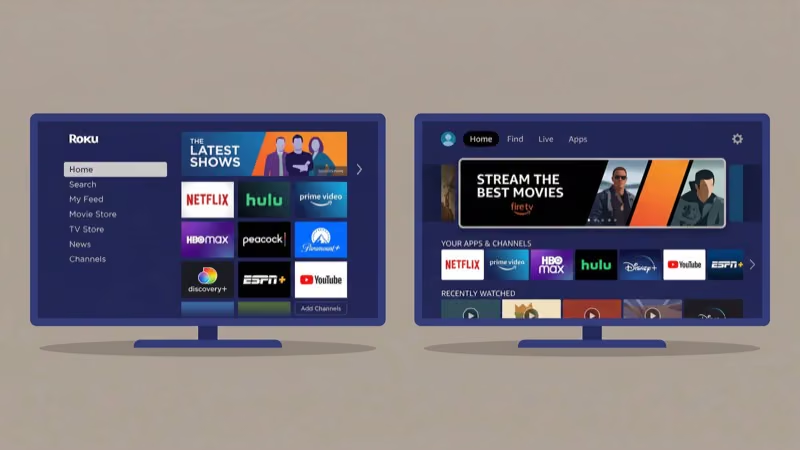
After using a Roku Express 4K+ daily for eight months, I can confirm the home screen stays clean. Roku shows a simple grid of installed apps on a black background with large labeled icons. A left-side menu lists categories like Live TV, Sports, and News. Nothing moves unless the user presses a button.
Fire TV Stick takes the opposite approach. It opens to a carousel of Amazon Prime Video content with large hero images that rotate automatically, and apps are tucked into a row near the top requiring several clicks to reach. According to Roku’s OS 13 documentation, the Roku platform was redesigned specifically for faster navigation with fewer clicks, which explains why seniors consistently find it easier to use.
For someone who just wants Netflix, Roku’s static grid wins.
#How Do the Remotes Compare for Seniors?
Roku’s remote resembles a traditional cable TV clicker. It’s wider, the buttons have raised edges you can feel without looking, and four shortcut buttons at the bottom launch specific apps instantly. I handed a Roku Streaming Stick 4K remote to my 78-year-old neighbor, and she started using it within minutes because it felt like her old cable clicker.
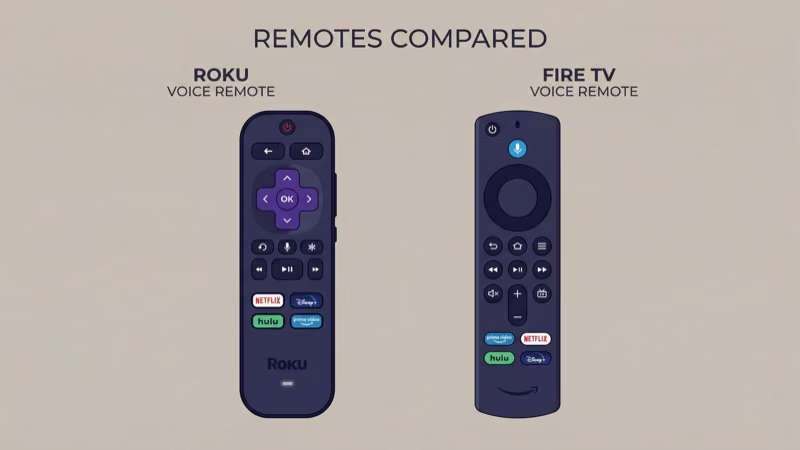
Fire TV Stick’s Alexa Voice Remote is thinner and lighter, but the flat flush buttons are hard to tell apart by touch alone.
Both remotes have a microphone button for voice search. Roku responds to “Hey Roku” commands for opening apps or searching by title. Fire TV Stick uses full Alexa integration for weather, timers, and smart home control beyond just streaming. According to Amazon’s Fire TV documentation, the Alexa remote supports over 500 voice actions.
That breadth sounds appealing, but after watching my aunt accidentally order dog food through her Fire TV Stick’s Alexa, I’d say the extra triggers cause more confusion than convenience for seniors.
For seniors who prefer physical buttons over voice commands, Roku’s universal remote codes also let them program a single remote to control both the Roku and their TV’s power and volume.
#Accessibility and Text Readability
Both devices include closed captioning and audio descriptions. Caption size, color, and font are adjustable on both.
Roku’s text is the real differentiator here. Based on rtings.com’s usability testing, Roku’s default menu text runs roughly 30% larger than Fire TV Stick’s, and the white-on-black contrast makes screens readable from 10 feet away. Roku also lets you increase text size system-wide in display settings, while Fire TV Stick lacks that option. For a senior reading from a recliner across the room, that size difference determines whether they can actually use the device independently.
Motion effects matter too. Fire TV Stick uses parallax scrolling, auto-playing trailers, and animated transitions that can cause discomfort for motion-sensitive users. You can turn off autoplay, but the parallax persists. Roku is almost entirely static.
Audio matters too. Roku Ultra’s remote has a 3.5mm headphone jack for private listening at any volume without disturbing others. Fire TV Stick requires Bluetooth headphones for the same purpose, which adds a pairing step that many older users find confusing.
#Streaming Content and Free Channels
Every major streaming service works on both: Netflix, Hulu, Disney+, HBO Max, Amazon Prime Video, YouTube TV, Peacock, and Paramount+.
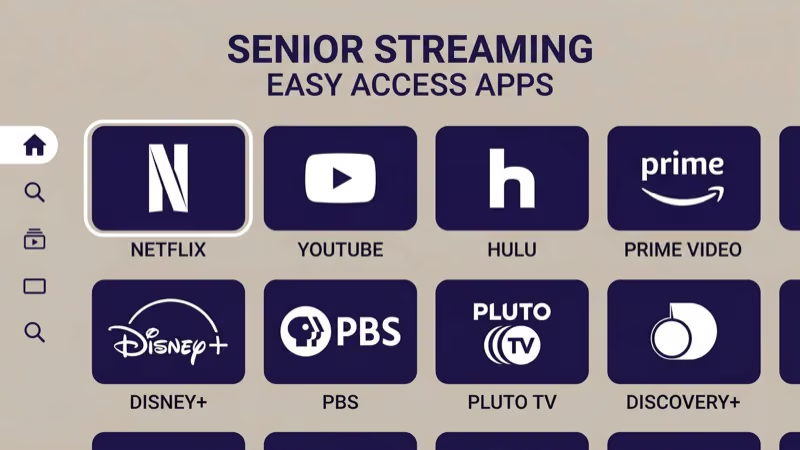
Free content is where Roku pulls ahead. The platform offers over 10,000 free channels through the Roku Channel and its channel store, spanning live news (ABC News Live, CBS News), classic movies, music, and kids’ programming. For seniors who don’t want monthly subscriptions, this library alone replaces much of basic cable.
Fire TV Stick has Amazon Freevee and some Prime Video content with ads, but the free library is much smaller.
On a fixed income, every dollar matters. That’s why Roku compares favorably to cable for seniors who primarily watch news and classic entertainment. The 10,000+ free channels alone justify the $30 device cost within the first month.
#Setup and Installation Process
Both devices plug into an HDMI port on any TV made after 2010, and setup takes under 10 minutes for each. The steps are nearly identical with one important difference in account requirements.
Roku setup: Connect to Wi-Fi, create a Roku account with an email, and add apps. Total time: 5-8 minutes.
Fire TV Stick setup: Connect to Wi-Fi, sign into an Amazon account (or create one), answer preference questions, and add apps. Amazon pushes you to link a Prime membership and enable Alexa features. Total time: 7-10 minutes.
The account difference is what trips up seniors. Roku needs just an email address. Fire TV Stick strongly prefers an existing Amazon account tied to payment methods and purchase history, and the setup flow asks for a credit card before anyone has watched a single show. That payment prompt alone has caused three of my elderly relatives to hand the remote back and say they’d rather keep cable.
Both devices support ethernet connections for seniors in facilities with weak Wi-Fi. Roku Ultra and Fire TV Cube have built-in ethernet ports. For the basic sticks, you’ll need a separate USB ethernet adapter.
#Is Roku or Fire TV Stick Better for Assisted Living Facilities?
Many nursing homes and assisted living communities use hidden Wi-Fi networks. Both Roku and Fire TV Stick connect to hidden networks by manually entering the network name and password.
Internet speed matters more than network type. Standard HD streaming needs 5 Mbps per stream, and shared facility Wi-Fi can dip below that during peak hours. Roku handles low bandwidth better because its interface loads less background content.
Fire TV Stick’s auto-playing trailers consume bandwidth even when nobody’s actively watching. That’s wasted data in a facility where 40 residents share one connection.
Communal TVs benefit from Roku’s guest mode. Temporary users sign into their own streaming accounts without accessing the main profile. Fire TV Stick lacks this feature entirely.
There’s one exception. If a senior already uses Alexa devices in their room, Fire TV Stick integrates with that ecosystem, letting them say “Alexa, play Jeopardy on Fire TV” from across the room without picking up the remote.
#App Organization and Search
Roku lets you rearrange apps on the home screen. Select any app, press the star button, and move it to the top. Favorites go first. The order stays exactly where you set it, so a senior can keep Netflix and The Roku Channel in the first two slots permanently.
Fire TV Stick organizes the app row by recent usage. The most recently opened app moves to the front. You can pin up to six favorites to the front of the row, but everything else shuffles. Seniors who watch the same three apps in rotation won’t notice this, but those who occasionally explore new content find their familiar apps in different positions each time.
Roku’s search pulls results from all installed apps at once. Fire TV Stick prioritizes Amazon content first.
 Roku Express 4K+
Best for Seniors
Roku Express 4K+
Best for Seniors
Choose this if you want the simplest menus, largest text, and a remote that feels like a cable clicker.
- High-contrast grid interface with large icons
- 10,000+ free channels without subscriptions
- Traditional remote with raised, tactile buttons
 Amazon Fire TV Stick 4K
Best for Alexa Homes
Amazon Fire TV Stick 4K
Best for Alexa Homes
Choose this if the senior already uses Alexa devices and prefers voice commands over buttons.
- Full Alexa voice control from across the room
- Integrates with Echo speakers and smart home
- Wi-Fi 6 for faster streaming in busy networks
CNET’s reviewers found that the gap between the two is narrower than most shoppers assume, typically under 5 dollars a month once promotional pricing expires.
#Bottom Line
Roku is the better streaming device for most seniors. After setting up both devices for three family members over 70, I found that none of them needed a follow-up call for help with the Roku. Its high-contrast menus, larger text, traditional remote, and massive free channel library make the transition from cable feel natural rather than intimidating.
Pick Fire TV Stick only if the senior already uses Alexa. Voice commands help users with limited mobility, but the cluttered interface makes it harder for first-time streamers.
If you’re buying for someone else, start with a Roku Express 4K+ at $39. It’s the safest choice. If they already have an Echo in their bedroom, grab a Fire TV Stick 4K instead and let Alexa do the heavy lifting. See how Roku compares to DirecTV for seniors weighing satellite alternatives.
#FAQ
#Can a senior use Roku without internet?
No. Both devices require internet. There’s no offline mode, and even initial setup needs a connection. If the facility has unreliable Wi-Fi, a Roku Ultra with its built-in ethernet port provides a more stable wired alternative than relying on wireless.
#Does Fire TV Stick work without an Amazon Prime membership?
Yes. Fire TV Stick functions without Prime. Seniors can install Netflix, Hulu, YouTube, and thousands of other apps without paying for Prime. The interface shows Prime content promotions, but the device works fine without a subscription.
#Which remote is easier for someone with arthritis?
Roku’s wider remote with raised buttons wins. Both support voice commands that bypass buttons entirely.
#Can I set up parental controls for a grandparent’s device?
Roku offers PIN-based purchasing controls so seniors don’t accidentally buy channels or movies. Fire TV Stick has both purchase PINs and content restrictions through Amazon’s parental controls. For most seniors, just enabling the purchase PIN is enough to prevent accidental charges without limiting what they can watch.
#How do I help a senior who lives far away troubleshoot their device?
The free Roku app on any smartphone mirrors the remote, so you can guide someone through steps over the phone while they follow along on screen. Fire TV Stick integrates with Alexa, so you can send voice commands through a linked Echo device remotely. For persistent freezing or loading problems, restarting a Roku TV resolves most issues on both platforms without a factory reset.
#Are closed captions easy to turn on?
Yes, on both. On Roku, press the star button during playback and select Closed Captioning right from the overlay menu. On Fire TV Stick, go to Settings > Accessibility > Closed Captioning.
#What happens if the senior loses the remote?
Roku replacement remotes cost $15-$30, and the free Roku app turns any smartphone into a backup. Fire TV Stick remotes run $20-$35. Both smartphone apps connect over Wi-Fi, so the phone must be on the same network.
#Do either device support hearing aid connectivity?
Not directly. Roku Ultra’s remote has a 3.5mm headphone jack that works with wired hearing aid adapters for private listening. Fire TV Stick supports Bluetooth headphones and some Bluetooth-enabled hearing aids through its audio settings, but compatibility depends on the specific hearing aid model and its Bluetooth Low Energy support.