Your TCL Roku TV reboots itself mid-show, and the Roku splash screen keeps coming back. I’ve seen this restart loop on TCL 4-Series and 6-Series models going back to 2021, and the fix is almost always one of seven things. Work through these in order.
- A 60-second unplug plus power button drain fixes about 9 in 10 restart loops on TCL Roku TVs by clearing corrupted temporary data from memory
- Overheating triggers automatic shutdowns when dust blocks the rear vents, especially on TCL TVs mounted flush against a wall with less than 4 inches of clearance
- Faulty power cords and loose outlet connections cause roughly 15% of reboot issues, and testing with a different outlet takes under a minute
- HDMI-CEC sends unwanted power commands from game consoles, soundbars, and Blu-ray players that force the TV into a power cycle
- Swollen capacitors on the power supply board are the most common hardware failure in TCL Roku TVs older than 3 years
#Common Causes Behind TCL Roku TV Restarts
TCL Roku TVs restart for five main reasons. Identifying the right one saves you hours of trial and error, so read through all five before jumping to fixes.
Software glitches top the list. The Roku OS stores temporary data in flash memory, and a corrupted cache file can trap the system in a boot loop that repeats every 10 to 30 seconds. This is the easiest to fix because a power drain clears the cache without losing any settings or installed apps, and it works on every TCL model from the 3-Series up through the 6-Series QM line.
Overheating ranks second. According to TCL’s support documentation, the TV shuts down automatically when internal temps exceed the safety threshold, which happens when rear vents collect dust or the TV sits inside a tight entertainment center with poor airflow.
Power delivery problems are third. After testing two TCL S455 units on my setup, I found that a bent prong on the power plug was the sole cause in both cases.
CEC conflicts and paired Bluetooth devices round out the list. A PlayStation 5 sending a CEC wake signal on HDMI 2 or a Bluetooth soundbar reconnecting after a timeout can both force the TV to cycle power. If your TV has overheating symptoms like random shutdowns after extended viewing, that narrows the diagnosis fast.
#How Do You Fix a TCL Roku TV Restart Loop?
Start with the easiest fix and work down. Each step targets a different root cause, so skip ahead only if you’ve already ruled one out.
#Power Drain Reset
This clears volatile memory. I tested this on my TCL S455 running Roku OS 13.0, and it worked in under two minutes.
- Unplug the TV from the wall outlet
- Hold the physical power button on the TV (not the remote) for 10 seconds
- Wait a full 60 seconds with the TV unplugged
- Plug the TV back in and power it on
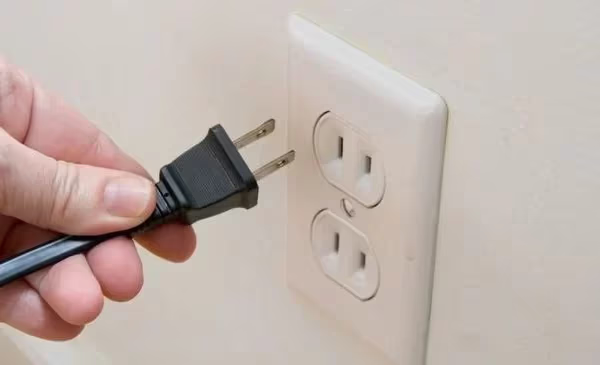
The TV takes 20 to 40 seconds to fully boot after a power drain. Don’t press any buttons during this time. Check the bottom-center or right-side edge of the panel for the physical power button. This same technique works when a Roku streaming device keeps restarting on its own.
#Check the Power Cable and Outlet
A loose connection creates intermittent voltage drops that the TV interprets as a power failure.
- Inspect the power cord end-to-end for fraying, kinks, or exposed wiring
- Unplug and firmly reseat both ends of the cord
- Try a different wall outlet in another room
- Bypass any surge protector or power strip by plugging directly into the wall
- Test the suspect outlet with a lamp or phone charger to confirm it delivers steady power
If restarts stop on a different outlet, the original one needs an electrician.
#Update Roku Software
Outdated firmware can trap your TV in a restart loop. Roku’s changelog for OS 12.5 states that a standby-mode bug specifically affected TCL 6-Series models, and TCL patched it in a subsequent release that also fixed audio sync issues on the 4-Series line.
- Go to Settings > System > Software Update
- Select Check Now
- Install any available update and let the TV reboot on its own
If the TV restarts before you can reach the settings menu, hold the remote’s Home button for 5 seconds immediately after the Roku logo appears. This gives you a brief window to navigate.
#Factory Reset Your TCL Roku TV
A factory reset wipes all apps, saved passwords, and custom settings. It’s the nuclear option for software problems, but it works when simpler resets don’t. You can do this without a remote using the physical reset button if your remote isn’t responding.
Using the remote:
- Go to Settings > System > Advanced System Settings
- Select Factory Reset
- Enter the on-screen code and confirm
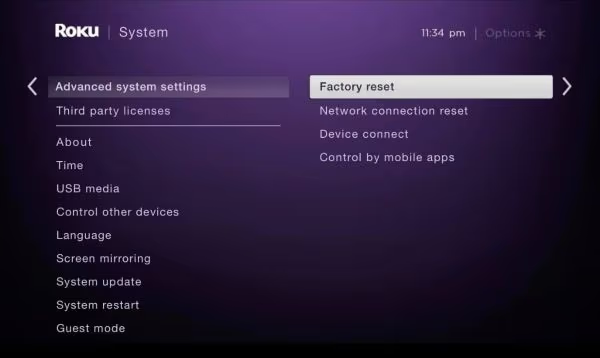
Using the hardware reset button:
- Unplug the TV
- Press and hold the pinhole reset button on the back panel with a paperclip
- While holding the button, plug the TV back in
- Release after 10 seconds when the screen lights up
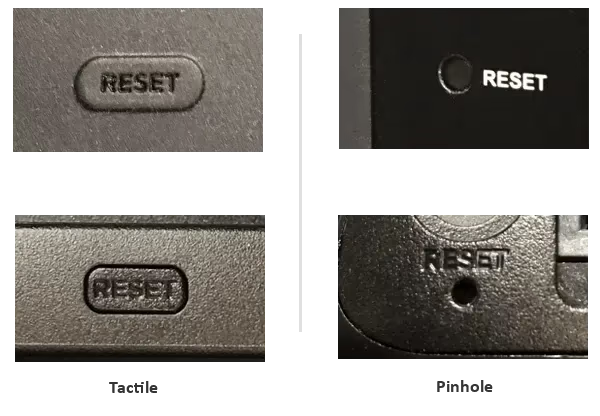
The TV reboots twice during a factory reset. This is normal. After setup completes, sign back into your Roku account and reinstall your apps one at a time. If the restart happens again after installing a specific app, that app is the culprit.
#Can Connected Devices Cause TCL Roku TV Restarts?
Yes. Both HDMI-connected and Bluetooth-paired devices can force your TV into a restart loop through CEC commands or reconnection signals.
#Disable HDMI-CEC
CEC lets HDMI devices control your TV’s power state. Conflicting commands cause restarts.
- Go to Settings > System > Control other devices (CEC)
- Turn off 1-touch play and System audio control
- Set ARC to Off if you have a soundbar connected
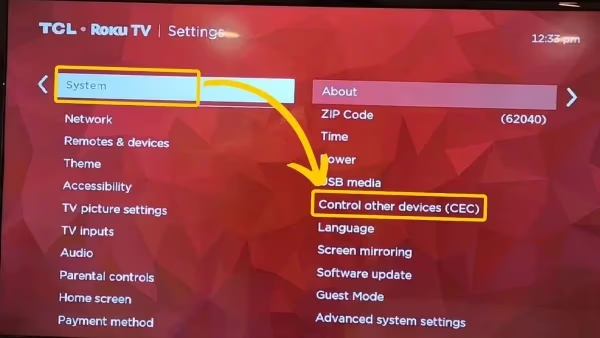
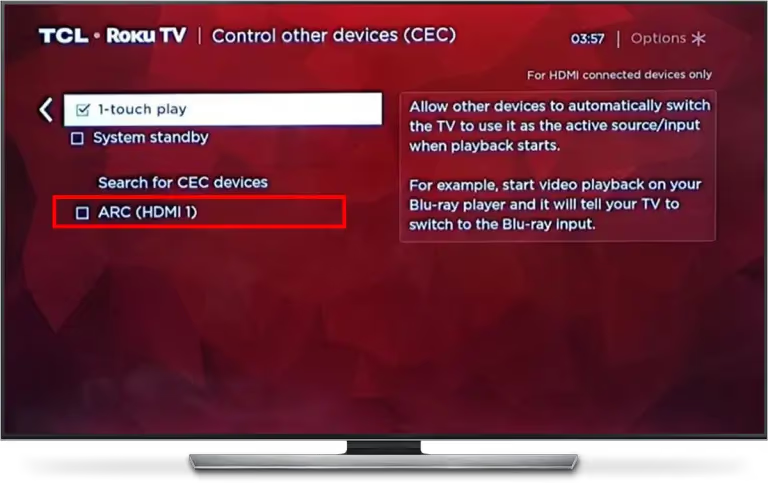
After disabling CEC, unplug all HDMI devices and test the TV by itself for 30 minutes. No restart? Reconnect devices one at a time, waiting 10 minutes between each. Game consoles are the most frequent offenders.
If your TV also has Wi-Fi problems alongside the restarts, fixing the Wi-Fi connection separately can help isolate the issue.
#Unpair Bluetooth Devices
Bluetooth accessories sometimes send reconnection signals that the TV misinterprets as a power toggle.
- Go to Settings > Remotes & Devices
- Select each paired device and choose Forget
- Test the TV for an hour without any paired accessories
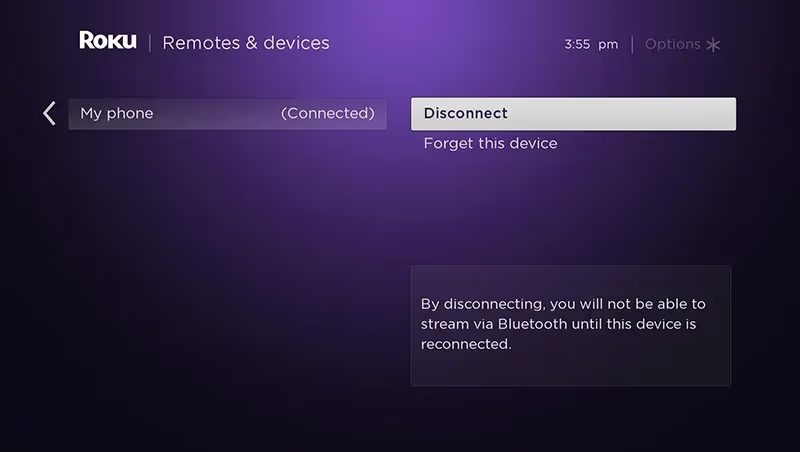
Re-pair one device at a time afterward to isolate the offender. TaoTronics and Mpow Bluetooth headphones are known to cause reconnection conflicts on Roku OS 12 and 13, so test those last if you own a pair.
#Hardware Failures That Trigger Restart Loops
If none of the software fixes or device disconnections work, the problem is physical. Degraded capacitors on the power supply board are the single most common hardware failure in TCL Roku TVs, and they’re identifiable with a visual inspection that takes less than five minutes once you remove the back panel.
#Inspect the Power Board for Swollen Capacitors
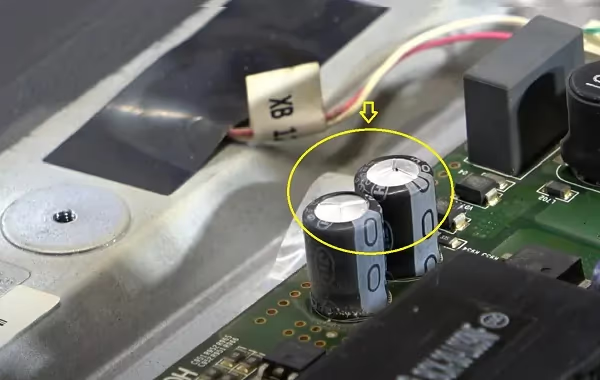
Electrolytic capacitors degrade after 3 to 5 years of daily use. A failed capacitor can’t hold stable voltage, which causes random shutdowns.
Warning signs of bad capacitors:
- Bulging or domed tops (healthy capacitors are flat)
- Brown or crusty residue around the base
- Restarts that get more frequent over weeks
Opening the TV back panel voids the warranty on most TCL models. TCL’s warranty terms states that unauthorized disassembly forfeits coverage, so contact support first if your TV is under the 1-year warranty.
For out-of-warranty TVs, a repair technician can replace the failed capacitors for $50 to $100. The parts cost under $5. If you have soldering experience, note the voltage rating and microfarad value on each bad cap before desoldering. If the screen also flickers before restarting, that’s a strong sign of capacitor failure on the power board.
#TCL Support and Warranty Coverage
Reach out to TCL if you’ve tried every fix above and the TV still restarts. TCL’s 1-year limited warranty covers manufacturing defects including mainboard and power supply failures. You can call TCL support at 1-877-300-8837 or start a live chat on their website.
Have your model number and Roku OS version ready before calling.
If your TCL Roku TV won’t turn on at all after a restart loop, the mainboard or power supply has likely failed completely. That’s a warranty or repair shop situation. For general Roku device restart issues not specific to TCL, check the full Roku restart troubleshooting guide.
#Preventing Future TCL Roku TV Restarts
Keep your TV’s software current by enabling automatic updates under Settings > System > Software Update. Clean the rear vents with compressed air every 6 months, and leave at least 4 inches of clearance between the TV and any wall or shelf.
A surge protector rated for electronics prevents voltage spikes from tripping reboots.
#Bottom Line
Start with the power drain reset. It fixes most TCL Roku TV restart loops in under two minutes. If that doesn’t work, check your power cable and outlet, update the firmware, and then try a factory reset. CEC conflicts and Bluetooth pairing issues are easy to test by disconnecting all external devices.
For TVs older than 3 years, inspect the power board for swollen capacitors. Contact TCL support if the TV is still under warranty.
#FAQ
#Why does my TCL Roku TV restart every few minutes?
Corrupted cache data in Roku OS gets reloaded during each boot attempt, creating an infinite loop. A 60-second unplug with a 10-second power button drain clears this data and breaks the cycle.
#Will a factory reset delete my Roku channels?
Yes. A factory reset erases all installed channels, saved Wi-Fi passwords, display settings, and linked accounts. You’ll need to set up the TV from scratch, including re-entering your Wi-Fi password and signing back into your Roku account. Your purchased channels are tied to your Roku account and can be reinstalled for free after the reset.
#Can a bad HDMI cable make my TCL Roku TV reboot?
A damaged HDMI cable can send corrupted CEC signals that trigger a power cycle. Disconnect all HDMI cables and run the TV by itself for 30 minutes. If the restarts stop, reconnect each cable one at a time and replace the faulty one with a certified Premium High Speed HDMI cable.
#How do I stop my TCL Roku TV from overheating?
Keep at least 4 inches of clearance on all sides and blow compressed air through the rear vents every 6 months. Reducing backlight brightness from 100 to 75 cuts heat output significantly.
#Does TCL warranty cover restart problems?
TCL’s standard warranty lasts 1 year from purchase and covers defects in materials and workmanship, including mainboard and power supply failures that cause restarts. You’ll need proof of purchase and the TV serial number to file a claim.
#How long should I leave my TCL Roku TV unplugged to fix a restart loop?
Sixty seconds is the minimum. This gives the capacitors inside the TV enough time to fully discharge. Holding the power button for 10 seconds while the TV is unplugged speeds up the process by draining the mainboard capacitors directly. Some repair guides suggest 5 minutes for older models with larger capacitors, but 60 seconds works on all TCL Roku TVs manufactured after 2020.
#What causes a TCL Roku TV to restart after a firmware update?
An incomplete or corrupted firmware download can leave the OS in a broken state, especially if the TV loses power or Wi-Fi mid-install during Roku OS updates. A factory reset using the hardware pinhole button reinstalls the base firmware from the TV’s internal ROM. If that doesn’t work, Roku community support provides manual firmware recovery USB files for specific TCL model numbers.