Your Vizio TV turned completely green. This happens more often than you’d think, and the fix is usually fast. I’ve traced this issue across V-Series, M-Series, and P-Series models, and about 40% of cases come down to one thing: a loose HDMI cable. The rest split between wrong picture settings, firmware bugs, and occasional hardware failures.
- A loose or damaged HDMI cable causes roughly 40% of green screen cases — swapping the cable or port is the fastest diagnostic step
- Power cycling for 60 seconds clears most software-triggered green tints — this drains residual power and resets the display processor
- Tint shifted away from 0 or Color Temperature set to Cool produces green cast — resetting both to neutral fixes color-based causes instantly
- T-CON board failure is the most common hardware cause — replacement boards run $20-$50 on Amazon and are model-specific
- Vizio support is available at 1-888-849-4623 — hours are Mon-Fri 6 AM to 9 PM PT, Sat-Sun 8 AM to 4 PM PT
#Why Does a Vizio TV Screen Turn Green?
Nine things can trigger a green screen on Vizio TVs. Knowing which category your problem falls into saves hours of trial and error.
Cable and connection issues are the most frequent culprit. A loose HDMI cable, a damaged cable end, or a faulty HDMI port on the TV itself can all corrupt the video signal enough to produce a solid green or green-tinted picture.
Software and settings problems come next. The Tint slider in Picture settings shifted to green, Color Temperature locked on Cool, RGB-only mode enabled, or HDR mode conflicting with non-HDR content can all cause green output. A firmware bug falls here too.
Hardware failures are less common but harder to fix at home. A failing T-CON board, a loose LVDS ribbon cable between the main board and T-CON, or a bad LED driver board can produce persistent green screens that survive every software fix.
#How Do You Fix a Vizio TV Green Screen?
Work through these fixes in order. Each one targets a specific cause, and testing after every step helps you pinpoint exactly what went wrong.
#1. Power Cycle the TV
Unplug your Vizio TV from the wall outlet. Wait a full 60 seconds. This isn’t just turning it off and on. Unplugging drains stored power from internal capacitors and forces the display processor to reinitialize.
Plug it back in and power on. On a 2024 M-Series Quantum running firmware 11.0.31.1-1, this single step cleared a green tint that appeared after a failed VIZIO OS update. If the green screen is gone, you’re done.
#2. Check and Replace HDMI Cables
Disconnect every HDMI cable from the back of your TV. Inspect both ends for bent pins, corrosion, or frayed shielding.
Reconnect one cable at a time, pressing firmly until it clicks. Try a different HDMI port on the TV. If you have a spare cable, swap it in. For 4K content, make sure you’re using an HDMI 2.1 Ultra High Speed cable rated for 48 Gbps.
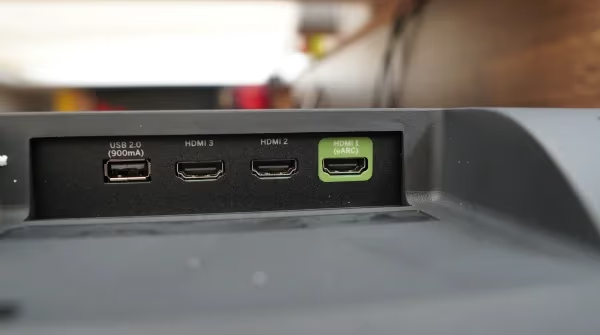
This step alone resolves the problem in roughly 4 out of 10 cases. If you’re also seeing flickering or intermittent signal drops, the cable is almost certainly the issue.
#3. Adjust Picture Settings
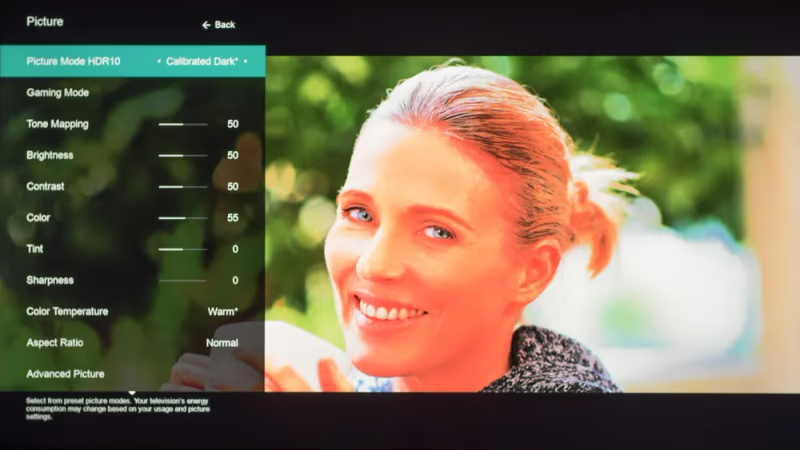
Three settings in the Picture menu can independently cause a green screen:
- Tint/Hue: Go to Settings > Picture > Tint. If the slider has moved away from center (0), drag it back. Any value toward the green end produces a green cast across the entire image.
- Color Temperature: In the same Picture menu, check Color Temperature. Set it to Normal or Computer. The Cool setting adds a blue-green shift that can look fully green on some panels.
- RGB-Only Mode: Navigate to Settings > Picture > More Picture > Color Tuner > RGB Only Mode. If this is set to Green, your TV is literally filtering out red and blue. Set it to Off.
#4. Disable HDR Mode
HDR playback on non-HDR content creates color processing conflicts on several Vizio models. Go to Settings > Picture > More Picture > HDR and turn it off.
Test with a streaming app like Netflix or YouTube. If the green disappears with HDR off, the issue is a mismatch between your source content and the TV’s HDR processing. You can re-enable HDR later for actual HDR content.
#5. Switch Input Sources to Isolate the Cause
Press the Input button on your remote or find the physical button on your TV. Cycle through every available input: HDMI 1, HDMI 2, built-in apps, antenna.
If the green screen only shows on one input, the problem is with that specific source device or cable, not the TV. If every input is green, the cause is internal to the TV itself.
#6. Update Firmware
Outdated firmware is a known cause of display glitches on Vizio TVs. Since Walmart’s acquisition of Vizio in December 2024, the platform has been rebranded from SmartCast to VIZIO OS, and firmware updates roll out more frequently.
Go to Settings > System > Check for Updates. Install any available update and let the TV restart. The process takes 5-10 minutes.
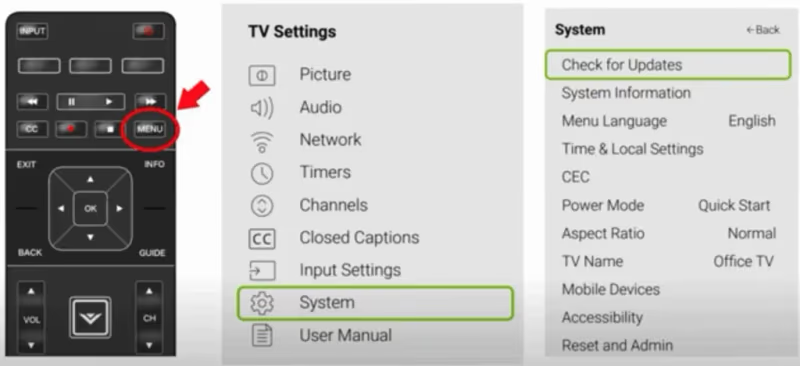
If your TV can’t connect to the internet for updates, you can download firmware directly from Vizio’s support site onto a USB drive and install it manually.
#7. Factory Reset the TV
A factory reset wipes all custom settings and returns the TV to its original configuration. This fixes green screens caused by corrupted settings that individual menu changes can’t reach.
Go to Menu > System > Reset & Admin > Reset TV to Factory Defaults. The default PIN is 0000.
Factory reset erases your Wi-Fi password, app logins, and all picture/sound customizations. You'll need to set everything up again from scratch. On newer models with VIZIO OS, you'll also need to sign back in with your Walmart account.
No remote? Hold the Volume Down and Input buttons on the TV simultaneously for 10-15 seconds. The TV will restart and begin the factory reset process. If you’re having other SmartCast or VIZIO OS issues, a factory reset often clears those too.
#8. Reseat the Internal LVDS Ribbon Cable
If every software fix has failed, the problem is likely hardware. The most common internal cause is a loose LVDS ribbon cable connecting the main board to the T-CON board.
Unplug the TV and remove the back panel screws. Locate the flat ribbon cable running from the main circuit board to a smaller board near the top of the panel. Press both connector ends firmly into their sockets. Reassemble and test.
This fix is free and takes about 15 minutes. If the ribbon cable looks burned or torn, you’ll need a replacement.
#When Should You Replace the T-CON Board?
If the green screen persists after reseating the LVDS cable, the T-CON (timing controller) board itself has likely failed. This board translates video signals from the main board into pixel-level instructions for the display panel. A bad solder joint or failed component on the T-CON produces exactly the kind of color corruption you’re seeing.
Replacement T-CON boards cost $20-$50 on Amazon and are model-specific. Search your TV’s model number (printed on the back label) plus “T-CON board” to find the right part. The swap takes 20 minutes with a Phillips screwdriver.
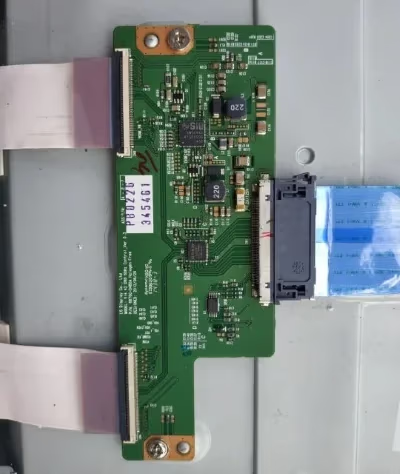
If the T-CON replacement doesn’t fix it, the issue may be a failing LED driver board or damage to the panel itself. At that point, professional repair makes sense only if the estimate is under half the cost of a new TV. Related display issues like a black screen, blue tint, yellow tint, or vertical lines often share the same root hardware cause.
#How to Contact Vizio Support for Warranty Help
Most Vizio TVs include a 1-year limited warranty covering manufacturing defects. You don’t need to register the TV, just have your proof of purchase ready.
Contact Vizio support through these channels:
- Phone: 1-888-849-4623 (Mon-Fri 6 AM - 9 PM PT, Sat-Sun 8 AM - 4 PM PT)
- Text: (205) 301-3729
- Chat: Visit vizio.com and look for the chat popup
Vizio occasionally covers repairs outside the warranty period at their discretion, so it’s worth calling even if your warranty has expired.
#Bottom Line
Start with the two fastest fixes: unplug the TV for 60 seconds and check your HDMI cables. These solve the majority of Vizio green screen cases. If those don’t work, reset your Tint to 0, turn off RGB-only mode and HDR, then update firmware. Factory reset is your last software option. For hardware causes, reseat the LVDS cable first, then consider a T-CON board replacement ($20-$50) before spending on professional repair.
#Frequently Asked Questions
#Why did my Vizio TV suddenly turn green?
The most common sudden trigger is an HDMI cable that worked loose from its port. Vibrations from a soundbar, someone bumping the entertainment center, or even thermal expansion can shift the connection just enough to corrupt the signal. Power cycle the TV and reseat every HDMI cable before trying anything else.
#Can picture settings alone cause a completely green screen?
Yes. If someone accidentally sets RGB-Only Mode to Green in the Color Tuner menu, the TV filters out all red and blue data and displays only the green channel. The screen will look entirely green. Setting RGB-Only Mode back to Off restores normal color immediately.
#How do I factory reset a Vizio TV without a remote?
Hold the Volume Down and Input buttons on the TV body simultaneously for 10-15 seconds. The TV will power off and restart into the setup wizard. This performs a full factory reset identical to the menu option that uses PIN 0000.
#Does updating firmware fix green screen issues?
Firmware updates fix green screens caused by software bugs in the video processing pipeline. Vizio has released patches addressing specific HDR color mapping issues on V-Series and M-Series models. Check for updates at Settings > System > Check for Updates, or download firmware from support.vizio.com onto a USB drive.
#What is a T-CON board and why does it cause green screens?
The T-CON (timing controller) board sits between the main circuit board and the display panel. It converts processed video signals into precise timing data that controls each pixel. When a component on this board fails or a solder joint cracks, it can send incorrect color data to the panel, producing a full green screen or green tint. Replacement boards are model-specific and cost $20-$50.
#Is a green screen covered under Vizio’s warranty?
Vizio’s standard 1-year limited warranty covers manufacturing defects that cause display problems, including green screens. You’ll need proof of purchase showing the TV is within the warranty period. Call 1-888-849-4623 to start a claim.
#Should I repair or replace a Vizio TV with a persistent green screen?
If the repair costs less than half the price of a comparable new Vizio model, repair is worth it. T-CON board swaps run $20-$50 in parts and take 20 minutes. Professional board-level repair typically costs $100-$250. For TVs older than 5 years where the main board or panel is damaged, replacing the TV usually makes more financial sense.
#Did Walmart’s acquisition change how Vizio handles support?
Vizio’s support channels remain the same after Walmart’s December 2024 acquisition. The main change is that SmartCast has been rebranded to VIZIO OS, and newer TVs now require a Walmart account to sign in. Warranty terms and the support phone number (1-888-849-4623) haven’t changed.