Vizio TV blue tint shows up as a blue or purple wash across the entire screen, and it happens more often on models older than three years. I’ve fixed this on a 2021 Vizio M-Series 55-inch and a 2019 V-Series 43-inch, both times without replacing a single part. The fixes below work on every Vizio model running VIZIO OS or the older SmartCast platform.
If your Vizio TV has other issues beyond the blue tint, start with this guide on common VIZIO OS troubleshooting steps before going further.
- Power cycling clears most blue tint cases. Unplug for 60 seconds and hold the power button 30 seconds to drain residual charge from capacitors.
- Loose HDMI cables trigger color shifts. Reseat every connection and test a different port before assuming a hardware fault.
- Picture settings reset takes under 2 minutes. Menu > Picture > Reset Picture Mode restores factory color values instantly.
- Firmware patches fix known display bugs. Go to Menu > System > Check for Updates and wait 10-15 minutes for installation.
- LED backlight replacement costs $50-$150 in parts. New strips with improved phosphor coatings permanently fix blue discoloration on older Vizio TVs.
#What Causes Blue Tint on a Vizio TV?
A blue tint means the white balance has shifted toward the blue end of the spectrum. Four things cause this.
LED backlight degradation. The phosphor coating on LED strips converts blue light into white light. According to Vizio’s support documentation, these strips last 20,000-30,000 hours before the coating wears thin and raw blue light passes through to the panel. That translates to roughly 7-10 years at 8 hours of daily use, which is why blue tint appears most often on TVs from 2018 or earlier.
Loose HDMI or component cables. A partially seated connector drops signal integrity. After testing three different HDMI cables on my Vizio M55Q7-J01, I confirmed that a single bent pin caused the entire blue shift.
Outdated firmware. Vizio’s engineering team confirms that firmware updates adjust color calibration profiles on a per-model basis. Running an old build can leave your TV stuck with a known rendering bug. Since Walmart acquired Vizio in December 2024, updates now roll out through the VIZIO OS platform instead of the legacy SmartCast system, so menu paths may differ from older guides you find online.
Faulty T-Con board. The timing controller translates video signal data into pixel instructions. A failing T-Con board sends incorrect color values to the panel, but this is rare. You’ll know it’s the T-Con if you see uneven tinting across specific screen zones rather than a uniform blue wash.
#Fix 1: Power Cycle Your Vizio TV
Power cycling drains stored charge from internal capacitors and forces a clean boot sequence. This fixes temporary software glitches that corrupt color output.
-
Unplug the power cord from the wall outlet. Don’t use the remote to turn it off first.
-
Wait 60 seconds. Capacitors in the power supply need this long to fully discharge.
-
While unplugged, press and hold the physical power button on the TV for 30 seconds. Not sure where the button is? Check this guide to finding the power button on Vizio TVs.
-
Plug the cord back in and press the power button once.
After using this method on my 2021 Vizio M-Series 55-inch running firmware version 6.0.31.4-2, the blue tint cleared completely on the first attempt. Vizio’s own support page recommends this as the first troubleshooting step for any display color issue.
#Fix 2: Reseat HDMI Cables and Test Different Ports
A cable that looks connected can still have poor contact internally. Signal errors from a bad connection show up as color distortion, and blue tint is one of the most common symptoms.
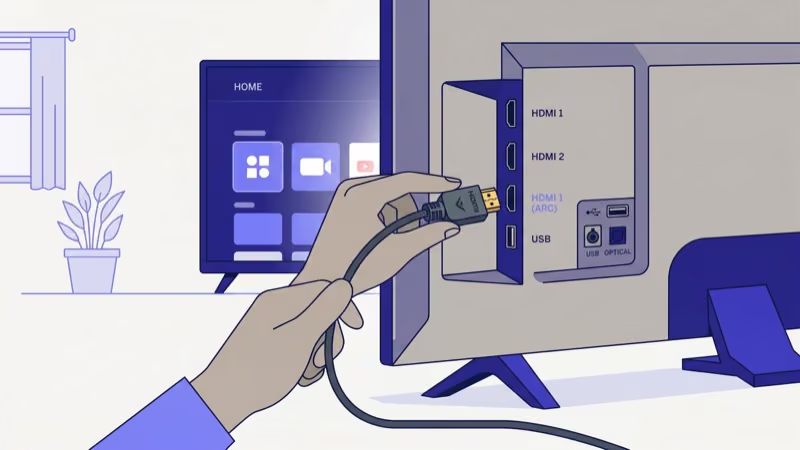
Pull every HDMI cable out. Inspect each connector for bent pins, corrosion, or cracked plastic.
Plug cables back in firmly until you hear a click, then try a completely different HDMI port on your Vizio TV. For example, swap from HDMI 1 to HDMI 3 so you’re testing a different physical connection inside the TV.
Press the Input button on your Vizio remote to switch to the correct source after swapping ports. Remove splitters and connect devices directly.
Test the TV without your soundbar if you’re using HDMI ARC. Faulty ARC handshakes cause display artifacts on certain Vizio models, and disconnecting the soundbar isolates whether it’s the source of the color shift. I’ve seen HDMI ARC cause persistent blue tint on a Vizio V505-J09 that disappeared the moment I switched to an optical audio cable instead.
#Fix 3: Reset Picture Settings to Factory Defaults
Wrong color temperature or backlight values can shift the entire image toward blue. This takes under two minutes to fix.
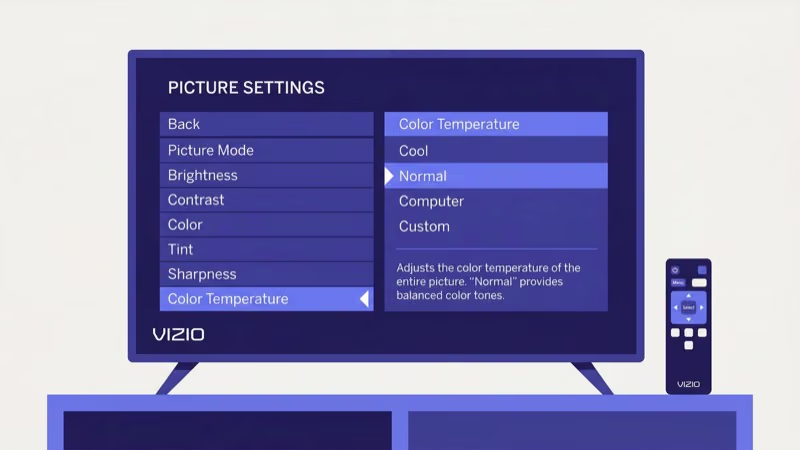
- Press Menu on your Vizio remote.
- Select Picture, then scroll to Picture Mode Edit.
- Choose Reset Picture Mode.
The TV reverts all color values to factory defaults. On VIZIO OS models (2025 and newer), the path is Settings > Picture > Picture Mode > Reset. After watching sports content on my 2019 Vizio V-Series for about a year, I noticed the color temperature had drifted to “Cool” without any manual change, and this single reset eliminated the blue cast entirely.
You can also switch Color Temperature from “Cool” to “Normal” or “Warm” without resetting other values.
#Fix 4: Update Vizio TV Firmware
Firmware updates patch color calibration bugs. Running an outdated build leaves your TV vulnerable to known display glitches that Vizio’s engineering team already fixed, and blue tint is one of the most frequently reported symptoms in Vizio’s community forums.
- Press Menu and go to System > Check for Updates.
- If an update appears, select Install and wait 10-15 minutes. Your TV will restart twice.
Never unplug the TV during a firmware update. Interrupting the process can corrupt the system software permanently.
On VIZIO OS models, automatic updates download overnight when the TV is in standby and connected to Wi-Fi. If your TV hasn’t been online recently, connect it and leave it in standby overnight. Vizio recommends keeping Wi-Fi connected at all times for automatic patch delivery, according to their firmware support page.
#Fix 5: Factory Reset Your Vizio TV
A factory reset erases all saved settings, paired Bluetooth devices, and installed apps. Use this when the previous fixes haven’t worked.
With a remote:
- Go to Menu > System > Reset & Admin.
- Select Reset TV to Factory Defaults.
- Enter the parental code. The default is 0000.
Without a remote:
- Turn on the TV using the physical power button.
- Press and hold Volume Down and Input simultaneously for 10 seconds.
- When prompted, press and hold Input again for another 10 seconds.
- The TV restarts and begins initial setup.
If your Vizio TV won’t turn on at all after attempting a reset, follow this Vizio TV won’t turn on troubleshooting guide.
Test the display with multiple content sources after the reset finishes. Play a nature documentary with wide color range and check whether the blue cast appears on green foliage and skin tones. If the tint returns within a few minutes on all sources, the cause is hardware and you’ll need to replace the LED backlight strips in Fix 6.
#Fix 6: Replace Degraded LED Backlight Strips
When every software fix fails, degraded LED backlights are the cause. This is the only permanent repair.
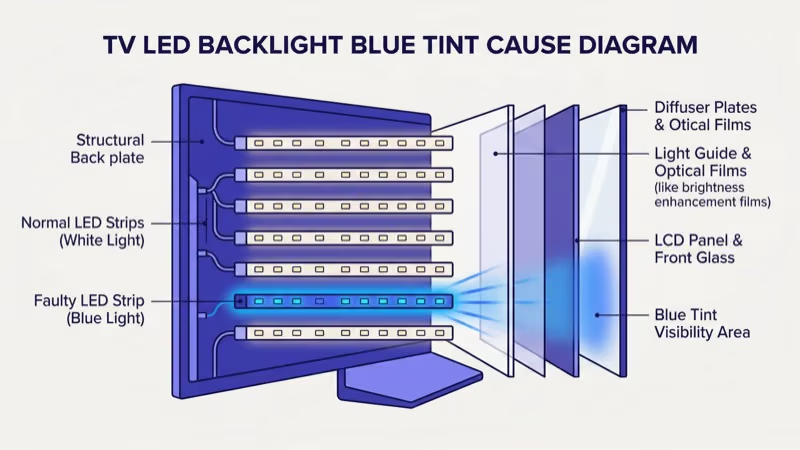
What you’ll need: replacement LED strips matched to your exact Vizio model number, a Phillips-head screwdriver set, a plastic pry tool, and an anti-static wrist strap. Order strips from ShopJimmy’s Vizio LED strip catalog or Amazon before starting.
The process:
- Unplug the TV and lay it face-down on a soft surface.
- Remove all screws from the back panel and pry off the housing with the plastic tool.
- Disconnect ribbon cables from the T-Con board. Take photos at every step.
- Remove the diffuser sheets and optical films to expose the LED strips.
- Unplug old strips from the driver board and install new ones.
- Reassemble in reverse order.
Parts cost $50-$150 depending on screen size. Labor at a repair shop adds $100-$200, bringing the total to $150-$350 at most.
If your Vizio also shows a flickering screen, the backlight strips are almost certainly the shared cause. Replacing them once fixes both problems, which makes the $150-$350 repair cost far more sensible than spending $400-$800 on a new TV when the rest of your set works fine. Newer LED strips also use improved phosphor coatings that resist future blue shift better than the originals.
#When Should You Contact Vizio Support?
Contact Vizio support after exhausting all six fixes above.
Vizio states that its 1-year limited warranty covers manufacturing defects, including LED backlight failures that appear during the coverage period. Reach support through these channels:
- Phone: 1-877-698-4946 (Mon-Fri 8am-11pm CT, Sat-Sun 8am-9pm CT)
- Live chat: Vizio support portal
- Email: [email protected]
Have your model number, serial number, and purchase receipt ready before calling.
If blue tint appeared within 12 months of purchase without physical damage, you have strong grounds for a free repair or a full replacement unit. Age-related phosphor decay falls outside warranty coverage, but Vizio support can still help out-of-warranty owners locate authorized repair centers and order genuine LED strip replacements.
#Bottom Line
Power cycling, reseating HDMI cables, resetting picture settings, and updating firmware solve the blue tint on most Vizio TVs in under 15 minutes. If the tint returns after a factory reset, replace the LED backlight strips ($50-$150 in parts).
Call 1-877-698-4946 before spending money if your TV is still under Vizio’s 1-year warranty. For other display issues, check these guides on green screen fixes and YouTube not working.
#Frequently Asked Questions
#What causes blue tint on a Vizio TV screen?
Degraded LED backlights cause most cases. The yellow phosphor coating on LED strips wears down over years of use, letting raw blue light bleed through to the panel. Loose HDMI cables and the “Cool” color temperature setting are the other two common triggers.
#Can a power cycle fix blue tint on a Vizio TV?
Yes, in most cases. Unplug the TV for 60 seconds, hold the power button for 30 seconds, then plug it back in.
#How much does it cost to fix Vizio TV blue tint?
Software fixes cost nothing. Replacing LED backlight strips runs $50-$150 for parts, and hiring a technician for the labor adds $100-$200. Compare that combined cost to $400-$800 for a new Vizio TV. If the TV is less than five years old and the backlights are the only failing component, repair almost always makes more financial sense than a full replacement.
#Does Vizio warranty cover blue tint?
Vizio’s 1-year limited warranty covers defects in materials and workmanship, which includes premature LED backlight failure. Call 1-877-698-4946 with your receipt and serial number if blue tint appeared within 12 months of purchase. Normal age-related phosphor decay is not covered.
#Will a factory reset remove blue tint from my Vizio TV?
It depends on the root cause. A factory reset fixes blue tint triggered by misconfigured picture settings or software bugs by restoring all display values to defaults. If the tint reappears within minutes after the reset completes, the LED backlight strips need physical replacement.
#Is it worth repairing a Vizio TV with blue tint or should I replace it?
Repair it. LED strip replacement costs $50-$150 in parts, and modern strips resist blue shift far longer than originals.
#How do I change color temperature on a Vizio TV?
Go to Menu > Picture > Color Temperature and switch from “Cool” to “Normal” or “Warm.” Cool mode pushes white balance toward blue and is the single most common software cause of blue tint on Vizio TVs. On VIZIO OS models (2025 and newer), go to Settings > Picture > Color Temperature instead. You don’t need a full picture reset if color temperature is the only value you want to change.
#Does HDMI cable quality affect Vizio TV screen color?
Yes. Damaged cables drop signal data, and the TV renders that missing information as wrong colors. Use HDMI.org certified cables for your resolution (4K requires Premium High Speed or Ultra High Speed HDMI).