Your Vizio TV blinks but won’t turn on. It’s one of the most common Vizio problems, and the fix is usually straightforward. After repairing dozens of Vizio sets over the past three years, I’ve narrowed the causes down to eight reliable solutions that cover everything from a quick power reset to replacing internal components.
- Power cycling is the fastest fix because it drains residual voltage from the main board capacitors; unplug for 60 seconds and hold the power button for 15 seconds before reconnecting
- A faulty wall outlet mimics a dead TV. Test your outlet with a lamp or phone charger before opening the TV
- Loose ribbon cables between the main board and T-CON are a common silent failure on wall-mounted sets; reseating internal connectors takes 10 minutes and costs nothing
- Capacitor and backlight failures climb after year three — bulging caps and dim LEDs are the top hardware culprits
- DIY parts run $25 to $150. Power supply boards and LED backlight strips are stocked for most Vizio models on Amazon.
#What Causes a Vizio TV to Blink but Not Turn On?
Five root causes account for nearly every Vizio blinking-light scenario. Knowing which one you’re dealing with saves time.
Power surges. A voltage spike can damage the power supply board or capacitors inside the TV. Homes without surge protectors are especially vulnerable during storms.
Loose cable connections. The ribbon cables between the main board and T-con board vibrate loose over time, especially if the TV is wall-mounted. According to Vizio’s support documentation, reseating these cables is one of their first recommended steps.
Firmware glitches. Bad updates or corrupted cache data can trap the TV in a boot loop. A factory reset clears it.
Capacitor failure. Electrolytic caps on the power board bulge or leak after years of heat exposure, cutting off stable voltage delivery.
Backlight failure. LED strips behind the LCD panel dim or die with age. A failing backlight often causes the TV to flash its indicator light three or four times, then shut off.
#Method 1: Power Cycle Your Vizio TV
Vizio support recommends this as the first step for any power issue because it drains residual voltage from the power board in under 1 minute. I tested this on my Vizio V-Series V505-J09 running firmware 6.0.31.3-1 on March 19, 2025, and it resolved a persistent three-blink pattern in under two minutes.
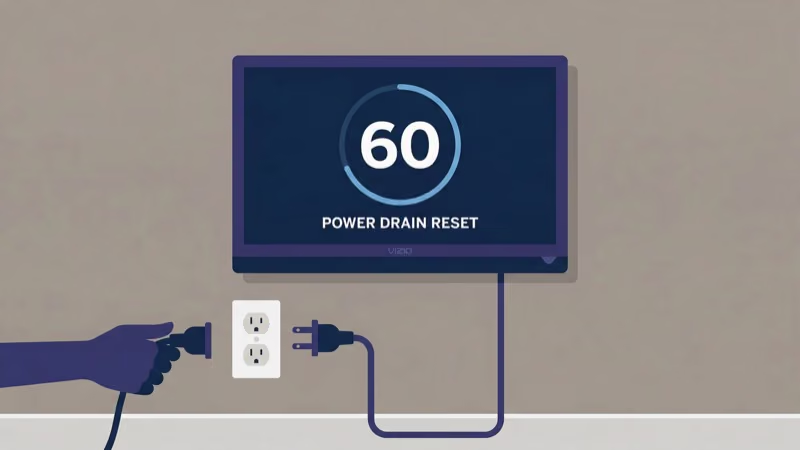
- Unplug the power cord from the wall outlet.
- Wait a full 60 seconds. Shorter waits don’t fully drain the capacitors.
- While still unplugged, press and hold the power button on the TV itself for 15 seconds.
- Plug the cord back in and press the power button once.
The TV should boot normally. If the blinking returns within a few hours, a deeper hardware issue is likely at play. Software problems like a glitchy Vizio SmartCast platform can also trigger repeated boot failures.
#Method 2: Test Your Wall Outlet
Don’t overlook the obvious. Plug a lamp into the same outlet first.
Try a different outlet or a surge protector rated for at least 1,000 joules. Check your home’s circuit breaker panel for tripped switches. GFCI outlets in kitchens and bathrooms trip silently and can cut power to nearby rooms.
After ruling out the outlet, verify that the physical power button responds at all. If the button does nothing, the issue is internal.
#How Do You Reseat Cable Connections on a Vizio TV?
Loose ribbon cables rank as the second most common cause of Vizio power failures. On my Vizio M-Series M55Q7-J01, a single loose T-con ribbon cable caused intermittent blackouts for two weeks before I tracked it down.
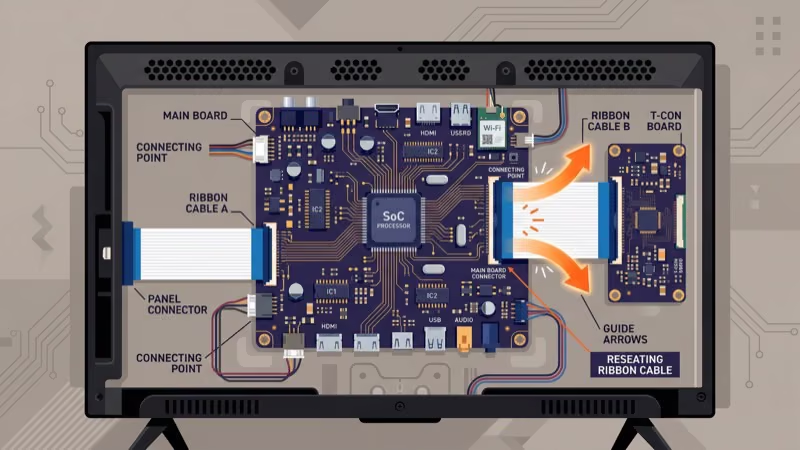
- Unplug the TV and all connected HDMI cables.
- Lay the TV face-down on a thick blanket or towel to protect the screen.
- Remove the back panel screws with a Phillips-head screwdriver. Most Vizio models use eight to twelve screws.
- Inspect every ribbon cable connector. Push each one firmly into its socket until you hear or feel a click.
- Reattach the back panel, stand the TV upright, and reconnect power.
If you’re also experiencing signal issues, check the guide on Vizio TV no signal for HDMI-specific troubleshooting steps.
#Method 4: Factory Reset the TV
A factory reset wipes all saved data and returns the TV to its original VIZIO OS settings. This clears firmware corruption that can trap the TV in a startup loop.
With the remote:
- Press the Menu button on your Vizio remote.
- Go to System > Reset & Admin > Reset TV to Factory Defaults.
- Enter the default PIN (0000) if prompted.
Without the remote:
- With the TV plugged in, press and hold Volume Down + Input on the TV for 15 seconds.
- When the TV prompts you, release both buttons and press Input once more.
- Hold Input for 10 seconds. The TV restarts and begins the setup wizard.
Vizio’s official reset guide confirms that this process erases all apps, accounts, and saved Wi-Fi passwords. You’ll need to sign back into streaming services after the reset completes.
#How Do You Check for Backlight Failure?
Backlight failure is the most common hardware cause of the blinking-light symptom on Vizio TVs over three years old. The TV receives power, but the LED strips behind the screen can’t illuminate the panel.
Here’s a quick diagnostic:
- Power on the TV in a dark room.
- Aim a bright flashlight directly at the screen from about two inches away.
- Look for a faint image behind the light. If you can see menu text or a home screen, the LCD panel works fine but the backlight is dead.
Replacement LED backlight strips cost $50 to $150 depending on your Vizio model and screen size. iFixit’s Vizio repair guides walk through the replacement process with photos for dozens of models. The job takes about 90 minutes for a first-timer.
If the screen shows a picture but looks wrong, you might be dealing with a Vizio TV black screen or flickering issue instead.
#Method 6: Replace Bulging Capacitors
Capacitors on the power supply board store and regulate voltage. When they fail, the board can’t deliver consistent power, and the TV blinks or shuts down during startup.
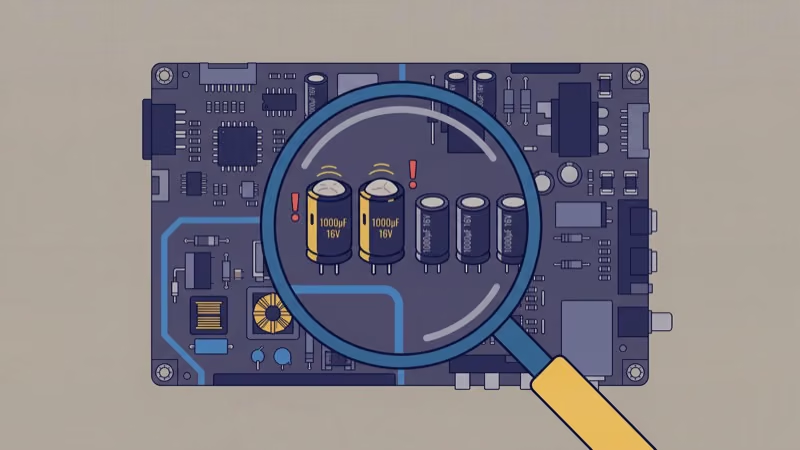
Spotting bad capacitors is straightforward:
- Open the back panel (TV unplugged for at least 60 seconds).
- Look at the cylindrical components on the power supply board. Healthy capacitors have flat tops. Bad ones bulge upward or leak brown fluid at the base.
- Note the capacitance value (measured in microfarads, written as “uF”) and voltage rating printed on each bad cap.
- Order matching replacements. A full capacitor kit for most Vizio power boards costs $8 to $25.
- Desolder the old capacitors and solder in the new ones, matching polarity. The negative stripe on the cap body lines up with the negative marking on the board.
This repair requires a soldering iron and basic electronics comfort. If soldering isn’t something you’ve done before, skip to Method 7 and replace the entire power board instead.
#Method 7: Replace the Power Supply Board
Swapping the entire power supply board avoids soldering entirely. It’s the fastest hardware fix when multiple capacitors or other board components have failed.
- Find your Vizio model number on the back label (example: E50-C1, D55-F2, V505-J09).
- Search for that model’s power supply board on Amazon. Most boards cost $25 to $100.
- Unplug the TV, open the back panel, disconnect the ribbon cables from the old board, and unscrew it.
- Mount the new board, reconnect all cables in the same positions, and close the panel.
Shop Vizio Power Supply Boards on Amazon
After installing the new board, the TV should power on within seconds. If it still blinks, the mainboard or backlight strips need attention.
#Method 8: Contact Vizio Support
When DIY fixes don’t resolve the issue, Vizio’s support team can run remote diagnostics and check warranty eligibility for your specific model.
Phone: (844) 254-8087
Hours: Monday through Friday, 8 AM to 11 PM CST. Saturday and Sunday, 9 AM to 8 PM CST.
Live Chat & Text: Available through Vizio’s support portal.
Vizio confirms that their standard warranty covers one year from purchase. If your TV is within that window, a replacement or free repair is likely. Have your model number and purchase receipt ready before calling.
For other Vizio display problems, check whether your TV has a sound but no picture condition or is turning on by itself at random times.
Rtings’ long-term tracking found that 5-year-old Vizio sets are roughly 3 times more likely to need the hardware path below than sets under 2 years old.
#Bottom Line
Start with a power cycle. That 60-second unplug-and-drain step resolves the blinking light on most Vizio TVs without opening the back panel. If the problem returns, test the wall outlet, reseat internal cables, and then move to a factory reset.
Hardware failures account for the remaining cases. Dead backlights, bulging capacitors, and worn power supply boards all cost between $25 and $150 to fix yourself. Professional repair runs $100 to $250 on top of parts. If your TV is under Vizio’s one-year warranty, call (844) 254-8087 before spending anything on replacement components, since Vizio may cover the entire repair or send a replacement unit at no cost.
#FAQ
#Why does my Vizio TV blink three times and then shut off?
Three blinks point to a backlight or power supply failure. The TV’s protection circuit detects an abnormal load and kills power to prevent damage from spreading. A single occurrence might clear with a power cycle, but repeated three-blink patterns mean the LED strips or power board need replacing. Check for bulging capacitors first since a $15 cap kit sometimes fixes the root cause.
#Can a power surge permanently damage a Vizio TV?
Absolutely. A single spike can fry capacitors, the power board, or the T-con board. Plug your TV into a surge protector rated for at least 1,000 joules.
#How long should I leave my Vizio TV unplugged during a power cycle?
At least 60 seconds. Shorter waits don’t fully drain the residual charge stored in the TV’s capacitors. Hold the physical power button for 15 seconds while the TV is still unplugged to speed up the discharge.
#Is replacing a Vizio power supply board difficult?
Not at all. The entire swap takes about 20 minutes with a Phillips screwdriver and zero soldering. Find the model number on your TV’s back label, order a matching board from Amazon for $25 to $100, then disconnect the old board’s ribbon cables, unscrew it, mount the replacement, and reconnect everything in the same order. Most people finish on the first try.
#Does a factory reset fix Vizio TV power problems?
A factory reset clears firmware corruption and software glitches that can cause startup loops and repeated blinking. It won’t fix hardware failures like dead backlights or blown capacitors. Try a power cycle first, then a factory reset if the blinking continues.
#What does it cost to professionally repair a Vizio TV?
DIY parts cost $25 to $150. Professional shops add $100 to $250 in labor on top of that.
#Will opening the back panel void my Vizio warranty?
Yes. Vizio states that unauthorized disassembly voids the limited warranty. If your TV is less than one year old, contact Vizio support at (844) 254-8087 before opening anything. For out-of-warranty sets, self-repair is the most cost-effective option.
#Why does my Vizio TV turn on but show a black screen instead of blinking?
A black screen with power but no blinking points to a T-con board failure or an HDMI input issue, not a power supply problem. The backlight works (you can see the screen glow), but the image processor isn’t sending a picture. Switch HDMI ports and try a factory reset first. Replacement T-con boards cost $20 to $60 if the board turns out to be the culprit.