If your Vizio TV doesn’t have a coaxial input, you can still watch free over-the-air channels with the right hardware. I’ll walk you through every option, from budget converter boxes to wireless streaming setups that work with tuner-less Vizio displays.
- Vizio P-Series and select E-Series models (2016-2017) ship without built-in tuners or coaxial inputs, so you’ll need external hardware for OTA channels
- An ATSC digital converter box costs $25-$40 and bridges your antenna to the TV through HDMI
- HDHomeRun paired with Plex streams OTA channels wirelessly over your home network to multiple devices at once
- Hidden input settings on Vizio TVs can make the TV source invisible, so check System > Input Settings before buying new hardware
- Most indoor antennas pick up 30+ free HD channels within 50 miles, and amplified outdoor models can reach up to 60-70 miles
#Which Vizio TVs Don’t Have an Antenna Input?
In 2016-2017, Vizio sold several TV models as “home theater displays” without built-in tuners or coaxial inputs. These sets rely entirely on streaming for content.
Confirmed tuner-less Vizio models:
- P50-C1
- P55-C1
- P65-C1
- P75-C1
- E32-E1
- E43-E2
- E48-E2
- E50-E1
- E55-E1
- E60-E3
- E65-E0
- E70-E3
The fastest way to check is by looking at the ports on the back of your TV. If there’s no coaxial jack labeled “DTV/TV,” your Vizio doesn’t support a direct antenna connection. You can also look up your model number on Vizio’s support page to confirm.
#How Do You Connect an External Tuner or Converter Box?
If your Vizio TV lacks a coaxial input, an external ATSC digital tuner or converter box solves the problem. These devices decode over-the-air signals and output the picture through HDMI, acting as a stand-in for the missing internal tuner.
#Steps To Set Up an External Tuner
-
Buy an ATSC digital converter box with both coaxial input and HDMI output.
-
Connect the antenna cable to the coaxial input on the tuner.
-
Run an HDMI cable from the tuner to an open HDMI port on your Vizio TV.
-
Turn on the TV and tuner box, then switch to the correct HDMI input.
-
Use the tuner’s menu to auto-scan and save available OTA channels.
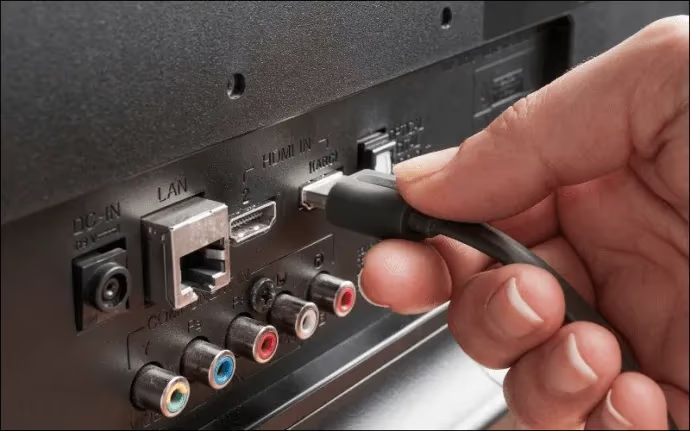
Once everything’s connected, you’ll use the tuner’s remote to change channels and adjust volume. That takes some getting used to, but it works the same as a cable box.
The Mediasonic HomeWorx is a solid budget pick at around $30. For multi-room streaming or DVR capabilities, the SiliconDust HDHomeRun is the better long-term investment.
Newer external tuners now support ATSC 3.0 (NextGen TV), which delivers 4K OTA broadcasts. ATSC 3.0 is rolling out in major US markets, so an ATSC 3.0 tuner gives you access to higher-quality broadcasts as they become available.
If your Vizio TV’s remote isn’t working, you might have trouble switching inputs. Check out tips for powering on your Vizio without a remote if you’re stuck on the wrong source.
#Can You Access Channels Wirelessly With HDHomeRun?
A more flexible approach is using SiliconDust’s HDHomeRun. Instead of running HDMI cables across the room, this device connects your antenna to your home network and streams live TV over Wi-Fi or Ethernet.
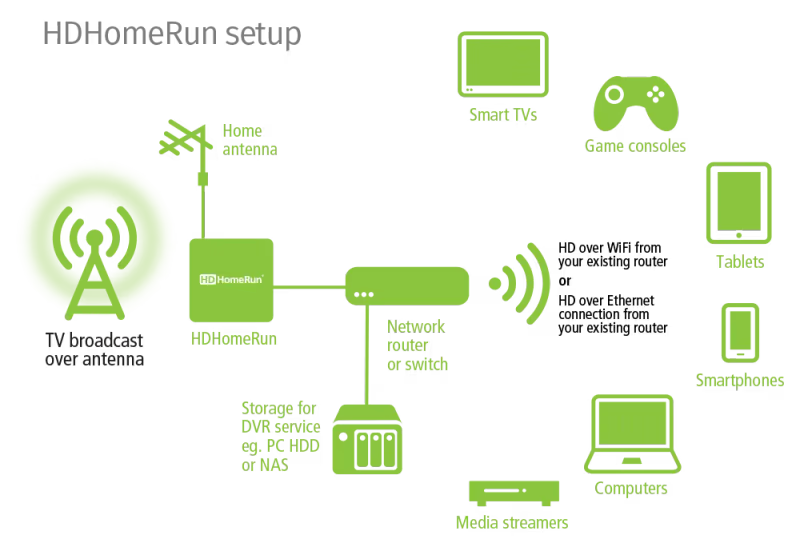
Here’s how to set it up:
-
Connect your antenna cable to the HDHomeRun’s coaxial input.
-
Plug the HDHomeRun into your router with the included Ethernet cable.
-
Open the Plex app on your Vizio TV (HDHomeRun doesn’t have a native Vizio app, so Plex is the go-to solution).
-
In Plex, go to Settings > Live TV & DVR and follow the prompts to detect your HDHomeRun and scan for channels.
A single HDHomeRun can feed live TV to every device on your network. That means your phone, tablet, laptop, and other smart TVs all get OTA channels without their own antennas.
#Recording OTA Channels With Plex DVR
Plex paired with HDHomeRun also gives you full DVR functionality. You can schedule recordings, pause live TV, and watch saved shows on any device in your home.
This requires a Plex Pass subscription: $6.99/month, $69.99/year, or $249.99 for a lifetime license. You’ll also need a hard drive connected to your Plex server for storing recordings.
If you’re having issues getting the Plex app to load on your Vizio, the Vizio OS troubleshooting guide covers common fixes for app crashes and connectivity problems.
#How Do You Check for Hidden Input Sources?
Before buying new hardware, make sure your Vizio isn’t just hiding the TV input. The “Hide Input” feature removes unused sources from the input list, and if it was accidentally toggled on, your tuner’s HDMI port won’t show up.
Here’s how to reveal hidden inputs:
-
Press the Menu button on your Vizio remote.
-
Go to System > Input Settings.
-
Select Hide Input.
-
Find the missing input labeled TV or the HDMI port your tuner is connected to.
-
Change the toggle to Visible.
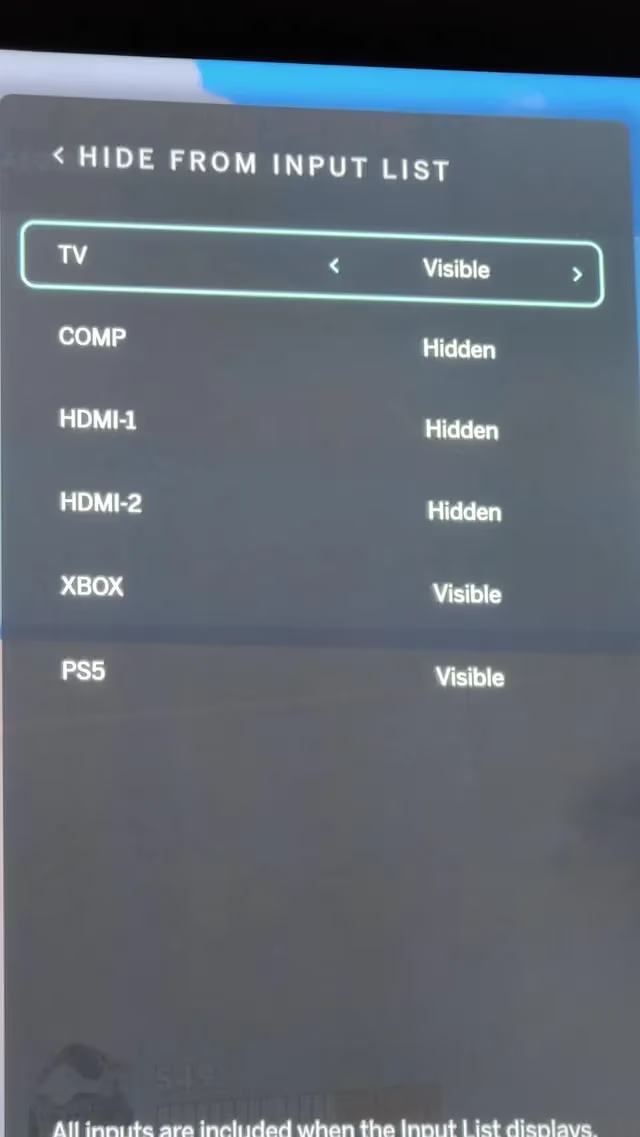
The input should now appear when you cycle through sources. Reconnect your antenna setup through coaxial to tuner to HDMI and try again.
#Antenna and Tuner Troubleshooting Tips
If your external tuner is connected but you’re not picking up channels, work through these checks:
-
Adjust your antenna placement for better signal. Use AntennaWeb to find the direction of your local broadcast towers.
-
Make sure coaxial connections are screwed in tight at both ends.
-
Inspect cables for cracks, bends, or corrosion. Swap them out if they look damaged.
-
Rescan channels on the tuner after every adjustment you make.
-
Check for firmware updates on your tuner box.
-
Confirm the TV input matches the HDMI port your tuner is plugged into.
-
Factory reset the tuner, then rescan channels from scratch.
-
As a last resort, factory reset your Vizio TV, reconnect the tuner, and rescan.
Under good conditions, most indoor antennas reliably receive channels within 30-50 miles. An amplified directional outdoor antenna can push that range to about 60-70 miles, according to the FCC’s antenna guide. Terrain, tall buildings, and weather all affect reception quality.
If you’re experiencing lag or slow performance on your Vizio while using streaming apps alongside your tuner setup, clearing the TV’s cache or restarting the set usually helps.
#How Do You Set Up an Antenna on a Standard Vizio TV?
If your Vizio has a built-in tuner and coaxial port, setup is straightforward:
-
Get an indoor or outdoor HDTV antenna (the Mohu Leaf and Antennas Direct ClearStream are popular picks).
-
Position the antenna with a clear line of sight toward your local broadcast towers.
-
Connect the coaxial cable from the antenna to the DTV/TV input on your Vizio.
-
Turn on the TV and switch to the TV or DTV input.
-
Open the menu and navigate to Channels & Inputs > Antenna Channels > Find Channels. Select Auto, then Start to begin scanning.
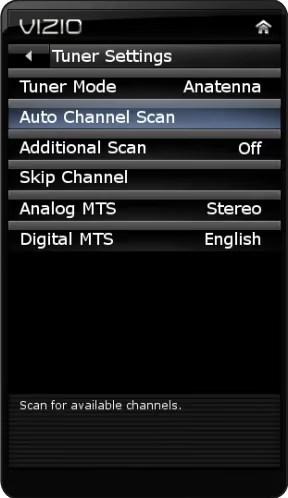
On older Vizio TVs (pre-2024), the menu path is Channels > Channel Scan instead of Channels & Inputs > Antenna Channels > Find Channels. Check your TV's year to use the right path.
If you’re not getting all the stations you’d expect, reposition the antenna and rescan. Even a $20 unamplified antenna can pull in 30+ free HD channels in most areas. When comparing your Vizio to other brands, check out how Vizio stacks up against LG for overall value.
#Bottom Line
Getting OTA channels on a tuner-less Vizio TV takes a bit of extra hardware, but it isn’t complicated. A $30 ATSC converter box handles the basics. If you want wireless streaming and DVR, pair an HDHomeRun with Plex for whole-home antenna TV. Before buying anything, check your TV’s hidden input settings first. And if your Vizio turns on by itself after connecting new HDMI devices, a quick CEC setting change will fix that.
#Frequently Asked Questions
#What input do I use to connect an antenna to a Vizio TV?
If your Vizio has a built-in tuner, plug the coaxial cable from your antenna into the “DTV/TV” port. Switch to the “TV” source and scan for channels. For tuner-less models, connect the antenna to an external ATSC converter box first, then run an HDMI cable from the converter to your TV.
#Why can’t my Vizio TV find channels from the antenna?
Start by checking your antenna placement with AntennaWeb to make sure it’s pointed at the nearest broadcast towers. Rescan after every repositioning. Inspect the coaxial cable for damage and confirm both ends are screwed in securely. If towers are far away, adding a signal amplifier can help.
#Do I need internet to use an antenna on a Vizio TV?
No. Over-the-air TV works without an internet connection. The only exception is an HDHomeRun setup, which streams channels over your local network using Plex. A standard coaxial antenna connection works completely offline.
#What is the realistic range of an HDTV antenna?
Most indoor antennas pick up stations within 30-50 miles under good conditions. Amplified outdoor antennas with clear line of sight can reach roughly 60-70 miles. The FCC notes that terrain, buildings, and weather all reduce effective range. Claims beyond 70 miles are generally marketing hype.
#How do I know if my Vizio TV has a built-in tuner?
Look at the back panel for a coaxial jack labeled “DTV/TV.” If you see one, your TV has a built-in ATSC tuner. You can also search your model number on Vizio’s website or check the spec sheet that came in the box.
#Can I record OTA channels on a tuner-less Vizio TV?
Yes. Pair an HDHomeRun with Plex and enable the DVR feature. Plex records live broadcasts to a connected hard drive, and you can watch recordings on any device. DVR requires a Plex Pass subscription, which costs $6.99/month, $69.99/year, or $249.99 for lifetime access.
#What is the best external tuner for a Vizio TV without coaxial input?
The Mediasonic HomeWorx is a reliable budget option for basic channel viewing. For multi-room streaming, DVR, and future-proofing with ATSC 3.0 support, the SiliconDust HDHomeRun is the stronger choice. Both connect to your Vizio through HDMI.
#Does HDHomeRun have an app for Vizio TVs?
No. HDHomeRun doesn’t offer a native app for Vizio TVs. The best workaround is using the Plex app on your Vizio, which integrates with HDHomeRun for live TV and DVR. You can also use the Channels app or HDHomeRun’s web interface on a computer connected to the same network.