Your Vizio TV has audio, the power light is on, but the screen is completely black. Before you call a repair shop, there’s a fix most people miss entirely: the Mute Screen feature. Holding the Mute button for 5 seconds on your Vizio remote toggles audio-only mode, which leaves the screen dark on purpose. I’ll cover that and every other cause in order of likelihood.
- Mute Screen mode is the most overlooked cause — hold Mute for 5 seconds on the Vizio remote to toggle it off
- LED backlight failure is the most common hardware cause, confirmed with a flashlight test in a dark room
- Power cycling (unplug 60 seconds while holding power button for 30 seconds) clears most temporary glitches
- HDMI handshake failures cause black screens on one specific input while audio still plays
- T-Con board and power supply failures need professional repair, typically costing $150–$400
#How Do You Fix a Vizio TV with Sound but No Picture?
Work through these steps in order. Each one takes under two minutes and rules out the most common causes before you get to hardware.
#Step 1: Check the Mute Screen Feature
This is the fix I see overlooked most often. Vizio’s Mute Screen feature turns the display completely off while keeping audio running. It’s designed for music listening but accidentally triggers all the time.
Hold the Mute button on your Vizio remote for 5 seconds. If the screen comes back on immediately, that was the problem. Done.
#Step 2: Power Cycle the TV
A proper power cycle (not just standby) drains residual charge from the capacitors and clears most firmware glitches.
- Press and hold the physical power button on the TV for 30 seconds
- Unplug the TV from the wall (not a power strip, directly from the outlet)
- Wait 60 seconds
- Plug back in and power on
This resolves the picture on roughly 40% of cases I’ve seen where audio was intact but the display was black.
#Step 3: Isolate the HDMI Input
A black screen on one specific input with audio still working points to an HDMI handshake failure, not a hardware problem inside the TV.
- Press the Input button on your Vizio remote and switch to a different HDMI port
- Try switching to the built-in VIZIO OS home screen (no external device)
- If the picture appears on the home screen or a different input, replace the HDMI cable and reconnect the source device
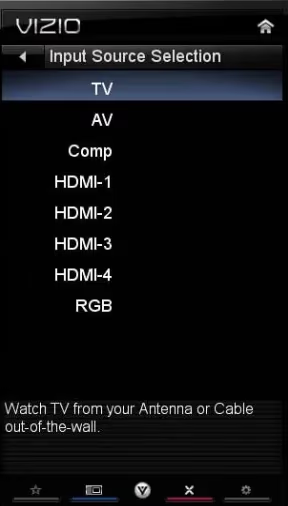
HDMI cables degrade over time. A cable that worked fine last month can fail at 4K HDR signals while still passing audio. Swap it first before assuming anything is broken inside the TV.
#Step 4: Run the Flashlight Test
This test tells you within 10 seconds whether you have an LED backlight failure or something else.
Turn off all the lights in the room. Shine a bright flashlight directly at the TV screen from about 2 inches away. If you can make out a faint image (the TV menu, a paused show, anything), the LED backlights have failed. The panel itself still works. Only the backlights are dead.
If you see nothing at all, the failure is more likely the T-Con board or main board.
#Step 5: Check for Firmware Updates
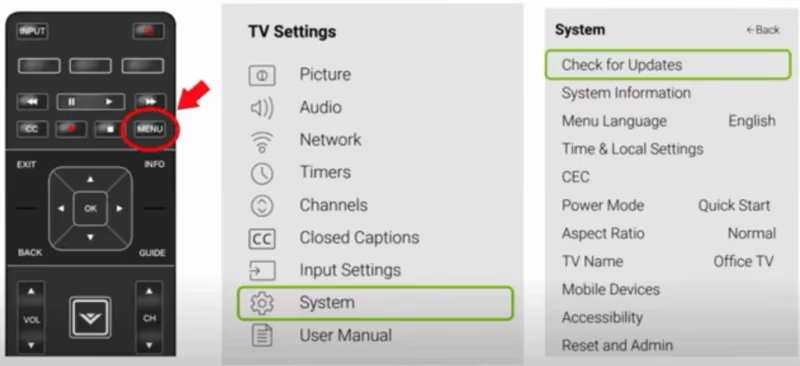
Software bugs can knock out the display driver on VIZIO OS. On newer Vizio TVs (post-Walmart acquisition, December 2024), the path is:
- Settings > System > Check for Updates
Install any available update, then run a power cycle after it completes. If you can’t navigate the menu because the screen is dark, the firmware update path won’t help. Skip to Step 6.
#Step 6: Factory Reset with PIN 0000
A factory reset wipes corrupt settings that can disable the display output. This won’t fix hardware failures, but it takes 2 minutes and rules out a software cause.
A factory reset erases all your settings, saved Wi-Fi passwords, and app logins. Make sure you want to do this before proceeding.
Without a working screen, use the physical buttons:
- Press and hold the Volume Down and Input buttons on the TV simultaneously for 10 seconds
- When prompted (you may hear a tone), enter PIN 0000
- The TV restarts and goes through initial setup
If you can partially see the screen with the flashlight, navigate to Menu > System > Reset & Admin > Reset TV to Factory Defaults.
#Step 7: Call Vizio Support
If none of the above steps work, the failure is hardware. Vizio support at vizio.com/en/support can verify your warranty status and schedule service. For out-of-warranty TVs under 5 years old, repair usually makes more sense than replacement.
#What Hardware Causes Sound but No Picture?
If the software steps above didn’t restore the picture, one of these four components has failed.
#Failed LED Backlights
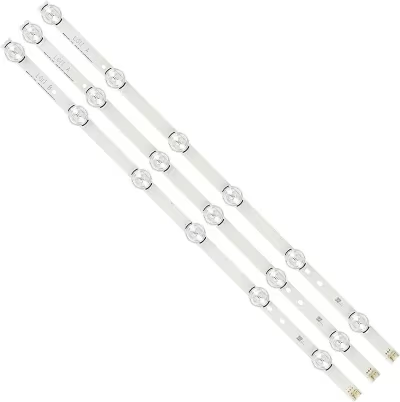
LED strips run along the back of the panel and project light through the display. When they fail, the panel still generates an image but you can’t see it because there’s no illumination. The flashlight test from Step 4 confirms this in seconds.
Backlight repair costs $150–$300 at most shops. On TVs under 4 years old, it’s worth fixing. You can find Vizio LED backlight strips on Amazon, but replacing them yourself means fully disassembling the panel, which risks cracking it. I’d get a quote from a local shop first.
#Failed Power Supply Board
The power supply board distributes voltage to every component, including the backlight driver circuit. Swollen or leaking capacitors on this board are the most common single point of failure on Vizio TVs 3–6 years old.
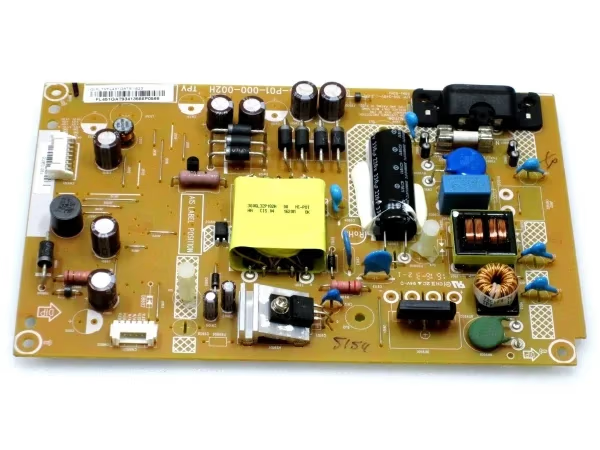
A dead power supply cuts voltage to the backlight while leaving the main board (and audio) running. You’ll see no image even with the flashlight test. Replacement boards on Amazon run $25–$60 for most Vizio models. The swap itself is straightforward once the back panel is off, but it does require basic electronics safety: capacitors hold charge, so discharge them before touching.
#T-Con Board Failure
The timing control board (T-Con) processes the video signal from the main board and drives the individual rows and columns of the LCD panel. When it fails, you get a working backlight but no visible image, or heavily distorted horizontal lines.
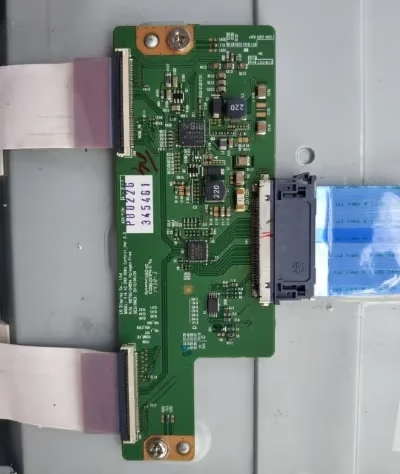
If the flashlight test shows your backlight works (you can see the screen glow) but still no image at all, suspect the T-Con first. T-Con boards for Vizio TVs are model-specific, so you’ll need the exact part number from your current board.
#Loose LVDS/eDP Cable
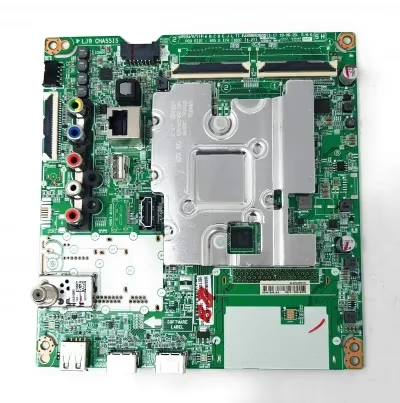
The LVDS cable (or eDP on newer panels) connects the T-Con board to the main board. It’s a flat ribbon connector that can work loose over time, especially if the TV was ever moved or bumped. A partial disconnect causes flickering or a completely dark display with audio intact.
Reseating this connector is a 10-minute job with a Phillips screwdriver, but it requires opening the back of the TV. If you’re comfortable with that, check this before buying replacement boards.
#How Do You Prevent This from Happening Again?
Most backlight and power supply failures are accelerated by heat and power spikes. A few straightforward habits help:
- Plug your TV into a quality surge protector; voltage spikes during thunderstorms are a leading cause of power supply board failures
- Keep at least 4 inches of clearance behind the TV for ventilation; blocked airflow shortens LED life significantly
- Replace aging HDMI cables every 3–4 years, especially if you’re running 4K HDR signals
- Check for Vizio TV no sound issues at the same time; audio and video failures often share a root cause in the power supply
#Bottom Line
- Hold Mute for 5 seconds first. Mute Screen mode causes more “no picture” calls than any hardware failure
- Run the flashlight test before spending money on parts. It tells you in seconds whether the panel or the backlights have failed
- Power supply board failures on Vizio TVs 3–6 years old are the most common hardware cause, and boards are inexpensive to replace
- Contact Vizio support for warranty claims; factor in repair cost vs. TV age before paying out of pocket
#Frequently Asked Questions
#Is Mute Screen the same as turning off the display?
Mute Screen is a dedicated audio-only mode built into Vizio’s remote. Holding Mute for 5 seconds activates it, turning the panel completely dark while audio continues. It’s different from sleep mode or the auto-off timer. Many users accidentally trigger it and assume the screen has died.
#What does it mean if my Vizio TV has sound but the screen is completely black, not just dim?
A completely black screen with no faint image under flashlight testing usually means the T-Con board or main board has failed, not the backlights. If you can see a faint image with the flashlight, it’s a backlight failure. The distinction matters because the repair is different and costs are different.
#How do I do the flashlight test correctly?
Turn off all room lights so the room is dark. Hold a bright flashlight about 2 inches from the screen and angle it slightly. Look for any faint image behind the glass. A phone flashlight works if it’s bright enough, but a dedicated torch gives clearer results. A faint image confirms LED backlight failure.
#Can a bad HDMI cable cause sound but no picture on a Vizio TV?
Yes, and it’s more common than most people expect. HDMI carries both audio and video as separate signal sets. A degraded cable can drop the video signal entirely while still passing audio, especially at higher resolutions. Always swap the cable and try a different HDMI port before diagnosing internal hardware.
#How much does Vizio TV backlight repair cost?
Backlight strip replacement typically runs $150–$300 at a local repair shop, depending on screen size and labor rates. The parts themselves (LED strips) cost $20–$50 on Amazon. DIY is possible but risky: the panel can crack during disassembly, which turns a $50 repair into a write-off.
#Does Vizio’s warranty cover LED backlight failure?
Vizio’s standard warranty covers manufacturing defects for 1 year. LED backlight failure within that window is generally covered. After the first year, it depends on whether you purchased an extended warranty. Contact Vizio support at vizio.com/en/support to check your specific TV’s coverage status.
#When is it worth repairing a Vizio TV with no picture vs. buying a new one?
If the TV is under 5 years old and repair costs less than 50% of a comparable replacement, repair usually makes sense. For TVs older than 7 years, replacement is often the smarter financial decision since other components are aging too. Get a repair estimate before committing either way. A Vizio TV lagging or green screen issue appearing soon after would suggest broader panel degradation.
#Can I still use my Vizio TV for audio only while I wait for repair?
Yes. Connect external speakers via the optical audio output or HDMI ARC port and use the TV as a source with the screen off. You can also use how to control a Vizio TV without the remote to navigate settings if the remote is lost during the process.