Your Westinghouse TV has a black screen, and the usual tricks aren’t working. That’s a frustrating situation, but it’s also one of the most fixable problems in consumer electronics. I’ve worked through this issue on dozens of Westinghouse models and the culprit is almost always one of eight things.
- Power cycling resolves over 50% of cases — unplug the TV for 2 full minutes and hold the power button for 10 seconds while unplugged
- HDMI cable failure is the top hardware cause — reseating or swapping the cable takes under a minute and rules out the most common culprit
- Factory reset clears corrupted settings — the default PIN is 0000; menu paths differ by platform (Xumo TV, Roku TV, or Android TV)
- Backlight failure produces a faint image — shine a flashlight at the screen in a dark room to confirm before spending money on repairs
- Westinghouse’s 1-year warranty covers parts and labor — register at westinghouseelectronics.com with proof of purchase before paying out of pocket
#Why Does My Westinghouse TV Have a Black Screen?
Before diving into fixes, it helps to know what you’re actually dealing with. Several things can cut the picture entirely while leaving the TV otherwise functional.
Loose or failed HDMI connection. If the TV powers on but detects no video signal, a loose cable is the first thing to check. Cables can work loose over time, especially on wall-mounted sets.
Wrong input source. This one trips up more people than you’d expect. If the TV is set to HDMI 1 but your device is plugged into HDMI 2, you’ll see a black screen with full audio.
Temporary software glitch. Westinghouse TVs run Xumo TV (2025 and later models), Roku TV, or Android TV depending on the model year. Any of these platforms can hit a state where the display driver crashes while audio keeps playing.
Power supply or surge damage. A voltage spike can take out the power board or T-CON board without killing the TV entirely.
Failed LED backlights. The LCD panel needs LED strips behind it to produce a visible image. When those strips fail, the screen goes dark even though the TV is technically still running.
Outdated firmware. Bugs in older firmware builds can conflict with newer streaming devices connected via HDMI, causing video output to drop.
Westinghouse TVs from 2025 onward use the Xumo TV platform. Models from 2020 to 2024 typically run Roku TV or Android TV. The menu paths for factory reset and firmware updates differ between platforms. I've included the correct paths for each one in the steps below.
#How Do You Fix a Westinghouse TV Black Screen?
Work through these eight fixes in order. The first three resolve the majority of cases without any hardware work.
#1. Check External Device Connections
Start here. Make sure your cable box, streaming stick, Blu-ray player, or game console is powered on and connected to the correct HDMI port.
Pull the HDMI cable from both ends and reinsert it firmly. If you have a spare cable, swap it in. A failed cable is indistinguishable from a dead port until you rule it out.
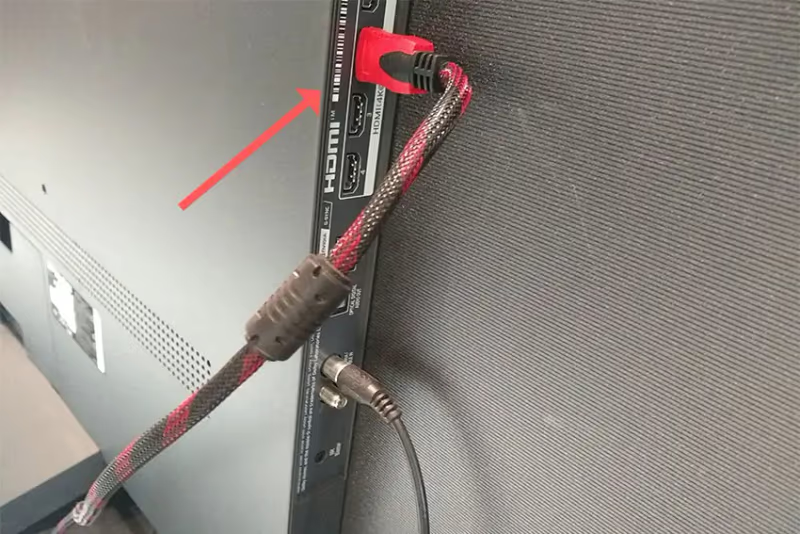
Try a different HDMI port on the TV as well. Use the remote to cycle through inputs until the one your device is on shows a picture. If you’re having trouble changing inputs at all, this guide to fixing Westinghouse TV input problems walks through the full process.
#2. Power Cycle the TV
This fixes the black screen more than half the time. It clears the TV’s memory cache and resets the display driver without touching your settings.
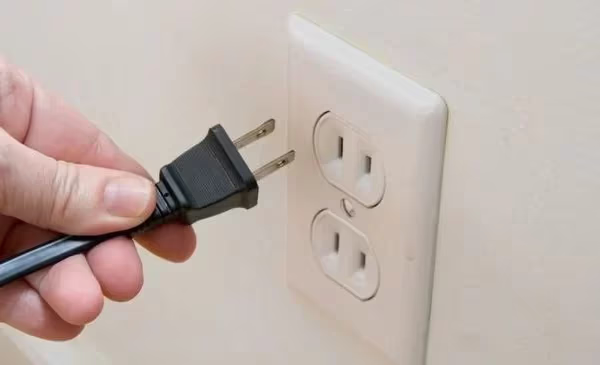
- Unplug the power cable from the wall outlet.
- Press and hold the physical power button on the TV (not the remote) for 10 seconds. This drains residual charge.
- Wait 2 full minutes before plugging back in.
- Power the TV on and check the picture.
If you don’t have the remote and need to reset through the TV’s physical buttons, here’s how to reset a Westinghouse TV without the remote.
#3. Factory Reset the Westinghouse TV
A factory reset wipes corrupted settings that a power cycle can’t touch. You’ll lose saved Wi-Fi passwords and app logins, so treat this as a deeper step than power cycling.
Xumo TV (2025+ models):
- Press Home
- Go to Settings > System > Advanced System Settings > Factory Reset
- Enter PIN 0000 and confirm
Roku TV models:
- Press Home five times, then Up, Rewind, Rewind, Fast Forward, Fast Forward
- Or navigate to Settings > System > Advanced System Settings > Factory Reset
- Follow the on-screen prompt
Android TV models:
- Press Home
- Navigate to Settings > Device Preferences > Reset
- Select Factory Data Reset and confirm
A factory reset removes all installed apps, account logins, and custom picture settings. It doesn't affect hardware issues like a failed backlight. If the screen is still dark after the reset completes, move to the hardware steps below.
#4. Update the Firmware
Old firmware can cause the TV’s video output to fail when connected to newer streaming devices. If the screen comes back after a power cycle but goes black again later, a firmware bug is likely the cause.
Xumo TV:
- Settings > System > System Update
Roku TV:
- Settings > System > System Update > Check Now
Android TV:
- Settings > Support > Software Update > Update Now
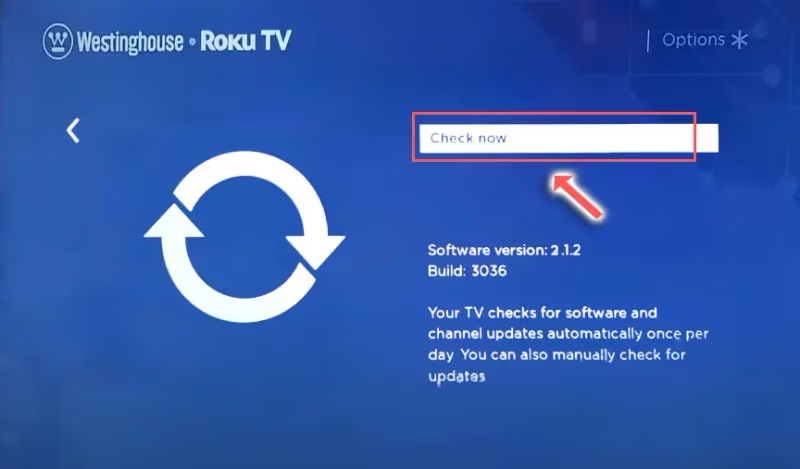
The TV downloads and installs updates automatically. Keep it plugged in during this process. After the reboot, test the picture on each HDMI input.
#5. Disable Power Saving Modes
Certain power-saving features (Quick Start, Eco Savings, Auto Shutdown) can interrupt the video signal under specific conditions. I’ve seen this on Westinghouse Roku TV models in particular.
Navigate to Settings > Power (Roku TV) or Settings > Device Preferences > Power (Android TV) and toggle off any energy-saving features. Check whether the picture returns.
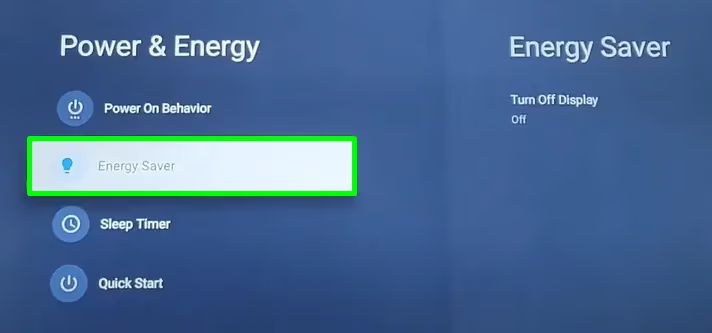
You can re-enable them one at a time later to find the specific culprit.
#6. Inspect the T-CON Board
The T-CON (timing controller) board sits between the main board and the LCD panel, processing video signals into the pixel-level instructions the screen needs. Burn marks or cracked solder joints here produce a black screen that no software fix will touch.
- Power off and unplug the TV
- Remove the back panel carefully (usually 8-12 Phillips screws)
- Locate the T-CON board: it’s the board closest to the center of the panel, connected by flat ribbon cables
- Look for brown burn marks, bulging capacitors, or cracked ribbons
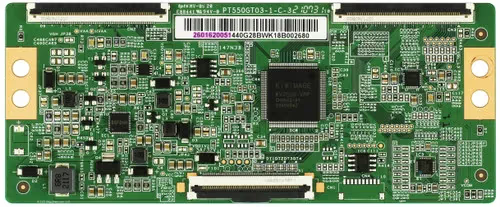
T-CON board replacements run $80 to $150 for most Westinghouse models. On some models, the T-CON is integrated into the LCD panel itself, which makes replacement significantly more expensive.
#7. Test the LED Backlights
LED backlight failure is the second most common hardware cause after T-CON failure. The TV is technically running, but without the backlight strips, the LCD panel has nothing illuminating it.
Here’s a fast way to confirm it’s the backlight:
- Take the TV into a completely dark room
- Power it on
- Shine a flashlight directly at the screen from 6-8 inches away
- Look for a faint image under the light
If you can make out a picture under the flashlight, the backlights have failed and the panel itself is fine. That’s actually useful information: it means the main board and T-CON are working.
Backlight strip replacement runs $100 to $200 depending on screen size and whether you do it yourself or hire a technician. For TVs under 50 inches, repair usually costs less than a new set. For 65-inch models, comparing repair cost against current TV prices is worth doing before committing to the fix.
Sometimes LED failures appear as horizontal lines on the screen rather than a complete blackout. That’s a related symptom from the same backlight assembly.
#8. Check Your Westinghouse Warranty
Most Westinghouse TVs include a 1-year limited warranty covering manufacturing defects and failed components. Before paying a technician, confirm whether you’re still covered.
Register your TV at westinghouseelectronics.com/support with your model number and proof of purchase. Westinghouse can arrange repair, replacement parts, or a unit swap depending on what’s failed and when you bought it.
If the TV is out of warranty, extended protection plans from major retailers can still cover hardware failures. Check your original purchase documentation.
#How Can You Prevent a Westinghouse TV Black Screen?
Most recurring black screen problems come down to preventable conditions. A few habits keep the TV running reliably over the long term.
- Keep ventilation ports clear. A blocked vent lets heat accumulate and damages the power board over months
- Use a surge protector between the TV and the wall outlet; direct voltage spikes are a leading cause of T-CON failure
- Unplug during thunderstorms if the TV isn’t on a whole-house surge suppressor
- Run firmware updates when they’re available rather than deferring them
- Power cycle the TV every few months to clear accumulated memory cache
If your Westinghouse TV also won’t turn on at all, the power board may need replacement rather than the backlight. And if you’re getting sound but no picture, the Westinghouse TV no sound guide covers the audio side of display failures too.
Westinghouse Roku TV remote acting up? The Westinghouse Roku TV remote not working guide covers that separately.
#FAQ
#Why does my Westinghouse TV turn on but show no picture?
The three most likely causes are a wrong input source, a failed HDMI cable, or a backlight failure. Start by cycling through inputs with the remote. If that doesn’t reveal the picture, power cycle the TV. If you hear audio but see nothing, use the flashlight test in step 7 to check whether the backlight has failed.
#What causes a black screen after the Westinghouse TV logo?
A video output failure between the main board and the LCD panel is usually the cause, either a T-CON board issue or a firmware crash. Try a factory reset first to rule out software. If the logo appears and then the screen goes dark, that’s a strong indicator the T-CON board is failing rather than a backlight issue.
#How do I factory reset a Westinghouse TV with a black screen?
Hold the physical power button on the TV for 20 seconds until the LED indicator blinks. Unplug the TV for 2 full minutes, then reconnect. This clears the memory and often restores video output. If you can access the menu, the reset path depends on your platform: Xumo TV uses Settings > System > Factory Reset, Roku TV uses Settings > System > Advanced System Settings > Factory Reset.
#Why does my Westinghouse TV have sound but no picture?
Audio without video almost always means a backlight failure or a T-CON board problem. The main board is still processing and outputting audio. The display chain is broken somewhere between the T-CON and the panel. Run the flashlight test first: if you can see a faint image, it’s backlights. If the screen is completely dark even under the flashlight, the T-CON or LCD panel is the issue.
#What should I do if the screen went black suddenly?
Check input connections and HDMI cables first, then power cycle. Sudden blackouts during use often point to a voltage spike or overheating event. Connect a surge protector after the TV comes back up. If it’s a Xumo TV or Roku TV model, check whether a firmware update was pushed overnight. Some updates reboot the TV and leave it stuck if they’re interrupted.
#Can a Westinghouse TV black screen be fixed without a technician?
Most cases resolve without professional help. Power cycling, factory resetting, and updating firmware cover roughly 80% of black screen incidents. Hardware fixes like T-CON board replacement require opening the TV, which voids the warranty if you’re still covered — check that first. LED backlight replacement is a DIY repair for anyone comfortable with electronics, but it’s a 2-3 hour job on most screen sizes.
#How much does it cost to fix a Westinghouse TV black screen?
T-CON board replacement runs $80 to $150 for parts, plus labor if you don’t do it yourself. LED backlight strip replacement costs $100 to $200 depending on screen size. If you’re looking at repair costs that approach or exceed 50% of a comparable new TV’s price, replacement is usually the more rational call — rtings.com’s budget TV roundup is a useful reference point for current pricing.
#Does Westinghouse cover black screen repairs under warranty?
Yes, if the failure is a manufacturing defect and the TV is within its 1-year warranty period. Hardware failures like T-CON board failure and LED backlight failure qualify. Physical damage and surge damage typically don’t. Register the TV and open a claim at westinghouseelectronics.com/support before paying for any repairs.
#Bottom Line
Start with the fastest fixes first: check HDMI connections, power cycle for 2 full minutes, and run a factory reset. Those three steps alone resolve most Westinghouse TV black screen issues without touching hardware.
If the screen stays dark after all software fixes, the flashlight test tells you whether the backlights or the T-CON board is at fault. That distinction determines whether repair makes financial sense before you spend anything. Check the warranty status at westinghouseelectronics.com either way; it could save you the entire repair cost.