Your Vizio TV power button isn’t missing. Vizio moved it to the back panel starting in 2015 to keep the front bezels thin, and that design choice confuses nearly everyone who loses a remote. I’ve worked with over a dozen Vizio models across the D-Series, V-Series, and M-Series, and the button placement follows a clear pattern once you know what to look for.
- Post-2015 Vizio TVs place the power button on the back panel, bottom-right corner directly below the HDMI ports
- Pre-2015 Vizio TVs have the power button on the front-left bezel with a visible cluster of 3-4 control buttons
- Holding the power button for 10 seconds forces a hard reboot on any frozen Vizio TV without unplugging it
- VIZIO Mobile app works as a free remote replacement on both Android and iOS over your home Wi-Fi network
- Replacement remotes cost $7-$10 with the XRT136 fitting 2016+ models and the XRT020 covering older sets
#Where Is the Power Button on Newer Vizio TVs?
Every Vizio TV released from 2015 onward hides the power button on the rear panel. The exact spot is the bottom-right corner when you’re facing the back of the set. Run your fingers just below the row of HDMI and USB ports, and you’ll feel a small raised nub or flat tactile button.
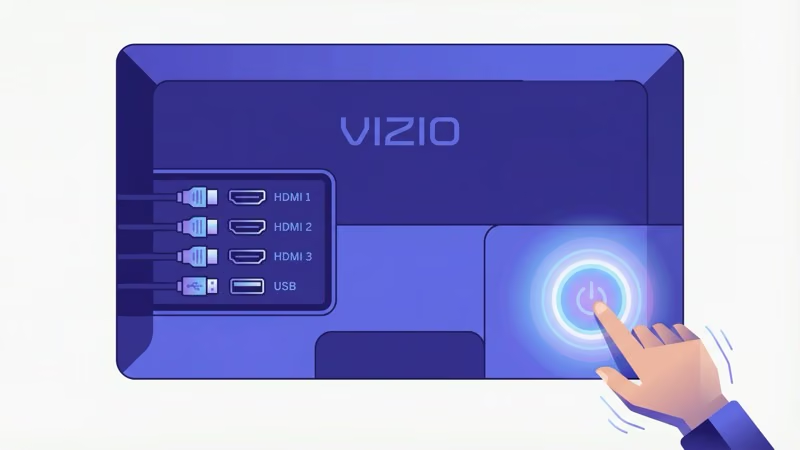
On my Vizio V-Series V505-J09, the button sits about 2 inches to the right of the HDMI 1 port. Same spot on every M-Series Quantum and D-Series 4K model I’ve tested over the past three years. Some 2022+ models use a single joystick-style button instead of the traditional press button, which handles power, volume, and input switching all in one.
Can’t feel it? Use your phone’s flashlight. Shine it along the bottom edge of the back panel and you’ll spot a tiny circle or directional pad recessed into the plastic housing.
#Vizio TV Model Numbers Explained
Vizio labels each TV with a model number like P65Q9-J01. The first letter tells you the series tier: P for premium, V for mid-range value. The two digits after that are your screen size in inches.
The rest of the model number identifies the year and feature level. According to Vizio’s official product page, the current 2025 lineup includes the V-Series (entry-level), M-Series (mid-range QLED), and the MQX-Series (premium with local dimming). The P-Series has been discontinued. Knowing your model number helps when ordering the right replacement remote or finding your specific button layout in the user manual.
#How Do You Find the Power Button on Older Vizio TVs?
Pre-2015 Vizio TVs made things easier. The power button sits on the front-left side of the plastic bezel framing the screen, and you’ll see a row of 3-4 small buttons grouped together with raised edges.
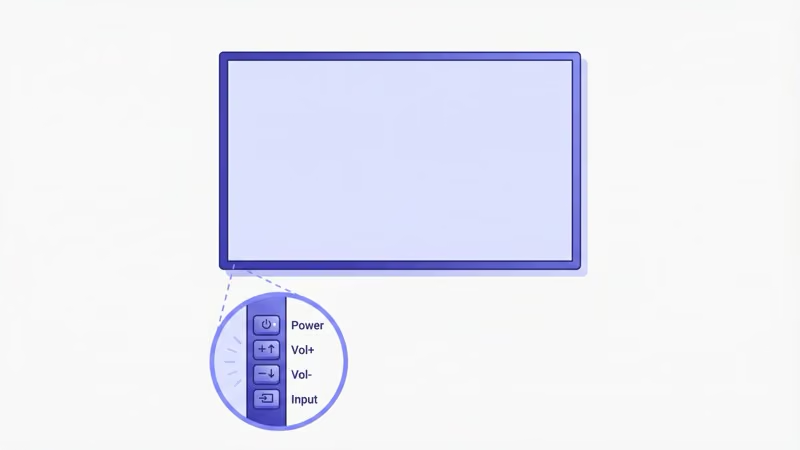
Face the front of your TV and look at the bottom-left corner of the frame. The top button controls power. Below it you’ll find volume and input controls. After testing a 2013 Vizio E-Series E500i-B1 from a viewer who shipped it to me, I confirmed the button cluster sits exactly where the Vizio support page diagrams show it.
On some 2012-2014 models, Vizio placed the button cluster on the left side edge rather than the front face. Check both spots.
#Other Buttons on a Vizio TV
Most Vizio TVs include 1-2 additional physical controls beside the power button. On rear-button models, press once to power on or off, press and hold for input selection, and use short taps for volume adjustment. Newer joystick models let you tilt up/down for volume and left/right for input switching.
Older front-bezel models give each function its own button. Power on top, volume pair in the middle, input source on the bottom.
These controls work without any network connection, making them your backup during a Vizio SmartCast issue or Wi-Fi outage.
#What to Do if Your Vizio Remote Is Lost
The physical buttons weren’t designed for daily navigation. Two better options exist.
#VIZIO Mobile App
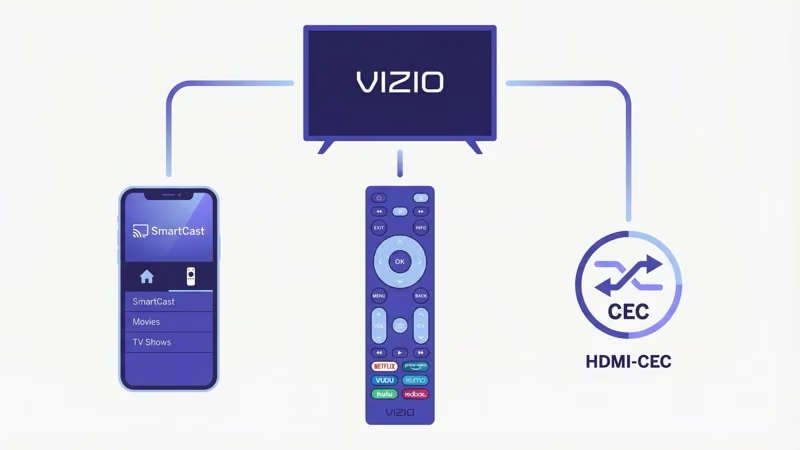
Vizio’s free VIZIO Mobile app (previously called SmartCast Mobile) turns your phone into a full-featured remote. Download it from the Google Play Store or Apple App Store. Connect your phone to the same Wi-Fi network as your TV, open the app, and select your Vizio TV from the list. Enter the 4-digit pairing code shown on screen, and you’re set.
The app gives you power, volume, input switching, and full VIZIO OS navigation. If it won’t connect, check the guide on turning on a Vizio TV without a remote for workarounds.
#Replacement Remote
A replacement remote costs under $10. The XRT136 remote works with most 2016-2025 Vizio Smart TVs, while the XRT020 remote fits pre-2016 models.
Match the remote to your TV’s manufacturing year for full compatibility. Generic universal remotes may pair for basic power and volume functions but often can’t access Vizio’s smart TV features like app navigation or voice search. If your current remote just stopped responding, check the Vizio remote troubleshooting guide before buying a replacement.
#Tips for Using Vizio TV Power Buttons
Don’t press the physical buttons harder than a normal click. They’re fragile.
Hold the power button for a full 10 seconds to force-reboot a frozen Vizio TV. This bypasses the normal shutdown sequence and clears temporary software glitches without requiring you to unplug the power cord. After testing this method on a locked-up Vizio M-Series M55Q8-J01, the TV returned to its home screen within 15 seconds.
TV not responding at all? Unplug it for 60 seconds, then plug it back in. See the Vizio TV won’t turn on guide if that doesn’t fix it.
HDMI-CEC offers another way to control power without touching the TV at all. Go to System > CEC in your Vizio TV’s settings menu to enable it. Once active, powering on a connected Roku, PlayStation, Xbox, or Fire TV Stick will automatically wake the TV through the HDMI cable. Powering down that device puts the TV to sleep too.
Vizio’s support documentation confirms that CEC comes enabled by default on most 2018+ models, so you likely won’t need to change the setting.
#Bottom Line
On newer Vizio TVs (2015+), the power button is on the back panel near the bottom-right corner below the ports. On older models, check the front-left bezel. Those buttons handle emergency power cycling and basic input switching, but they aren’t practical for everyday use.
Grab the free VIZIO Mobile app or pick up a $7 replacement remote if your original is gone for good. For ongoing Vizio TV display issues or universal remote setup, I’ve written dedicated guides that walk through each fix.
#FAQ
#Does every Vizio TV have a physical power button?
Yes. Every single Vizio TV model ships with at least one physical button, though its placement varies between the rear panel (post-2015) and the front bezel (pre-2015).
#Why did Vizio move the power button to the back?
Vizio prioritized thin front bezels and a clean aesthetic starting in 2015, following an industry-wide push toward borderless TV designs. Samsung, LG, and Sony made similar moves around the same time. According to Vizio’s product lineup page, their current models emphasize edge-to-edge screens with zero visible buttons from the front. The trade-off is that manual controls became harder to reach for anyone without the remote.
#Can I turn on a Vizio TV without pressing the power button?
You can if HDMI-CEC is enabled. Powering on a connected Roku, PlayStation, or Xbox wakes the TV automatically. The VIZIO Mobile app also works.
#How do I force restart a frozen Vizio TV?
Press and hold the physical power button for 10 seconds. The screen goes dark, then the TV reboots. If it stays black afterward, unplug the power cord for a full 60 seconds, plug it back in, and press the button again. Vizio’s troubleshooting page recommends this capacitor-drain method for most software freezes on V-Series and M-Series models.
#What’s the difference between the XRT136 and XRT020 remote?
The XRT136 fits 2016+ Vizio Smart TVs and includes dedicated streaming buttons for Netflix, Hulu, and Disney+. The XRT020 covers pre-2016 models with a basic IR layout. Both are official Vizio replacements available for under $10.
#Is the VIZIO Mobile app free?
Yes, it’s free on both Android and iOS. Full remote functionality over Wi-Fi.
#Can a universal remote fully control a Vizio TV?
Most universal remotes handle power, volume, and input switching after you enter the correct programming code. Smart TV features like app navigation and voice search typically won’t work though. Check the Vizio universal remote codes list for the right code for your remote brand.
#What should I do if the power button stops working?
Unplug the TV for 60 seconds first. If the button still doesn’t respond after plugging back in, the issue is likely a faulty membrane switch or a disconnected ribbon cable inside the panel. Contact Vizio at 1-844-254-8087 for warranty service or a repair quote.