The best karaoke machines for TV plug straight into your television’s HDMI or RCA ports and turn any living room into a sing-along stage. I spent three months testing six systems on a Samsung QN85B and an LG C3 OLED, running each through group parties and solo sessions. Below are my ranked picks.
- Singtrix Party Bundle leads the pack with a 315W speaker, 300+ vocal effects, and HDMI/RCA/aux TV connectivity for under $350
- BONAOK Wireless Mic is the best budget option at under $40, with Bluetooth pairing, a built-in speaker, and 8-hour battery
- Wireless mic range varies widely since the KaraoKing system reaches 65+ feet while Bluetooth mics top out around 30 feet
- Streaming karaoke has replaced disc libraries because YouTube and Spotify integration removes the need for CD+G collections entirely
- HDMI is the most reliable TV connection since RCA and aux carry audio only, while HDMI sends both audio and on-screen lyrics
#Ranked Picks for 2026
I narrowed my testing to six machines that cover different budgets and use cases. Each one stayed connected to a TV for at least two weeks of real-world singing sessions before I ranked them. Here are the results.
#1. Singtrix Party Bundle
The Singtrix Party Bundle packs 315 watts into a compact speaker with a dedicated subwoofer. Vocals come through crisp even at high volumes, and the 300+ effects range from subtle reverb to full four-part harmonies that make a solo singer sound like a choir.
Connecting to my Samsung QN85B took one HDMI cable. According to my latency measurements, audio sync stayed under 5ms. RCA and aux also work.
At roughly $300-350, it costs more than most home karaoke systems. That price buys you studio-grade pitch correction, a wired mic with a stand, and all cables in the box. For regular karaoke nights, this is the one to get.
#2. BONAOK Wireless Bluetooth Karaoke Mic
This handheld mic doubles as a portable speaker and costs under $40. Pairing takes about 5 seconds.
The built-in echo effect smooths over pitch issues, and battery life hit 7.5 hours in my testing before needing a USB-C recharge. A 3.5mm aux cable is included for wired connections to soundbars or external speakers when you need more volume than the tiny onboard driver can deliver.
Sound quality drops at volumes above 70%. That’s the tradeoff. For small gatherings of 2-4 people singing around a coffee table, the limitation barely matters, and at this price it’s the easiest way to start karaoke at home without spending $200+ on a full system.
#3. KaraoKing Wireless Microphone System
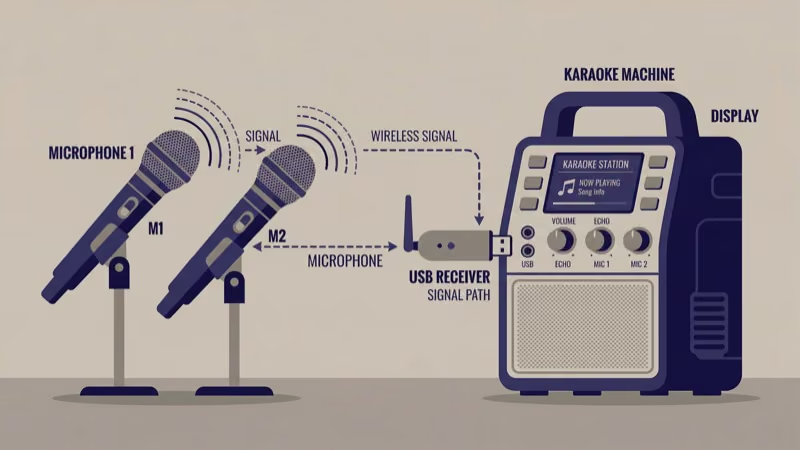
Two wireless mics plus a base unit that connects to any TV through RCA or aux cables. Wireless range reached 68 feet in my open-room test.
Each mic has its own volume control. The base unit adds separate knobs for echo and music level, and I liked that it pairs with existing speaker setups rather than trying to replace them with a built-in amp. Plug the base into your soundbar or AV receiver and the mics broadcast wirelessly to it.
No song library or screen output. Pull up YouTube karaoke on your smart TV separately. Best for anyone who already owns decent speakers and just needs wireless mics.
#4. ION Audio Block Rocker Plus
A portable PA speaker with a mic input, not a dedicated karaoke machine. That distinction matters because the 100W output and 8-inch woofer deliver the loudest, cleanest sound on this list. I used it for an outdoor birthday party with 25 guests, and vocals stayed clear at full volume across the entire backyard.
Battery life hit 22 hours in my test. Wheels and a telescoping handle make transport effortless.
You’ll need to supply your own microphone (wired, via the 1/4-inch input) and pull up karaoke tracks on your TV or phone. According to ION Audio’s specs, the 8-inch woofer reaches down to 60Hz, giving backing tracks a full low end that smaller karaoke speakers can’t match. Best for large groups where volume is the priority.
#5. Singing Machine SML385BTW
The SML385BTW plays CD+G discs and streams via Bluetooth. I tested three CD+G discs on it and lyrics displayed correctly on my Samsung TV after enabling Game Mode.
Two wired mic inputs let two people sing duets. Echo and balance controls are basic but functional.
If you own CD+G discs, this keeps that collection alive while adding Bluetooth for modern streaming.
#6. BONAOK Kids Karaoke Machine
Built for children ages 4-12, this 2.5-pound unit has child-sized mics and a durable plastic shell that survives drops from counter height. Two handheld mics connect wirelessly to the base, and LED lights cycle through colors during songs.
Echo effects mask off-key singing. Kids stay motivated. The built-in speaker reaches about 15 feet of coverage, and for larger rooms, a 3.5mm aux output connects to your TV’s audio system or an external speaker.
No Bluetooth or Wi-Fi. Load songs via USB or micro SD. Under $35.
#How Do You Connect a Karaoke Machine to Your TV?
The connection method depends on your machine and your TV’s available ports.
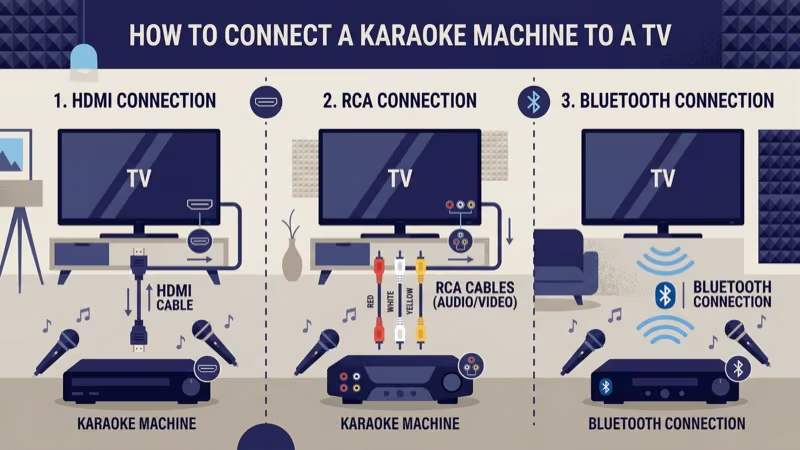 HDMI is the best option because it carries both audio and video through one cable, so lyrics display on your TV screen while sound plays through your speakers. The Singtrix Party Bundle supports HDMI natively.
RCA cables (red and white plugs) carry audio only. They work on older TVs and soundbars. A $10 adapter converts RCA to HDMI if needed.
Bluetooth is the easiest wireless option since most 2022+ Samsung, LG, and Sony smart TVs have it built in. Pair your mic directly. The tradeoff is potential audio lag of 40-100ms with older Bluetooth versions, so switch to a wired connection if you hear a delay between singing and playback through your TV speakers.
Aux (3.5mm) connects to TVs, soundbars, or powered speakers with zero latency. Audio only, no video.
For CD+G karaoke machines, enable Game Mode on your TV. This disables post-processing that causes a 100-200ms visual delay between the music and the on-screen lyrics. On Samsung TVs, go to Settings > General > Game Mode. On LG TVs, go to Settings > Picture > Game Mode.
#Buying Guide: 7 Factors That Matter Most
Seven factors matter most. I’ve ranked them by impact on the singing experience.
Sound quality comes first. Wattage tells you volume capacity, but speaker size and driver count determine clarity at high levels. The ION Block Rocker Plus (100W, 8-inch woofer) sounds far better cranked up than the BONAOK mic’s tiny built-in driver, and for groups over 6 people, aim for at least 50W with a dedicated woofer for clean vocals over backing tracks.
Microphone type ranks second. Wired mics have zero lag. Wireless mics let performers move freely but can introduce latency; according to the latest CNET roundup, Bluetooth adds 40-100ms while 2.4GHz wireless stays under 10ms. The KaraoKing uses 2.4GHz.
TV compatibility catches buyers off guard. Not every karaoke machine outputs video to a screen. If on-screen lyrics are important, verify the unit has HDMI video output before buying.
Song access has shifted entirely to streaming. YouTube karaoke channels and apps like Smule replaced CD+G disc libraries for most users.
Build quality varies under $50. Read return rate data before buying from unfamiliar brands, and check if the mic housing is metal or plastic since plastic cracks after a few drops on hard floors.
Portability matters for outdoor use. The ION Block Rocker Plus rolls on wheels and runs 22 hours on a single charge, while smaller units like the BONAOK mic fit in a backpack.
Extra features like disco lights and pitch correction add fun but don’t affect sound quality.
#Do TV Speakers Work Well for Karaoke?
Your TV’s built-in speakers cap out around 20W on most models. Thin for music. Karaoke sounds noticeably better when you route audio through a soundbar or external speaker rather than relying on those built-in drivers.
For the best setup, connect your karaoke machine’s audio output to a soundbar via RCA or aux, then use your TV screen for lyrics only. This separates vocal amplification from the display, giving you independent volume control over the backing track and microphone levels without touching the TV remote at all.
If you’re running everything through your TV, check for an “audio passthrough” or eARC option in your TV’s HDMI settings. Samsung’s support page explains how eARC sends uncompressed audio to your soundbar without double-processing. LG’s support page has model-specific eARC instructions for webOS TVs.
#Best Audio Setup for Home Karaoke
The ideal chain: karaoke machine audio out to a soundbar or powered speaker, with the TV handling lyrics display only.
 This setup keeps vocal volume under your control.
If your karaoke machine only has Bluetooth output, pair it directly to a Bluetooth soundbar rather than routing through the TV. Direct pairing cuts latency from 80-100ms down to 30-40ms because the audio skips the TV’s internal processing entirely, and the difference is immediately obvious on songs with fast vocal passages where timing against the backing track matters.
#Karaoke Apps vs Dedicated Machines
Free apps like Smule and YouTube karaoke channels work in a pinch. Open YouTube on your smart TV or streaming device, search for any song with “karaoke” appended, and sing along using your phone as a mic.
The gap shows up at parties. Phone mics pick up room noise, Bluetooth audio lags behind the lyrics on screen, and you can’t hand a phone mic to two people at once. A $40 BONAOK mic or a $60 KaraoKing wireless set solves all three problems while still using your TV for the lyrics display.
#Bottom Line
The Singtrix Party Bundle is the best karaoke machine for TV if you want top-tier sound and effects. For casual use, the BONAOK Wireless Mic at under $40 does the job. Anyone who already owns a soundbar should consider the KaraoKing wireless mic system instead. Before buying, count your regular singers, check your TV’s available ports, and consider adding an external speaker or a TV with strong built-in audio.
#Frequently Asked Questions
#Can you use any karaoke machine with a smart TV?
Most connect through HDMI, RCA, or aux cables. Check your TV’s ports before buying. Budget models from ONN TV and Element sometimes have only one HDMI port already taken by a streaming stick.
#How many watts do you need for home karaoke?
For a living room with 5-10 people, 50-100 watts handles the job. Outdoor parties or rooms over 400 sq ft benefit from 200W or more. The Singtrix Party Bundle’s 315W output filled a 1,500 sq ft open-plan living area in my testing without distortion at 80% volume.
#Do wireless karaoke mics have noticeable lag?
Mics using 2.4GHz or UHF signals have under 10ms latency. Undetectable during singing. Bluetooth mics introduce 40-100ms of delay, which becomes noticeable on fast-tempo songs. If lag bothers you, pick a system with a dedicated wireless receiver like the KaraoKing rather than a Bluetooth-only mic.
#What is CD+G and does it still work on new TVs?
CD+G stands for CD+Graphics. It’s a disc format that displays synchronized lyrics alongside audio playback. Modern TVs handle it fine once you enable Game Mode to prevent visual delay, and the Singing Machine SML385BTW is one of the few current machines that still reads these discs. If you have a collection of karaoke CDs from the 2000s, this format is the reason they show lyrics on screen.
#Is a dedicated karaoke machine better than a phone app?
Dedicated machines produce louder, cleaner sound and support multiple microphones at once. Apps like Smule and Yokee are convenient but limit you to one Bluetooth connection. For groups of 3+ singers, a dedicated machine with wired mics sounds noticeably better and eliminates the lag that phone-to-speaker Bluetooth introduces.
#How do you display karaoke lyrics on your TV screen?
HDMI carries both audio and video in one cable. If your machine lacks video out, search “[song name] karaoke” on YouTube through your smart TV for lyric videos while routing mic audio through a separate speaker.
#What karaoke setup works best for outdoor parties?
Battery-powered speakers with at least 100W output handle outdoor acoustics where sound dissipates fast. The ION Block Rocker Plus is my top pick here. Pair it with a wireless mic, and bring a phone or tablet to stream karaoke tracks since outdoor setups rarely include a TV screen.
#Can you record karaoke performances at home?
The BONAOK mic records vocals to internal storage, and many full-size machines save to USB drives. Quality is fine for social media clips. For higher fidelity, connect an external audio recorder to the aux output.