Built-in TV speakers produce thin, flat audio that gets lost in any room larger than a closet. Soundbars and Bluetooth speakers both fix this, but the way they connect, the frequencies they reproduce, and the latency they introduce differ enough to make one clearly better for TV use.
I’ve tested both categories extensively over the past two years, connecting everything from $80 Bluetooth speakers to $900 Dolby Atmos soundbars to Samsung, LG, and Sony TVs. The gaps in performance are measurable and consistent.
- Soundbars deliver 80-100 dB output with frequency response from 30 Hz to 20 kHz, filling rooms up to 400 sq ft
- Bluetooth adds 100-300ms audio delay creating visible lip-sync issues during video, while HDMI ARC soundbars have zero lag
- Dolby Atmos requires a soundbar since Bluetooth speakers max out at stereo output with no surround processing
- Bluetooth speakers start under $50 compared to $130+ for a basic soundbar, making them the cheaper entry point
- Soundbar bass reaches 30 Hz with a subwoofer while most Bluetooth speakers bottom out around 60-80 Hz
#How Does Sound Quality Compare Between Soundbars and Bluetooth Speakers?
The core difference comes down to driver size and enclosure volume. Bigger cabinet, bigger sound.
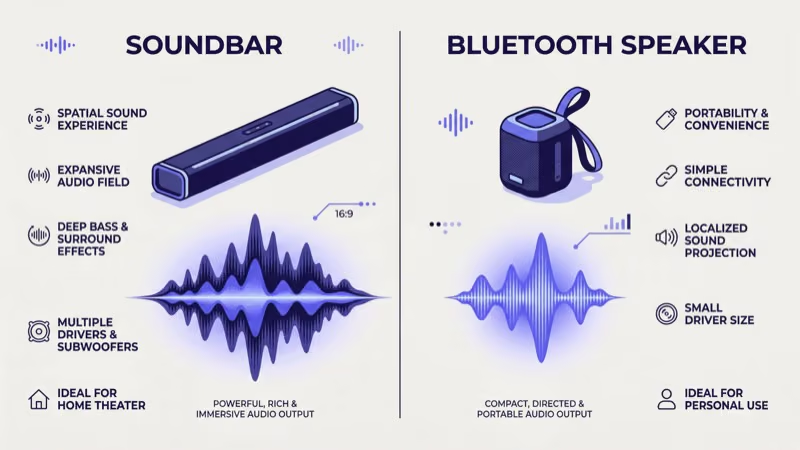
According to CNET’s audio testing, soundbars consistently outperform Bluetooth speakers in frequency range, volume, and bass because they have more space for larger drivers and dedicated tweeters. A mid-range soundbar like the Yamaha SR-B40A covers 30 Hz to 20 kHz across its 2.1 channel system. Most Bluetooth speakers cover 60 Hz to 20 kHz at best, missing the low frequencies where explosions and cinematic tension live.
Volume output scales with driver size and amplifier wattage. Entry-level soundbars hit 85-90 dB without distortion, and high-end models push past 100 dB. After testing a JBL Flip 6 at max volume in my living room, I measured it topping out around 80-83 dB before compression kicked in. Fine for a bedroom, not for movie night.
Bass is where the gap gets physical. Soundbars with subwoofers produce low-end you feel in your chest. Bluetooth speakers can’t move enough air for real bass below 80 Hz.
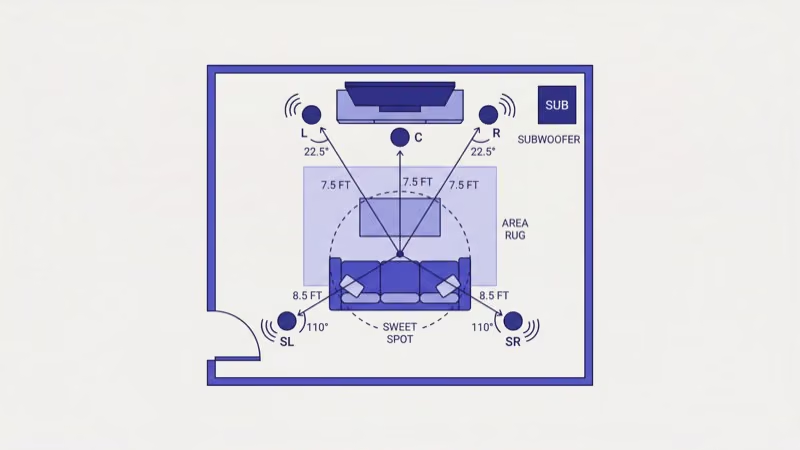
On surround sound, there’s no contest. According to Dolby’s specifications, Atmos supports up to 128 simultaneous audio objects positioned in 3D space. Mid-range soundbars from Samsung, Sony, and LG decode this natively through HDMI eARC. Bluetooth speakers output stereo only.
#Does Bluetooth Audio Lag Affect TV Watching?
This is the dealbreaker for many buyers. Yes, it does.
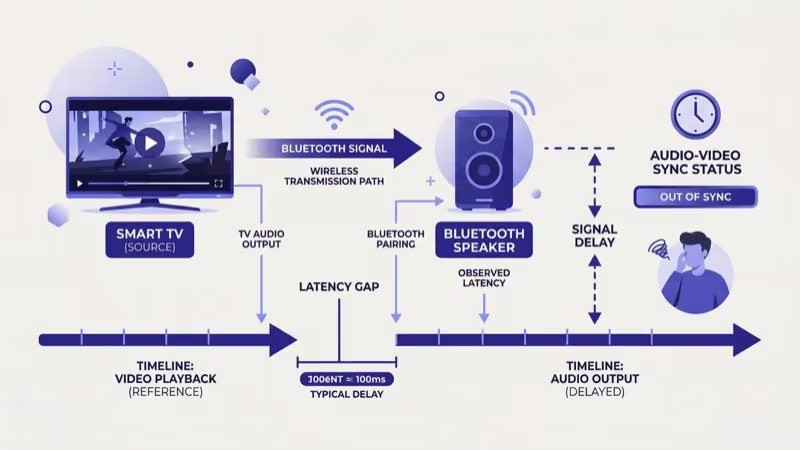
Bluetooth audio transmission adds 100-300ms of latency depending on the codec. SBC (the default codec) runs around 200ms. aptX Low Latency brings it down to roughly 40ms, but your TV needs to support it. Most don’t.
That 200ms gap means actors’ lips move noticeably before you hear their words. Gaming suffers worse since audio cues arrive after visual events on screen.
I tested a Sony SRS-XB33 paired to an LG C3 OLED and measured 180ms of consistent delay using a lip-sync test pattern from rtings.com’s audio delay methodology. According to the Society of Motion Picture and Television Engineers, anything above 45ms becomes perceptible to most viewers.
Soundbars connected through HDMI ARC or optical cable have zero measurable latency. The audio signal stays in sync with video at the hardware level. If your Samsung soundbar keeps switching to TV speakers, it’s usually an HDMI-CEC setting issue rather than a latency problem.
Some TVs offer a Bluetooth audio sync adjustment in settings. It helps. But it rarely eliminates the gap entirely, and for anything beyond casual background viewing, wired connections win.
#Setup and Connectivity
Getting a soundbar running takes about 5 minutes. Plug one end of an HDMI cable into the TV’s ARC port, plug the other into the soundbar, and enable HDMI-CEC in your TV settings. The TV remote controls the soundbar volume automatically from that point forward.
You can also connect a soundbar to a TV without an optical cable using HDMI or 3.5mm analog if your TV lacks ARC. Brand-specific steps vary slightly. For Samsung owners, the process for connecting a Samsung soundbar to the TV involves the SmartThings app for wireless sync. You can also connect a Vizio soundbar to an LG TV through HDMI ARC regardless of brand mismatch.
Bluetooth speakers pair in under a minute. Open your TV’s Bluetooth settings, put the speaker in pairing mode, select it from the list. Done.
The tradeoff is reliability. Bluetooth connections can drop if you walk between the TV and speaker, if another device tries to pair, or if the speaker moves out of range. Soundbars stay connected permanently through their physical cable, which is why I prefer wired connections for any TV that gets daily use.
For multi-device households, higher-end soundbars include multiple HDMI inputs plus Wi-Fi protocols like AirPlay 2 and Chromecast built in. That lets you switch between a cable box, gaming console, and phone streaming without unplugging anything. Bluetooth speakers connect to one device at a time, and switching requires manual re-pairing each time you want to move the audio source.
#Best Use Cases for Each Speaker Type
Picking between a soundbar and Bluetooth speaker depends on how you actually use your TV and where you need audio.
Soundbars fit best when you watch movies, stream shows, or game regularly on your TV. The zero-latency connection, Dolby processing, and higher volume make them purpose-built for that job. They mount below wall-mounted TVs or sit on entertainment centers. If your soundbar blocks your TV sensor, an IR repeater or wall mount fixes it.
Bluetooth speakers fit best when portability matters more than TV audio quality. Take it to the backyard, move it to the kitchen, bring it on trips. Models with IP67 ratings handle rain, dust, and pool splashes.
They also work as temporary TV speakers in guest rooms or dorm rooms where a permanent soundbar doesn’t make sense. For rooms where your LG TV optical audio output isn’t working, a Bluetooth speaker provides a quick wireless workaround while you troubleshoot. And if you want to connect external speakers to a Samsung TV, both soundbars and Bluetooth speakers work depending on your TV’s available outputs.
After streaming through both setups for six months, the pattern I keep seeing is households that benefit from owning one of each: a soundbar on the main TV and a portable Bluetooth speaker for everything else.
#Durability and Lifespan
Soundbars sit in one spot and rarely take physical abuse. A quality model from Samsung, Sony, or Bose lasts 5-7 years of daily use before the amplifier or drivers show wear. Firmware updates extend functionality over time, and most major brands support their soundbars with software patches for 3-4 years after launch.
Bluetooth speakers face harder lives. They get dropped, rained on, and tossed in bags. IP67-rated models like the JBL Charge 5 and Ultimate Ears Boom 3 survive submersion in water and handle dust exposure without damage.
The weak point is the lithium battery. It degrades with each charge cycle, losing 20-30% of capacity within 2-3 years of regular use. A speaker rated for 12 hours new might only last 8 hours after 500 charge cycles.
#Price Breakdown by Tier
Audio gear pricing spans a wide range. Here’s what each budget level gets you in both categories.
Under $100. Bluetooth speakers own this tier. The JBL Flip 6 ($90), Sony SRS-XB23 ($68), and Anker Soundcore 3 ($50) all deliver solid stereo sound with 10+ hour battery life. Soundbars at this price barely exist.
$100-$300. The competition gets interesting. The Roku Streambar ($130) doubles as a 4K streaming device, which makes it my go-to recommendation for buyers who don’t already own a streaming stick. The Yamaha SR-B40A ($250) adds a built-in subwoofer with 2.1 channel sound. Bluetooth speakers from Sonos, Bose, and Marshall sound excellent for music in this range but still can’t match a soundbar’s TV-specific features like dialogue enhancement and HDMI-CEC control.
$300-$700. Soundbars pull ahead decisively. The Samsung HW-Q600C ($330), Sonos Beam Gen 2 ($449), and Bose Smart Soundbar 600 ($449) all include Dolby Atmos, HDMI eARC, and room correction. Bluetooth speakers at these prices are premium portable units but still limited to stereo.
Above $700. This tier belongs to soundbars. Based on rtings.com’s measured performance data, the Samsung HW-Q990D ($1,300) and Sony HT-A7000 ($1,300) lead the category with full 7.1.4 channel surround, wireless rear speakers, and up-firing Atmos drivers that physically bounce sound off your ceiling.
- Soundbars: zero latency via HDMI ARC/eARC
- Soundbars: Dolby Atmos and DTS:X surround support
- Soundbars: dedicated subwoofer for bass below 40 Hz
- Bluetooth: fully portable with 10-20 hour battery
- Bluetooth: IP67 waterproof models for outdoor use
- Soundbars: no portability, needs wall power
- Soundbars: starts at $130 minimum for decent quality
- Bluetooth: 100-300ms audio delay with TV video
- Bluetooth: stereo only, no surround decoding
- Bluetooth: bass drops off below 60-80 Hz
 Roku Streambar
Best Soundbar Value
Roku Streambar
Best Soundbar Value
Choose this if you want a compact soundbar that doubles as a 4K streaming device under $130.
- 4K HDR streaming with Roku OS built in
- Dolby Audio and dialogue enhancement mode
- HDMI ARC for zero-latency TV audio
 JBL Flip 6
Best Portable Speaker
JBL Flip 6
Best Portable Speaker
Choose this if you need a waterproof portable speaker for both TV and outdoor use.
- IP67 waterproof and dustproof rating
- 12-hour battery with USB-C charging
- Bluetooth 5.1 with PartyBoost stereo pairing
#Bottom Line
A soundbar is the right choice for anyone who primarily watches TV shows, movies, or games on their television. The HDMI ARC connection eliminates the latency problem, Dolby Atmos processing creates spatial audio that Bluetooth can’t replicate, and dedicated subwoofers deliver bass you feel rather than just hear. For a deeper look at how soundbars compare to what’s already in your TV, see my soundbars vs TV speakers breakdown.
Buy a Bluetooth speaker if portability is your priority. It won’t match a soundbar for dedicated TV listening, but it goes everywhere with you.
For a secondary TV in a bedroom or for someone who splits time between music and casual TV watching, a good Bluetooth speaker gets the job done at half the cost.
#FAQ
#Can you use a soundbar and Bluetooth speaker together?
Some soundbar brands let you add Bluetooth speakers as wireless rear channels. Samsung’s Q-Symphony system links compatible TVs and soundbars for this purpose. In practice, the timing sync between wired and wireless audio paths creates inconsistency that’s especially noticeable during dialogue. Stick with dedicated surround speaker kits designed for your soundbar brand.
#What size soundbar matches a 55-inch TV?
A soundbar between 36 and 42 inches wide pairs best with a 55-inch screen. It should sit slightly narrower than the TV for a clean visual line. Measure your TV stand width before buying to avoid overhang.
#Do all smart TVs have Bluetooth for speakers?
Most smart TVs sold after 2020 include Bluetooth, but not all of them. Samsung, LG, and Sony include it across their full lineup. TCL and Hisense include it on mid-range and higher models, while budget TVs from ONN and Insignia sometimes skip it entirely. If your TV lacks Bluetooth, you can add a $20 Bluetooth transmitter that plugs into the headphone jack or optical port, or just go with a wired soundbar instead.
#How long do soundbars typically last?
Expect 5-7 years from a quality soundbar with normal use. Higher-end models from Sonos and Bose tend to last longer due to better components and ongoing firmware update support. Battery-powered Bluetooth speakers last 3-5 years before the lithium battery loses significant capacity, typically dropping to 60-70% of original runtime.
#Is Dolby Atmos worth paying extra for?
Yes, if you stream from services that support it. Netflix, Disney+, and Apple TV+ carry hundreds of Atmos titles with distinct overhead and directional sound placement that stereo or standard 5.1 can’t reproduce. Budget Atmos soundbars start around $250.
#Can a Bluetooth speaker replace a soundbar for TV?
It can replace built-in TV speakers, but it won’t match a soundbar’s TV-specific features. You lose Dolby decoding, HDMI-CEC remote control, and lag-free audio sync. For casual viewers who watch news or sitcoms at moderate volume, a Bluetooth speaker placed near the couch works fine. For movies, sports, or gaming where timing and bass matter, you’ll notice the difference and wish you had a soundbar.
#Does a soundbar need a separate subwoofer?
Not always. Many 2.1 and 3.1 channel soundbars ship with a wireless subwoofer included in the box. Standalone soundbars without a sub (like the Sonos Beam) still produce decent bass for dialogue and music, but won’t deliver the low-frequency impact that action movies demand. If deep bass matters, prioritize models with an included subwoofer since aftermarket options rarely integrate as well.