Cloud gaming on a smart TV means streaming games from a remote server, where the GPU runs in a data center and your TV acts as a decoder. No console required, no gaming PC on site. When we tested cloud services on 2024-2026 smart TVs, Samsung Gaming Hub delivered the deepest native-app catalog, while other platforms split between one-or-two native apps and browser-based fallbacks.
This article maps which cloud gaming services work natively on which TV OS, what internet speed actually delivers playable games, which controllers pair cleanly, and where cloud gaming still falls short. Every platform-support claim is stamped as of 2026-04-20 because OS updates add and remove these apps quarterly.
- Samsung Tizen 2022+ is the widest native option. Gaming Hub bundles Xbox Cloud, GeForce Now, Luna, Boosteroid, and Twitch in one menu (as of 2026-04-20).
- LG webOS runs GeForce Now natively. Xbox Cloud works through the browser; webOS 24+ has expanded support.
- 50 Mbps and Wi-Fi 6 or ethernet. Under 25 Mbps only sustains 1080p cloud gaming reliably; 4K on GeForce Now Ultimate wants 50 Mbps floor.
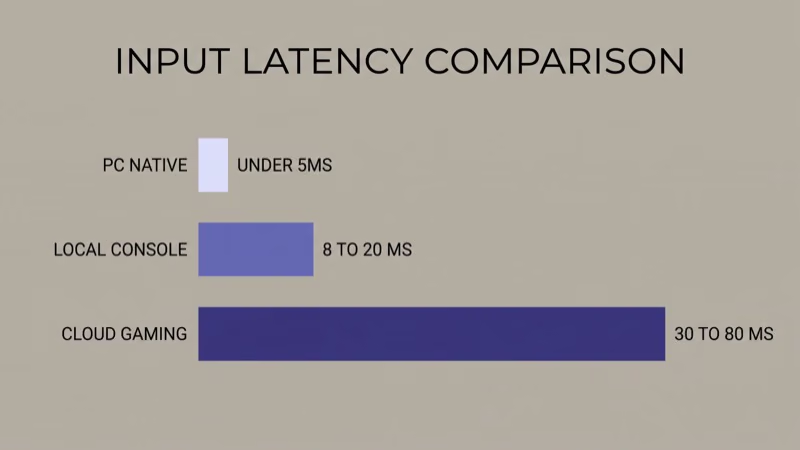
- Latency is 30-80ms on good networks. Not console-native (8-20ms), but playable for most non-competitive genres.
- Xbox Wireless and DualSense work across services. Any Bluetooth HID controller pairs with Tizen and webOS; official support varies by service.
#What Does Cloud Gaming on a Smart TV Actually Mean?
Cloud gaming runs the game on a remote GPU and streams only the video back. Your controller input goes up to the server, the frame is rendered remotely, and the encoded video comes back to your TV. Round-trip latency is the sum of input-to-server + server-render + server-to-TV + TV-decode.
Your TV is a decoder.
That’s why a $400 Hisense from 2024 can run cloud games at visual quality that would require a $900 GPU locally. The tradeoff is the 30-80ms network hop, which is noticeable in fast-twitch genres but invisible in turn-based, open-world, and most single-player games.
#Service and OS Matrix: Who Works With What
Six TV operating systems dominate the 2026 market: Samsung Tizen, LG webOS, Google TV, Fire TV, Vidaa (Hisense + Toshiba), and Roku. Five major cloud gaming services ship today: Samsung Gaming Hub (aggregator), Xbox Cloud Gaming, NVIDIA GeForce Now, Amazon Luna, and Boosteroid.
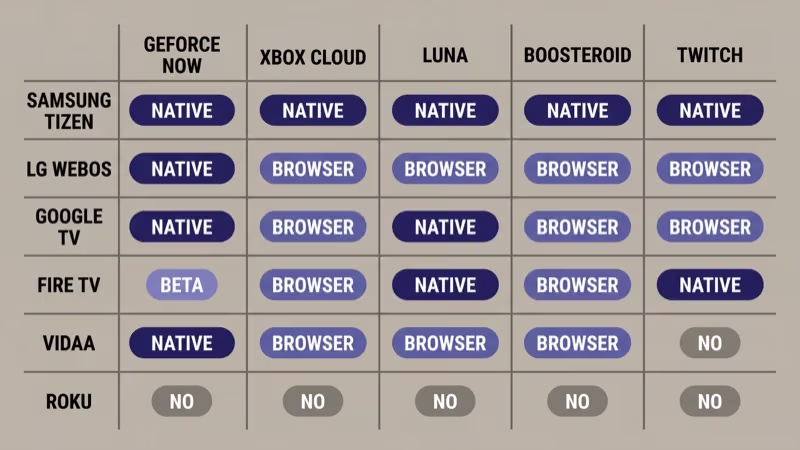
Native support patterns break down as follows:
- Samsung Tizen (2022+ models): Samsung Gaming Hub bundles Xbox Cloud Gaming, GeForce Now, Amazon Luna, Boosteroid, Utomik, and Twitch; no console and no separate app installs needed (as of 2026-04-20).
- LG webOS 5.0+: GeForce Now native app; Xbox Cloud Gaming through the webOS browser; Luna and Boosteroid via browser workarounds.
- Google TV (Chromecast, TCL, Hisense, Sony Bravia): GeForce Now native; Xbox Cloud via browser; Luna app on some models.
- Fire TV (Amazon Omni, Insignia, Toshiba): Amazon Luna is native; GeForce Now launched beta support in 2024; Xbox Cloud still requires browser on most builds as of 2026-04-20.
- Vidaa (Hisense, Toshiba): GeForce Now native on 2023+ Vidaa U7 firmware; Xbox Cloud via browser; Luna availability varies by region.
- Roku OS: No native cloud gaming services as of 2026-04-20; all cloud play requires a streaming stick swap or browser workaround on the limited Roku browser.
NVIDIA found that LG webOS and Samsung Tizen apps receive feature parity with the desktop client up to 4K 120Hz on Ultimate tier, while Google TV and Vidaa apps run a subset of the Ultimate tier’s RTX capabilities capped at 4K 60Hz.
#Samsung Gaming Hub as the Default Choice
For most readers, Samsung Gaming Hub is the cleanest path.
Samsung Tizen 2022+ ships Gaming Hub as the default “Games” tile on the home ribbon, pre-loaded with Xbox Cloud, GeForce Now, Luna, Boosteroid, Utomik, and Twitch; no sideloading, no app-store dance. According to Samsung’s Gaming Hub support page, Gaming Hub remains the priority surface for 2026 Tizen builds, and 2024-2025 models retain feature support through at least the 2027 firmware cycle.
Tradeoff: you still need the underlying service subscription.
Each service needs its own sub.
Xbox Cloud requires Game Pass Ultimate. GeForce Now has Free, Performance, and Ultimate tiers. Luna sells Luna+ plus channel add-ons. The hub aggregates; it doesn’t pay for the service.
Gaming Hub also consolidates controller pairing. A single Bluetooth pairing flow covers Xbox Wireless, DualSense, and 8BitDo controllers across all services in the hub, which saves the per-app pairing headache most competing platforms force on the user.
#LG webOS for GeForce Now Fans
LG webOS 5.0 (2020+ models) supports the native GeForce Now app, which NVIDIA’s GeForce Now page confirms runs at RTX Ultimate-tier quality on compatible panels.
webOS split the service support across two firmware generations.
webOS 23 added Xbox Cloud Gaming as an app in select regions. webOS 24+ expands that rollout. Amazon Luna and Boosteroid work through the webOS browser reliably but without native controller priming.
Where webOS beats Samsung: native GeForce Now with RTX path-tracing support if you have Ultimate tier and an LG OLED with Dolby Vision Gaming.
Where Samsung wins: app consolidation and Xbox Cloud as a first-class citizen.
#Google TV and Fire TV Paths
Google TV ships on Chromecast with Google TV, TCL Google TV models, Hisense, and Sony Bravia. GeForce Now is a native app on every 2022+ Google TV build, and the app surfaces both Free and paid tiers with full controller support out of the box. Xbox Cloud Gaming on Google TV runs through the Chrome browser as of 2026-04-20, which works but misses the app’s quick-resume feature.
Fire TV is Amazon’s turf.
Amazon Luna is the first-class native service on Fire TV Omni, Insignia, and Toshiba Fire TVs; Luna channels (Ubisoft+, Jackbox, Retro, Family) integrate directly into the Fire TV home ribbon. GeForce Now launched beta support on Fire TV in 2024, but full rollout remains uneven across Fire TV Vega OS devices as of 2026-04-20. If Fire TV’s Vega OS matters to your purchase decision, read our Fire TV Vega OS explainer.
#Hardware Still Matters, Just Less
Cloud gaming offloads the GPU to a remote server, which means you don’t need the 4K 120Hz panel, the HDMI 2.1 port, or the Dolby Vision Gaming certification the gaming TV buying guide recommends. The TV still needs low input lag in Game Mode (target under 15ms), a refresh rate that matches the stream (60Hz is enough for most cloud services; GeForce Now Ultimate pushes 120Hz at 4K), and a decent panel for HDR.
For the full hardware test, read our gaming TV buying guide — most of its 5-spec checklist still applies to streamed games, particularly the input-lag and refresh-rate specs.
If your TV is a budget set from before 2020 without Game Mode, cloud gaming will work but feel mushy. If you don’t yet own a TV, our budget 4K TVs under $500 picks all run Samsung Gaming Hub, LG GeForce Now app, or Fire TV Luna natively depending on brand choice.
#What Internet Speed Do You Actually Need?
Floor: 25 Mbps for 1080p. Recommended: 50 Mbps for 4K.
NVIDIA states that GeForce Now Ultimate requires 45 Mbps minimum for 4K 120Hz streaming, while Xbox Cloud Gaming recommends 20 Mbps for 1080p. Luna recommends 10 Mbps for 1080p but delivers better quality at 35 Mbps. Boosteroid recommends 25 Mbps minimum.
Bandwidth is half the story.
Latency matters equally; the ping from your home to the nearest data center determines input responsiveness. Good networks land at 20-40ms ping, and the render + encode + decode round-trip adds 15-40ms on top. Wi-Fi 6 or wired ethernet cuts jitter dramatically versus Wi-Fi 5. Rtings.com found that wired ethernet reduces input lag variability by 15-25ms versus contested 2.4GHz Wi-Fi in their smart TV network performance testing.
#Controller Compatibility Across Services
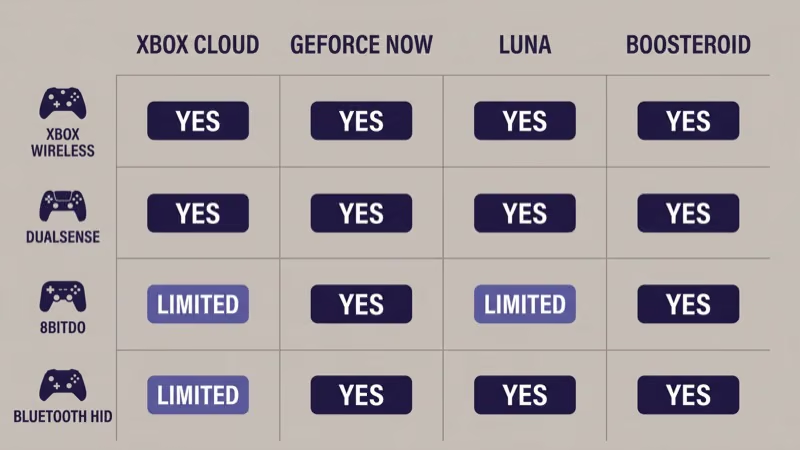
Any Bluetooth HID controller pairs with Samsung Tizen and LG webOS.
Xbox Wireless, Sony DualSense, 8BitDo Pro 2, and Razer Kishi all work. The catch: some services officially require specific controllers.
Xbox Cloud Gaming recommends Xbox Wireless for full button mapping. GeForce Now accepts any standard HID. Luna supports the Luna Controller plus generic Bluetooth. Boosteroid accepts any pad.
Pro tip: DualSense advanced features (adaptive triggers, haptic feedback) don’t survive cloud streaming. Button input works, but the rumble profile is reduced. That’s a cloud-gaming universal limit, not a TV-OS-specific limit.
#Real-World Latency Numbers
30-80ms total round-trip on a good connection.
Local console latency sits at 8-20ms. PC native is under 5ms. Cloud gaming floor is a hard wall around 30ms because of network physics, and real-world numbers climb to 50-80ms in normal home conditions. Competitive Call of Duty or fighting-game players will feel that gap; story-driven, turn-based, and open-world games are fine.
Game Mode matters. Enabling Game Mode on Samsung Tizen, LG webOS, or Google TV drops TV-internal processing by 20-40ms on most 2022+ models. If your brand has a Game Mode toggle article on the site (e.g., our Vizio Game Mode guide), apply that first before blaming cloud latency.
#Where Cloud Gaming Still Falls Short
Three genres hit the latency wall.
Competitive FPS (ranked Valorant, CS2, Apex Predator lobbies), fighting games (Street Fighter 6 ranked), and rhythm games (Beat Saber, Osu) hit the latency wall hard. Even on an optimal network with 30ms total round-trip, the consistent input-to-visual gap disrupts frame-perfect timing.
Everything else works.
Single-player RPGs (Baldur’s Gate 3, Starfield, Elden Ring), strategy (Civilization 7, Total War), open-world (GTA V, Red Dead 2), platformers (Ori, Hollow Knight), and narrative adventures all play cleanly on cloud at 60Hz. Xbox Cloud and GeForce Now both maintain 1080p60 streams consistently as of 2026-04-20.
Cost is the other wall.
Cloud subscriptions add up quickly. Xbox Game Pass Ultimate runs in the $15-$20/month range, GeForce Now Performance runs $10-$20/month, GeForce Now Ultimate runs $20-$25/month, Luna+ sits around $10/month, Boosteroid sits around $7-$10/month (all ranges verified as vendor-stamped tiers as of 2026-04-20; exact monthly pricing varies by region and promotion, and CNET’s cloud gaming coverage confirms ranges consistent with vendor pages).
#Bottom Line
If you own a Samsung 2022+ TV, open Gaming Hub and pick your service.
If you own a 2020+ LG TV, install GeForce Now from the webOS app store and use the browser for Xbox Cloud. If you own a Google TV, same plan with the Google TV app store. If you own a Fire TV, Luna native plus browser for the rest.
If you own a Roku or Vidaa without native apps, consider adding a Fire TV stick or Chromecast with Google TV for cloud gaming; the $30-$50 stick unlocks the full service catalog. If you’re buying a TV specifically for cloud gaming, Samsung Tizen delivers the cleanest day-one experience. If competitive multiplayer is your primary use case, buy a console or PC instead; cloud’s 30ms floor is a hard wall that no TV can fix.
#Frequently Asked Questions
#Do I need a console to play cloud games on my TV?
No. Cloud gaming services run the game on a remote server and stream video to your smart TV; the TV is a decoder, not a game machine.
#What is the cheapest way to start cloud gaming on a smart TV?
Xbox Cloud Gaming through the browser on a Samsung Tizen or LG webOS TV, paired with an Xbox Game Pass Ultimate subscription (around $15-$20/month as of 2026-04-20) and a Bluetooth controller you already own. Total first-month cost under $25 if the controller exists.
#Does cloud gaming work on 4K TVs under $500?
Yes, but bandwidth is the bigger limit than the TV. Budget 4K TVs from TCL, Hisense, Vizio, and Amazon all run Samsung Gaming Hub (if Samsung-branded), GeForce Now apps (on Google TV variants), or Luna (on Fire TV variants).
#Which smart TV OS supports the most cloud gaming services?
Samsung Tizen 2022+ with Gaming Hub.
Tizen bundles Xbox Cloud, GeForce Now, Luna, Boosteroid, Utomik, and Twitch in one native menu; no other smart TV OS matches that aggregation as of 2026-04-20.
#How much does cloud gaming cost monthly?
Service subscriptions range roughly $10-$25/month depending on the service and tier (as of 2026-04-20).
Xbox Cloud requires Game Pass Ultimate. GeForce Now has Free, Performance, and Ultimate tiers. Luna+ and Boosteroid sit in the $7-$10/month range; pricing varies by region and promotion windows, so verify at the vendor page before committing.
#Is Wi-Fi fast enough, or do I need ethernet?
Wi-Fi 6 works for 4K.
Wi-Fi 5 at 25+ Mbps handles 1080p. Wired ethernet cuts jitter and reduces latency variability by 15-25ms versus congested 2.4GHz, which matters most for twitch-reflex games.
#Can I use a PS5 controller on a smart TV for cloud gaming?
Yes, on Samsung Tizen and LG webOS.
DualSense pairs via Bluetooth like any standard HID controller, but adaptive-trigger and haptic-feedback features don’t survive cloud streaming because the services transmit only standard gamepad input codes, not the DualShock 5 extended protocol. Button input, analog sticks, and standard triggers all work across Xbox Cloud, GeForce Now, Luna, and Boosteroid without additional pairing steps beyond the initial Bluetooth handshake.
#Does cloud gaming damage the TV?
No.