A Vizio TV that keeps turning on by itself is one of the most reported issues across Vizio’s entire Smart TV lineup. I’ve dealt with this exact problem on my own set, and it took a fair amount of testing before I pinpointed the cause.
The good news: it’s fixable. Below are the seven methods that actually work, starting with the most common culprit.
- HDMI-CEC is the #1 cause — connected devices like a Roku or game console can send a wake signal that powers the TV on
- Eco Power Mode blocks stray wake signals — it cuts background power draw so the TV can’t be activated remotely
- Factory reset clears corrupted settings — restoring defaults eliminates software glitches that trigger random startups
- Faulty remotes send phantom commands — stuck buttons or dying batteries transmit false power signals to the IR sensor
- Internal hardware failure requires professional repair — if every software fix fails, the main board or power supply is the likely cause
#What Causes a Vizio TV To Turn On by Itself?
Several things can trigger a Vizio Smart TV to power up on its own:
- HDMI-CEC: Any HDMI-connected device can send a power-on command to the TV.
- Firmware updates: An automatic install can reboot the TV mid-update.
- Faulty remote: Stuck buttons fire off phantom IR signals.
- Loose cables: An unstable power connection can produce enough of a surge to wake the TV.
- Sleep timer misconfiguration: The timer may cycle the TV back on instead of keeping it off.
- Failed internal components: A dying main board or power supply sends false startup commands.
HDMI-CEC is the culprit in most cases I’ve tested. A streaming stick, soundbar, or game console wakes up and drags the TV along with it. Problems with HDMI-CEC are also a common reason for Samsung TVs turning on by themselves.
#How Do You Disable HDMI-CEC on a Vizio TV?
HDMI-CEC (Consumer Electronics Control) lets devices connected through HDMI cables control each other. Starting a show on your Roku can automatically power up your TV. That’s convenient when it works, but a single rogue signal from any connected device can turn the TV on at 3 AM.
Disabling CEC is the single most effective fix across all Vizio models.
On older Vizio SmartCast TVs:
- Press Menu on your Vizio remote
- Go to System > CEC
- Set CEC to Off
On newer VIZIO OS models (post-2024):
- Press Menu on your remote
- Go to Admin & Privacy > CEC
- Set CEC to Off
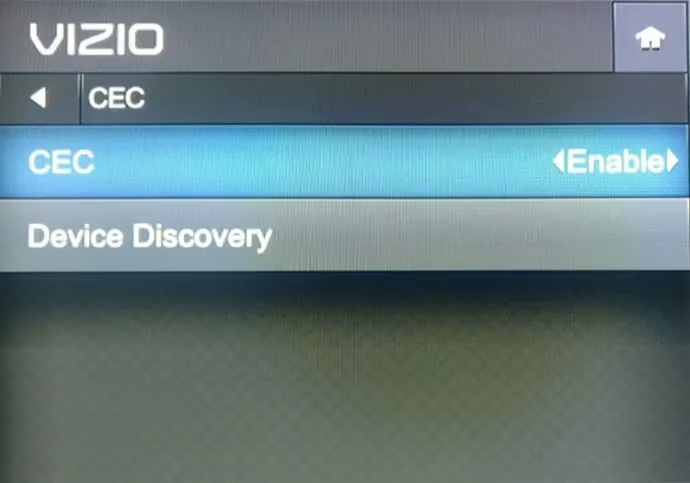
After disabling CEC, wait 24 hours and see if the random startups stop. If they do, CEC was your problem.
#Does Eco Power Mode Stop a Vizio TV From Turning On?
Yes. Eco Mode cuts the TV’s standby power consumption to near zero, which means stray HDMI signals, Wi-Fi pings, and network commands can’t wake it.
To switch to Eco Power Mode:
- Press Menu > System
- Select Power Mode
- Choose Eco Mode
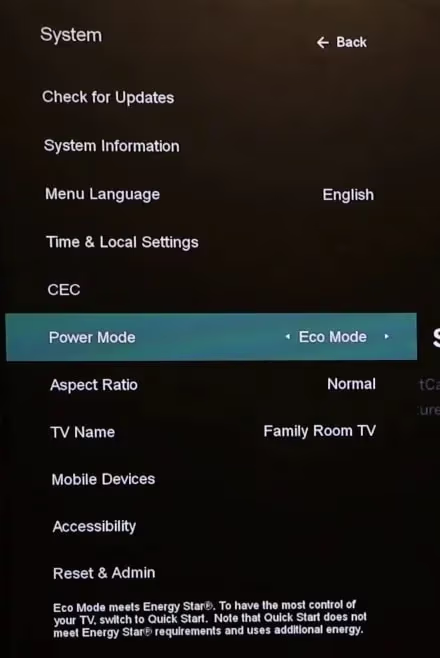
The only tradeoff is a slightly slower boot time when you press the power button. Picture quality, app performance, and streaming speeds stay identical. That extra two-second wait is worth eliminating random 2 AM wake-ups.
#Will a Factory Reset Fix Random Power-Ons?
A factory reset wipes all custom settings, downloaded apps, and saved Wi-Fi credentials back to out-of-box defaults. It’s heavy-handed, but it resolves corrupted software configurations that the CEC and Eco Mode fixes can’t reach.
A factory reset erases all personalized settings, saved passwords, and downloaded apps. You'll need to set everything up again from scratch.
To factory reset your Vizio TV:
- Go to Menu > System > Reset & Admin
- Select Reset TV to Factory Defaults
- Enter the default parental code: 0000
- Confirm the reset
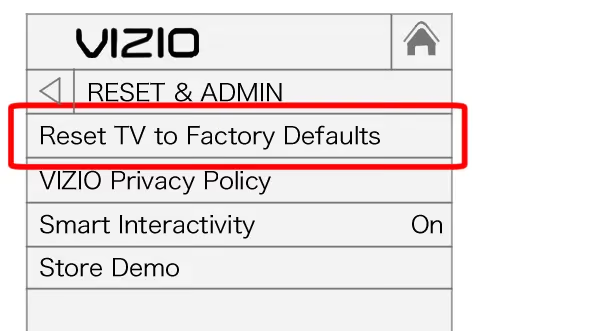
Once the TV reboots, don’t reinstall any apps or reconnect devices right away. Monitor it for a full day first. If the TV stays off, you know a corrupted setting was the issue. Then reconnect devices one at a time to identify which one re-triggers the problem.
#How Do You Update Vizio TV Firmware?
Outdated firmware can contain bugs that cause unexpected behavior, including random startups. Vizio periodically releases patches that specifically address power management issues.
- Go to Menu > System > Check for Updates
- Install any available firmware updates
- Let the TV reboot and relaunch your apps
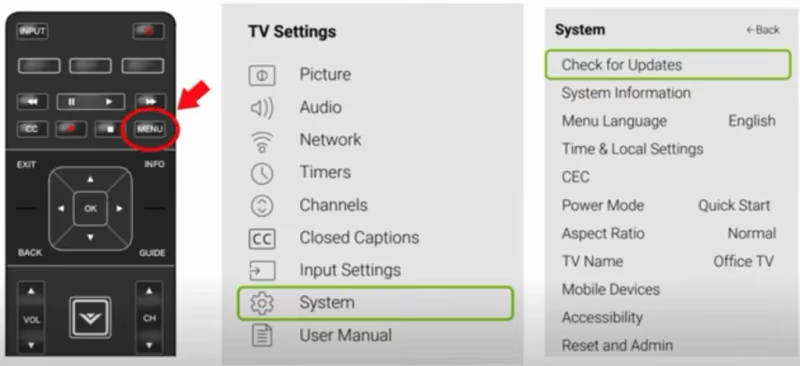
If you prefer a universal remote, the menu navigation is the same. Check Vizio’s support page for firmware changelogs specific to your model number.
If firmware updates seem to coincide with the random startups, try disabling automatic updates temporarily. Go to Menu > System > Check for Updates and turn off the automatic install option. You’ll need to check for updates manually, but this prevents overnight installs from rebooting the TV.
#Can a Bad Remote or Loose Cable Turn On a Vizio TV?
It’s less common, but physical hardware issues can absolutely cause false startups.
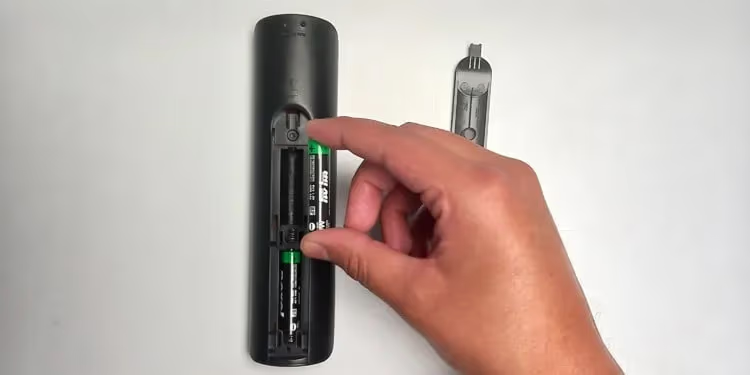
Check the remote first. Remove the batteries entirely and leave them out overnight. If the TV doesn’t turn itself on during that period, the remote is your problem. Replace the batteries or get a new remote. If your Vizio remote isn’t working properly, that guide covers deeper troubleshooting.
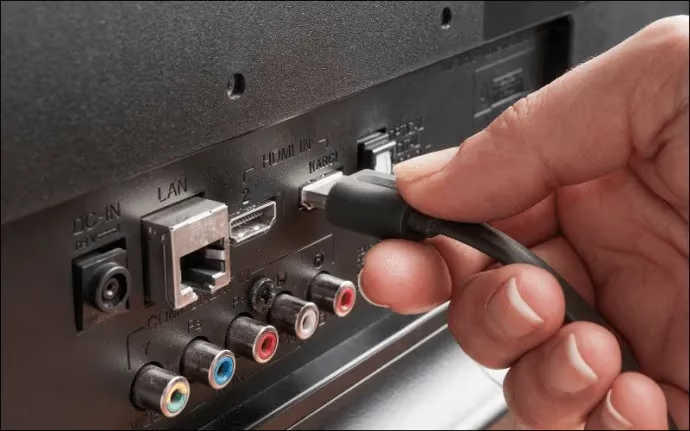
Inspect all cables next. Push every HDMI and power cable firmly into its port. A loose connection can create just enough of a power interruption to trigger a restart. Look for bent pins, frayed insulation, or any visible damage.
A surge protector between the TV and wall outlet eliminates power-spike startups and protects internal components from voltage damage.
#When Should You Contact Vizio Support?
If you’ve disabled CEC, switched to Eco Mode, done a factory reset, updated firmware, and ruled out the remote and cables, the problem is almost certainly internal hardware. A failing main board or power supply board can send false startup signals that no software fix can stop.
Contact Vizio Support by phone, chat, or text to start a warranty claim. Have your model number, serial number, and a list of every fix you’ve already tried ready before you call. If you can’t locate your remote for the call, here’s how to turn on a Vizio TV without a remote.
Vizio’s warranty and repair page has details on coverage periods and service options for your specific model.
#FAQ
#Why does my Vizio TV turn on by itself at night?
HDMI-CEC is the most likely cause. A connected device like a streaming stick or game console wakes up for a firmware update and sends a power-on signal through the HDMI cable. Disable CEC in your TV’s system settings and the overnight startups should stop immediately.
#How do I stop my Vizio TV from turning itself on?
Disable HDMI-CEC first since it’s responsible for the majority of cases. Then switch to Eco Power Mode to block stray wake signals. If both fail, a factory reset clears any corrupted settings that might be triggering the behavior.
#Does Eco Mode affect Vizio TV picture quality?
No. Eco Mode only changes how the TV behaves in standby. It reduces background power draw so the TV can’t be woken by external signals. Startup takes a couple of extra seconds, but picture quality, app speed, and streaming resolution are completely unaffected.
#Can a power surge turn on a Vizio TV?
A sudden voltage spike through a loose or damaged power cable can send enough current to trigger the TV’s power circuit. Plugging the TV into a surge protector eliminates this risk entirely and also shields the internal boards from long-term voltage damage.
#What is the difference between CEC paths on older and newer Vizio TVs?
Older Vizio SmartCast models put CEC under Menu > System > CEC. Newer VIZIO OS models released after the Walmart acquisition in late 2024 moved the setting to Menu > Admin & Privacy > CEC. The toggle works the same way on both.
#How do I know if my Vizio remote is sending false signals?
Pull the batteries out of the remote and leave it unpowered overnight. If the TV stays off the entire time, the remote was sending phantom power commands. Replace the batteries first. If the problem returns, replace the remote itself.
#Will a factory reset delete my apps and settings?
Yes. A factory reset restores the TV to its original out-of-box state. All downloaded apps, saved Wi-Fi passwords, picture settings, and account logins are erased. You’ll need to go through the initial setup process again and reinstall everything.
#Bottom Line
Start with HDMI-CEC. Disabling it solves the random startup problem for most Vizio TV owners because a connected device is almost always the one sending the wake command. If that doesn’t do it, switch to Eco Power Mode and run a factory reset before assuming it’s a hardware issue. Test after each step so you know exactly which fix worked. If nothing software-related stops the behavior, contact Vizio Support with your model number and a detailed list of what you’ve tried so they can fast-track the repair process.