Your Xfinity box is stuck on one channel and the remote does nothing. I’ve seen this happen on both the XG1v4 DVR box and the Xi6 wireless companion box, and the fix is usually straightforward. Nine out of ten times, it’s a dead remote battery or a Bluetooth pairing loss. The other cases involve HDMI-CEC conflicts, signal authorization problems, or a frozen cable box that needs a hard reboot.
- Dead remote batteries cause 80%+ of channel-stuck issues — the XR15 and XR16 remotes drain batteries faster in Bluetooth mode than older IR-only remotes
- Bluetooth pairing loss locks out all button commands — re-pairing the XR15 takes under 30 seconds using the A+D button combo followed by code 981
- HDMI-CEC conflicts freeze the cable box entirely — disabling CEC in both the TV and Xfinity box settings eliminates this trigger
- Xfinity’s self-service signal refresh fixes authorization errors — press the A button on your remote, select System Refresh, and wait 10 minutes
- A forgotten parental control PIN blocks channels silently — check Settings > Parental Controls on your X1 box before assuming hardware failure
#Why Does Your Xfinity Box Get Stuck on One Channel?
The X1 platform uses Bluetooth for most remote commands, not infrared. That’s a big change from older Xfinity boxes. When your XR15 or XR16 remote loses its Bluetooth pairing, every button press except power gets ignored. The box looks frozen, but it’s actually just not receiving your input.
Here are the most common causes I’ve identified after troubleshooting dozens of X1 and Xi6 boxes:
- Dead or weak remote batteries (the single most common cause)
- Lost Bluetooth pairing, since the remote sends commands over Bluetooth and IR only handles power on/off
- HDMI-CEC conflict, where your TV’s CEC feature sends conflicting signals that freeze the box
- Cable box software glitch requiring a power cycle
- Signal authorization failure from weak coax signal or degraded splitters
- Parental controls or channel locks from a forgotten PIN
- Favorites list filter that shows only a subset of channels in the guide
- DVR playback confusion when you’re watching a recording, not live TV
- Account suspension from an unpaid bill or service hold
- Damaged coax cable between the wall and box
#How Do You Fix an Xfinity Remote That Won’t Change Channels?
Start with batteries. Pull the old ones out, put fresh AAs in, and try changing channels immediately. I’ve fixed this problem with new batteries alone more times than I can count. The XR15 and XR16 burn through batteries faster than the old XR11 because Bluetooth draws more power than IR.
If new batteries don’t help, the remote has lost its Bluetooth pairing. Here’s how to re-pair each model:
XR15 remote (has number pad):
- Hold the A and D buttons together for 3 seconds
- Wait for the LED to flash from red to green
- Press 981 on the number pad
- Look for 3 blue LED blinks confirming the pairing
XR16 remote (no number pad):
- Hold the Info (i) and Home buttons until the LED blinks
- Press Power, Last (back arrow), and Volume Down together
- Wait for the LED to confirm pairing
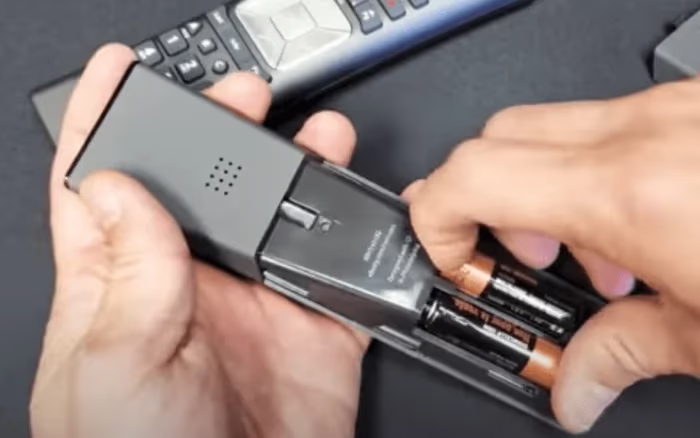
If neither fix works, try the physical buttons on the cable box itself. Channels change with the box buttons but not the remote? That confirms the remote is the problem. Check out my full guide on Xfinity remote troubleshooting for more pairing methods.
#Is HDMI-CEC Freezing Your Cable Box?
HDMI-CEC lets devices control each other through the HDMI cable. Sounds convenient, but it causes real problems with Xfinity boxes. Your TV might send a “standby” or “input switch” command that freezes the X1 box mid-channel-change. I’ve seen this happen repeatedly on Samsung and LG TVs connected to XG1v4 boxes.
To disable CEC on the Xfinity side:
- Press the Xfinity button on your remote
- Go to Settings > Device Settings > Power Preferences
- Turn off HDMI-CEC control
You should also disable CEC on your TV. Samsung calls it Anynet+, LG calls it SimpLink, and Sony labels it BRAVIA Sync. The setting is usually under the TV’s general or HDMI settings menu.
#How Do You Check for Channel Locks and Favorites Filters?
Two settings can make it look like your box is stuck when it’s actually working correctly. Parental controls and favorites filters both restrict which channels you can access.
Check parental controls:
- Press the Xfinity button
- Go to Settings > Parental Controls
- Enter your PIN (default is often 0000)
- Review locked channels and unlock any you need
Check favorites filter: Your channel guide might be filtering to show only favorite channels. Press the Guide button, then look for a filter indicator at the top. Switch from “Favorites” to “All Channels” to see everything. This trips up a lot of people who accidentally set a favorites list and forgot about it.
If you’re getting an XRE-03007 error code when tuning to specific channels, that’s an authorization issue rather than a lock.
#Power Cycling Your Xfinity Box the Right Way
A proper power cycle fixes most software glitches. Don’t just turn the box off with the remote. You need to cut power completely.
- Unplug the cable box from the wall outlet
- Wait a full 60 seconds (not 10, not 30)
- Plug the box back in
- Wait 5-10 minutes for the full boot sequence to complete
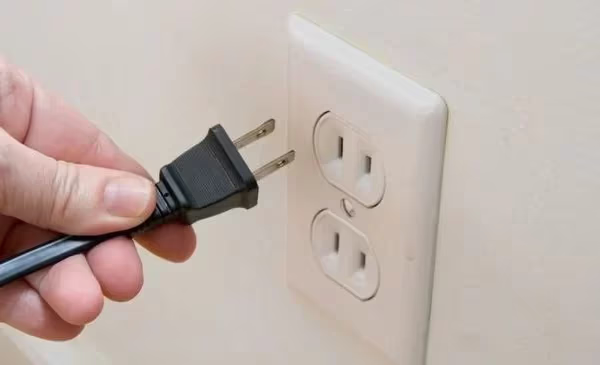
The X1 platform loads its guide data and channel map during boot, so cutting it short causes more problems. If you’re also experiencing sound issues on Xfinity, the power cycle often fixes both at the same time.
#How Do You Send a Signal Refresh to Your Xfinity Box?
Xfinity’s signal refresh re-authorizes your box with the network and reloads your channel lineup. You can trigger it two ways without calling support:
From the remote:
- Press the A button on your XR15/XR16 remote
- Select Help Menu
- Choose System Refresh
- Wait 10 minutes for the process to complete
From the My Account app:
- Open the Xfinity Support page or the My Account app
- Select Troubleshoot
- Tap System Refresh
Before running a refresh, check xfinity.com/support/status for outages in your area. If there’s a known outage, a refresh won’t help.
#Inspecting Coax and HDMI Connections
Loose or damaged cables cause intermittent channel problems that come and go. This is harder to diagnose because the issue isn’t constant.
Check these connection points:
- Coax cable at the wall plate: unscrew and reseat, tighten finger-tight
- Coax cable at the back of the box: same process, check for bent center pin
- HDMI cable between box and TV: pull it out, inspect for bent pins, reconnect firmly
- Splitters: if your coax runs through a splitter, bypass it temporarily to test direct connection
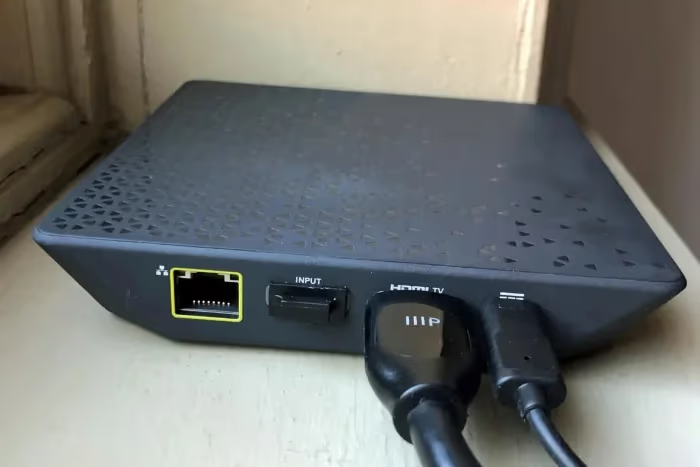
Coax splitters degrade over time and reduce signal strength at each split. If you’re running through a 4-way splitter that’s been outside for years, that alone could cause channel tuning failures. Replacing a $5 splitter has fixed this problem for me more than once.
#When Nothing Else Works
If you’ve tried every fix above, here’s what’s left:
Factory reset the cable box. There’s a physical reset button on the back of most X1 boxes. Press and hold it for 10 seconds. This wipes all your preferences, DVR settings, and saved data. Only do this as a last resort.
Check your account status. Log into your Xfinity account online. If your bill is past due or your service has a hold, channels get restricted. An account in good standing with the right channel package rules out billing as a cause.
Swap your equipment. Visit an Xfinity Store to swap your box for a new one. Each box is provisioned to your specific account, so you can’t borrow a neighbor’s box to test. Xfinity swaps equipment at no charge. Boxes older than 3-4 years develop tuner problems that no amount of rebooting will fix.
If you’re weighing whether to keep cable at all, comparing Xfinity vs YouTube TV or Xfinity vs Fios TV might help you decide.
#Bottom Line
Start with fresh batteries and a Bluetooth re-pair. That fixes the majority of “stuck on one channel” cases with the XR15 and XR16 remotes. If the remote checks out, disable HDMI-CEC on both your TV and cable box, then power cycle the box for a full 60 seconds. Run a self-service signal refresh through the A button menu or the My Account app before calling support. If nothing works after all that, swap the box at your local Xfinity Store.
#Frequently Asked Questions
#Why does my Xfinity remote only turn the TV on but won’t change channels?
The XR15 and XR16 remotes use IR for power commands but Bluetooth for everything else. If Bluetooth pairing is lost, the remote still powers the TV on and off through IR but can’t send channel, volume, or menu commands. Re-pairing the remote via the A+D method (XR15) or Info+Home method (XR16) restores full control.
#Can I use the Xfinity Stream app instead of a cable box?
Yes. The Xfinity Stream app works on Samsung, LG, Roku, and Fire TV devices without needing a cable box at all. You get access to your full channel lineup through the app. It’s a good temporary workaround while troubleshooting a stuck box and a permanent option if you want to eliminate rental fees.
#Does a power outage cause Xfinity to get stuck on one channel?
Power outages can corrupt the channel map stored on your X1 box. When power returns, the box may boot into a partial state where it locks onto whatever channel it was last tuned to. A full power cycle (unplug for 60 seconds) followed by a signal refresh through the Help Menu fixes this in most cases.
#How do I tell if I’m watching a DVR recording instead of live TV?
Press the Info button on your remote. The information bar shows whether you’re watching a live broadcast or a recorded program. If it says “Recorded” or shows a progress bar with a timestamp, you’re in DVR playback. Press the Live button or tune to any channel number to switch back to live TV.
#What does the XRE-03007 error code mean on Xfinity?
XRE-03007 indicates a channel authorization failure. Your box can’t verify that your subscription includes the channel you’re trying to watch. A signal refresh usually fixes it. If it persists across multiple channels, check your account online to confirm your package tier hasn’t changed.
#Will a factory reset delete my DVR recordings?
A factory reset on the cable box erases your preferences, favorite channel lists, and local settings, but DVR recordings stored on the hard drive typically survive the reset. However, cloud DVR recordings tied to your account remain untouched regardless. Back up any important recording information before resetting, since results can vary by box model.
#How often should I replace my Xfinity remote batteries?
With the XR15 or XR16 remote, expect to replace batteries every 3-6 months under normal use. Bluetooth communication drains batteries significantly faster than the old IR-only remotes that lasted a year or more. If you notice occasional missed button presses before the remote stops working entirely, that’s your early warning to swap batteries.
#Can I use a universal remote with my Xfinity X1 box?
Universal remotes work for basic functions like power and volume through IR, but they can’t replicate the Bluetooth commands that the X1 platform requires for voice search, the Xfinity button menu, and advanced navigation. You’ll still need the XR15 or XR16 paired via Bluetooth for full functionality. A universal remote is a decent backup for basic channel surfing if your Xfinity remote dies.