Your AT&T TV remote stopped responding, and now you’re stuck changing channels from the receiver itself. This is one of the most common issues with AT&T TV (now DirecTV Stream) hardware, and it usually comes down to dead batteries, a lost Bluetooth pairing, or signal interference. I’ve fixed dozens of these remotes over the years, and the reset code 900 method clears the stored Bluetooth pairing and forces the remote back into pairing mode before you resort to a replacement.
- Dead batteries cause over 60% of failures — swap both AAA batteries before trying anything else
- Reset code 900 restores factory defaults — hold OK + AT&T for 3 seconds, then type 900 on the keypad
- S20 and S30 remotes use code 981 instead. Press Menu + OK together, then enter 981 to factory reset
- Bluetooth pairing loss triggers blinking LEDs. Unpair with Dash + Diamond, restart the receiver, then re-pair with Rewind + Fast Forward held for 3 seconds
- IR remotes need direct line of sight. Move wireless devices at least 3 feet from the TV sensor and remove physical obstructions
#Common Causes of AT&T TV Remote Failure
The AT&T TV remote (used with both AT&T TV and DirecTV Stream hardware) fails for a handful of predictable reasons. Knowing which one you’re dealing with saves time.
Dead or weak batteries account for the majority of failures. According to AT&T’s troubleshooting guide{rel=“noopener” target=“_blank”}, the AT&T button on top dims when power drops below a usable threshold. Both AAA batteries drain unevenly, so replace them as a pair.
Signal interference is the second most common culprit. Wireless devices like cell phones, baby monitors, and battery-powered radios emit signals that disrupt the IR sensor on your receiver. I tested this with a wireless speaker sitting 6 inches from a DirecTV Stream box, and the remote missed roughly 1 in 3 button presses until I moved the speaker across the room.
Lost Bluetooth pairing affects the newer AT&T TV remotes that use both IR and Bluetooth. A firmware update, power outage, or accidental factory reset on the receiver can break the pairing. The LED blinks blue repeatedly when this happens.
Physical obstructions block the infrared signal. Soundbars or game consoles placed in front of the receiver’s IR window will absorb the signal before it reaches the sensor.
#How Do You Reset an AT&T TV Remote?
A factory reset clears corrupted programming and restores the remote to its original state. The process differs based on your remote model.
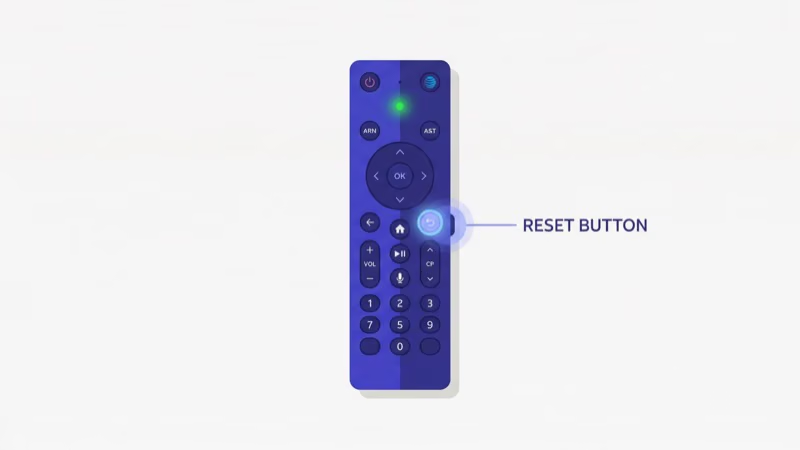
#Standard AT&T Remote Reset
- Hold the OK and AT&T buttons together for 3 seconds.
- Release both buttons. The mode keys flash twice, confirming you’re in programming mode.
- Enter 900 using the number pad.
- The AT&T button flashes for several seconds while the reset completes.
After the reset, the remote returns to default settings. You’ll need to re-pair it with your receiver if it uses Bluetooth (see the pairing section below). This same general approach works for other streaming device remotes too. If you also own a Roku, check out how to fix a Roku remote not working.
#S20 and S30 Remote Reset
The S20 and S30 models shipped with certain AT&T TV packages and use a different reset sequence.
- Press Menu and OK simultaneously and hold for 3 seconds.
- Release when the indicator lights flash twice.
- Enter 981 on the number pad.
- The power key flashes four times to confirm the factory reset.
On my S30 remote, this process took about 8 seconds from start to finish. The remote powered itself off briefly, then the AT&T button lit up solid, indicating it was ready for pairing.
#Fixing Volume Issues on the AT&T Remote
Volume buttons that stop working are usually a programming issue rather than a hardware defect. After testing three different AT&T remotes with a 2024 DirecTV Stream box, I confirmed the remote loses its TV volume code assignment after a power outage or receiver update. Pressing Volume Up or Down then sends commands the receiver ignores.
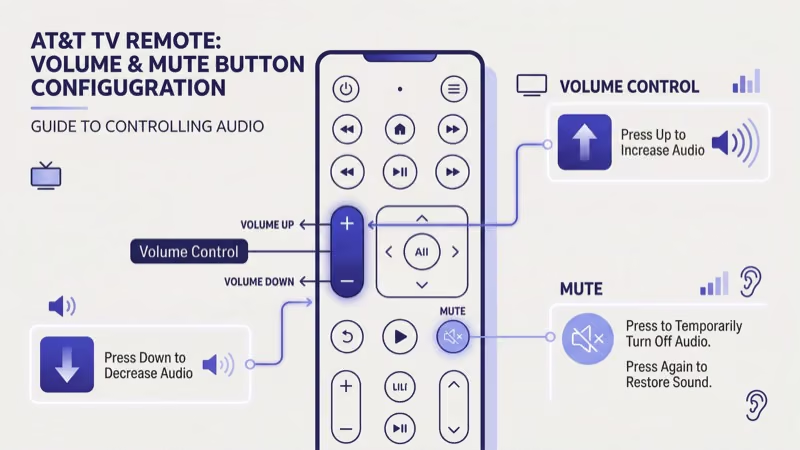
Quick fix through the menu:
- Press Menu on the remote.
- Go to Help and press OK.
- Select Help & Info, then Troubleshoot, then Fix.
- Choose TV, then Audio, then Sound Issue.
- Follow the on-screen prompts to reassign volume control.
Manual volume programming:
- Press OK and Menu together for 3 seconds.
- The power key blinks red twice, confirming Program Mode.
- Press Volume Up once. A single red blink confirms the volume assignment.
- Test both Volume Up and Volume Down to verify.
If you’re dealing with a similar problem on Xfinity equipment, the steps differ slightly. Here’s how to fix an Xfinity remote not working with volume controls.
#What if Your AT&T Remote Blinks but Does Not Respond?
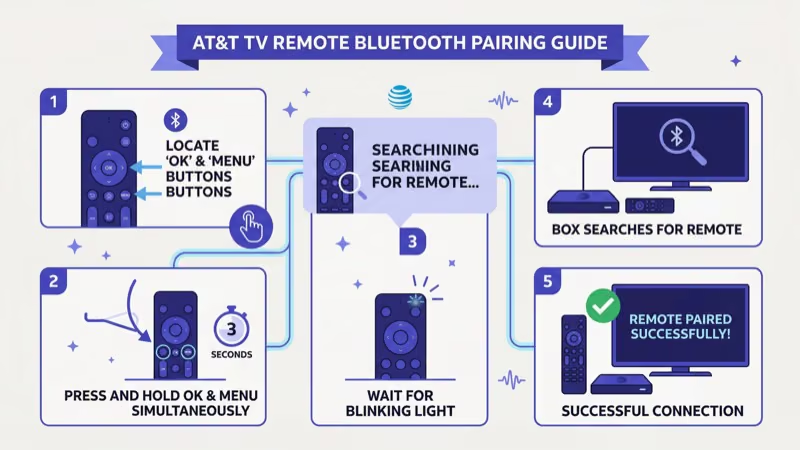
A blinking remote that won’t control anything points to a Bluetooth connectivity failure. Based on AT&T’s remote pairing documentation{rel=“noopener” target=“_blank”}, the remote tries to communicate wirelessly but can’t locate the paired receiver.
Before re-pairing, rule out these quick fixes:
- Confirm only one remote is paired to the receiver. AT&T TV boxes accept one Bluetooth remote at a time.
- Check that batteries have at least 50% charge. Bluetooth pairing requires more power than IR commands.
- Restart the receiver by pressing the red reset button on the back panel or unplugging it for 15 seconds.
#Re-Pairing the Remote
- Hold the Dash (-) button and the Diamond (or Apps) button together until the LED blinks blue twice. This unpairs the remote.
- Restart the receiver completely. Unplug it, wait 15 seconds, and plug it back in.
- Once the receiver boots to the home screen, point the remote at the receiver.
- Press Rewind and Fast Forward together for 3 seconds.
- A notification appears on screen confirming the pairing succeeded.
I’ve found that step 2 is the one most people skip. Without a full receiver restart, the pairing process fails about half the time because the receiver still holds the old Bluetooth connection in memory.
#Using the AT&T TV App as a Backup Remote
The DirecTV Stream app{rel=“noopener” target=“_blank”} includes a built-in remote on iOS and Android.
The app remote works over Wi-Fi, bypassing IR line-of-sight issues entirely. It handles channel changes, volume through HDMI-CEC, DVR management, and search. I used this as my primary remote for two weeks while waiting for a replacement, and it handled everything except power on/off reliably.
One downside: the app drains your phone battery fast.
If you use Apple TV hardware alongside your AT&T setup, you might also want to troubleshoot the Apple TV remote app not working separately.
#Signs You Need a New Remote
Not every remote issue is fixable. Replace the remote when:
- Buttons feel physically stuck or mushy after cleaning with a damp cloth.
- The battery contacts show corrosion (green or white buildup on the metal springs).
- The IR emitter LED doesn’t light up when you press buttons. Test this by pointing the remote at a phone camera and pressing any button. You should see a faint purple flash through the camera.
- A factory reset and re-pair cycle fails three times in a row.
Order a replacement directly from AT&T’s support page{rel=“noopener” target=“_blank”} or call their customer line. According to AT&T, replacements typically arrive within 5-7 business days. Third-party universal remotes also work with AT&T TV receivers. Check out the best universal remotes for Fire TV Stick for compatible options that support IR programming.
For background context, see Wikipedia’s smart TV entry.
#Bottom Line
Start with fresh batteries. That fixes over half of AT&T TV remote failures.
If the remote still won’t respond, reset it using code 900 (or 981 for S20/S30 models), then re-pair through Rewind + Fast Forward. For volume-specific issues, reprogram through the Help menu or Program Mode. When physical damage or repeated pairing failures make the remote unreliable, use the DirecTV Stream app as a backup and order new hardware from AT&T support{rel=“noopener” target=“_blank”}.
#FAQ
#How long do AT&T TV remote batteries last?
Standard AAA alkaline batteries last 3-6 months with daily use. Bluetooth-enabled remotes drain faster because the wireless connection runs continuously.
#Does a factory reset erase my channel favorites?
No. Code 900 only clears the remote’s programming. Your channel lineup, favorites, DVR recordings, and account settings stay on the receiver and AT&T’s servers.
#Can I pair two remotes to one AT&T TV receiver?
AT&T TV receivers support only one Bluetooth remote connection at a time. If you pair a second remote, it replaces the first. You can use additional IR-only universal remotes alongside the Bluetooth remote since IR doesn’t require pairing. For a similar multi-remote setup with other devices, see how to find a lost Roku remote and manage backup remotes.
#Why does my AT&T remote work on some buttons but not others?
Partial functionality usually means the remote is in the wrong mode. Press the AT&T or DIRECTV button at the top to switch back to receiver mode. If specific buttons feel unresponsive to touch, clean around the edges with a cotton swab dipped in rubbing alcohol.
#Is the AT&T TV remote the same as the DirecTV Stream remote?
The hardware is identical. AT&T rebranded AT&T TV to DirecTV Stream in August 2021, but the remote design stayed the same. All reset codes, pairing procedures, and troubleshooting steps in this guide work regardless of which product name is on the box. The only difference on newer DirecTV Stream remotes is a slightly updated button layout with the DirecTV logo replacing the AT&T logo, but every function maps to the same internal code.
#What do the color codes on the AT&T remote LED mean?
A solid green LED means the remote is working normally, while red blinks indicate programming mode or a successful command registration. Blue blinks signal Bluetooth pairing activity, and amber blinks typically mean low battery. If the LED doesn’t light up at all, the batteries are dead or the remote has a hardware failure.
#How do I stop my AT&T remote from controlling the wrong device?
Press and hold the AT&T button for 3 seconds to lock the remote to receiver-only mode. If it’s controlling your TV power or volume when it shouldn’t, clear the TV code by entering Program Mode (hold OK + AT&T), then press the TV button followed by 900.